
1. ആമുഖം
Thank you for choosing the IIWEY Q7 Dual 4K Dash Cam. This device is designed to provide comprehensive vehicle surveillance, capturing high-resolution video footage from both the front and rear of your vehicle. Equipped with advanced features such as dual 4K recording, GPS tracking, G-sensor, loop recording, and various parking modes, the Q7 ensures reliable evidence collection and enhanced driving safety. This manual provides detailed instructions for installation, operation, and maintenance to help you maximize the functionality of your dash cam.
2. പാക്കേജ് ഉള്ളടക്കം
താഴെ ലിസ്റ്റ് ചെയ്തിരിക്കുന്ന എല്ലാ ഇനങ്ങളും നിങ്ങളുടെ പാക്കേജിൽ ഉൾപ്പെടുത്തിയിട്ടുണ്ടെന്ന് ദയവായി പരിശോധിക്കുക. ഏതെങ്കിലും ഇനങ്ങൾ നഷ്ടപ്പെട്ടിട്ടുണ്ടെങ്കിലോ കേടായിട്ടുണ്ടെങ്കിലോ, ദയവായി ഉപഭോക്തൃ പിന്തുണയുമായി ബന്ധപ്പെടുക.
- IIWEY Q7 Front Dash Cam Unit
- Rear Camera with Connection Cable
- ഹാർഡ്വെയർ കിറ്റ്
- CPL (Circular Polarizing Lens) Filter
- ജിപിഎസ് മൊഡ്യൂൾ
- സക്ഷൻ കപ്പ് മ .ണ്ട്
- കാർ ചാർജർ പവർ കേബിൾ
- ഉപയോക്തൃ മാനുവൽ
- 128GB MicroSD Card (Pre-installed or included separately)

Image: Packaging for the Circular Polarizing Lens (CPL) Filter, which is included in the package.
3. ഉൽപ്പന്നം കഴിഞ്ഞുview
The IIWEY Q7 Dash Cam is an all-inclusive solution for vehicle recording, featuring a robust design and advanced functionalities.
- ഡ്യുവൽ 4K റെക്കോർഡിംഗ്: Captures crystal-clear 3840*2160p video from both front and rear cameras simultaneously.
- വിശാലമായ View: സമഗ്രമായ റോഡ് കവറേജിനായി 170° വൈഡ് ആംഗിൾ ലെൻസ്.
- ഐപിഎസ് സ്ക്രീൻ: 3.18" IPS display for clear viewing and easy navigation.
- ജിപിഎസ് ട്രാക്കിംഗ്: Records driving route and speed, viewable on maps.
- സൂപ്പർ കപ്പാസിറ്റർ: Provides enhanced durability and reliability, especially in extreme temperatures.
- Gravity Sensor (G-Sensor): Automatically detects sudden movements or collisions and locks the current video file തിരുത്തിയെഴുതുന്നത് തടയാൻ.
- ലൂപ്പ് റെക്കോർഡിംഗ്: Continuously records by overwriting the oldest unlocked fileമെമ്മറി കാർഡ് നിറയുമ്പോൾ s.
- Parking Modes: Offers Motion Detection, Collision Detection, and Time-Lapse recording for 24/7 vehicle protection (requires hardwire kit).
- കുറഞ്ഞ വോളിയംtagഇ സംരക്ഷണം: The hardwire kit includes a power management chip that cuts off power to the dash cam if the vehicle battery voltage drops below 11.6V, preventing battery drain.
- സിപിഎൽ ഫിൽട്ടർ: Reduces glare and reflections from the windshield, enhancing video clarity and color saturation.
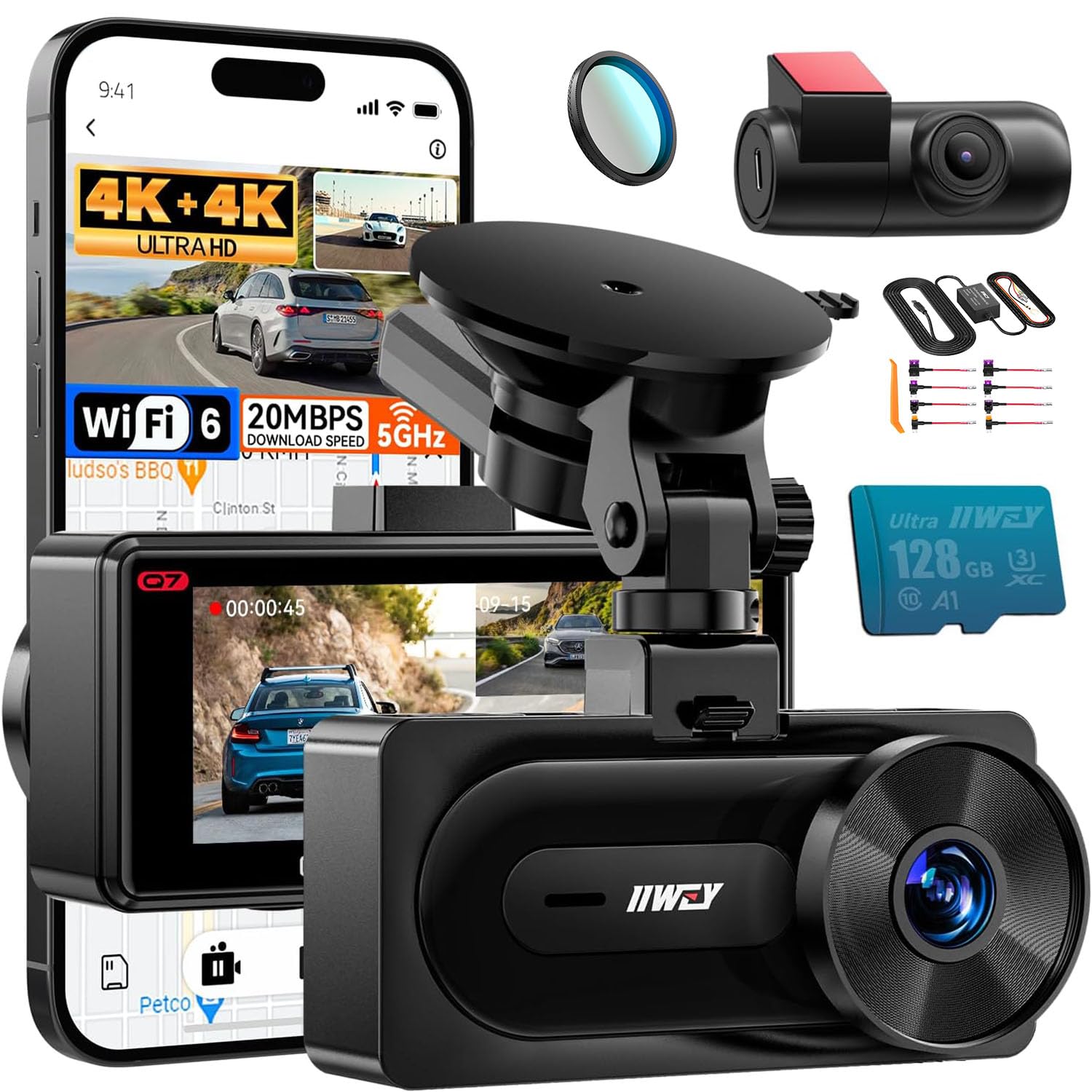
ചിത്രം: കഴിഞ്ഞുview of the IIWEY Q7 Dash Cam highlighting key features like GPS, Loop Recording, Super Capacitor, Gravity Sensor, 128GB card support, and Dual 4K recording.
4. സജ്ജീകരണവും ഇൻസ്റ്റാളേഷനും
4.1 Dash Cam and Rear Camera Installation
- ഫ്രണ്ട് ഡാഷ് കാം മൌണ്ട് ചെയ്യുക: Attach the suction cup mount to a clean, dry spot on your windshield, preferably behind the rearview കണ്ണാടി, അത് നിങ്ങളുടെ കണ്ണുകളെ തടസ്സപ്പെടുത്തുന്നില്ലെന്ന് ഉറപ്പാക്കുന്നു view. Secure the front dash cam to the mount.
- പിൻ ക്യാമറ ഇൻസ്റ്റാൾ ചെയ്യുക: Mount the rear camera on the rear windshield using the adhesive pad. Ensure the camera lens has a clear view പിന്നിലെ റോഡിന്റെ.
- കേബിളുകൾ ബന്ധിപ്പിക്കുക: Connect the rear camera cable to the front dash cam. Route the cable neatly along the headliner and A-pillar to avoid interference with driving. Connect the power cable (either car charger or hardwire kit) to the front dash cam and route it to your vehicle's power source.
- മൈക്രോ എസ്ഡി കാർഡ് ചേർക്കുക: Ensure a compatible MicroSD card (128GB included, supports up to 512GB) is inserted into the dash cam's card slot.
4.2 CPL Filter Installation
The CPL filter helps reduce glare and reflections from the windshield, improving video quality.
- അനുയോജ്യത പരിശോധിക്കുക: Ensure your IIWEY Q7 dash cam has pre-threaded lens for the CPL filter. The Q7 model is designed for this filter.
- ഫിൽട്ടർ ഘടിപ്പിക്കുക: Gently screw the CPL filter onto the front lens of the dash cam.
- Adjust for Optimal Effect: Once attached, you can rotate the CPL filter to achieve the desired glare reduction. Observe the live view on the dash cam screen while rotating to find the optimal position where reflections are minimized.
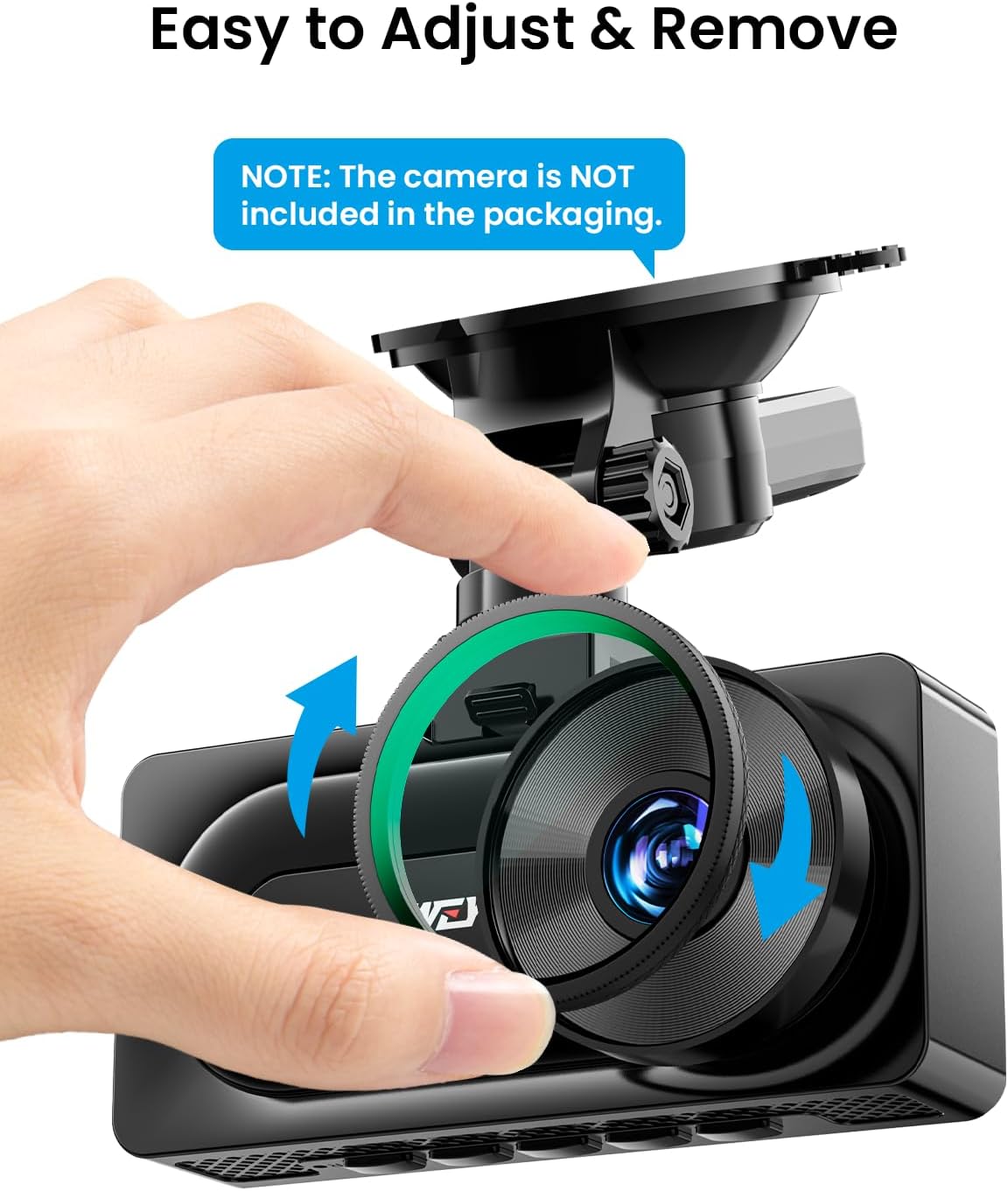
Image: Demonstrates how to easily adjust and remove the CPL filter from the dash cam lens.

Image: Illustrates the benefits of the CPL filter, including enhanced color tone, better details, and reduced light reflection.

Image: Confirms compatibility of the CPL filter with the IIWEY Q7 dash cam, showing the pre-threaded lens design.
4.3 Hardwire Kit Installation (for Parking Modes)
The hardwire kit enables 24/7 parking surveillance and provides low voltage protection for your vehicle's battery.
- ഫ്യൂസ് ബോക്സ് തിരിച്ചറിയുക: Locate your vehicle's fuse box.
- Connect ACC Wire (Red): Connect the red ACC wire of the hardwire kit to a fuse that provides power only when the ignition is on (e.g., radio, cigarette lighter).
- Connect BAT Wire (Yellow): Connect the yellow BAT wire to a fuse that provides constant power even when the ignition is off (e.g., hazard lights, dome light).
- Connect GND Wire (Black): Connect the black GND wire to a metal bolt or screw on the vehicle's chassis for a secure ground connection.
- ഡാഷ് കാമിലേക്ക് കണക്റ്റുചെയ്യുക: Plug the hardwire kit's output cable into the dash cam's power input port.

Image: Shows the three main wires of the hardwire kit: ACC (red), GND (black), and BAT (yellow), for connection to the vehicle's electrical system.

Image: Illustrates the 24-hour surveillance capability provided by the hardwire kit, powering the dash cam even when the car is parked.

Image: Details the low voltage protection feature of the hardwire kit, which automatically powers off the dash cam if the vehicle's battery voltage 11.6V-ന് താഴെയായി കുറയുന്നു.
5. പ്രവർത്തന നിർദ്ദേശങ്ങൾ
5.1 അടിസ്ഥാന പ്രവർത്തനം
- പവർ ഓൺ/ഓഫ്: The dash cam will automatically power on and begin recording when your vehicle's ignition is turned on (if connected via car charger or hardwire kit). It will power off automatically when the ignition is turned off. You can also manually power it on/off using the power button.
- റെക്കോർഡിംഗ്: Once powered on, the dash cam will automatically start continuous loop recording. A red indicator light or icon on the screen typically indicates recording is active.
- മെനു നാവിഗേഷൻ: Use the physical buttons on the dash cam to navigate through the menu options on the IPS screen to adjust settings.
5.2 റെക്കോർഡിംഗ് മോഡുകൾ
- ലൂപ്പ് റെക്കോർഡിംഗ്: ഡാഷ് ക്യാം വീഡിയോ സെഗ്മെന്റുകളായി റെക്കോർഡുചെയ്യുന്നു (ഉദാ. 1, 3, അല്ലെങ്കിൽ 5 മിനിറ്റ്). മെമ്മറി കാർഡ് നിറയുമ്പോൾ, ഏറ്റവും പഴയത് അൺലോക്ക് ചെയ്യപ്പെടും. fileപുതിയ റെക്കോർഡിംഗുകൾ യാന്ത്രികമായി തിരുത്തിയെഴുതപ്പെടുന്നു. ഇത് മാനുവൽ ഇടപെടലില്ലാതെ തുടർച്ചയായ റെക്കോർഡിംഗ് ഉറപ്പാക്കുന്നു.
- ജി-സെൻസർ (അടിയന്തര റെക്കോർഡിംഗ്): The built-in G-sensor detects sudden impacts or rapid acceleration/deceleration. When triggered, it automatically locks the current video segment, preventing it from being overwritten by loop recording. These emergency files are stored in a separate folder.
5.3 Parking Modes (Requires Hardwire Kit)
With the hardwire kit installed, the dash cam can monitor your vehicle even when parked.
- ചലനം കണ്ടെത്തൽ: The dash cam will automatically start recording if it detects movement in its field of view while parked.
- കൂട്ടിയിടി കണ്ടെത്തൽ: If the G-sensor detects an impact while the vehicle is parked, the dash cam will automatically power on and record an emergency video.
- സമയദൈർഘ്യ റെക്കോർഡിംഗ്: Records video at a very low frame rate (e.g., 1 frame per second) to condense long periods of parking surveillance into short, viewable clips.
5.4 ജിപിഎസ് പ്രവർത്തനം
The integrated GPS module records your vehicle's driving route and speed. This data can be viewed using a dedicated GPS player software on a computer, providing valuable information for incident analysis.
5.5 ലോ വോളിയംtagഇ സംരക്ഷണം
When using the hardwire kit, the dash cam's power supply will automatically cut off if your vehicle's battery voltage drops below 11.6V. This feature protects your car battery from draining completely, ensuring you have enough power to start your engine.
6. പരിപാലനം
- ലെൻസ് വൃത്തിയാക്കൽ: Regularly clean the dash cam lenses with a soft, lint-free cloth to ensure clear video quality. Avoid abrasive materials or harsh chemicals.
- മൈക്രോ എസ്ഡി കാർഡ് പരിപാലനം: It is recommended to format the MicroSD card periodically (e.g., once a month) within the dash cam's settings. This helps maintain card performance and prevents data corruption. Back up any important fileഫോർമാറ്റ് ചെയ്യുന്നതിന് മുമ്പ് എസ്.
- ഫേംവെയർ അപ്ഡേറ്റുകൾ: Check the IIWEY official website periodically for any available firmware updates. Keeping your dash cam's firmware up-to-date can improve performance and add new features.
- താപനില പരിഗണനകൾ: Avoid exposing the dash cam to extreme temperatures for prolonged periods. The super capacitor design offers better heat resistance compared to traditional batteries, but extreme conditions can still affect performance.
7. പ്രശ്നപരിഹാരം
- ഡാഷ് കാം ഓണാക്കുന്നില്ല:
- Check if the power cable is securely connected to both the dash cam and the power source.
- Ensure the vehicle's ignition is on if using the car charger.
- If using the hardwire kit, verify all connections (ACC, BAT, GND) are correct and fuses are intact.
- Recording Issues (e.g., stops recording, corrupted files):
- Format the MicroSD card within the dash cam's settings.
- Try a different, high-quality MicroSD card (Class 10 or U3 recommended).
- Ensure loop recording is enabled in the settings.
- ജിപിഎസ് പ്രവർത്തിക്കുന്നില്ല:
- Ensure the GPS module is securely connected to the dash cam.
- Position the dash cam or GPS module in an area with a clear view of the sky, away from metallic obstructions.
- Allow a few minutes for the GPS to acquire a signal after powering on.
- Screen Freezes or Malfunctions:
- Perform a soft reset by pressing and holding the power button for 10-15 seconds.
- If the issue persists, try a factory reset through the dash cam's menu (note: this will erase all settings).
- CPL Filter Not Reducing Glare:
- Rotate the CPL filter while observing the live view on the screen to find the optimal angle for glare reduction.
- Ensure the filter is clean and free from smudges.
8 സ്പെസിഫിക്കേഷനുകൾ
| ഫീച്ചർ | സ്പെസിഫിക്കേഷൻ |
|---|---|
| മോഡൽ | IIWEY Q7 |
| വീഡിയോ റെസല്യൂഷൻ | Front: 4K (3840x2160p), Rear: 4K (3840x2160p) |
| ലെൻസ് ആംഗിൾ | 170° (Front & Rear) |
| ഡിസ്പ്ലേ സ്ക്രീൻ | 3.18" ഐപിഎസ് |
| സംഭരണം | Supports MicroSD card up to 512GB (128GB included) |
| പവർ ഇൻപുട്ട് | 12V-24V |
| Hardwire Kit Output | 5V/3A |
| കുറഞ്ഞ വോളിയംtagഇ കട്ട്-ഓഫ് | 11.6V |
| പ്രത്യേക സവിശേഷതകൾ | GPS, G-Sensor, Loop Recording, Parking Modes, Super Capacitor, CPL Filter |
9. വാറൻ്റിയും പിന്തുണയും
The IIWEY Q7 Dual 4K Dash Cam comes with a standard manufacturer's warranty. For specific warranty terms and conditions, please refer to the warranty card included in your package or visit the official IIWEY webസൈറ്റ്.
If you encounter any issues or have questions regarding your product, please contact IIWEY customer support. Our team is available to assist you with troubleshooting, technical support, and any other inquiries.
ഉപഭോക്തൃ പിന്തുണയുമായി ബന്ധപ്പെടുക: Please refer to the contact information provided on the product packaging or the official IIWEY webസൈറ്റ്.