
1. ആമുഖം
This manual provides comprehensive instructions for the installation, setup, operation, and maintenance of your Veise VE029 VE027-K Built-in Wi-Fi Smart Lock. Please read this manual carefully before installation and use to ensure proper function and security. Keep this manual for future reference.
2. ഉൽപ്പന്നം കഴിഞ്ഞുview
The Veise VE029 VE027-K is a smart deadbolt lock designed for enhanced home security and convenience. It features built-in 2.4GHz Wi-Fi for remote access without an additional hub, offering multiple unlocking methods and smart access control capabilities.
പ്രധാന സവിശേഷതകൾ:
- അന്തർനിർമ്മിത വൈഫൈ: Control and monitor your lock remotely via the mobile application.
- ഒന്നിലധികം അൺലോക്കിംഗ് രീതികൾ: Fingerprint, IC card, PIN code, backup key, remote app control, and voice control (Alexa/Google Assistant).
- സ്മാർട്ട് ആക്സസ് മാനേജ്മെന്റ്: Create and manage various password types (permanent, recurring, one-time, duration) and user permissions.
- നീണ്ട ബാറ്ററി ലൈഫ്: Powered by 8 AA batteries, designed for extended operation. Includes Type-C emergency charging port and backup keys for lockout prevention.
- എളുപ്പമുള്ള ഇൻസ്റ്റാളേഷൻ: Designed for DIY replacement of existing deadbolts.

ചിത്രം: കഴിഞ്ഞുview of the Veise VE029 VE027-K Smart Lock system, showing the exterior keypad, interior unit, physical keys, IC cards, and the mobile application interface.
3. എന്താണ് ഉൾപ്പെടുത്തിയിരിക്കുന്നത്
ഇൻസ്റ്റാളേഷൻ ആരംഭിക്കുന്നതിന് മുമ്പ് എല്ലാ ഘടകങ്ങളും നിലവിലുണ്ടെന്ന് ദയവായി പരിശോധിക്കുക.
- Exterior Smart Lock Assembly (Keypad)
- Interior Smart Lock Assembly (Battery Cover, Thumb Turn)
- ഡെഡ്ബോൾട്ട് ലാച്ച്
- സ്ട്രൈക്ക് പ്ലേറ്റ്
- മൗണ്ടിംഗ് പ്ലേറ്റ്
- ഭൗതിക കീകൾ (2)
- ഐസി കാർഡുകൾ (2)
- മൗണ്ടിംഗ് സ്ക്രൂകളും ഹാർഡ്വെയറും
- ഇൻസ്റ്റാളേഷൻ ടെംപ്ലേറ്റ്
- ഉപയോക്തൃ മാനുവൽ
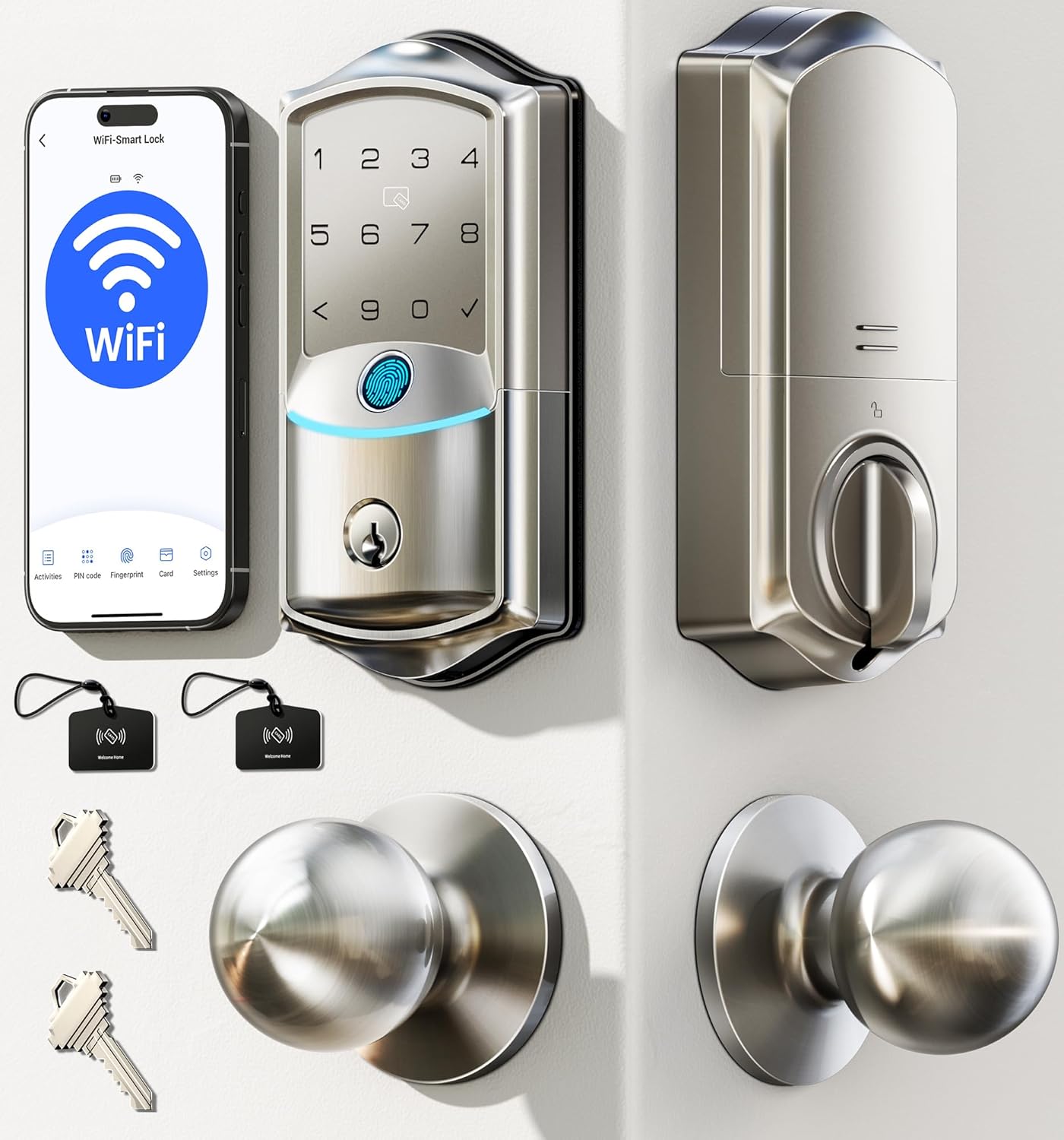
Image: The Veise VE029 VE027-K Smart Lock installed on a door, illustrating the complete system with included accessories.
4. ഇൻസ്റ്റാളേഷൻ ഗൈഡ്
The Veise VE029 VE027-K Smart Lock is designed for easy DIY installation, typically replacing an existing deadbolt. A screwdriver is the only tool required. Refer to the included installation template for precise measurements.
നിങ്ങൾ ആരംഭിക്കുന്നതിന് മുമ്പ്:
- Ensure your door is compatible with standard deadbolt dimensions (backset, door thickness).
- ആവശ്യമായ ഉപകരണങ്ങൾ ശേഖരിക്കുക: ഫിലിപ്സ് ഹെഡ് സ്ക്രൂഡ്രൈവർ.
- Do not install batteries until the lock is fully installed on the door.
ഇൻസ്റ്റലേഷൻ ഘട്ടങ്ങൾ (പൊതുവായത്):
- നിലവിലുള്ള ഡെഡ്ബോൾട്ട് നീക്കം ചെയ്യുക: വാതിലിൽ നിന്ന് നിലവിലുള്ള ഡെഡ്ബോൾട്ട് അഴിച്ച് നീക്കം ചെയ്യുക.
- ലാച്ച് ഇൻസ്റ്റാൾ ചെയ്യുക: Insert the new deadbolt latch into the door edge. Ensure the latch bolt faces the correct direction.
- ബാഹ്യ അസംബ്ലി ഇൻസ്റ്റാൾ ചെയ്യുക: Place the exterior keypad assembly onto the door, ensuring the spindle passes through the latch.
- മൗണ്ടിംഗ് പ്ലേറ്റ് ഇൻസ്റ്റാൾ ചെയ്യുക: Secure the mounting plate to the interior side of the door using screws, aligning it with the exterior assembly.
- കേബിളുകൾ ബന്ധിപ്പിക്കുക: ബാഹ്യ അസംബ്ലിയിൽ നിന്ന് ഇന്റീരിയർ അസംബ്ലിയിലേക്ക് കേബിൾ ബന്ധിപ്പിക്കുക.
- ഇന്റീരിയർ അസംബ്ലി ഇൻസ്റ്റാൾ ചെയ്യുക: Attach the interior assembly to the mounting plate, securing it with screws. Ensure the thumb turn operates smoothly.
- സ്ട്രൈക്ക് പ്ലേറ്റ് ഇൻസ്റ്റാൾ ചെയ്യുക: Replace your old strike plate on the door frame with the new one provided.
- ബാറ്ററികൾ ചേർക്കുക: Open the battery cover on the interior assembly and insert 8 AA batteries (not included), observing polarity.
- Perform Handing Process: Follow the instructions in the app or quick start guide to calibrate the lock for your door's handing (left or right).
5. സജ്ജീകരണവും കോൺഫിഗറേഷനും
5.1 മൊബൈൽ ആപ്ലിക്കേഷൻ സജ്ജീകരണം
- അപ്ലിക്കേഷൻ ഡൗൺലോഡുചെയ്യുക: ഇതിനായി തിരയുക the 'Veise' app (or specified app name in your quick start guide) on the App Store or Google Play Store.
- അക്കൗണ്ട് സൃഷ്ടിക്കുക: ഒരു പുതിയ അക്കൗണ്ടിനായി രജിസ്റ്റർ ചെയ്യുക അല്ലെങ്കിൽ നിങ്ങൾക്ക് ഇതിനകം ഒന്ന് ഉണ്ടെങ്കിൽ ലോഗിൻ ചെയ്യുക.
- ഉപകരണം ചേർക്കുക: Follow the in-app instructions to add your smart lock. Ensure your phone is connected to a 2.4GHz Wi-Fi network during the pairing process.
- വൈഫൈയിലേക്ക് കണക്റ്റുചെയ്യുക: The lock will connect directly to your home's 2.4GHz Wi-Fi network. No additional hub is required.

Image: The mobile application interface demonstrating remote control capabilities, including setting temporary PIN codes and managing user permissions.
5.2 User Management (PIN Codes, Fingerprints, IC Cards)
Manage access for family members, guests, or service providers through the mobile app.
- PIN Codes: Create permanent, recurring, one-time, or duration-based PIN codes.
- വിരലടയാളങ്ങൾ: Register fingerprints for quick and secure access. The lock features a self-learning AI chip for improved recognition.
- ഐസി കാർഡുകൾ: Pair the included IC cards for tap-to-unlock functionality.
- Revoke Access: Easily revoke any access method instantly from the app.
5.3 Voice Control Integration (Alexa/Google Home)
സൗകര്യപ്രദമായ വോയ്സ് കമാൻഡുകൾക്കായി നിങ്ങളുടെ സ്മാർട്ട് ലോക്ക് ആമസോൺ അലക്സയുമായോ ഗൂഗിൾ ഹോമുമായോ സംയോജിപ്പിക്കുക.
- അക്കൗണ്ട് ലിങ്ക് ചെയ്യുക: In the Alexa or Google Home app, search for the 'Veise' skill/service and link your Veise account.
- ഉപകരണങ്ങൾ കണ്ടെത്തുക: Allow the voice assistant to discover your new smart lock.
- വോയ്സ് കമാൻഡുകൾ: Use commands like "Alexa, unlock the front door" (you may need to set up a voice PIN for unlocking).

Image: Demonstrates compatibility with Amazon Alexa and Google Home for voice-controlled unlocking.
6. പ്രവർത്തന നിർദ്ദേശങ്ങൾ
6.1 അൺലോക്ക് രീതികൾ
The Veise Smart Lock offers six ways to unlock:
- Remote App Control: Unlock from anywhere using the mobile application.
- ഫിംഗർപ്രിന്റ്: പെട്ടെന്നുള്ള ആക്സസ്സിനായി നിങ്ങളുടെ രജിസ്റ്റർ ചെയ്ത വിരൽ സെൻസറിൽ വയ്ക്കുക.
- ഐസി കാർഡ്: Tap a registered IC card on the designated area of the keypad.
- പിൻ കോഡ്: Enter your registered PIN code on the keypad, followed by the '#' or checkmark button.
- ബാക്കപ്പ് കീ: Use the physical key as a traditional backup method.
- ശബ്ദ നിയന്ത്രണം: Use integrated voice assistants (Alexa/Google Home) with a voice command.
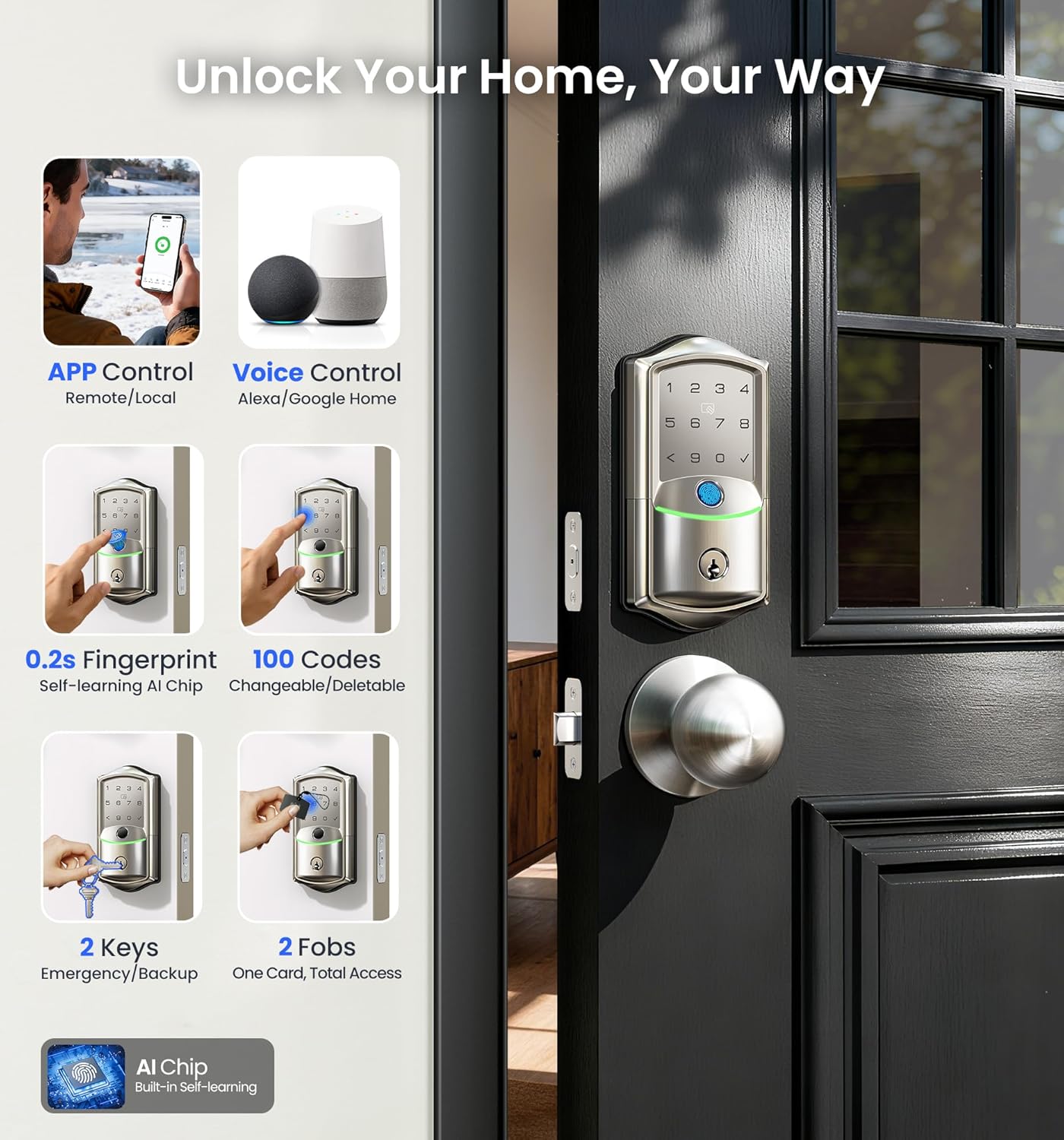
Image: Visual representation of the six available unlocking methods for the smart lock.
6.2 ലോക്കിംഗ് രീതികൾ
- യാന്ത്രിക ലോക്കിംഗ്: The lock can be configured to automatically lock after a set period (5-180 seconds) once closed. This feature is adjustable via the app.
- സ്വമേധയാലുള്ള ലോക്കിംഗ്: Press any key on the keypad, or use the thumb turn from the inside.
- Remote App Locking: Lock the door from anywhere using the mobile application.

Image: Demonstrates the auto-lock feature settings and various locking methods.
6.3 പാസേജ് മോഡ്
Passage mode allows the door to remain unlocked for a specified period, useful for high-traffic times. This mode can be activated and deactivated via the mobile app.
7. പരിപാലനം
7.1 ബാറ്ററി മാറ്റിസ്ഥാപിക്കൽ
The Veise Smart Lock is powered by 8 AA batteries (not included). It is recommended to use high-quality alkaline batteries for optimal performance and battery life (up to 240+ days).
- കുറഞ്ഞ ബാറ്ററി അലേർട്ടുകൾ: The lock will provide low battery warnings via the mobile app and potentially an audible alert on the lock itself.
- മാറ്റിസ്ഥാപിക്കൽ: When alerted, replace all 8 AA batteries promptly. Open the battery cover on the interior unit, remove old batteries, and insert new ones, ensuring correct polarity.

Image: Illustrates the battery compartment, low battery alerts, and the Type-C emergency charging port.
7.2 അടിയന്തര വൈദ്യുതി
In case of complete battery depletion, the lock can be temporarily powered using a Type-C cable connected to an external power bank. This allows you to unlock the door and replace the batteries.
7.3 വൃത്തിയാക്കൽ
ലോക്കിന്റെ പുറം പ്രതലങ്ങൾ മൃദുവായ, d തുണി ഉപയോഗിച്ച് തുടയ്ക്കുക.amp തുണി. ഫിനിഷിനോ ഇലക്ട്രോണിക് ഘടകങ്ങളോ കേടുവരുത്തുന്ന അബ്രാസീവ് ക്ലീനറുകളോ ലായകങ്ങളോ ഒഴിവാക്കുക.
8. പ്രശ്നപരിഹാരം
പൊതുവായ പ്രശ്നങ്ങളും പരിഹാരങ്ങളും:
- ലോക്ക് പ്രതികരിക്കുന്നില്ല: Check battery level. Replace batteries if low. Use the Type-C emergency power port or backup key.
- ആപ്പ് കണക്റ്റിവിറ്റി പ്രശ്നങ്ങൾ: Ensure your phone and lock are connected to a 2.4GHz Wi-Fi network. Restart your router and the lock (by removing and reinserting batteries). Check app permissions.
- വിരലടയാളം തിരിച്ചറിയാൻ കഴിഞ്ഞില്ല: നിങ്ങളുടെ വിരൽ വൃത്തിയുള്ളതും വരണ്ടതുമാണെന്ന് ഉറപ്പാക്കുക. പ്രശ്നങ്ങൾ നിലനിൽക്കുകയാണെങ്കിൽ നിങ്ങളുടെ വിരലടയാളം വീണ്ടും രജിസ്റ്റർ ചെയ്യുക.
- പിൻ കോഡ് പ്രവർത്തിക്കുന്നില്ല: Verify the PIN code is correct and active. Ensure the lock is not in a 'do not disturb' or 'sleep' mode.
- Lock mechanism jammed: Check for any obstructions in the door frame or latch. Ensure the lock was installed correctly and the door is properly aligned.
9 സ്പെസിഫിക്കേഷനുകൾ
| മോഡൽ | VE029 VE027-K |
| ബ്രാൻഡ് | വീസ് |
| കണക്റ്റിവിറ്റി | Built-in 2.4GHz Wi-Fi |
| പവർ ഉറവിടം | 8 x AA ബാറ്ററികൾ (ഉൾപ്പെടുത്തിയിട്ടില്ല) |
| എമർജൻസി പവർ | ടൈപ്പ്-സി യുഎസ്ബി പോർട്ട് |
| അൺലോക്ക് രീതികൾ | App, Fingerprint, IC Card, PIN, Key, Voice Control |
| പ്രവർത്തന താപനില | Refer to product packaging for specific range |
| വാട്ടർപ്രൂഫ് റേറ്റിംഗ് | IP65 (as per image) |
| സുരക്ഷ | AES 128 Local Storage Data Encryption (as per image) |

Image: Highlights key specifications and security features of the smart lock, including IP65 rating and AES 128 encryption.
10. വാറൻ്റിയും പിന്തുണയും
Veise provides the following support for your smart lock:
- വാറൻ്റി: 1 വർഷത്തെ പരിമിത വാറൻ്റി.
- US-Based Phone Support: Available Monday-Friday, 9 AM-5 PM PST.
- ഇമെയിൽ സഹായം: 24/7 after-sales email support.
For technical assistance or warranty claims, please refer to the contact information provided in your product packaging or on the official Veise webസൈറ്റ്.