
ആമുഖം
This manual provides detailed instructions for the use and maintenance of your GOBOULT Raven True Wireless Stereo (TWS) Earbuds. Please read this manual thoroughly before using the product to ensure proper operation and to maximize your listening experience.

ചിത്രം: കഴിഞ്ഞുview of GOBOULT Raven TWS Earbuds showcasing main features like 70 hours playtime, app support, dual device pairing, 10mm drivers, quad mic environmental noise cancellation, and available color options.
ബോക്സിൽ എന്താണുള്ളത്
Your GOBOULT Raven TWS Earbuds package includes the following items:
- GOBOULT Raven TWS Earbuds (Left and Right)
- ചാർജിംഗ് കേസ്
- യുഎസ്ബി ചാർജിംഗ് കേബിൾ
- ഒന്നിലധികം വലിപ്പത്തിലുള്ള ഇയർടിപ്പുകൾ
- ഉപയോക്തൃ മാനുവൽ (ഈ പ്രമാണം)
- വാറൻ്റി കാർഡ്
ഉൽപ്പന്നം കഴിഞ്ഞുview
The GOBOULT Raven TWS Earbuds are designed for comfort and high-quality audio. Familiarize yourself with the components:
- ഇയർബഡുകൾ: Left (L) and Right (R) earbuds with touch control areas and microphones.
- ചാർജിംഗ് കേസ്: Stores and charges the earbuds. Features a USB Type-C charging port.
- LED സൂചകങ്ങൾ: On both earbuds and the charging case, indicating battery status, charging, and pairing mode.
- മൈക്രോഫോണുകൾ: Quad microphones for Environmental Noise Cancellation (ENC) during calls.

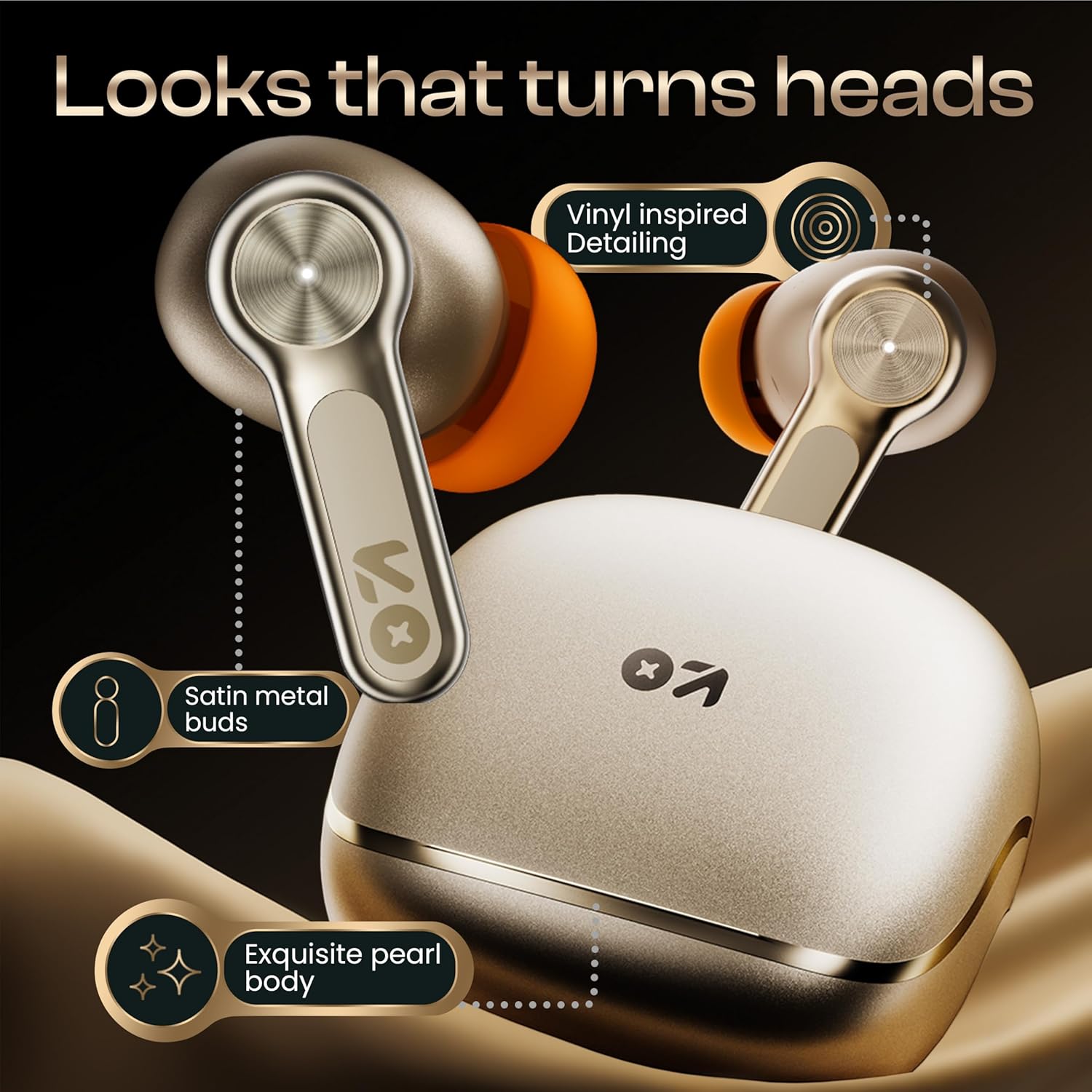
ചിത്രം: വിശദമായത് view of the GOBOULT Raven earbuds and their charging case, showcasing the satin metal finish and exquisite pearl body design.
സജ്ജമാക്കുക
1. പ്രാരംഭ ചാർജിംഗ്
ആദ്യമായി ഉപയോഗിക്കുന്നതിന് മുമ്പ്, ഇയർബഡുകളും ചാർജിംഗ് കേസും പൂർണ്ണമായും ചാർജ് ചെയ്യുക.
- രണ്ട് ഇയർബഡുകളും ചാർജിംഗ് കേസിൽ വയ്ക്കുക.
- യുഎസ്ബി ടൈപ്പ്-സി ചാർജിംഗ് കേബിൾ കേസിലെ ചാർജിംഗ് പോർട്ടിലേക്കും ഒരു പവർ സ്രോതസ്സിലേക്കും ബന്ധിപ്പിക്കുക.
- The LED indicator on the case will show charging status. Once fully charged, the indicator will change or turn off.
A 10-minute charge provides approximately 120 minutes of playtime.

Image: The GOBOULT Raven earbuds being charged in their case, highlighting the impressive 70-hour total battery life and the quick charge capability (10 mins charge for 120 mins playtime).
2. ഒരു ഉപകരണവുമായി ജോടിയാക്കൽ
The earbuds use Bluetooth 5.4 for stable and quick connections.
- ചാർജിംഗ് കേസ് തുറക്കുക. ഇയർബഡുകൾ സ്വയമേവ ജോടിയാക്കൽ മോഡിലേക്ക് പ്രവേശിക്കും (LED ഇൻഡിക്കേറ്ററുകൾ മിന്നിമറയും).
- നിങ്ങളുടെ ഉപകരണത്തിൽ (സ്മാർട്ട്ഫോൺ, ടാബ്ലെറ്റ്, ലാപ്ടോപ്പ്), ബ്ലൂടൂത്ത് പ്രവർത്തനക്ഷമമാക്കുക.
- ഇതിനായി തിരയുക "GOBOULT Raven" in the list of available Bluetooth devices and select it to connect.
- കണക്റ്റ് ചെയ്തുകഴിഞ്ഞാൽ, ഇയർബഡുകളിലെ LED ഇൻഡിക്കേറ്ററുകൾ മിന്നുന്നത് നിർത്തും.
The earbuds feature Blink&Pair™ technology for instant pairing after the initial setup.

Image: The GOBOULT Raven earbuds and case, emphasizing the upgraded Bluetooth v5.4 for instant pairing and reliable connection, along with support for SBC and AAC audio codecs.
3. GOBOULT App Installation
For enhanced customization and control, download the GOBOULT App from your device's app store.
- ഇതിനായി തിരയുക "GOBOULT" in the App Store (iOS) or Google Play Store (Android).
- Install the app and follow the on-screen instructions to connect your Raven earbuds.
- The app allows you to customize sound profiles (EQ modes), control features, and manage touch controls.

Image: A smartphone screen displaying the GOBOULT Amp APP, illustrating features like equalizer customization, custom touch controls, gaming mode activation, and widget support for a personalized audio experience.
പ്രവർത്തന നിർദ്ദേശങ്ങൾ
ടച്ച് നിയന്ത്രണങ്ങൾ
The GOBOULT Raven earbuds feature intuitive touch controls on each earbud. The specific functions can often be customized via the GOBOULT App.
| ആക്ഷൻ | ഫംഗ്ഷൻ |
|---|---|
| സിംഗിൾ ടാപ്പ് (ഇടത്/വാതിൽ) | സംഗീതം പ്ലേ ചെയ്യുക/താൽക്കാലികമായി നിർത്തുക, കോൾ സ്വീകരിക്കുക/അവസാനിപ്പിക്കുക |
| ഡബിൾ ടാപ്പ് (ഇടത്) | മുമ്പത്തെ ട്രാക്ക് |
| ഡബിൾ ടാപ്പ് (R) | അടുത്ത ട്രാക്ക് |
| ട്രിപ്പിൾ ടാപ്പ് (ഇടത്/വാതിൽ) | വോയ്സ് അസിസ്റ്റൻ്റ് സജീവമാക്കുക |
| ലോംഗ് പ്രസ്സ് (L/R) | Reject Call, Toggle Gaming Mode (customizable) |
Note: These are typical touch control functions. Refer to the GOBOULT App for exact and customizable controls.
ചിത്രം: വിശദമായ ഒരു ചിത്രം view of the GOBOULT Raven earbud's touch-sensitive surface, indicating areas for music playback control and call management.
ഇരട്ട ഉപകരണ ജോടിയാക്കൽ
The earbuds can connect to two devices simultaneously, allowing seamless switching between them.
- Pair the earbuds with your first device (e.g., smartphone) as described in the "Pairing with a Device" section.
- Disconnect Bluetooth on the first device or put the earbuds back in the case and close it, then open it again to re-enter pairing mode.
- Pair the earbuds with your second device (e.g., laptop).
- Reconnect the earbuds to the first device via its Bluetooth settings. The earbuds should now be connected to both.
ഉപകരണം ഉള്ളടക്കം പ്ലേ ചെയ്യുന്നതിനോ കോൾ സ്വീകരിക്കുന്നതിനോ ഓഡിയോ സ്വയമേവ മാറും.

Image: The GOBOULT Raven earbuds and their case positioned between a smartphone and a laptop, demonstrating the dual device pairing feature for seamless switching between audio sources.
ഗെയിമിംഗ് മോഡ് (അൾട്രാ-ലോ ലേറ്റൻസി)
Activate Gaming Mode for a 50ms ultra-low latency experience, ideal for gaming and video playback.
- Gaming Mode can typically be activated via a specific touch control gesture (refer to your GOBOULT App settings or the table above).
- You can also enable/disable Gaming Mode through the GOBOULT App.

Image: The GOBOULT Raven earbuds and their charging case next to a gaming controller, emphasizing the Combat™ Gaming Mode with 50ms ultra-low latency for an optimized gaming experience.
വോയ്സ് അസിസ്റ്റൻ്റ്
Access your device's voice assistant (Google Assistant, Siri) directly from the earbuds.
- Perform the designated touch control gesture (e.g., triple tap) to activate the voice assistant.
- പ്രോംപ്റ്റിന് ശേഷം നിങ്ങളുടെ കമാൻഡ് പറയുക.

Image: A composite image illustrating the Smart AI Voice Assistance feature, showing integration with "Ok Google" and "Hey Siri", alongside the IPX5 water-resistant rating of the earbuds.
മെയിൻ്റനൻസ്
വൃത്തിയാക്കൽ
- ഇയർബഡുകളും ചാർജിംഗ് കെയ്സും മൃദുവായതും ഉണങ്ങിയതും ലിന്റ് രഹിതവുമായ തുണി ഉപയോഗിച്ച് പതിവായി വൃത്തിയാക്കുക.
- ഇയർബഡ് നോസിലുകളിൽ നിന്ന് ഇയർവാക്സ് അല്ലെങ്കിൽ അവശിഷ്ടങ്ങൾ ഉണ്ടെങ്കിൽ, ചെറിയ ബ്രഷ് അല്ലെങ്കിൽ കോട്ടൺ സ്വാബ് ഉപയോഗിച്ച് ഇയർടിപ്പുകൾ നീക്കം ചെയ്ത് വൃത്തിയാക്കുക.
- ഇയർബഡുകളിലെയും കെയ്സിലെയും ചാർജിംഗ് കോൺടാക്റ്റുകൾ വൃത്തിയുള്ളതും വരണ്ടതുമാണെന്ന് ഉറപ്പാക്കുക.
ജല പ്രതിരോധം (IPX5)
The GOBOULT Raven earbuds are IPX5 water-resistant, meaning they can withstand sweat and light rain. They are not designed for submersion in water.
- Do not expose the earbuds to running water or submerge them.
- അവ നനഞ്ഞാൽ, ചാർജിംഗ് കേസിൽ തിരികെ വയ്ക്കുന്നതിന് മുമ്പ് നന്നായി തുടച്ച് ഉണക്കുക.
സംഭരണം
ഇയർബഡുകൾ ഉപയോഗിക്കാത്തപ്പോൾ അവയുടെ ചാർജ്ജിംഗ് കെയ്സിൽ സൂക്ഷിക്കുക, അവയെ സംരക്ഷിക്കുകയും ചാർജ്ജ് ചെയ്തിരിക്കുകയും ചെയ്യുക.
- തീവ്രമായ താപനിലയിലോ ഉയർന്ന ആർദ്രതയിലോ സൂക്ഷിക്കുന്നത് ഒഴിവാക്കുക.
ട്രബിൾഷൂട്ടിംഗ്
| പ്രശ്നം | സാധ്യമായ പരിഹാരം |
|---|---|
| ഇയർബഡുകൾ ജോടിയാക്കുന്നില്ല |
|
| ഒരു ഇയർബഡ് മാത്രമേ പ്രവർത്തിക്കൂ |
|
| മോശം ശബ്ദ നിലവാരം |
|
| ചാർജിംഗ് പ്രശ്നങ്ങൾ |
|
സ്പെസിഫിക്കേഷനുകൾ
| ഫീച്ചർ | വിശദാംശങ്ങൾ |
|---|---|
| മോഡലിൻ്റെ പേര് | Raven (Airbass Earbuds) |
| കണക്റ്റിവിറ്റി | ബ്ലൂടൂത്ത് v5.4 |
| വയർലെസ് ശ്രേണി | 10 മീറ്റർ വരെ |
| ഓഡിയോ ഡ്രൈവറുകൾ | 10 എംഎം ഡൈനാമിക് ഡ്രൈവറുകൾ |
| കളിസമയം | 70 മണിക്കൂർ വരെ (ചാർജിംഗ് കേസ് ഉപയോഗിച്ച്) |
| ചാർജിംഗ് സമയം | Approx. 20 minutes (for quick charge) |
| ഓഡിയോ ലേറ്റൻസി | 50ms (Gaming Mode) / 45ms (as per spec) |
| മൈക്രോഫോണുകൾ | പരിസ്ഥിതി ശബ്ദ റദ്ദാക്കലുള്ള ക്വാഡ് മൈക്ക് (ENC) |
| ജല പ്രതിരോധം | IPX5 |
| നിയന്ത്രണ രീതി | സ്പർശിക്കുക, ശബ്ദം |
| പ്രത്യേക സവിശേഷതകൾ | Dual Device Pairing, GOBOULT App Support, Smart AI Voice Assistance |
| ഫ്രീക്വൻസി പ്രതികരണം | 20 Hz (lower bound) |
| സംവേദനക്ഷമത | 115 ഡി.ബി |
| ഹാർഡ്വെയർ ഇന്റർഫേസ് | യുഎസ്ബി ടൈപ്പ് സി |
| ഉൽപ്പന്ന അളവുകൾ | 5 x 4.5 x 5.4 സെ.മീ |
| ഇനത്തിൻ്റെ ഭാരം | 600 g (package weight) |
ശ്രദ്ധിക്കുക: മുൻകൂർ അറിയിപ്പ് കൂടാതെ സ്പെസിഫിക്കേഷനുകൾ മാറ്റത്തിന് വിധേയമാണ്.
വാറൻ്റിയും പിന്തുണയും
വാറൻ്റി വിവരങ്ങൾ
Your GOBOULT Raven TWS Earbuds come with a 1 വർഷത്തെ നിർമ്മാതാവിന്റെ വാറന്റി from the date of purchase. This warranty covers manufacturing defects and ensures trusted performance and premium build quality.
- Please retain your purchase receipt and the warranty card for warranty claims.
- ദുരുപയോഗം, അപകടങ്ങൾ, അനധികൃത പരിഷ്കാരങ്ങൾ, അല്ലെങ്കിൽ സാധാരണ തേയ്മാനം എന്നിവ മൂലമുണ്ടാകുന്ന നാശനഷ്ടങ്ങൾക്ക് വാറന്റി പരിരക്ഷ നൽകുന്നില്ല.
ഉപഭോക്തൃ പിന്തുണ
For any queries, technical assistance, or warranty claims, please contact GOBOULT customer support. Refer to the contact information provided on your warranty card or visit the official GOBOULT webപിന്തുണാ വിശദാംശങ്ങൾക്കുള്ള സൈറ്റ്.
നിർമ്മാതാവ്: GOBOULT, B-67 Wazirpur Industrial Area, New Delhi 110052, India