
1. ആമുഖം
The OnRetul V519 OBD2 Scanner is a diagnostic tool designed to assist in vehicle maintenance and troubleshooting. It provides access to vehicle diagnostic information, allowing users to read and clear diagnostic trouble codes (DTCs), view live data streams, and perform various system tests. This manual provides instructions for the proper use and care of your V519 scanner.
2. ഉൽപ്പന്നം കഴിഞ്ഞുview
The V519 OBD2 Scanner features a 2.8-inch color screen, an ergonomic design, and a durable ABS housing. It connects directly to your vehicle's OBD2 port for power and data transfer.

Figure 2.1: OnRetul V519 OBD2 Scanner. The device features a screen, navigation buttons, function keys (F1, F2, EXIT, OK, Up, Down, Left, Right), and an integrated OBD2 connector cable.
പ്രധാന സവിശേഷതകൾ:
- Reads and clears engine fault codes (P0, P1, P2, P3 series).
- തത്സമയ ബാറ്ററി വോളിയം പ്രദർശിപ്പിക്കുന്നുtage, RPM, and engine load.
- Monitors critical metrics with live data plotting and recording.
- Performs one-click I/M Readiness tests for emissions.
- Built-in DTC library with over 35,901 fault codes for instant definitions.
- Supports all OBD2-compliant vehicles (1996+ US, 2000+ EU, and global models).
- No external power source required; powered directly from the vehicle's OBD2 port.
3. സജ്ജീകരണം
The V519 scanner is designed for plug-and-play operation. No batteries or external power adapters are needed.
- Locate the vehicle's 16-pin Data Link Connector (DLC). This port is typically found under the dashboard on the driver's side.
- Ensure the vehicle's ignition is in the "OFF" position.
- Firmly plug the V519 scanner's OBD2 connector into the vehicle's DLC.
- Turn the vehicle's ignition to the "ON" position (engine can be running or off, depending on the desired diagnostic function). The scanner will power on automatically.
- സ്കാനർ ഇപ്പോൾ ഉപയോഗത്തിന് തയ്യാറാണ്.
Figure 3.1: Connecting the V519 scanner to the vehicle's OBD2 port. The scanner draws power directly from the vehicle.
4. പ്രവർത്തന നിർദ്ദേശങ്ങൾ
This section details the primary functions of the V519 scanner.
4.1. ഡയഗ്നോസ്റ്റിക് ട്രബിൾ കോഡുകൾ (ഡിടിസി) വായിച്ച് മായ്ക്കൽ
The V519 can read current, pending, and permanent DTCs, and clear them to turn off the Check Engine Light.
- From the main menu, select "OBD/EOBD" and press OK.
- "കോഡുകൾ വായിക്കുക" തിരഞ്ഞെടുക്കുക view stored DTCs.
- To clear codes, select "Erase Codes" and confirm the action. മുന്നറിയിപ്പ്: Clearing codes will erase all diagnostic data. Ensure you have recorded any necessary information before proceeding.
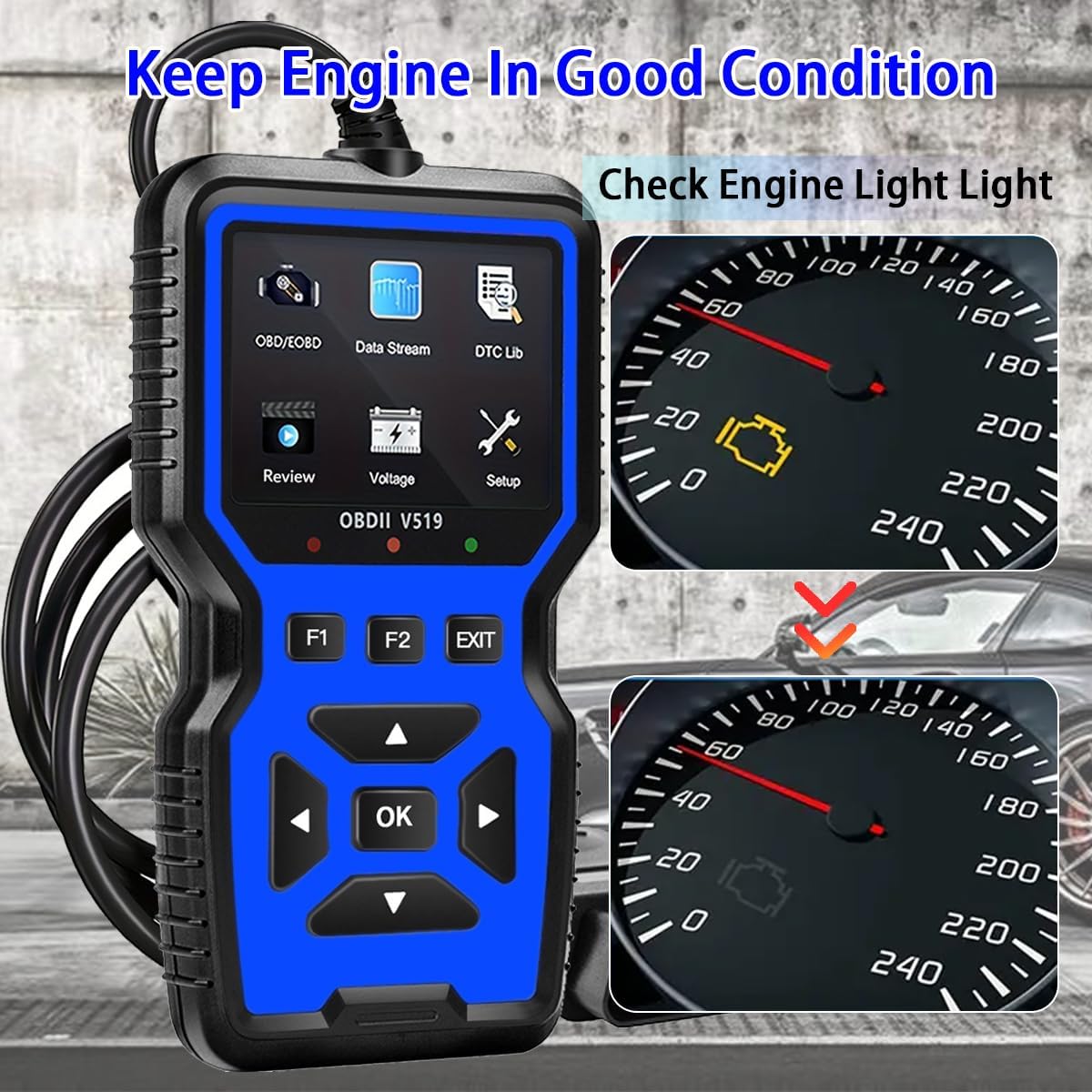
Figure 4.1: The V519 scanner can help diagnose and clear the Check Engine Light, indicating a return to good engine condition.
4.2. ലൈവ് ഡാറ്റ സ്ട്രീം
View real-time operational parameters of the vehicle's engine, such as RPM, vehicle speed, engine coolant temperature, and calculated load value.
- From the main menu, select "Data Stream" and press OK.
- Use the arrow buttons to scroll through various data parameters.
- The scanner can also display this data in a graphical format for easier trend analysis.

Figure 4.2: Live data stream displayed on the V519, showing real-time curves for various engine parameters.
4.3. I/M Readiness Test
This function checks the readiness of the emission-related monitoring systems on the vehicle. It is useful for determining if the vehicle is ready for an emissions test.
- From the main menu, select "OBD/EOBD" and press OK.
- Select "I/M Readiness" and press OK.
- The screen will display the status of various monitors (e.g., MIL, MIS, FUE, CCM, CAT, EVAP, O2S). A green checkmark indicates the monitor is complete, while a red 'X' indicates it is incomplete.

Figure 4.3: The V519's I/M Readiness screen, showing the status of emission monitors. This helps determine if a vehicle is ready for an emissions test.
4.4. ഡിടിസി ലുക്ക്അപ്പ്
The built-in DTC library allows you to look up definitions for diagnostic trouble codes directly on the device.
- From the main menu, select "DTC Lib" and press OK.
- Enter the DTC using the arrow buttons and OK ബട്ടൺ.
- The scanner will display the definition of the code.
4.5. മറ്റ് പ്രവർത്തനങ്ങൾ
The V519 also supports the following diagnostic functions:
- ഫ്രീസ് ഫ്രെയിം ഡാറ്റ: ഒരു തകരാർ കോഡ് സജ്ജീകരിച്ചിരിക്കുന്ന സമയത്ത് വാഹന പ്രവർത്തന സാഹചര്യങ്ങളുടെ ഒരു സ്നാപ്പ്ഷോട്ട് പകർത്തുന്നു.
- O2 സെൻസർ ടെസ്റ്റ്: O2 സെൻസർ മോണിറ്റർ പരിശോധനാ ഫലങ്ങൾ വീണ്ടെടുക്കുന്നു.
- ഓൺ-ബോർഡ് മോണിറ്റർ ടെസ്റ്റ് (മോഡ് 6): തുടർച്ചയായി നിരീക്ഷിക്കപ്പെടാത്ത എമിഷനുമായി ബന്ധപ്പെട്ട പവർട്രെയിൻ ഘടകങ്ങളുടെയും സിസ്റ്റങ്ങളുടെയും പരിശോധനാ ഫലങ്ങൾ വീണ്ടെടുക്കുന്നു.
- EVAP സിസ്റ്റം ടെസ്റ്റ് (മോഡ് 8): ബാഷ്പീകരണ ഉദ്വമന നിയന്ത്രണ സംവിധാനത്തിന്റെ ഒരു പരീക്ഷണം ആരംഭിക്കുന്നു.
- വാഹന വിവരം: വാഹന തിരിച്ചറിയൽ നമ്പർ (VIN), കാലിബ്രേഷൻ ഐഡി (CID), കാലിബ്രേഷൻ വെരിഫിക്കേഷൻ നമ്പർ (CVN) എന്നിവ വീണ്ടെടുക്കുന്നു.
- വാല്യംtagഇ ടെസ്റ്റ്: നിലവിലെ ബാറ്ററി വോളിയം പ്രദർശിപ്പിക്കുന്നുtage.

ചിത്രം 4.4: ഓവർview of the V519's full OBD II functions, including Read Codes, Erase Codes, Live Data, Freeze Frame, I/M Readiness, O2 Sensor Test, EVAP System Test, Vehicle Info, DTC Lookup, and Voltagഇ ടെസ്റ്റ്.

Figure 4.5: The V519 uses color-coded visual indicators (Red, Orange, Green) to quickly communicate vehicle status or required actions.
5. പരിപാലനം
To ensure the longevity and proper functioning of your V519 scanner, follow these maintenance guidelines:
- വൃത്തിയാക്കൽ: ഒരു സോഫ്റ്റ് ഉപയോഗിക്കുക, ഡിamp സ്കാനറിന്റെ പുറംഭാഗം വൃത്തിയാക്കാൻ തുണി ഉപയോഗിക്കുക. അബ്രസീവ് ക്ലീനറുകളോ ലായകങ്ങളോ ഉപയോഗിക്കരുത്.
- സംഭരണം: ഉപകരണം വരണ്ടതും തണുത്തതുമായ ഒരു അന്തരീക്ഷത്തിൽ സൂക്ഷിക്കുക, നേരിട്ടുള്ള സൂര്യപ്രകാശത്തിൽ നിന്നും തീവ്രമായ താപനിലയിൽ നിന്നും അകറ്റി നിർത്തുക.
- കേബിൾ കെയർ: Avoid bending or crimping the OBD2 cable excessively. Always grasp the connector when plugging or unplugging, not the cable itself.
- സോഫ്റ്റ്വെയർ അപ്ഡേറ്റുകൾ: നിർമ്മാതാവ് പരിശോധിക്കുക website periodically for any available software updates to ensure optimal performance and compatibility.
6. പ്രശ്നപരിഹാരം
If you encounter issues with your V519 scanner, refer to the following common troubleshooting steps:
| പ്രശ്നം | സാധ്യമായ കാരണം | പരിഹാരം |
|---|---|---|
| സ്കാനർ പവർ ഓൺ ചെയ്യുന്നില്ല. | Loose connection to DLC; vehicle ignition off; blown fuse in vehicle's OBD2 circuit. | Ensure the OBD2 connector is firmly seated. Turn vehicle ignition to "ON". Check vehicle's fuse box for a blown fuse related to the OBD2 port. |
| "Link Error" message displayed. | Communication failure with vehicle; incorrect protocol detected; vehicle not OBD2 compliant. | Verify the vehicle is OBD2 compliant (1996+ US, 2000+ EU). Ensure the connection is secure. Try connecting to a different OBD2 compliant vehicle to rule out scanner issue. |
| കോഡുകൾ മായ്ക്കാൻ കഴിയില്ല. | Vehicle ignition not in "ON" position; underlying fault still present. | Ensure ignition is "ON" (engine off). If codes persist, the underlying issue causing the code has not been resolved. Address the vehicle fault first. |
7 സ്പെസിഫിക്കേഷനുകൾ
| ഫീച്ചർ | വിശദാംശങ്ങൾ |
|---|---|
| ബ്രാൻഡ് | OnRetul |
| മോഡൽ നമ്പർ | V519 |
| പവർ ഉറവിടം | Corded Electric (via OBD2 port) |
| ഉൽപ്പന്ന അളവുകൾ (L x W x H) | 6" x 1" x 3.4" (15.24 സെ.മീ x 2.54 സെ.മീ x 8.64 സെ.മീ) |
| സ്ക്രീൻ വലിപ്പം | 2.8 ഇഞ്ച് |
| ഓട്ടോമോട്ടീവ് ഫിറ്റ് തരം | യൂണിവേഴ്സൽ ഫിറ്റ് (OBD2 അനുസൃത വാഹനങ്ങൾ) |
| പ്രവർത്തന താപനില | -4°F മുതൽ 158°F വരെ (-20°C മുതൽ 70°C വരെ) |
| ഉൾപ്പെടുത്തിയ ഘടകങ്ങൾ | V519 OBD2 Scanner, User Manual |

Figure 7.1: Physical dimensions of the OnRetul V519 OBD2 Scanner.
8. വാറൻ്റിയും പിന്തുണയും
The OnRetul V519 OBD2 Scanner comes with a 3 മാസത്തെ നിർമ്മാതാവിന്റെ വാറന്റി വാങ്ങിയ തീയതി മുതൽ. സാധാരണ ഉപയോഗത്തിലുള്ള മെറ്റീരിയലുകളിലെയും വർക്ക്മാൻഷിപ്പുകളിലെയും വൈകല്യങ്ങൾ ഈ വാറന്റി ഉൾക്കൊള്ളുന്നു.
For technical support, warranty claims, or further assistance, please contact OnRetul customer service through the retailer where the product was purchased or refer to the contact information provided in the product packaging.