
1. ആമുഖം
This manual provides essential information for setting up, operating, maintaining, and troubleshooting your CHUWI Hi10 X2 2-in-1 Laptop Tablet. Please read it thoroughly before using your device.
ബോക്സിൽ എന്താണുള്ളത്
- Hi10 X2 Tablet
- കാന്തിക കീബോർഡ്
- സ്റ്റാൻഡിനൊപ്പം കേസ്
- ചാർജർ സെറ്റ്
- ഉപയോക്തൃ മാനുവൽ (ഈ പ്രമാണം)

Image 1.1: CHUWI Hi10 X2 Tablet with Magnetic Keyboard and Case.
2. സജ്ജീകരണം
2.1 പ്രാരംഭ ചാർജിംഗ്
Before first use, fully charge your CHUWI Hi10 X2 tablet using the provided charger set. Connect the charger to the Type-C port on the tablet and plug it into a power outlet. The charging indicator light will illuminate.
2.2 Attaching the Magnetic Keyboard and Case
Align the tablet with the magnetic connectors on the keyboard. The magnets will secure the tablet in place. The case with stand can be adjusted to your preferred viewing ആംഗിൾ.
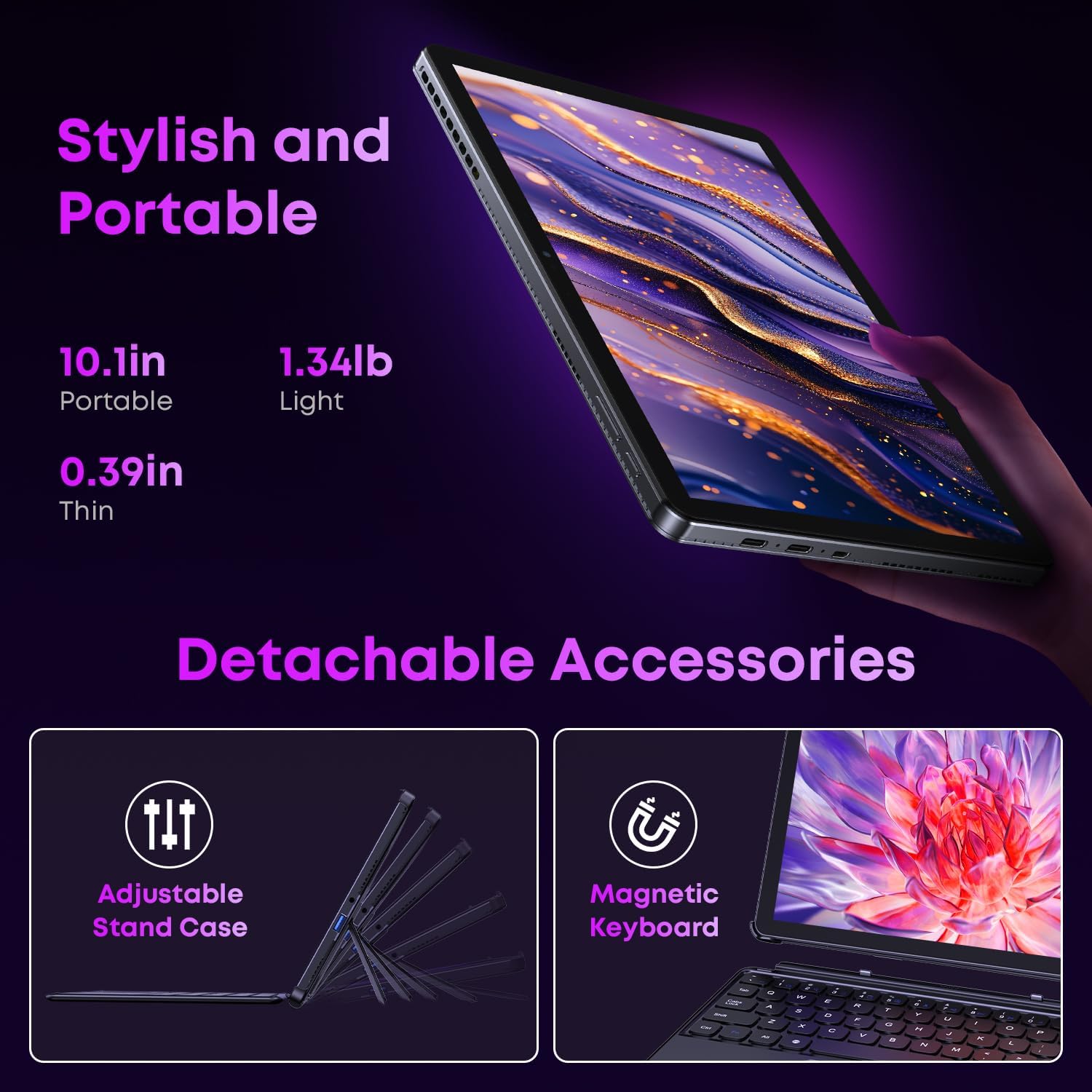
Image 2.1: Detachable accessories including the magnetic keyboard and adjustable stand case.
2.3 First Boot-Up and Windows Activation
Press and hold the power button until the screen turns on. Follow the on-screen instructions to complete the initial Windows 11 setup. If your Windows system arrives unactivated, please send the serial number (located on the back of the device) to CHUWI support via Amazon for your activation key.
2.4 Wi-Fi-ലേക്ക് ബന്ധിപ്പിക്കുന്നു
During setup, you will be prompted to connect to a Wi-Fi network. Select your network and enter the password. The device supports Wi-Fi 6 for fast and stable connections.
3. പ്രവർത്തന നിർദ്ദേശങ്ങൾ
3.1 പവർ ഓൺ/ഓഫ്, സ്ലീപ്പ് മോഡ്
- പവർ ഓൺ: സ്ക്രീൻ പ്രകാശിക്കുന്നത് വരെ പവർ ബട്ടൺ അമർത്തിപ്പിടിക്കുക.
- പവർ ഓഫ്: From the Windows Start menu, select Power > Shut down.
- സ്ലീപ്പ് മോഡ്: Briefly press the power button to enter or exit sleep mode.
3.2 ടച്ച്സ്ക്രീൻ ഉപയോഗിക്കുന്നു
The 10.1-inch HD touchscreen supports 10-point multi-touch gestures. Use taps, swipes, and pinches for navigation and interaction with applications.

Image 3.1: The 10.1-inch HD touchscreen display.
3.3 Laptop and Tablet Modes
The magnetic keyboard allows for seamless switching between laptop and tablet modes. Attach the keyboard for typing and productivity, or detach it for a pure tablet experience.
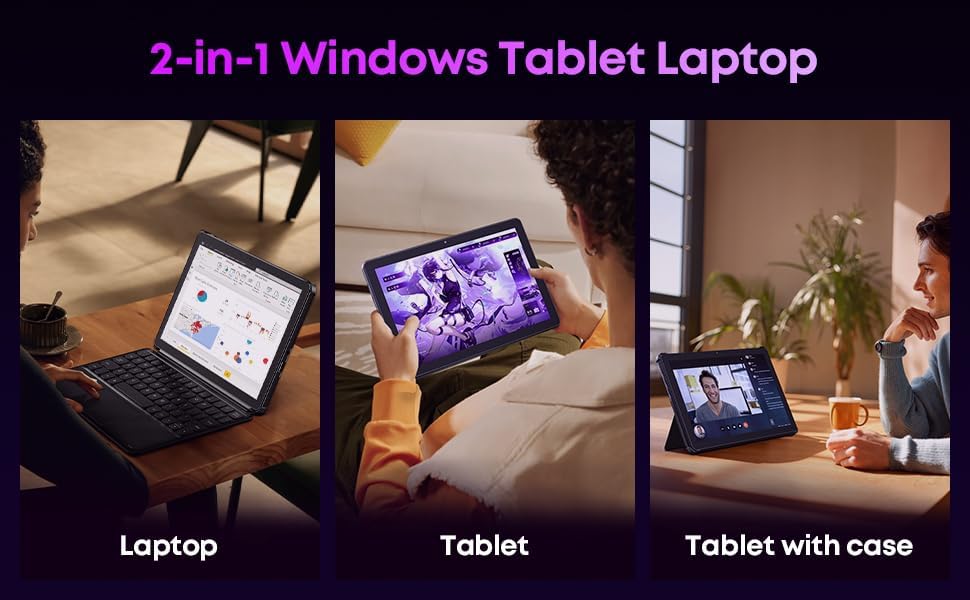
Image 3.2: Usage scenarios demonstrating laptop, tablet, and tablet with case modes.
3.4 കണക്റ്റിവിറ്റി
- USB പോർട്ടുകൾ: The tablet features a full-featured Type-C port and a USB 3.2 Gen1 port for data transfer and connecting peripherals.
- മൈക്രോ HDMI: Connect to external monitors or TVs using the Micro HDMI port for extended display options, supporting up to 4K video output.
- ബ്ലൂടൂത്ത് 5.3: Pair with wireless headphones, mice, and other Bluetooth accessories.
- Wi-Fi 6: Enjoy high-speed internet connectivity for streaming and browsing.
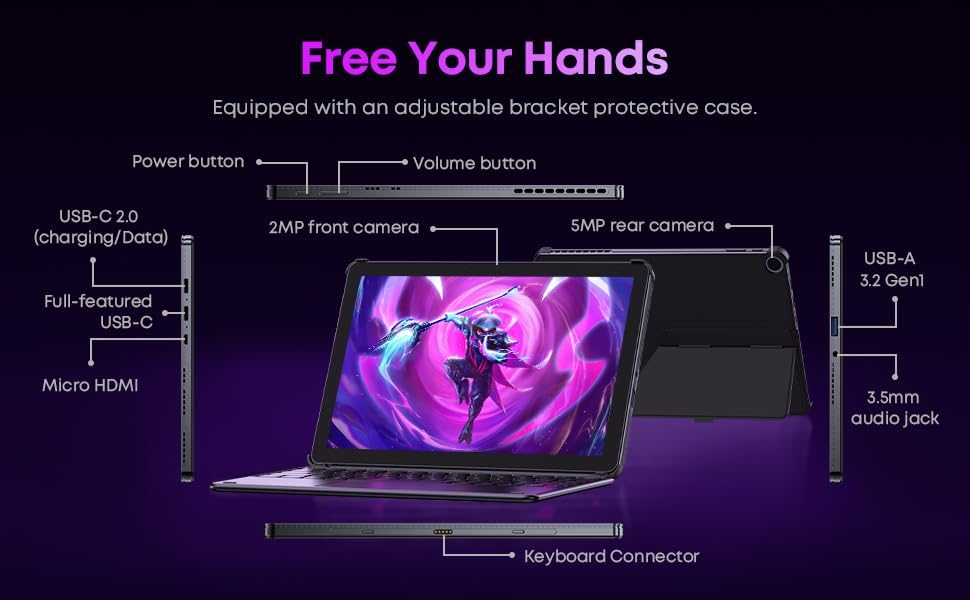
ചിത്രം 3.3: വിശദമായത് view of the tablet's ports and connectors.
3.5 ക്യാമറ ഉപയോഗം
The tablet is equipped with a 5MP autofocus rear camera for capturing photos and videos, and a 2MP front camera for video calls and selfies.

Image 3.4: Camera and wireless connectivity features.
3.6 Processor and Storage
Powered by a 10th Gen Intel Core i3 processor (up to 3.9GHz) and 8GB RAM, the tablet handles multitasking efficiently. The 256GB SSD provides ample storage and fast access to your files.

Image 3.5: Intel 10th Gen Core i3 Processor details.
3.7 ഉൽപ്പന്നം കഴിഞ്ഞുview വീഡിയോ
വീഡിയോ 3.6: ഒരു ഓവർview of the CHUWI Hi10 X2 2-in-1 Laptop Tablet, highlighting its features and functionality.
4. പരിപാലനം
4.1 ഉപകരണം വൃത്തിയാക്കുന്നു
ടാബ്ലെറ്റിന്റെ സ്ക്രീനും ബോഡിയും വൃത്തിയാക്കാൻ മൃദുവായ, ലിന്റ് രഹിത തുണി ഉപയോഗിക്കുക. കഠിനമായ പാടുകൾക്ക്, ചെറുതായി ഡി.ampതുണിയിൽ വെള്ളം അല്ലെങ്കിൽ സ്ക്രീൻ-ക്ലീനിംഗ് ലായനി ഉപയോഗിക്കുക. കഠിനമായ രാസവസ്തുക്കളോ ഉരച്ചിലുകളോ ഉള്ള വസ്തുക്കൾ ഒഴിവാക്കുക.
4.2 ബാറ്ററി കെയർ
To prolong battery life, avoid exposing the tablet to extreme temperatures. It is recommended to keep the battery charge between 20% and 80% for optimal longevity. Avoid fully discharging the battery frequently.
4.3 സോഫ്റ്റ്വെയർ അപ്ഡേറ്റുകൾ
നിങ്ങളുടെ സിസ്റ്റത്തിൽ ഏറ്റവും പുതിയ സുരക്ഷാ പാച്ചുകളും പ്രകടന മെച്ചപ്പെടുത്തലുകളും ഉണ്ടെന്ന് ഉറപ്പാക്കാൻ വിൻഡോസ് അപ്ഡേറ്റുകൾ പതിവായി പരിശോധിച്ച് ഇൻസ്റ്റാൾ ചെയ്യുക. ക്രമീകരണങ്ങൾ > വിൻഡോസ് അപ്ഡേറ്റ് എന്നതിലേക്ക് പോകുക.
4.4 സ്റ്റോറേജ് മാനേജ്മെൻ്റ്
ആനുകാലികമായി റീview അനാവശ്യമായത് ഇല്ലാതാക്കുക files and applications to free up storage space on the 256GB SSD. This helps maintain optimal device performance.
5. പ്രശ്നപരിഹാരം
5.1 ഉപകരണം ഓണാക്കുന്നില്ല
- Ensure the device is fully charged. Connect the charger and wait a few minutes before attempting to power on.
- ഹാർഡ് റീസെറ്റ് നടത്താൻ പവർ ബട്ടൺ 10-15 സെക്കൻഡ് അമർത്തിപ്പിടിക്കുക.
5.2 വൈ-ഫൈ കണക്റ്റിവിറ്റി പ്രശ്നങ്ങൾ
- നിങ്ങളുടെ വൈഫൈ റൂട്ടറും ടാബ്ലെറ്റും പുനരാരംഭിക്കുക.
- മറ്റ് ഉപകരണങ്ങൾക്ക് ഒരേ വൈഫൈ നെറ്റ്വർക്കിലേക്ക് കണക്റ്റ് ചെയ്യാൻ കഴിയുമോ എന്ന് പരിശോധിക്കുക.
- Forget the network in Windows settings and reconnect.
5.3 സ്ക്രീൻ സ്പർശനത്തോട് പ്രതികരിക്കുന്നില്ല
- ടാബ്ലെറ്റ് പുനരാരംഭിക്കുക.
- സ്ക്രീൻ വൃത്തിയുള്ളതും അവശിഷ്ടങ്ങൾ ഇല്ലാത്തതുമാണെന്ന് ഉറപ്പാക്കുക.
5.4 കീബോർഡ് പ്രവർത്തിക്കുന്നില്ല
- Ensure the tablet is correctly aligned and securely connected to the magnetic keyboard.
- ടാബ്ലെറ്റ് പുനരാരംഭിക്കുക.
കൂടുതൽ സഹായത്തിന്, ദയവായി പിന്തുണ വിഭാഗം പരിശോധിക്കുക.
6 സ്പെസിഫിക്കേഷനുകൾ
| ഫീച്ചർ | സ്പെസിഫിക്കേഷൻ |
|---|---|
| ബ്രാൻഡ് | ചുവി |
| മോഡലിൻ്റെ പേര് | Hi10 X2 |
| പ്രോസസ്സർ | Intel Core i3 (10th Gen, up to 3.9 GHz) |
| ഓപ്പറേറ്റിംഗ് സിസ്റ്റം | വിൻഡോസ് 11 ഹോം |
| റാം | 8 ജിബി |
| സംഭരണം | 256 ജിബി എസ്എസ്ഡി |
| സ്ക്രീൻ വലിപ്പം | 10.1 ഇഞ്ച് |
| ഡിസ്പ്ലേ റെസല്യൂഷൻ | 1280x800 പിക്സലുകൾ |
| കണക്റ്റിവിറ്റി | വൈ-ഫൈ 6, ബ്ലൂടൂത്ത് 5.3 |
| തുറമുഖങ്ങൾ | Full-featured Type-C, USB 3.2 Gen 1, Micro HDMI, 3.5mm Audio Jack |
| ക്യാമറകൾ | 5MP Autofocus Rear, 2MP Front |
| ഭാരം | 1.3 പൗണ്ട് (ഏകദേശം 0.59 കിലോഗ്രാം) |
| അളവുകൾ (L x W x Th) | 9.6" x 6.49" x 0.39" |
| ബാറ്ററി ശേഷി | 3400 mAh |
7. വാറൻ്റി വിവരങ്ങൾ
The CHUWI Hi10 X2 2-in-1 Laptop Tablet comes with a 1 വർഷത്തെ പരിമിത വാറൻ്റി. This warranty covers manufacturing defects and malfunctions under normal use. Please retain your proof of purchase for warranty claims.
For detailed warranty terms and conditions, please refer to the official CHUWI webസൈറ്റ് അല്ലെങ്കിൽ ഉപഭോക്തൃ പിന്തുണയുമായി ബന്ധപ്പെടുക.
8. പിന്തുണ
If you encounter any issues not covered in the Troubleshooting section, or require assistance with Windows activation, please contact CHUWI customer support. You can typically find support contact information on the official CHUWI website or through your purchase platform (e.g., Amazon seller messaging).
When contacting support, please have your device's serial number and proof of purchase readily available.