
ആമുഖം
This manual provides comprehensive instructions for the installation, operation, and maintenance of your Eseesmart Smart Front Door Lock Set (Model YL-MD168). This advanced keyless entry system offers multiple unlocking methods including Bluetooth APP control, anti-peep passcode, RFID cards, and physical keys. It features auto-lock functionality, passage mode, and robust security features designed for durability and convenience. Please read this manual thoroughly before installation and use to ensure proper function and safety.
പാക്കേജ് ഉള്ളടക്കം
Before beginning installation, verify that all components are present in the package.
- Front Plate * 1
- Base Plate Assembly * 1
- ലാച്ച് * 1
- ബോൾട്ട് * 1
- ട്യൂബ് * 1
- Spring * 1
- Decorative Cover * 1
- Battery Cover * 1
- Screw Pack (includes Self-tapping screws * 4, M4 screw (short) * 3, M4 screw (long) * 2, M5 screw * 1)
- Backup Key * 2

ചിത്രം: പൊട്ടിത്തെറിച്ചു view of the Eseesmart Smart Lock components, showing the front plate, base plate, latch, bolt, tube, spring, decorative cover, battery cover, various screws, and backup keys.
സജ്ജീകരണവും ഇൻസ്റ്റാളേഷനും
The Eseesmart Smart Front Door Lock Set is designed for easy installation, typically requiring no additional drilling for standard door setups. It replaces existing locks and is compatible with US standard left and right-handed doors.
1. ഡോർ അനുയോജ്യതാ പരിശോധന
നിങ്ങളുടെ വാതിൽ ഇനിപ്പറയുന്ന സ്പെസിഫിക്കേഷനുകൾ പാലിക്കുന്നുണ്ടെന്ന് ഉറപ്പാക്കുക:
- വാതിൽ കനം: 1.49 - 1.97 ഇഞ്ച് (38 - 50 മിമി)
- ബാക്ക്സെറ്റ്: 2-3/8 inches (60 mm) or 2-3/4 inches (70 mm)
- ദ്വാര വ്യാസം: Greater than 1-17/20 inches (47 mm)
- Distance between bore holes: 5-1/2 inches (140 mm) apart.

Image: Diagram illustrating door thickness, backset, hole diameter, and distance between bore holes for proper installation of the Eseesmart Smart Lock.

Image: Visual guide for checking door dimensions and compatibility with the Eseesmart Smart Lock, showing measurements for left-handed and right-handed doors.
2 ഇൻസ്റ്റലേഷൻ ഘട്ടങ്ങൾ
Follow the detailed instructions provided in the included manual for step-by-step installation. A video guide is also available for visual assistance.
പ്രധാനപ്പെട്ടത്: Ensure the bore holes are exactly 5-1/2 inches (140mm) apart for stable installation.
3. ബാറ്ററി ഇൻസ്റ്റാളേഷൻ
The lock requires 4 AAA batteries (not included). Install them into the battery compartment located on the interior side of the lock.

ചിത്രം: View of the Eseesmart Smart Lock's interior, showing the battery compartment designed for 4 AAA batteries.
പ്രവർത്തന നിർദ്ദേശങ്ങൾ
1. അൺലോക്ക് രീതികൾ
Your Eseesmart Smart Lock offers multiple convenient ways to unlock your door:
- ബ്ലൂടൂത്ത് ആപ്പ് നിയന്ത്രണം: Use the dedicated mobile application to unlock your door remotely.
- കീപാഡ് പാസ്കോഡ്: Enter your personalized code on the anti-peep OLED keypad.
- RFID കാർഡുകൾ: Tap a registered RFID card to the lock for quick access.
- ഭൗതിക കീ: പരമ്പരാഗത അൺലോക്കിംഗിനായി നൽകിയിരിക്കുന്ന ബാക്കപ്പ് കീകൾ ഉപയോഗിക്കുക.
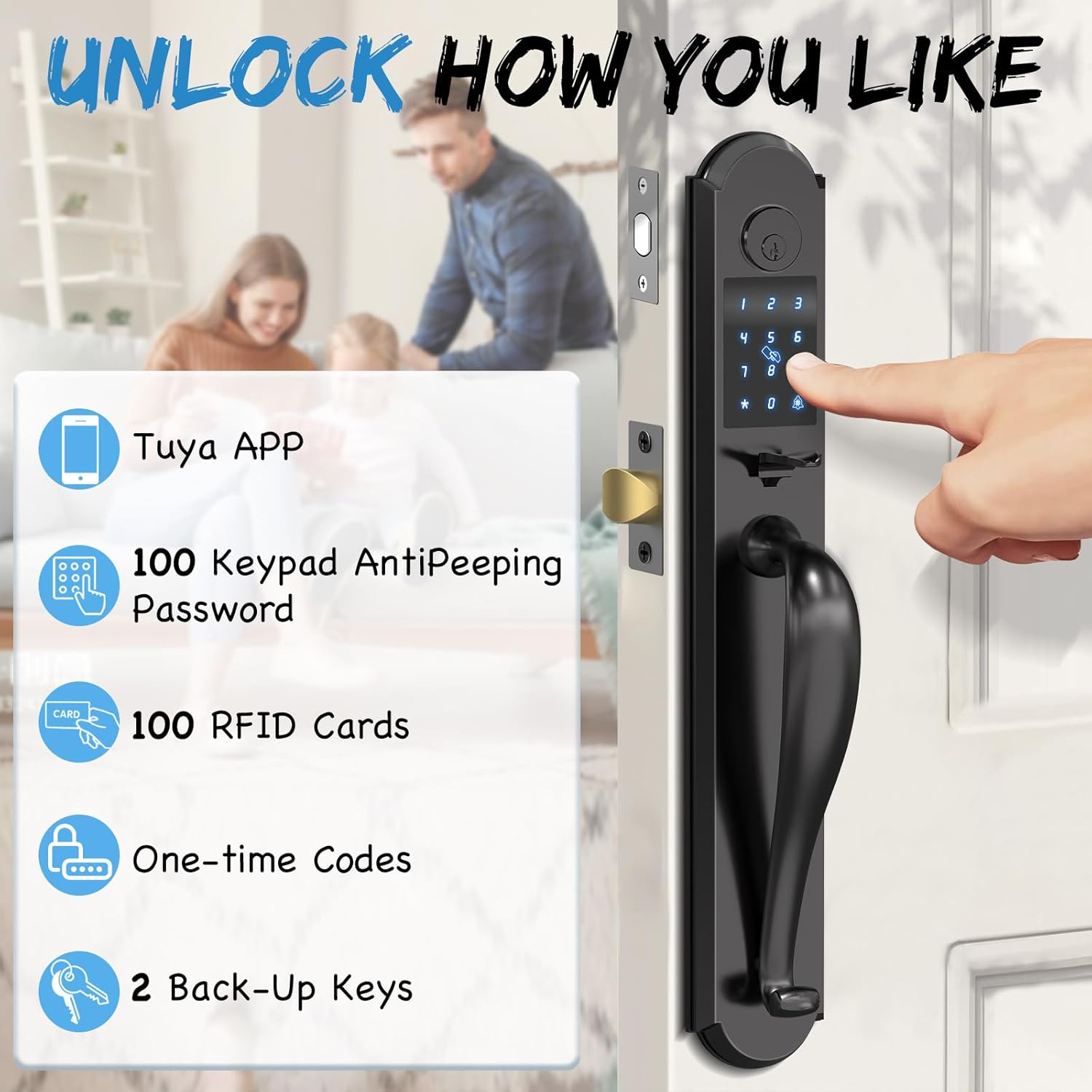
Image: Illustration of various unlocking methods including Tuya APP, keypad with anti-peeping password, RFID cards, one-time codes, and backup keys.
2. Keypad Passcode Entry (Anti-Peep Feature)
To enhance security, the keypad supports an anti-peep function. You can enter random digits before and after your actual passcode. The lock will recognize the correct sequence within the longer string of numbers.

Image: Demonstrates the anti-peep password feature, where random digits can be entered before and after the actual password to prevent onlookers from discerning the code.
3. Mobile Application Control
The Eseesmart app allows you to manage your lock from your smartphone. Features include:
- Generating various types of codes (one-time, permanent, timed, recurring, custom) for guests.
- Assigning up to 100 guest passcodes and 100 IC cards.
- Setting Auto Lock Timer or Passage Mode.
- Real-time push notifications and activity logs.

Image: Screenshot of the Eseesmart mobile application interface, showing options for creating various types of PIN codes such as one-time, permanent, timed, custom, recurring, and erase codes.

Image: A user interacting with the Eseesmart app, highlighting features like app control, real-time push notifications, activity logs, and user management.
4. Auto Lock and Passage Mode
- യാന്ത്രിക ലോക്ക്: The lock can be configured to automatically lock after a set period (5-60 seconds) once the door is closed. This feature can be customized via the app.
- പാസേജ് മോഡ്: When Passage Mode is enabled, the auto-lock function is temporarily turned off, allowing the door to remain unlocked for continuous access. This is useful for gatherings or when frequent entry/exit is needed.

Image: Depicts the Auto Lock feature, showing the lock automatically engaging after a set time, and the Passage Mode, where the lock remains unlocked for convenience during social events.

Image: A woman with a baby bag demonstrating the auto-lock feature, where the door automatically locks after a customizable duration of 5-60 seconds.

Image: A group of people enjoying a gathering, illustrating the Passage Mode where the lock remains unlocked, allowing free entry and exit without needing to re-enter codes.
5. Adjustable Volume
The lock's operational sounds can be adjusted to Mute, Low, Medium, or High volume settings.

Image: Shows the adjustable volume settings for the smart lock, including mute, low, medium, and high volume options, with a sleeping child in the background to emphasize quiet operation.
മെയിൻ്റനൻസ്
1. ബാറ്ററി മാനേജ്മെന്റ്
- കുറഞ്ഞ ബാറ്ററി അലേർട്ട്: The lock will provide clear alerts when the battery level drops below 20%. Replace batteries promptly to ensure continuous operation.
- Emergency Charge: In case of complete battery depletion, the lock features a USB-C port for emergency power, allowing you to temporarily power the lock and gain entry.
- ബാക്കപ്പ് കീ: Always keep a physical backup key in a secure location outside your home for emergency access.
Image: Displays the battery compartment, the USB-C port for emergent charging, a real-time battery status indicator, and the option to unlock with a backup physical key.
2. വൃത്തിയാക്കൽ
ലോക്കിന്റെ പുറംഭാഗം മൃദുവായ, ഡി ക്ലീനർ ഉപയോഗിച്ച് തുടയ്ക്കുക.amp തുണി. അബ്രാസീവ് ക്ലീനറുകളോ ലായകങ്ങളോ ഉപയോഗിക്കുന്നത് ഒഴിവാക്കുക, കാരണം ഇവ ഫിനിഷിനും ഇലക്ട്രോണിക് ഘടകങ്ങൾക്കും കേടുവരുത്തും.
ട്രബിൾഷൂട്ടിംഗ്
If you encounter issues with your Eseesmart Smart Lock, refer to the following common solutions:
- ലോക്ക് പ്രതികരിക്കുന്നില്ല: Check battery levels. If low, replace batteries or use the emergency USB-C charge port.
- കീപാഡ് പ്രകാശിക്കുന്നില്ല: ബാറ്ററികൾ ശരിയായി ഇൻസ്റ്റാൾ ചെയ്തിട്ടുണ്ടെന്നും ചാർജ്ജ് ചെയ്തിട്ടുണ്ടെന്നും ഉറപ്പാക്കുക.
- ആപ്പ് കണക്ഷനിലെ ബുദ്ധിമുട്ട്: Ensure Bluetooth is enabled on your device and you are within range of the lock. Restart the app or your phone if necessary.
- ആന്റി ടിamper alarm triggered: The lock features an anti-saw tongue with a built-in hidden anti-saw pin and an alarm system. If the prevent-pry setting is enabled and tampering is detected, the system will lock and alarm for 180 seconds.
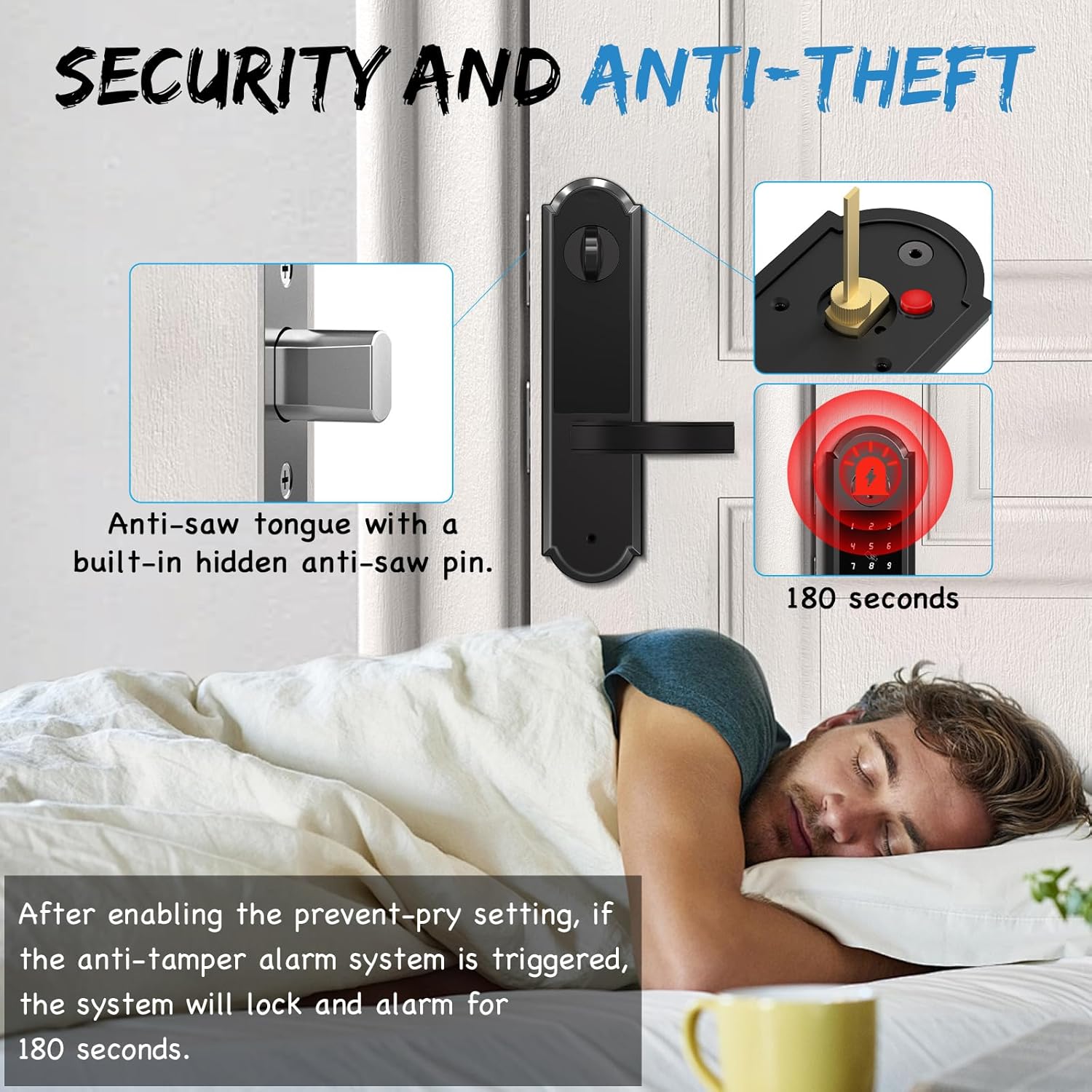
Image: Illustrates the anti-saw tongue with a hidden anti-saw pin and the anti-tamper alarm system, which triggers a 180-second alarm if tampഎറിംഗ് കണ്ടെത്തി.

Image: A person sleeping peacefully, while the image highlights the anti-saw tongue with a built-in hidden anti-saw pin and an alarm system that activates for 180 seconds if tampഎറിംഗ് കണ്ടെത്തി.
സ്പെസിഫിക്കേഷനുകൾ
| ബ്രാൻഡ് | എസെസ്മാർട്ട് |
| മോഡൽ നമ്പർ | YL-MD168 |
| മെറ്റീരിയൽ | Heavy Duty Alloy |
| നിറം | കറുപ്പ് |
| ശൈലി | Smart Fashion |
| ലോക്ക് തരം | Deadbolt Lock, Keyless Entry Door Lock with Handle, Keypad Lock |
| ഉൽപ്പന്ന അളവുകൾ | 3.2 x 1.39 x 20 ഇഞ്ച് |
| ഇനത്തിൻ്റെ ഭാരം | 11 പൗണ്ട് |
| പവർ ഉറവിടം | 4 AAA ബാറ്ററികൾ (ഉൾപ്പെടുത്തിയിട്ടില്ല) |
| പ്രത്യേക സവിശേഷതകൾ | App Control, Anti-Peep Passcode, RFID Cards Unlock, Auto Lock, One-Touch Lock, Passage Mode, Physical Key, Emergent Charge (USB-C), Low Battery Alert, Anti-Saw Tongue, Alarm System, Tempered Glass Keypad, Integrated Design |
| ഈട് | Resistant to -31°F to 158°F, IP65 Waterproof, Shock Resistant, 168H Salt Spray & Humidity Test, 150,000 Usage Test |
Image: Close-up of the Eseesmart Smart Lock keypad, highlighting its robust construction and features like 2173N appearance pressure resistance, temperature resistance (-31°F to 158°F), 168H salt spray & humidity test, 150,000 usage test, and IP65 waterproof rating.

Image: The Eseesmart Smart Lock installed on a door during snowy weather, emphasizing its resistance to temperatures from -31°F to 158°F and its IP65 waterproof rating.
വാറൻ്റിയും പിന്തുണയും
Eseesmart provides a 12-month replacement or refund policy for your product. Additionally, LIFETIME troubleshooting and customer service support ലഭ്യമാണ്.
For any queries, technical assistance, or warranty claims, please contact Eseesmart customer service.
ബന്ധപ്പെടാനുള്ള വിവരങ്ങൾ: Refer to the Eseesmart webഏറ്റവും പുതിയ കോൺടാക്റ്റ് വിശദാംശങ്ങൾക്ക് സൈറ്റ് അല്ലെങ്കിൽ നിങ്ങളുടെ വാങ്ങൽ ഡോക്യുമെന്റേഷൻ.