
1. ആമുഖം
This manual provides essential instructions for the safe and efficient operation, maintenance, and troubleshooting of your FOSSiBOT F7200 Portable Power Station. Please read this manual thoroughly before using the device and retain it for future reference.
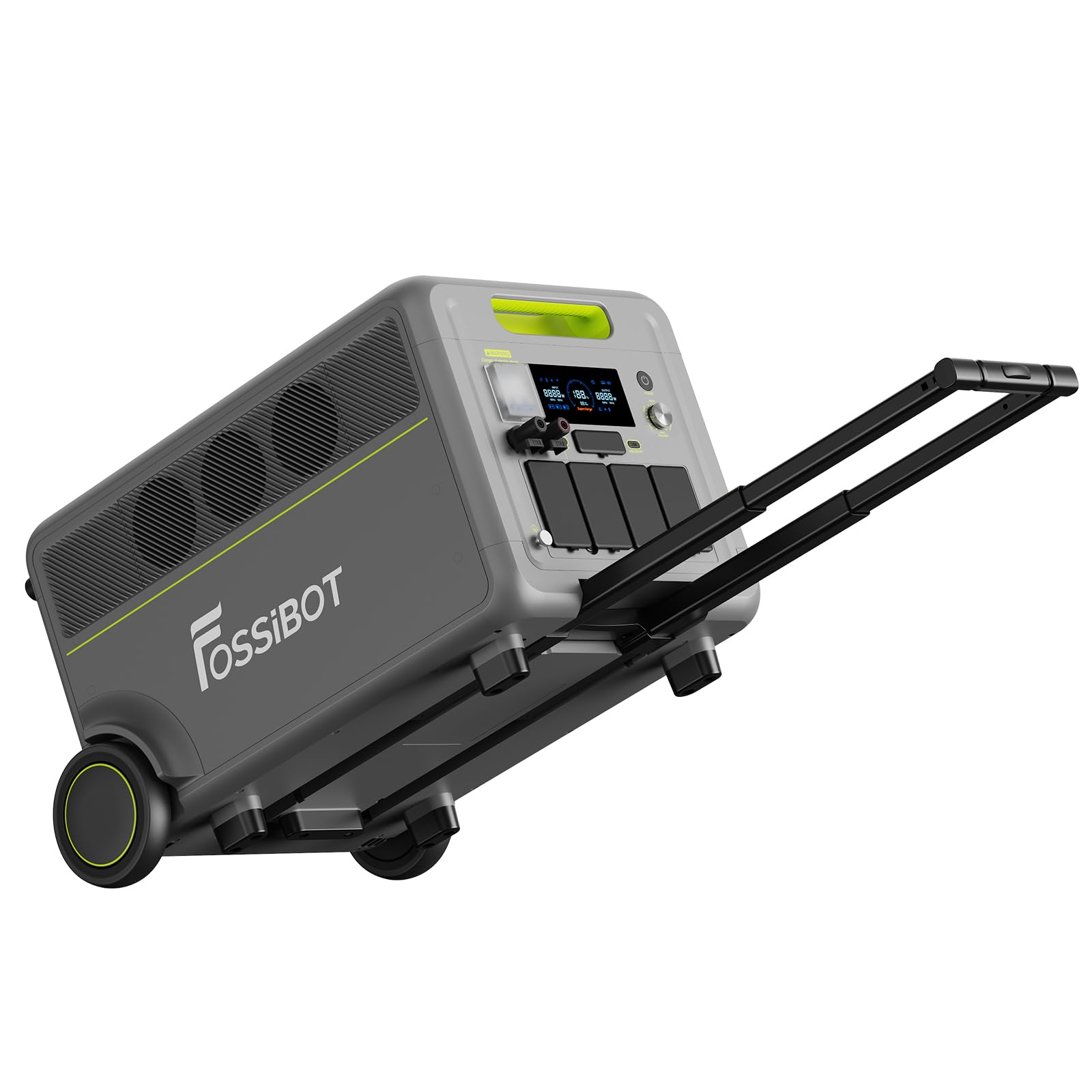
Image: The FOSSiBOT F7200 Portable Power Station, a grey unit with green accents and wheels, shown from the front-left angle.
2. സുരക്ഷാ നിർദ്ദേശങ്ങൾ
തീ, വൈദ്യുതാഘാതം, വ്യക്തിപരമായ പരിക്കുകൾ എന്നിവ കുറയ്ക്കുന്നതിന് വൈദ്യുത ഉപകരണങ്ങൾ ഉപയോഗിക്കുമ്പോൾ എല്ലായ്പ്പോഴും അടിസ്ഥാന സുരക്ഷാ മുൻകരുതലുകൾ പാലിക്കുക.
- യൂണിറ്റ് ഡിസ്അസംബ്ലിംഗ്, റിപ്പയർ അല്ലെങ്കിൽ പരിഷ്ക്കരിക്കരുത്.
- താപ സ്രോതസ്സുകൾ, നേരിട്ടുള്ള സൂര്യപ്രകാശം, കത്തുന്ന വസ്തുക്കൾ എന്നിവയിൽ നിന്ന് യൂണിറ്റ് അകറ്റി നിർത്തുക.
- വെള്ളം അല്ലെങ്കിൽ മറ്റ് ദ്രാവകങ്ങൾ യൂണിറ്റ് തുറന്നുകാട്ടരുത്.
- അമിതമായി ചൂടാക്കുന്നത് തടയാൻ ഉപയോഗ സമയത്ത് ശരിയായ വായുസഞ്ചാരം ഉറപ്പാക്കുക.
- ഒറിജിനൽ അല്ലെങ്കിൽ സാക്ഷ്യപ്പെടുത്തിയ ആക്സസറികൾ മാത്രം ഉപയോഗിക്കുക.
- കുട്ടികൾക്കും വളർത്തുമൃഗങ്ങൾക്കും ലഭ്യമാകാതെ സൂക്ഷിക്കുക.
- തീപിടിത്തമുണ്ടായാൽ, ഉണങ്ങിയ പൊടി അഗ്നിശമന ഉപകരണം ഉപയോഗിക്കുക.
3. ഉൽപ്പന്നം കഴിഞ്ഞുview
The FOSSiBOT F7200 is a high-capacity portable power station designed for various applications, from home backup to outdoor adventures. It features multiple output ports, flexible charging options, and smart control capabilities.
3.1. ഘടകങ്ങളും പോർട്ടുകളും

ചിത്രം: മുന്നിലും പിന്നിലും views of the F7200, highlighting its various ports and controls, labeled 1 through 17.
- എൽസിഡി ഡിസ്പ്ലേ
- പ്രധാന സ്വിച്ച്
- പവർ അഡ്ജസ്റ്റ്മെന്റ് ബട്ടൺ
- USB സ്വിച്ച്
- എസി സ്വിച്ച്
- സർക്യൂട്ട് ബ്രേക്കർ
- ഘട്ടം ടെർമിനൽ
- ന്യൂട്രൽ ടെർമിനൽ
- ഗ്രൗണ്ടിംഗ് സോക്കറ്റ്
- എസി ഔട്ട്പുട്ട്
- ഉയർന്ന വോളിയംtagഇ പിവി ഇൻപുട്ട്
- ഉയർന്ന വോളിയംtage PV Switch
- എസി ഇൻപുട്ട്
- Microinverter Interface
- ബാറ്ററി ഇന്റർഫേസ്
- ചാർജർ ഇൻപുട്ട്
- കുറഞ്ഞ വോളിയംtagഇ പിവി ഇൻപുട്ട്
3.2. എൽസിഡി ഡിസ്പ്ലേ ഐക്കണുകൾ

ചിത്രം: വിശദമായത് view of the LCD screen, explaining each icon and its function, labeled 1 through 17.
- 1. AC Charge
- 2. Solar/Vehicle Input
- 3. ബ്ലൂടൂത്ത്
- 4. വൈഫൈ
- 5. Battery Progress Bar
- 6. ഔട്ട്പുട്ട്
- 7. യുഎസ്ബി ഔട്ട്പുട്ട്
- 8. PD ഔട്ട്പുട്ട്
- 9. Main Unit Indicator
- 10. Secondary Unit Indicator
- 11. ബാറ്ററി ശതമാനംtage
- 12. ശേഷിക്കുന്ന സമയം
- 13. Temperature Protection
- 14. ഫാൻ സ്റ്റാറ്റസ്
- 15. Microinverter Interface
- 16. മൊത്തം ഇൻപുട്ട് പവർ
- 17. മൊത്തം ഔട്ട്പുട്ട് പവർ
4. സജ്ജീകരണം
4.1 അൺപാക്കിംഗും പ്രാരംഭ പരിശോധനയും
Carefully remove the FOSSiBOT F7200 from its packaging. Inspect the unit for any signs of damage. If any damage is found, do not use the product and contact customer support.

Image: Contents of the standard package, including the F7200 unit, various charging cables (AC, MC4 to XT90, Anderson to MC4, XT60 vehicle), user manual, wrenches, fork terminals, and banana connectors.
Standard Package Contents:
- FOSSiBOT F7200 Power Station (70kg, 670 x 450 x 410 mm)
- എസി ചാർജിംഗ് കേബിൾ (1.5മീ.)
- MC4 to XT90 Cable (1m)
- Anderson to MC4 Cable (1.5m)
- XT60 Vehicle Power Cable (1.5m)
- ഉപയോക്തൃ മാനുവൽ
- റെഞ്ച് (x2)
- Fork Terminal (x2)
- Banana Connector (x2)
4.2. പ്രാരംഭ ചാർജിംഗ്
Before first use, fully charge the FOSSiBOT F7200. Connect the AC charging cable to a wall outlet and to the AC input port on the power station. The LCD display will show the charging status.
5. പ്രവർത്തന നിർദ്ദേശങ്ങൾ
5.1. ഓൺ/ഓഫ് ചെയ്യുന്നു
Press and hold the Main Switch button for a few seconds to turn the unit on or off. The LCD display will illuminate upon activation.
5.2. ഉപകരണങ്ങൾ ബന്ധിപ്പിക്കുന്നു
The F7200 offers various output options:
- എസി ഔട്ട്ലെറ്റുകൾ: Connect your AC-powered devices to the 4 AC output sockets. Ensure the AC switch is turned on. The total maximum output is 7200W.
- USB പോർട്ടുകൾ: Connect USB-A and USB-C devices to the respective ports. Turn on the USB switch.
- Other DC Outputs: Utilize the specific DC outputs for compatible devices.
For whole-home power, the F7200 can provide a maximum output of 7200W. This can be achieved by using two groups of 3600W AC outlets or by connecting the F7200 to your home's electrical panel via wiring terminals.

Image: Illustration of connecting the F7200 to a home's electrical system via terminals or using its AC outlets for whole-house power. Note: Terminal connection requires professional installation by certified electricians to ensure safety and system stability.
5.3. F7200 ചാർജ് ചെയ്യുന്നു
F7200 ഒന്നിലധികം ചാർജിംഗ് രീതികളെ പിന്തുണയ്ക്കുന്നു:
- എസി ചാർജിംഗ്: Connect the AC charging cable to the AC input port and a wall outlet.
- സോളാർ ചാർജിംഗ്: Connect solar panels to the High Voltage PV Input or Low Voltage PV Input using the appropriate cables (e.g., MC4 to XT90). The F7200 intelligently adjusts photovoltaic-AC input for optimal charging.

Image: Fast charging methods, showing combined AC and PV input for maximum efficiency. Example charging times: AC+PV high voltage+PV low voltage (5200W ≈ 1.5h), AC+PV high voltage (4000W ≈ 1.7h), AC+PV low voltage (4200W ≈ 1.9h). Note: Combined high voltage solar and AC charging input power is limited to 2000W when the battery exceeds 85%.

Image: Visual representation of solar charging (2500W, 20-450V, ~2h 25min; 1200W, 20-55V, ~4h 21min) and AC charging (3000W, ~2h 15min). Note: Input power is limited to 2000W when the battery exceeds 88%.
5.4. തടസ്സമില്ലാത്ത വൈദ്യുതി വിതരണം (UPS) പ്രവർത്തനം
The F7200 features a 3000W UPS function with a switching time of less than 10 milliseconds. This ensures that connected sensitive devices like computers continue to receive power without interruption during a power outage.

Image: The F7200 acting as a UPS, providing continuous power with a transfer time under 10ms, shown in a garage environment with an aquarium.
5.5. ആപ്പ് നിയന്ത്രണം
Manage your F7200 remotely using the dedicated mobile application. The app allows you to monitor battery status, schedule charging cycles, and control outputs.

Image: Smartphone displaying the F7200 app interface, showing options for energy distribution, status monitoring, output customization, power off, and timer management. The app is available on Google Play and the App Store.
5.6. Adjusting Input Power
The F7200 features a rotary knob to adjust the input power from 600W to 3000W, allowing for customized fast or slow charging.

Image: A rotary input regulator knob with settings from 600W to 3000W, and a table showing corresponding full recharge times (e.g., 600W = 10 hours, 3000W = 2.2 hours).
5.7. പോർട്ടബിലിറ്റി
The F7200 is designed for easy transport with industrial wheels and a retractable handle, making it convenient to move the unit wherever power is needed.

Image: A worker pulling the F7200 power station across a construction site using its retractable handle and wheels, highlighting its portability. The unit weighs 70 kg and is equipped with wheels and a retractable handle.
6. പരിപാലനം
6.1. ബാറ്ററി പരിചരണം
The FOSSiBOT F7200 uses EVE LiFePO4 batteries, known for their safety and long lifespan.

Image: Visual representation of the EVE LiFePO4 battery, emphasizing its 17-year lifespan and 5-year official service warranty, with over 6500 cycles. It also mentions "Green-E" for being cobalt-free and ecological.
- To maximize battery life, avoid fully discharging the unit frequently.
- Store the unit in a cool, dry place, partially charged (e.g., 50-80%) if not used for extended periods.
- ആഴത്തിലുള്ള ഡിസ്ചാർജ് തടയാൻ ഓരോ 3-6 മാസത്തിലും യൂണിറ്റ് റീചാർജ് ചെയ്യുക.
6.2 വൃത്തിയാക്കലും സംഭരണവും
- Clean the exterior with a dry, soft cloth. Do not use abrasive cleaners or solvents.
- എല്ലാ തുറമുഖങ്ങളും പൊടിയും അവശിഷ്ടങ്ങളും ഇല്ലാത്തതാണെന്ന് ഉറപ്പാക്കുക.
- Store the unit in a well-ventilated area, away from extreme temperatures and humidity.
7. പ്രശ്നപരിഹാരം
നിങ്ങളുടെ FOSSiBOT F7200-ൽ പ്രശ്നങ്ങൾ നേരിടുകയാണെങ്കിൽ, ഇനിപ്പറയുന്ന പൊതുവായ പ്രശ്നങ്ങളും പരിഹാരങ്ങളും പരിശോധിക്കുക:
| പ്രശ്നം | സാധ്യമായ കാരണം | പരിഹാരം |
|---|---|---|
| യൂണിറ്റ് ഓണാക്കുന്നില്ല | Battery is fully discharged; Main switch is off. | Charge the unit; Press and hold the Main Switch. |
| എസി ഔട്ട്പുട്ട് പ്രവർത്തിക്കുന്നില്ല | AC switch is off; Overload protection activated. | Turn on AC switch; Reduce connected load, restart unit. |
| സ്ലോ ചാർജിംഗ് | Low input power setting; Inefficient solar panel angle. | Adjust input power knob; Optimize solar panel position. |
| ആപ്പ് കണക്റ്റ് ചെയ്യുന്നില്ല | Bluetooth/WiFi off; App not updated. | Ensure Bluetooth/WiFi is on; Update app to latest version. |
| ഓവർലോഡ് മുന്നറിയിപ്പ് | കണക്റ്റുചെയ്ത ഉപകരണങ്ങൾ യൂണിറ്റിന്റെ ഔട്ട്പുട്ട് ശേഷിയെ കവിയുന്നു. | Disconnect some devices; Reduce total power draw. |
| അമിത ചൂടാക്കൽ മുന്നറിയിപ്പ് | Insufficient ventilation; High ambient temperature. | Ensure clear airflow around the unit; Move to a cooler environment. |
If the problem persists, please contact FOSSiBOT customer support.
8 സ്പെസിഫിക്കേഷനുകൾ
| ഫീച്ചർ | സ്പെസിഫിക്കേഷൻ |
|---|---|
| മോഡൽ നമ്പർ | ഫോസിബോട്ട് F7200 |
| ബ്രാൻഡ് | ഫോസിബോട്ട് |
| എസി putട്ട്പുട്ട് പവർ | 7200W (പരമാവധി) |
| ബാറ്ററി ശേഷി | 5222Wh (Expandable up to 15.6 kWh with additional batteries) |
| ബാറ്ററി തരം | EVE LiFePO4 |
| ബാറ്ററി ആയുസ്സ് | 6500+ cycles, 17 years estimated life |
| യുപിഎസ് പ്രവർത്തനം | 3000W, <10ms switching time |
| പരമാവധി ഇൻപുട്ട് പവർ | 5200W (Combined AC + Solar) |
| എസി ഇൻപുട്ട് പവർ | Adjustable 600W-3000W |
| Solar Input (High Voltage) | 2500W (20-450V) |
| Solar Input (Low Voltage) | 1200W (20-55V) |
| കണക്റ്റിവിറ്റി | App Control (Bluetooth, WiFi) |
| അളവുകൾ (L x W x H) | 67 സെ.മീ x 45 സെ.മീ x 41 സെ.മീ |
| ഭാരം | 70 കി.ഗ്രാം |
| ശുപാർശ ചെയ്യുന്ന ഉപയോഗങ്ങൾ | Camping, വാണിജ്യ, റെസിഡൻഷ്യൽ |
| ആകെ എസി ഔട്ട്ലെറ്റുകൾ | 4 |
| ഉൾപ്പെടുത്തിയ ഘടകങ്ങൾ | Data cable, AC charging cable, MC4 to XT90 cable, Anderson to MC4 cable, XT60 vehicle power cable, user manual, wrench, fork terminal, banana connector |
9. വാറൻ്റിയും പിന്തുണയും
9.1. വാറൻ്റി വിവരങ്ങൾ
The FOSSiBOT F7200 Portable Power Station comes with a അഞ്ച് വർഷത്തെ വാറന്റി. സാധാരണ ഉപയോഗത്തിലുള്ള മെറ്റീരിയലുകളിലെയും നിർമ്മാണത്തിലെയും വൈകല്യങ്ങൾ ഈ വാറന്റി ഉൾക്കൊള്ളുന്നു. വാറന്റി ക്ലെയിമുകൾക്കായി നിങ്ങളുടെ വാങ്ങലിന്റെ തെളിവ് സൂക്ഷിക്കുക.
The intelligent Battery Management System (BMS) provides multiple protections to ensure reliable operation and battery longevity.

Image: BMS shield logo with icons representing various protections: Overload Protection, Low/High Temperature Protection, Low/High Voltage Protection, Short-Circuit/Overcurrent Protection, Over-discharge/Overcharge Protection.
9.2. ഉപഭോക്തൃ പിന്തുണ
For technical assistance, warranty claims, or any questions regarding your FOSSiBOT F7200, please contact FOSSiBOT customer support through the official webസൈറ്റ് അല്ലെങ്കിൽ നിങ്ങളുടെ റീട്ടെയിലർ.
You can also visit the FOSSiBOT store on Amazon for more information: FOSSiBOT Amazon Store