
ആമുഖം
Thank you for choosing the Hodozzy 4G+128G Android 2-DIN Car Stereo. This advanced car multimedia system features a responsive 7-inch Incell touchscreen, runs on Android 15, and offers seamless integration with wireless CarPlay and Android Auto. Enjoy features like GPS navigation, Wi-Fi connectivity, DSP audio processing, Bluetooth for calls and streaming, Mirror Link, steering wheel control compatibility, and support for a rear view camera. This manual provides essential information for installation, operation, maintenance, and troubleshooting to ensure optimal performance and user experience.
പാക്കേജ് ഉള്ളടക്കം
താഴെ ലിസ്റ്റ് ചെയ്തിരിക്കുന്ന എല്ലാ ഇനങ്ങളും നിങ്ങളുടെ പാക്കേജിൽ ഉൾപ്പെടുത്തിയിട്ടുണ്ടെന്ന് ദയവായി പരിശോധിക്കുക:
- Hodozzy Android Car Stereo
- പിൻഭാഗം View ക്യാമറ
- മൈക്രോഫോൺ
- Power Cables (various)
- ആർസിഎ കേബിൾ
- ജിപിഎസ് ആൻ്റിന
- 6 Pin USB Cable
- പിൻ ക്യാമറ ഇൻപുട്ട് കേബിൾ
- മൗണ്ടിംഗ് ആക്സസറികൾ
- 2 Din Frame
- ഉപയോക്തൃ മാനുവൽ

ചിത്രം: കഴിഞ്ഞുview of the Hodozzy car stereo and its included accessories, such as the rear camera, microphone, various cables, GPS antenna, and mounting hardware.
സജ്ജീകരണവും ഇൻസ്റ്റാളേഷനും
Professional installation is recommended for this device. Ensure the vehicle's power is disconnected before beginning installation.
വയറിംഗ് കണക്ഷനുകൾ
- പവർ കണക്ഷൻ: Connect the main power harness to your vehicle's wiring. Ensure correct connections for constant power (B+), accessory power (ACC), and ground (GND).
- സ്പീക്കർ കണക്ഷൻ: Connect the speaker wires to your vehicle's speakers, observing correct polarity for each channel (front left, front right, rear left, rear right).
- പിൻഭാഗം View ക്യാമറ: Connect the rear camera input cable to the designated port on the car stereo. Connect the camera's power to the reverse light circuit for automatic activation.
- ജിപിഎസ് ആന്റിന: വ്യക്തമായ വെളിച്ചമുള്ള ഒരു സ്ഥലത്ത് GPS ആന്റിന സ്ഥാപിക്കുക. view of the sky, typically on the dashboard or under the windshield. Connect it to the GPS antenna port.
- ബാഹ്യ മൈക്രോഫോൺ: Plug the external microphone into its dedicated input for improved call quality.
- യുഎസ്ബി/ടൈപ്പ്-സി പോർട്ടുകൾ: Connect the provided USB/Type-C cables for media playback, phone charging, or connecting other USB devices.
- സ്റ്റിയറിംഗ് വീൽ നിയന്ത്രണങ്ങൾ (SWC): Connect the SWC wires to your vehicle's steering wheel control interface. Refer to your vehicle's wiring diagram for specific connections.

ചിത്രം: മുൻവശവും വശവും view of the Hodozzy car stereo, illustrating the physical layout of buttons, ports, and the 7-inch Incell touchscreen.
പ്രവർത്തന നിർദ്ദേശങ്ങൾ
Android 15 സിസ്റ്റം
The car stereo operates on the latest Android 15 system, providing a familiar and secure user experience. It features 4GB RAM and 128GB ROM for smooth performance and ample storage for apps and media.
- ആപ്പ് ഇൻസ്റ്റാളേഷൻ: Download your favorite applications directly from the integrated app store.
- ഉപയോക്തൃ ഇൻ്റർഫേസ്: Customize the interface with multiple available themes to suit your preference.

Image: Visual representation of the Android 15 operating system, highlighting 4GB RAM and 128GB ROM specifications with digital graphics.
Wireless CarPlay & Android Auto / Mirror Link
Connect your smartphone wirelessly for seamless integration of CarPlay or Android Auto. This allows you to project maps, messages, and music directly onto the car stereo's screen.
- വയർലെസ് കണക്ഷൻ: Your phone will automatically connect once paired.
- പ്രവർത്തനക്ഷമത: Access navigation apps (e.g., Waze), make hands-free calls, and manage music playlists using the touchscreen or steering wheel controls.
- മിറർ ലിങ്ക്: Use the Mirror Link function for broader compatibility, mirroring your phone's screen directly to the car stereo.

Image: Display showing the car stereo interface with CarPlay and Android Auto icons, alongside a smartphone demonstrating wireless connection and Mirror Link functionality.
ജിപിഎസ് നാവിഗേഷനും വൈഫൈയും
The integrated GPS and Wi-Fi capabilities ensure you are always on the right path and connected.
- നാവിഗേഷൻ: Utilize online or offline maps for precise route guidance.
- വൈഫൈ: Connect to a Wi-Fi hotspot for internet access, app updates, and online services.

Image: A car driving on a scenic road with navigation overlays, and a detailed view of the car stereo's interface showing online and offline map options, along with various app icons.
Audio Features (DSP, Bluetooth, FM/RDS)
Experience professional-grade audio control with the integrated Digital Sound Processor (DSP).
- DSP Equalizer: Adjust sound frequencies to match your music genre and vehicle acoustics.
- ബ്ലൂടൂത്ത് ഓഡിയോ: Pair your phone via Bluetooth for crystal-clear calls and wireless audio streaming.
- FM/RDS റേഡിയോ: Enjoy clear reception of FM radio stations with RDS (Radio Data System) information display.
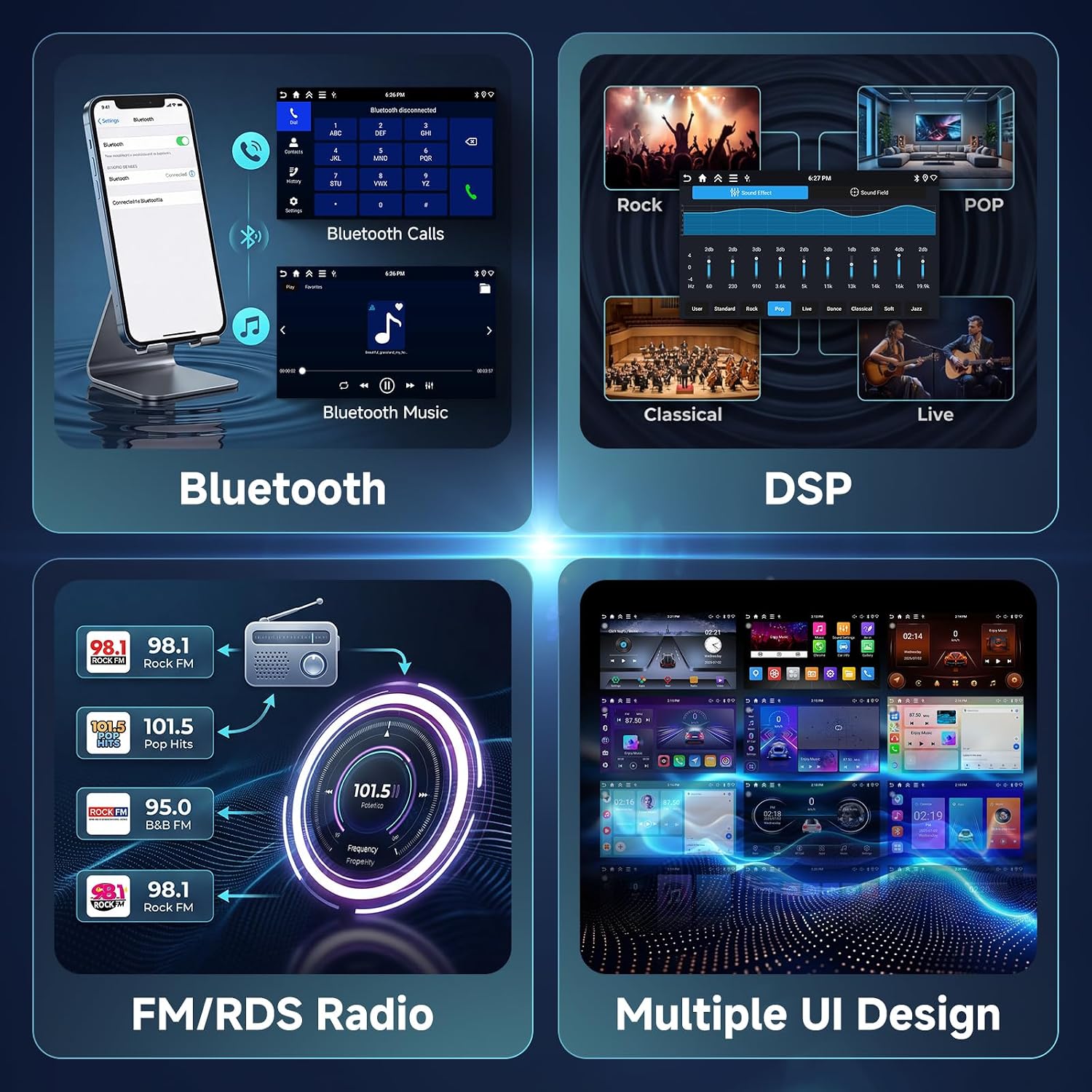
Image: A collage showing different audio interfaces: Bluetooth call screen, DSP equalizer settings for various music styles (Rock, Pop, Classical, Live), and FM/RDS radio tuning interface.
സ്പ്ലിറ്റ് സ്ക്രീൻ പ്രവർത്തനം
Utilize the intuitive split-screen feature to run two applications simultaneously, such as navigation and music, without switching between screens.

Image: Top section illustrates the In-Cell screen technology. The bottom section shows the car stereo display in split-screen mode, running two applications side-by-side, such as navigation and a phone dialer.
പിൻഭാഗം View Camera & Steering Wheel Controls
- പിൻഭാഗം View ക്യാമറ: The system supports a rear view camera (included) with clear guidelines for safe parking and reversing. It features night vision, a wide-angle lens, IP68 waterproof rating, and HD image quality.
- സ്റ്റിയറിംഗ് വീൽ നിയന്ത്രണങ്ങൾ (SWC): Maintain original vehicle functionality by connecting your steering wheel controls to manage volume, track changes, and answer/hang up calls directly from your steering wheel.

Image: Top section shows the rear view camera in action on the car stereo screen with parking lines, highlighting features like night vision, wide angle, and IP68 waterproof. The bottom section displays steering wheel control buttons for various functions.
മെയിൻ്റനൻസ്
- വൃത്തിയാക്കൽ: Use a soft, dry cloth to clean the touchscreen and unit. Avoid abrasive cleaners or solvents.
- സോഫ്റ്റ്വെയർ അപ്ഡേറ്റുകൾ: മികച്ച പ്രകടനവും പുതിയ സവിശേഷതകളിലേക്കുള്ള ആക്സസും ഉറപ്പാക്കാൻ, വൈഫൈ വഴി സോഫ്റ്റ്വെയർ അപ്ഡേറ്റുകൾക്കായി ഇടയ്ക്കിടെ പരിശോധിക്കുക.
- താപനില: അങ്ങേയറ്റത്തെ താപനിലയിലേക്ക് യൂണിറ്റ് തുറന്നുകാട്ടുന്നത് ഒഴിവാക്കുക.
ട്രബിൾഷൂട്ടിംഗ്
| പ്രശ്നം | സാധ്യമായ കാരണം | പരിഹാരം |
|---|---|---|
| ശക്തിയില്ല | തെറ്റായ വയറിംഗ്; ഫ്യൂസ് പൊട്ടി. | Check power connections (B+, ACC, GND). Inspect and replace fuses if necessary. |
| ശബ്ദമില്ല | സ്പീക്കർ വയറിംഗ് തെറ്റാണ്; ശബ്ദം വളരെ കുറവാണ്; മ്യൂട്ട് സജീവമാക്കി. | സ്പീക്കർ കണക്ഷനുകൾ പരിശോധിക്കുക. വോളിയം വർദ്ധിപ്പിക്കുക. മ്യൂട്ട് ഫംഗ്ഷൻ സജീവമാണോ എന്ന് പരിശോധിക്കുക. |
| GPS സിഗ്നൽ നഷ്ടപ്പെട്ടു അല്ലെങ്കിൽ കൃത്യമല്ല. | GPS antenna obstructed or improperly placed | ജിപിഎസ് ആന്റിനയ്ക്ക് വ്യക്തമായ ഒരു രേഖ ഉണ്ടെന്ന് ഉറപ്പാക്കുക view ആകാശത്തിന്റെ. ആന്റിന കണക്ഷൻ പരിശോധിക്കുക. |
| ബ്ലൂടൂത്ത് കണക്ഷൻ പ്രശ്നങ്ങൾ | Device not in pairing mode; Interference | Ensure Bluetooth is enabled on both devices and in pairing mode. Restart both devices. |
| ടച്ച്സ്ക്രീൻ പ്രതികരിക്കുന്നില്ല | System freeze; Software issue | Perform a soft reset (refer to device settings). If issue persists, contact support. |
സ്പെസിഫിക്കേഷനുകൾ
- ബ്രാൻഡ്: ഹോഡോസി
- മോഡൽ: 4G+128G Android Autoradio 2 Din
- ഓപ്പറേറ്റിംഗ് സിസ്റ്റം: ആൻഡ്രോയിഡ് 15
- റാം: 4 ജിബി
- ROM (Storage): 128 ജിബി
- സ്ക്രീൻ: 7-inch Incell Touchscreen
- കണക്റ്റിവിറ്റി: ബ്ലൂടൂത്ത്, HDMI, USB, വൈ-ഫൈ
- പ്രത്യേക സവിശേഷതകൾ: Wireless Android Auto, Wireless Apple CarPlay, Integrated Bluetooth, GPS Navigation, DSP (Digital Sound Processor), Mirror Link, Steering Wheel Control (SWC)
- അനുയോജ്യമായ ഉപകരണങ്ങൾ: സ്മാർട്ട്ഫോൺ
- നിർമ്മാതാവ്: ഹോഡോസി
- മാതൃരാജ്യം: ചൈന
വാറൻ്റിയും പിന്തുണയും
This Hodozzy product comes with a 2 വർഷത്തെ വാറൻ്റി വാങ്ങിയ തീയതി മുതൽ, നിർമ്മാണ വൈകല്യങ്ങൾ ഉൾക്കൊള്ളുന്നു. വാറന്റി ക്ലെയിമുകൾക്കായി നിങ്ങളുടെ വാങ്ങിയതിന്റെ തെളിവ് സൂക്ഷിക്കുക.
For technical support, troubleshooting assistance, or warranty inquiries, please contact Hodozzy customer service through the retailer where the product was purchased or visit the official Hodozzy webബന്ധപ്പെടാനുള്ള വിവരങ്ങൾക്കുള്ള സൈറ്റ്.