
1. ഉൽപ്പന്നം കഴിഞ്ഞുview
The Eyoyo Mini EY-015P is a compact and versatile 2D/1D barcode scanner designed for various applications. It supports multiple connection methods and is compatible with a wide range of devices.

Image: Two Eyoyo Mini EY-015P barcode scanners on a wooden surface, highlighting their compact design.
പ്രധാന സവിശേഷതകൾ:
- കോംപാക്റ്റ് ഡിസൈൻ: Ultra-compact at 3.5 × 1.18 × 0.78 inches and only 1.5 oz for portability.
- ഒന്നിലധികം കണക്ഷൻ ഓപ്ഷനുകൾ: Supports 2.4GHz wireless, Bluetooth wireless, and USB wired modes.
- Advanced 2D Scanning: Capable of scanning both 1D and 2D barcodes from printed surfaces and electronic screens, including QR, PDF417, DataMatrix, Aztec, and more.
- നീണ്ട ബാറ്ററി ലൈഫ്: 450mAh rechargeable battery provides up to 8 hours of continuous operation and 180 days standby time.
- Dual Data Transfer Modes: Instant upload and offline storage mode (up to 150,000 barcodes).
2. പാക്കേജ് ഉള്ളടക്കം
പാക്കേജിൽ എല്ലാ ഇനങ്ങളും ഉണ്ടെന്ന് ഉറപ്പാക്കുക:
- 1x Eyoyo 2D Barcode Scanner (or 2x for 2-pack)
- 1x 2.4G യുഎസ്ബി ഡോംഗിൾ
- 1x USB കേബിൾ
- 1x ഉപയോക്തൃ മാനുവൽ
3. സജ്ജീകരണം
3.1 സ്കാനർ ചാർജ് ചെയ്യുന്നു
Before initial use, fully charge the scanner. Connect the provided USB cable to the scanner and a power source (e.g., computer USB port or USB wall adapter). A full charge takes approximately 4 hours.
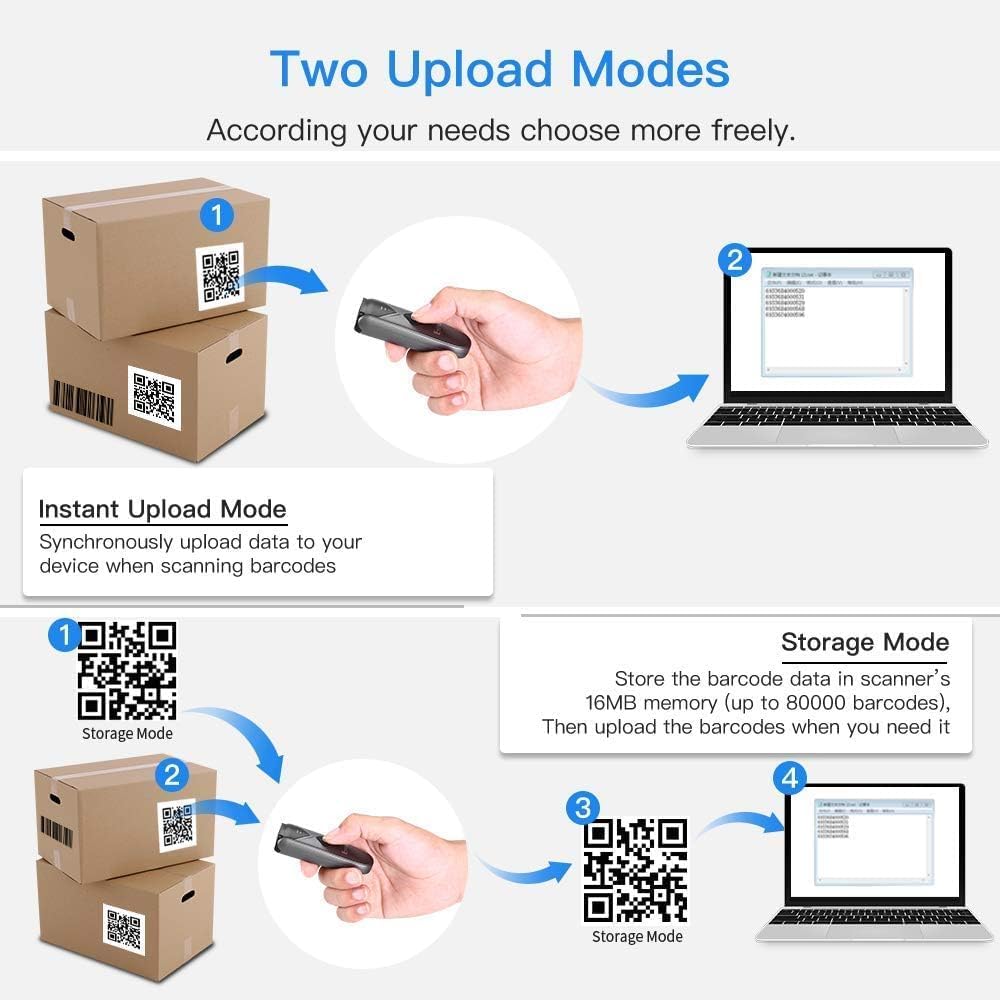
Image: Diagram showing the scanner's battery life, indicating 4 hours to charge, 8 hours of continuous scanning, and 720 hours of standby time.
3.2 കണക്ഷൻ രീതികൾ
The scanner offers three connection options:
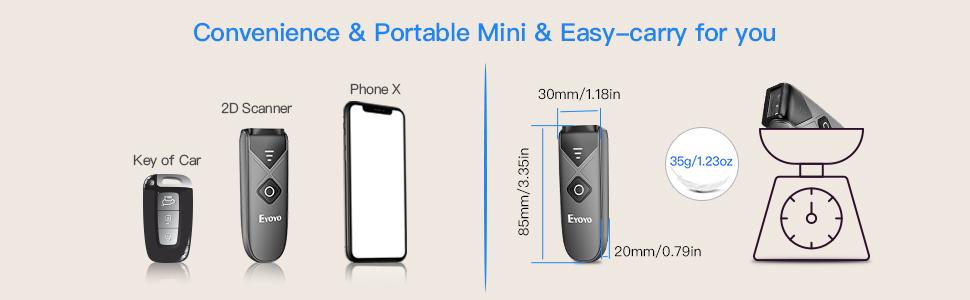
Image: Illustration of the three connection methods: Bluetooth, 2.4G Wireless (with dongle), and USB Wired.
3.2.1 ബ്ലൂടൂത്ത് വയർലെസ് കണക്ഷൻ
ബ്ലൂടൂത്ത് വഴി ബന്ധിപ്പിക്കാൻ:
- സ്കാനർ ഓണാക്കുക.
- Enable Bluetooth on your device (laptop, tablet, smartphone).
- ഇതിനായി തിരയുക available Bluetooth devices and select "Eyoyo-015" or a similar name.
- The scanner will pair with your device.
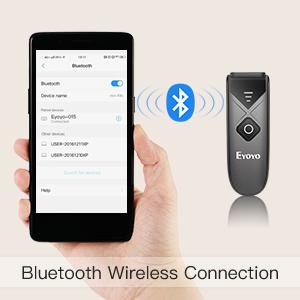
Image: A hand holding a smartphone with Bluetooth settings open, showing the scanner connecting via Bluetooth.
3.2.2 2.4G വയർലെസ് കണക്ഷൻ
To connect using the 2.4G wireless dongle:
- നിങ്ങളുടെ കമ്പ്യൂട്ടറിൽ ലഭ്യമായ ഒരു USB പോർട്ടിലേക്ക് 2.4G USB ഡോംഗിൾ പ്ലഗ് ചെയ്യുക.
- സ്കാനർ ഓണാക്കുക. അത് ഡോംഗിളിലേക്ക് യാന്ത്രികമായി കണക്റ്റ് ചെയ്യണം.
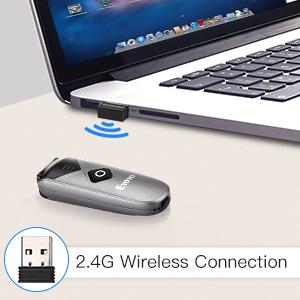
Image: The scanner and a 2.4G USB dongle plugged into a laptop, illustrating the wireless connection.
3.2.3 യുഎസ്ബി വയർഡ് കണക്ഷൻ
To connect via USB cable:
- നൽകിയിരിക്കുന്ന USB കേബിൾ ഉപയോഗിച്ച് നിങ്ങളുടെ കമ്പ്യൂട്ടറിലേക്ക് സ്കാനർ ബന്ധിപ്പിക്കുക.
- സ്കാനർ ഒരു വയർഡ് ഉപകരണമായി പ്രവർത്തിക്കുകയും ഒരേസമയം ചാർജ് ചെയ്യുകയും ചെയ്യും.
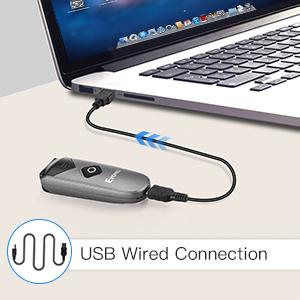
Image: The scanner connected to a laptop via a USB cable, demonstrating the wired connection mode.
3.3 അനുയോജ്യത
The scanner is compatible with:
- Windows XP, Win7, Win8, Win10 operating systems
- Mac OS
- ലിനക്സ്
- Android ഉപകരണങ്ങൾ
- iOS devices (for Bluetooth connection)
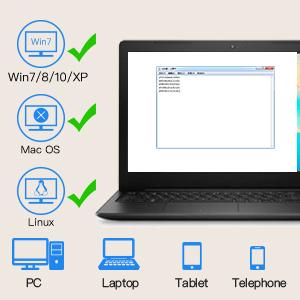
Image: Icons representing Windows, Mac OS, and Linux, indicating compatibility with various operating systems and devices like PCs, laptops, tablets, and phones.
4. പ്രവർത്തന നിർദ്ദേശങ്ങൾ
4.1 ബാർകോഡുകൾ സ്കാൻ ചെയ്യുന്നു
To scan a barcode, point the scanner's window at the barcode and press the scan button. The scanner will emit a light and a sound (if enabled) upon successful scan.

Image: The scanner pointed at various 1D and 2D barcodes, demonstrating its scanning capability.
The scanner can read various 1D and 2D barcode types, including:
- 1D ബാർകോഡുകൾ: Codabar, Code11, Code93, MSI, Code 128, UCC/EAN-128, Code 39, EAN-8, EAN-13, UPCA, ISBN, Industrial25, Interleaved 25, Standard 25, 2/5 Matrix.
- 2D ബാർകോഡുകൾ: QR, PDF417, MicroPDF417, DataMatrix, Aztec, Maxicode.
4.2 ഡാറ്റ ട്രാൻസ്ഫർ മോഡുകൾ
The scanner supports two data transfer modes:
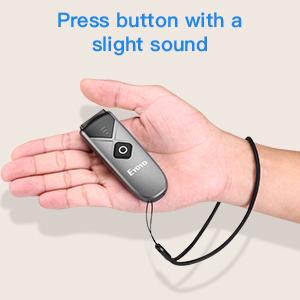
Image: Diagram illustrating Instant Upload Mode (data sent immediately to a laptop) and Storage Mode (data stored internally and uploaded later).
4.2.1 തൽക്ഷണ അപ്ലോഡ് മോഡ്
In this mode, scanned barcode data is immediately transmitted to your connected device. This is the default mode.
4.2.2 സ്റ്റോറേജ് മോഡ്
In offline storage mode, the scanner saves scanned data internally in its 16MB memory (up to 150,000 barcodes). You can upload the stored information to your device later when needed. To switch to storage mode or upload data, refer to the detailed instructions in the included manual or scan specific configuration barcodes.
4.3 Power-Saving Features
The scanner automatically enters shutdown mode after 5 minutes of inactivity to conserve battery. This timer can be customized or disabled by scanning specific configuration barcodes found in the full user manual.
4.4 ശബ്ദ, വൈബ്രേഷൻ ക്രമീകരണങ്ങൾ
The sound and vibration feedback upon scanning can be turned off or adjusted. Refer to the full user manual for the specific configuration barcodes to modify these settings.
5. പരിപാലനം
5.1 ബാറ്ററി കെയർ
- ബാറ്ററി ഇടയ്ക്കിടെ പൂർണ്ണമായും ഡിസ്ചാർജ് ചെയ്യുന്നത് ഒഴിവാക്കുക.
- Charge the scanner regularly, even if not in constant use, to maintain battery health.
- ദീർഘനേരം ഉപയോഗിക്കാത്തപ്പോൾ സ്കാനർ തണുത്തതും വരണ്ടതുമായ സ്ഥലത്ത് സൂക്ഷിക്കുക.
5.2 വൃത്തിയാക്കൽ
Use a soft, dry cloth to clean the scanner's exterior. For the scanning window, use a lint-free cloth and a mild cleaning solution if necessary. Avoid abrasive materials or harsh chemicals that could damage the device.
6. പ്രശ്നപരിഹാരം
6.1 സ്കാനർ കണക്റ്റുചെയ്യുന്നില്ല
- പവർ പരിശോധിക്കുക: Ensure the scanner is turned on and has sufficient battery charge.
- പരിശോധിച്ചുറപ്പിക്കൽ മോഡ്: Confirm the scanner is in the correct connection mode (Bluetooth, 2.4G, or USB) for your setup.
- ബ്ലൂടൂത്ത് വീണ്ടും ജോടിയാക്കുക: If using Bluetooth, try unpairing and re-pairing the scanner with your device.
- ഡോംഗിൾ കണക്ഷൻ: For 2.4G wireless, ensure the USB dongle is securely plugged into your computer.
- യൂഎസ്ബി കേബിൾ: If using wired mode, check that the USB cable is properly connected to both the scanner and the computer.
6.2 സ്കാനിംഗ് പ്രശ്നങ്ങൾ
- ബാർകോഡ് അവസ്ഥ: Ensure the barcode is clear, not damaged, smudged, or excessively reflective.
- ദൂരവും കോണും: സ്കാനറിനും ബാർകോഡിനും ഇടയിലുള്ള ദൂരവും കോണും ക്രമീകരിക്കുക.
- ലൈറ്റിംഗ്: ആവശ്യത്തിന് വെളിച്ചം ഉറപ്പാക്കുക, പക്ഷേ ബാർകോഡിൽ നേരിട്ടുള്ള തിളക്കം ഒഴിവാക്കുക.
- Supported Symbology: Verify that the barcode type is supported by the scanner.
6.3 Data Not Transmitting
- കണക്ഷൻ നില: Confirm the scanner is successfully connected to your device.
- ആപ്ലിക്കേഷൻ ഫോക്കസ്: Ensure the target application (e.g., text editor, POS software) on your device is active and ready to receive input.
- ഡാറ്റ മോഡ്: If in storage mode, remember to upload the data manually.
7 സ്പെസിഫിക്കേഷനുകൾ
| ഫീച്ചർ | സ്പെസിഫിക്കേഷൻ |
|---|---|
| മോഡൽ | EY-015P |
| അളവുകൾ (L x W x H) | 3.5" x 1.18" x 0.78" (85mm x 30mm x 20mm) |
| ഭാരം | 1.5 z ൺസ് (32 ഗ്രാം) |
| കണക്റ്റിവിറ്റി | 2.4G വയർലെസ്, ബ്ലൂടൂത്ത്, യുഎസ്ബി വയർഡ് |
| Wireless Transmission Distance (Barrier-free) | 2.4G: 30m/98ft; Bluetooth: 50m/164ft |
| Wireless Transmission Distance (Obstacles) | 2.4G: 15m/49ft; Bluetooth: 20m/66ft |
| ബാറ്ററി ശേഷി | 450mAh റീചാർജ് ചെയ്യാവുന്നതാണ് |
| തുടർച്ചയായ ജോലി സമയം | 8 മണിക്കൂർ വരെ |
| സ്റ്റാൻഡ്ബൈ സമയം | 180 ദിവസം വരെ (720 മണിക്കൂർ) |
| ചാർജിംഗ് സമയം | ഏകദേശം 4 മണിക്കൂർ |
| സംഭരണ ശേഷി | 16MB (150,000 ബാർകോഡുകൾ വരെ) |
| പിന്തുണയ്ക്കുന്ന ചിഹ്നങ്ങൾ | 1D: Codabar, Code11, Code93, MSI, Code 128, UCC/EAN-128, Code 39, EAN-8, EAN-13, UPCA, ISBN, Industrial25, Interleaved 25, Standard 25, 2/5 Matrix; 2D: QR, PDF417, MicroPDF417, DataMatrix, Aztec, Maxicode |
| അനുയോജ്യമായ ഉപകരണങ്ങൾ | ഡെസ്ക്ടോപ്പ്, ലാപ്ടോപ്പ്, പിഒഎസ്, സ്മാർട്ട്ഫോൺ, ടാബ്ലെറ്റ് |
| ഓപ്പറേറ്റിംഗ് വോളിയംtage | 5 വോൾട്ട് |
| സർട്ടിഫിക്കേഷനുകൾ | CE, FCC, RoHS |

Image: Diagram illustrating the wireless transmission distances for 2.4G and Bluetooth modes, both in barrier-free and obstacle environments.
8. വാറൻ്റിയും പിന്തുണയും
8.1 വാറൻ്റി വിവരങ്ങൾ
ഈ ഉൽപ്പന്നം എ 1 വർഷത്തെ നിർമ്മാതാവിൻ്റെ വാറൻ്റിവാറന്റി ക്ലെയിമുകൾക്കായി നിങ്ങളുടെ വാങ്ങിയതിന്റെ തെളിവ് സൂക്ഷിക്കുക.
8.2 ഉപഭോക്തൃ പിന്തുണ
For technical assistance, troubleshooting, or warranty inquiries, please contact Eyoyo customer support through the retailer's platform or the official Eyoyo website. Refer to the contact information provided with your purchase or on the product packaging.