
1. ആമുഖം
Thank you for choosing the Qubo TWS-400BK Bluetooth Earbuds. These wireless earbuds are designed to provide a superior audio experience with advanced features such as Active Noise Cancellation (ANC) and Environmental Noise Cancellation (ENC). This manual will guide you through the setup, operation, maintenance, and troubleshooting of your new earbuds.
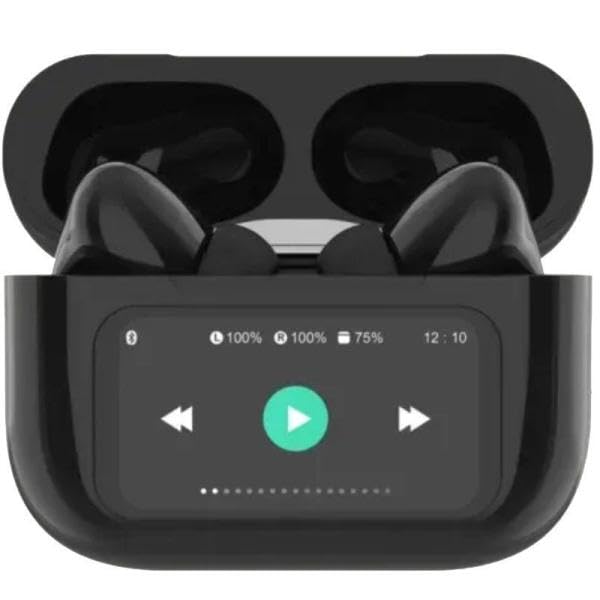
Image 1: Qubo TWS-400BK Bluetooth Earbuds in their open charging case, displaying the digital screen with battery levels and playback controls. The earbuds are black.
2. പാക്കേജ് ഉള്ളടക്കം
- Qubo TWS-400BK Bluetooth Earbuds (Left and Right)
- ഡിജിറ്റൽ ഡിസ്പ്ലേയുള്ള ചാർജിംഗ് കേസ്
- യുഎസ്ബി ചാർജിംഗ് കേബിൾ
- ഉപയോക്തൃ മാനുവൽ
3. സജ്ജീകരണം
3.1 ഇയർബഡുകളും കേസും ചാർജ് ചെയ്യുന്നു
- ഇയർബഡുകൾ ചാർജിംഗ് കേസിൽ വയ്ക്കുക. അവ അവയുടെ സ്ലോട്ടുകളിൽ ശരിയായി സ്ഥാപിച്ചിട്ടുണ്ടെന്ന് ഉറപ്പാക്കുക.
- USB ചാർജിംഗ് കേബിൾ കേസിലെ ചാർജിംഗ് പോർട്ടിലേക്കും അനുയോജ്യമായ ഒരു USB പവർ സ്രോതസ്സിലേക്കും (ഉദാ: കമ്പ്യൂട്ടർ, വാൾ അഡാപ്റ്റർ) ബന്ധിപ്പിക്കുക.
- The digital display on the charging case will indicate the charging status and battery levels. Allow the case and earbuds to fully charge before first use.
3.2 ഒരു ബ്ലൂടൂത്ത് ഉപകരണവുമായി ജോടിയാക്കൽ
- ഇയർബഡുകൾ ചാർജ് ചെയ്തിട്ടുണ്ടെന്നും ചാർജിംഗ് കെയ്സിനുള്ളിലാണെന്നും ഉറപ്പാക്കുക.
- Open the charging case lid. The earbuds will automatically enter pairing mode, indicated by a flashing light on the earbuds (refer to specific LED indicators in a separate diagram if available).
- നിങ്ങളുടെ ഉപകരണത്തിൽ (സ്മാർട്ട്ഫോൺ, ടാബ്ലെറ്റ്, കമ്പ്യൂട്ടർ), ബ്ലൂടൂത്ത് പ്രവർത്തനക്ഷമമാക്കി ലഭ്യമായ ഉപകരണങ്ങൾക്കായി തിരയുക.
- Select "Qubo TWS-400BK" from the list of found devices.
- കണക്റ്റ് ചെയ്തുകഴിഞ്ഞാൽ, ഇയർബഡുകൾ ജോടിയാക്കൽ വിജയകരമായി പൂർത്തിയായി എന്ന് സൂചിപ്പിക്കും (ഉദാഹരണത്തിന്, ഒരു വോയ്സ് പ്രോംപ്റ്റ് അല്ലെങ്കിൽ സോളിഡ് എൽഇഡി ലൈറ്റ്).
- ഉപകരണത്തിൽ ബ്ലൂടൂത്ത് പ്രവർത്തനക്ഷമമാക്കിയിട്ടുണ്ടെങ്കിൽ, കേസിൽ നിന്ന് നീക്കം ചെയ്യുമ്പോൾ ഇയർബഡുകൾ അവസാനമായി ജോടിയാക്കിയ ഉപകരണവുമായി യാന്ത്രികമായി വീണ്ടും കണക്റ്റുചെയ്യും.
3.3 ഇയർബഡുകൾ ധരിക്കൽ
Gently insert each earbud into your ear canal. Rotate them slightly to find a comfortable and secure fit. A proper fit is essential for optimal sound quality and noise cancellation performance.
4. പ്രവർത്തന നിർദ്ദേശങ്ങൾ
4.1 പവർ ഓൺ/ഓഫ്
- പവർ ഓൺ: ചാർജിംഗ് കെയ്സിന്റെ ലിഡ് തുറക്കുക, അല്ലെങ്കിൽ കെയ്സിൽ നിന്ന് ഇയർബഡുകൾ നീക്കം ചെയ്യുക. അവ സ്വയമേവ പവർ ചെയ്യും.
- പവർ ഓഫ്: ഇയർബഡുകൾ ചാർജിംഗ് കെയ്സിലേക്ക് തിരികെ വയ്ക്കുക, ലിഡ് അടയ്ക്കുക. അവ സ്വയമേവ ഓഫാകും.
4.2 ടച്ച് നിയന്ത്രണങ്ങൾ
The Qubo TWS-400BK earbuds feature touch-sensitive controls on each earbud. Specific functions may vary slightly; refer to the quick start guide for detailed gestures.
- പ്ലേ/താൽക്കാലികമായി നിർത്തുക: ഇയർബഡുകളിൽ ഏതെങ്കിലുമൊന്നിൽ ഒറ്റ ടാപ്പ് ചെയ്യുക.
- അടുത്ത ട്രാക്ക്: വലതുവശത്തെ ഇയർബഡിൽ രണ്ടുതവണ ടാപ്പ് ചെയ്യുക.
- മുമ്പത്തെ ട്രാക്ക്: ഇടതുവശത്തെ ഇയർബഡിൽ രണ്ടുതവണ ടാപ്പ് ചെയ്യുക.
- വോളിയം കൂട്ടുക: വലതുവശത്തെ ഇയർബഡിൽ മൂന്ന് തവണ ടാപ്പ് ചെയ്യുക.
- വോളിയം താഴേക്ക്: ഇടതുവശത്തെ ഇയർബഡിൽ മൂന്ന് തവണ ടാപ്പ് ചെയ്യുക.
- ഉത്തരം/അവസാന കോൾ: ഇയർബഡുകളിൽ ഏതെങ്കിലുമൊന്നിൽ ഒറ്റ ടാപ്പ് ചെയ്യുക.
- കോൾ നിരസിക്കുക: ഏതെങ്കിലും ഇയർബഡിൽ 2 സെക്കൻഡ് അമർത്തിപ്പിടിക്കുക.
- വോയ്സ് അസിസ്റ്റന്റിനെ സജീവമാക്കുക: കോൾ ചെയ്യാത്തപ്പോൾ, ഇയർബഡുകളിൽ ഏതെങ്കിലുമൊന്ന് 3 സെക്കൻഡ് അമർത്തിപ്പിടിക്കുക.
- ANC/Transparency Mode Toggle: Press and hold the left earbud for 2 seconds (cycles through ANC On, Transparency Mode, ANC Off).
4.3 ആക്ടീവ് നോയ്സ് ക്യാൻസലേഷൻ (ANC) ഉം എൻവയോൺമെന്റൽ നോയ്സ് ക്യാൻസലേഷൻ (ENC) ഉം
- ANC: Reduces external ambient noise, allowing for a more immersive listening experience. Activate/deactivate using the touch controls.
- ENC: Enhances call clarity by reducing background noise during phone conversations. This feature is automatically active during calls.
5. പരിപാലനം
5.1 വൃത്തിയാക്കൽ
- ഇയർബഡുകളും ചാർജിംഗ് കെയ്സും മൃദുവായതും ഉണങ്ങിയതും ലിന്റ് രഹിതവുമായ തുണി ഉപയോഗിച്ച് പതിവായി വൃത്തിയാക്കുക.
- അബ്രാസീവ് ക്ലീനറുകൾ, ആൽക്കഹോൾ, കെമിക്കൽ ലായകങ്ങൾ എന്നിവ ഉപയോഗിക്കരുത്.
- Ensure charging contacts on both earbuds and case are clean and free of debris to maintain proper charging.
5.2 സംഭരണം
- ഉപയോഗത്തിലില്ലാത്തപ്പോൾ, ഇയർബഡുകൾ സംരക്ഷിക്കുന്നതിനും ചാർജ്ജ് ചെയ്ത നിലയിൽ നിലനിർത്തുന്നതിനും എല്ലായ്പ്പോഴും ചാർജിംഗ് കേസിൽ സൂക്ഷിക്കുക.
- തീവ്രമായ താപനിലയിൽ നിന്നും നേരിട്ടുള്ള സൂര്യപ്രകാശത്തിൽ നിന്നും അകന്ന്, തണുത്തതും വരണ്ടതുമായ സ്ഥലത്ത് സൂക്ഷിക്കുക.
6. പ്രശ്നപരിഹാരം
- ഇയർബഡുകൾ ജോടിയാക്കുന്നില്ല:
- രണ്ട് ഇയർബഡുകളും ചാർജ്ജ് ചെയ്തിട്ടുണ്ടെന്ന് ഉറപ്പാക്കുക.
- നിങ്ങളുടെ ഉപകരണത്തിലെ ബ്ലൂടൂത്ത് ഓഫാക്കി വീണ്ടും ഓണാക്കുക.
- Forget/delete "Qubo TWS-400BK" from your device's Bluetooth list and try pairing again.
- ഇയർബഡുകൾ കെയ്സിൽ തിരികെ വയ്ക്കുക, ലിഡ് അടയ്ക്കുക, 10 സെക്കൻഡ് കാത്തിരിക്കുക, തുടർന്ന് ജോടിയാക്കൽ മോഡിൽ വീണ്ടും പ്രവേശിക്കാൻ തുറക്കുക.
- ഒരു ഇയർബഡ് മാത്രമേ പ്രവർത്തിക്കുന്നുള്ളൂ:
- രണ്ട് ഇയർബഡുകളും ചാർജ്ജ് ചെയ്തിട്ടുണ്ടെന്ന് ഉറപ്പാക്കുക.
- Place both earbuds back in the charging case, close the lid, and then open it again to reset the connection.
- ഇയർബഡുകൾ ചാർജ് ചെയ്യുന്നില്ല:
- ചാർജിംഗ് കേബിൾ കേസിലേക്കും പവർ സ്രോതസ്സിലേക്കും സുരക്ഷിതമായി ബന്ധിപ്പിച്ചിട്ടുണ്ടോയെന്ന് പരിശോധിക്കുക.
- Ensure the charging contacts on the earbuds and inside the case are clean and free of obstructions.
- മറ്റൊരു ചാർജിംഗ് കേബിളോ പവർ അഡാപ്റ്ററോ പരീക്ഷിച്ചുനോക്കൂ.
- മോശം ശബ്ദ നിലവാരം:
- നല്ല സീലിംഗിനായി ഇയർബഡുകൾ നിങ്ങളുടെ ചെവിയിൽ ശരിയായി ഘടിപ്പിച്ചിട്ടുണ്ടെന്ന് ഉറപ്പാക്കുക.
- ഇയർബഡ് നോസിലുകളിൽ നിന്ന് ഇയർവാക്സ് അല്ലെങ്കിൽ അവശിഷ്ടങ്ങൾ വൃത്തിയാക്കുക.
- ഇടപെടൽ ഒഴിവാക്കാൻ നിങ്ങളുടെ ജോടിയാക്കിയ ഉപകരണത്തിന് അടുത്തേക്ക് നീങ്ങുക.
7 സ്പെസിഫിക്കേഷനുകൾ
| മോഡൽ | TWS-400BK |
| ചിപ്സെറ്റ് | JL Bluetrum 5696D |
| ബ്ലൂടൂത്ത് പതിപ്പ് | 5.4 |
| പ്രക്ഷേപണ ശ്രേണി | 10 മീറ്റർ വരെ |
| സജീവ ശബ്ദ റദ്ദാക്കൽ (ANC) | അതെ |
| പരിസ്ഥിതി ശബ്ദം റദ്ദാക്കൽ (ENC) | അതെ |
| ഹൗസിംഗ് മെറ്റീരിയൽ | പ്ലാസ്റ്റിക് |
| സ്പീക്കർ ഡ്രൈവർ | 13 മി.മീ |
| പ്രതിരോധം | 32 ഓം |
| മൈക്രോഫോൺ | അന്തർനിർമ്മിത |
| Earbud Autonomy | 4 മണിക്കൂർ വരെ |
| ചാർജിംഗ് കേസ് ഡിസ്പ്ലേ | ഡിജിറ്റൽ |
| Product/Package Dimensions | 10 x 150 x 15 സെ.മീ |

ചിത്രം 2: വശം view of the Qubo TWS-400BK earbuds nestled within their charging case.
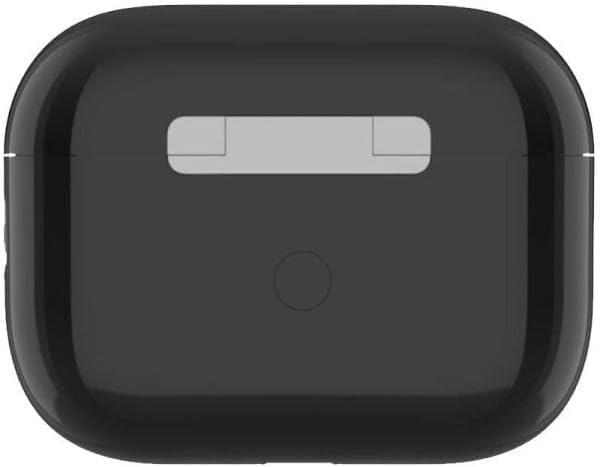
ചിത്രം 3: മുകളിൽ view of the Qubo TWS-400BK charging case, showing its sleek black design.
8. വാറൻ്റിയും പിന്തുണയും
8.1 വാറൻ്റി വിവരങ്ങൾ
The Qubo TWS-400BK Bluetooth Earbuds come with a മൂന്ന് വർഷത്തെ വാറന്റി against manufacturing defects from the date of purchase. This warranty covers defects in materials and workmanship under normal use. It does not cover damage caused by misuse, accidents, unauthorized modifications, or normal wear and tear.
8.2 നിർമ്മാതാവ്
നിർമ്മിച്ചത്: QUBO
For warranty claims or technical support, please contact your retailer or the official Qubo support channels.