
1. ആമുഖവും അവസാനവുംview
The GEYA GPS6-VA5 is an advanced adjustable over and under voltage protection device designed to safeguard electrical equipment from voltage fluctuations. It features a digital display for real-time monitoring of voltage and current, and offers customizable protection parameters. This device is suitable for various applications requiring reliable power protection.
This manual provides essential information for the safe and effective installation, operation, and maintenance of your GEYA GPS6-VA5 protection device.
2 സുരക്ഷാ വിവരങ്ങൾ
മുന്നറിയിപ്പ്: ഇലക്ട്രിക്കൽ ഇൻസ്റ്റാളേഷനും അറ്റകുറ്റപ്പണികളും യോഗ്യതയുള്ള ഉദ്യോഗസ്ഥർ മാത്രമേ നടത്താവൂ. ഈ നിർദ്ദേശങ്ങൾ പാലിക്കുന്നതിൽ പരാജയപ്പെടുന്നത് വൈദ്യുതാഘാതം, തീപിടുത്തം അല്ലെങ്കിൽ ഗുരുതരമായ പരിക്കിന് കാരണമായേക്കാം.
- Always disconnect power to the circuit before installing, wiring, or servicing the device.
- Ensure all wiring connections are secure and comply with local electrical codes and standards.
- ഉപകരണം കേടായതായി തോന്നിയാൽ അത് പ്രവർത്തിപ്പിക്കരുത്.
- വോളിയം പരിശോധിക്കുകtage and current ratings of your system are compatible with this device.
3. ഉൽപ്പന്ന സവിശേഷതകൾ
- സ്മാർട്ട് ഡിജിറ്റൽ ഡിസ്പ്ലേ: Clear LED display shows real-time voltage, current, and fault status for quick monitoring.
- Advanced Over & Under Voltagഇ സംരക്ഷണം: Equipped with factory default settings of 275V overvoltage and 175V undervoltage, ensuring device safety. These settings are adjustable.
- നിലവിലെ നിരീക്ഷണം: Displays current values, providing comprehensive electrical oversight.
- Adjustable Reset Time: Offers a factory default reset time of 30 seconds, adjustable from 2 to 900 seconds to suit specific application needs.
- കോംപാക്റ്റ് ഡിസൈൻ: Ultra-small size for efficient space utilization.
- DIN റെയിൽ മൗണ്ടിംഗ്: Designed for easy integration with 35mm DIN rail systems, simplifying installation.
4. സജ്ജീകരണവും ഇൻസ്റ്റാളേഷനും
The GEYA GPS6-VA5 is designed for 35mm DIN rail mounting. Ensure the mounting location is dry, well-ventilated, and free from excessive vibration or heat.
4.1 മൗണ്ടിംഗ്
Attach the device securely to a standard 35mm DIN rail. The device features a clip mechanism for easy installation and removal.

Image: Dimensions of the GEYA GPS6-VA5 device and an illustration of 35mm DIN rail mounting.
4.2 വയറിംഗ്
Connect the device according to the wiring diagram provided. Ensure correct polarity and secure connections for both input (Line and Neutral) and output to the load.
- Connect the incoming Line (L) and Neutral (N) wires to the designated input terminals.
- Connect the load's Line (L) and Neutral (N) wires to the designated output terminals.
- Tighten all screw terminals firmly to prevent loose connections.
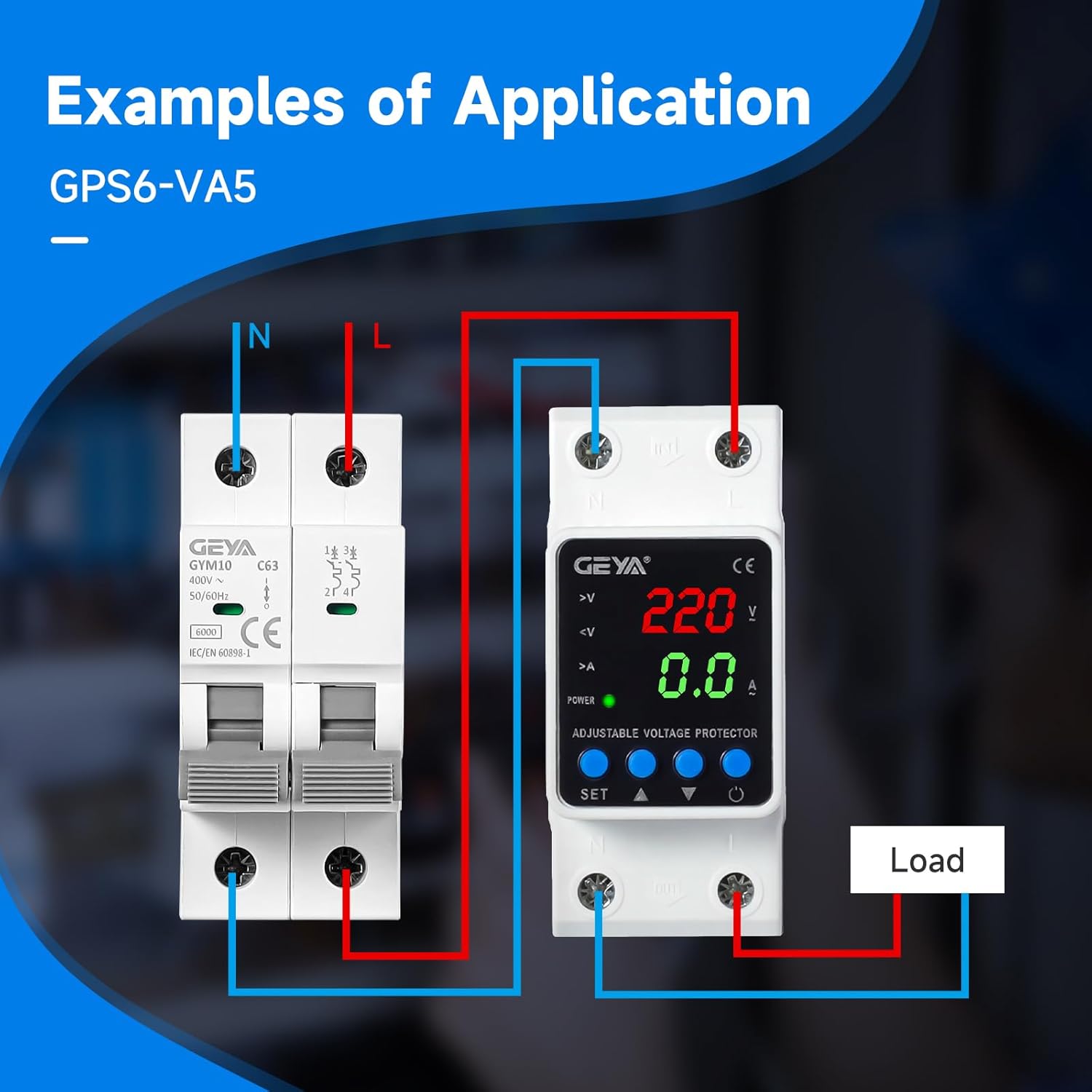
ചിത്രം: ഉദാample wiring diagram showing connections for the GEYA GPS6-VA5 with an external circuit breaker and load.
5. പ്രവർത്തന നിർദ്ദേശങ്ങൾ
Once installed and powered on, the device will display real-time voltage and current readings. The LED indicators provide status information.
5.1 ഡിജിറ്റൽ ഡിസ്പ്ലേ ഓവർview
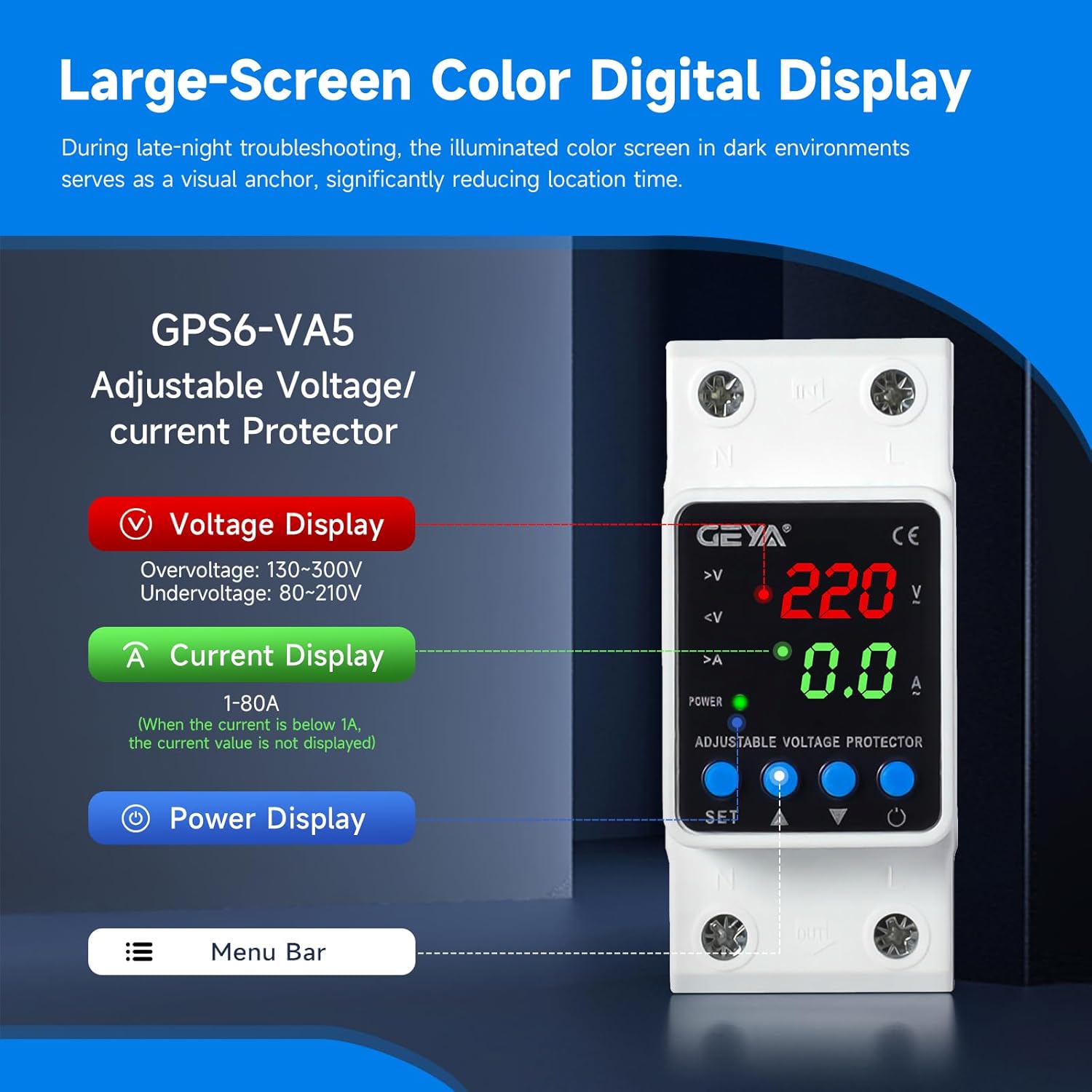
Image: Close-up of the GEYA GPS6-VA5 digital display, highlighting voltage, current, and power indicators, along with control buttons.
- വാല്യംtagഇ ഡിസ്പ്ലേ: നിലവിലെ വോളിയം കാണിക്കുന്നുtage (V). Overvoltage range: 130-300V, Undervoltagഇ ശ്രേണി: 80-210V.
- നിലവിലെ ഡിസ്പ്ലേ: Shows the current (A) flowing through the device (1-80A). If current is below 1A, the value may not be displayed.
- പവർ ഡിസ്പ്ലേ: പവർ സ്റ്റാറ്റസ് സൂചിപ്പിക്കുന്നു.
- സൂചകങ്ങൾ: LEDs for overvoltage (>V), undervoltage (<V), and overcurrent (>A) provide quick visual status.
5.2 ക്രമീകരണങ്ങൾ ക്രമീകരിക്കുന്നു
The device features 'SET', 'Up Arrow', and 'Down Arrow' buttons for adjusting protection parameters. Refer to the detailed instructions below for specific parameter adjustments.
- Press the 'SET' button to enter the setting mode.
- Use the 'Up Arrow' and 'Down Arrow' buttons to navigate through different parameters (e.g., overvoltage threshold, undervoltage threshold, reset time).
- Press 'SET' again to select a parameter, then use 'Up Arrow' and 'Down Arrow' to adjust its value.
- Press 'SET' to confirm the new value and move to the next parameter or exit setting mode.
കുറിപ്പ്: Factory default settings are 275V for overvoltage, 175V for undervoltage, and a 30-second reset time. These can be adjusted within the specified ranges.
6. പരിപാലനം
The GEYA GPS6-VA5 is designed for minimal maintenance. Regular checks can help ensure its continued reliable operation.
- വൃത്തിയാക്കൽ: Periodically wipe the device with a soft, dry cloth to remove dust. Do not use abrasive cleaners or solvents.
- കണക്ഷൻ പരിശോധന: എല്ലാ വയറിംഗ് കണക്ഷനുകളും വർഷം തോറും പരിശോധിച്ച് അവ ഇറുകിയതും തുരുമ്പെടുക്കാത്തതുമാണെന്ന് ഉറപ്പാക്കുക.
- പരിസ്ഥിതി വ്യവസ്ഥകൾ: പ്രവർത്തന അന്തരീക്ഷം നിർദ്ദിഷ്ട താപനിലയിലും ഈർപ്പത്തിലും പരിധിക്കുള്ളിൽ തന്നെയാണെന്ന് ഉറപ്പാക്കുക.
- ഉപയോക്തൃ-സേവനയോഗ്യമായ ഭാഗങ്ങൾ ഇല്ല: Do not attempt to open or repair the device. Refer any issues to qualified service personnel.
7. പ്രശ്നപരിഹാരം
If you encounter issues with your GEYA GPS6-VA5 device, refer to the following common troubleshooting steps:
- ഡിസ്പ്ലേ ഇല്ല/പവർ ഇല്ല:
- Check the main power supply to the device.
- Verify all input wiring connections are secure.
- Device Not Tripping on Fault:
- Confirm that the overvoltage/undervoltage thresholds are set correctly and within the expected range for your application.
- Ensure the fault condition (e.g., voltage outside set limits) is present and sustained long enough to trigger the trip delay.
- Device Tripping Unexpectedly:
- Check the actual line voltage and current to ensure they are within normal operating parameters.
- Review the set overvoltagഇ, അണ്ടർവോൾtage, and overcurrent thresholds. Adjust if necessary.
- Inspect for intermittent power fluctuations in your electrical system.
- തെറ്റായ വായനകൾ:
- Ensure wiring is correct and connections are tight.
- Compare readings with a calibrated multimeter if possible.
If the problem persists after attempting these steps, contact GEYA customer support or a qualified electrician.
8 സ്പെസിഫിക്കേഷനുകൾ
| പരാമീറ്റർ | മൂല്യം |
|---|---|
| ബ്രാൻഡ് നാമം | GEYA |
| മോഡൽ നമ്പർ | GPS6-VA5-2P-40A-220V |
| റേറ്റുചെയ്ത സപ്ലൈ വോളിയംtage | AC220V (L-N) |
| റേറ്റുചെയ്ത ഫ്രീക്വൻസി | 50/60Hz |
| നിലവിലെ റേറ്റിംഗ് | 40 Amps |
| കോയിൽ വോളിയംtage | 220 വോൾട്ട് (എസി) |
| മിനിമം സ്വിച്ചിംഗ് വോളിയംtage | 130 വോൾട്ട് (എസി) |
| ഓപ്പറേഷൻ മോഡ് | ഓട്ടോമാറ്റിക് |
| മൗണ്ടിംഗ് തരം | DIN റെയിൽ മ .ണ്ട് |
| കണക്റ്റർ തരം | സ്ക്രൂ |
| കോൺടാക്റ്റ് മെറ്റീരിയൽ | വെള്ളി |
| ബന്ധപ്പെടാനുള്ള തരം | സാധാരണയായി തുറന്നിരിക്കുന്നു |
| സമയം പുനഃസജ്ജമാക്കുക | 2-900s (Factory default: 30s) |
| സർട്ടിഫിക്കേഷൻ | CE |
9. വാറൻ്റിയും പിന്തുണയും
For warranty information or technical support, please contact GEYA customer service. Keep your purchase receipt as proof of purchase.
For further assistance, visit the official GEYA webസൈറ്റ് അല്ലെങ്കിൽ നിങ്ങളുടെ പ്രാദേശിക വിതരണക്കാരനെ ബന്ധപ്പെടുക.