
1. ആമുഖം
Thank you for choosing the Oraimo Necklace 5 ANC Wireless Neckband Earphones. This manual provides essential information for setting up, operating, and maintaining your earphones. Please read it carefully to ensure optimal performance and longevity of your device.
The Oraimo Necklace 5 ANC earphones are designed for daily music listening, long commutes, hands-free calls, active lifestyles, gaming, and video playback. They feature Active Noise Cancellation (ANC) for an immersive audio experience.
2. ഉൽപ്പന്നം കഴിഞ്ഞുview
2.1 പാക്കേജ് ഉള്ളടക്കം
The following items are included in your Oraimo Necklace 5 package:
- Oraimo Necklace 5 Earphones x1
- ഉപയോക്തൃ മാനുവൽ x1
- ടൈപ്പ്-സി ചാർജിംഗ് കേബിൾ x1
- Extra Ear Tips (S/L sizes) x2 pairs

Figure 2.1: What's in the Box - Oraimo Necklace 5 Earphones, Type-C charging cable, extra ear tips, and user manual.
2.2 ഇയർഫോൺ ഘടകങ്ങൾ
Familiarize yourself with the main components of your Oraimo Necklace 5 earphones:
- നെക്ക്ബാൻഡ്: Flexible band that rests around your neck.
- ഇയർബഡുകൾ: In-ear design with silicone ear tips.
- നിയന്ത്രണ പാനൽ: Integrated buttons for power, volume, playback, and call management.
- മൈക്രോഫോൺ: ഹാൻഡ്സ് ഫ്രീ കോളുകൾക്കായി.
- ടൈപ്പ്-സി ചാർജിംഗ് പോർട്ട്: ഉപകരണം ചാർജ് ചെയ്യുന്നതിനായി.

ചിത്രം 2.2: മുൻഭാഗം view of the Oraimo Necklace 5 Earphones, showing the neckband and earbuds.
3. സജ്ജീകരണം
3.1 ഇയർഫോണുകൾ ചാർജ് ചെയ്യുന്നു
- Connect the provided Type-C charging cable to the charging port on the neckband.
- കേബിളിന്റെ മറ്റേ അറ്റം ഒരു USB പവർ അഡാപ്റ്ററുമായി (ഉൾപ്പെടുത്തിയിട്ടില്ല) അല്ലെങ്കിൽ ഒരു കമ്പ്യൂട്ടറിന്റെ USB പോർട്ടുമായി ബന്ധിപ്പിക്കുക.
- The indicator light will show the charging status. A full charge typically takes a few hours.
കുറിപ്പ്: A quick 10-minute charge can provide up to 12 hours of playback time.
3.2 പവർ ഓൺ/ഓഫ്
The Oraimo Necklace 5 features a magnetic auto switch for convenient power control:
- പവർ ഓൺ: Separate the magnetic earbuds to automatically power on the earphones.
- പവർ ഓഫ്: Clip the magnetic earbuds together to automatically power off the earphones.

Figure 3.1: Magnetic Auto Switch for powering the earphones on and off.
3.3 ബ്ലൂടൂത്ത് ജോടിയാക്കൽ
- Ensure the earphones are powered on (separate the earbuds).
- നിങ്ങളുടെ ഉപകരണത്തിൽ (സ്മാർട്ട്ഫോൺ, ടാബ്ലെറ്റ്, ലാപ്ടോപ്പ്), ബ്ലൂടൂത്ത് പ്രവർത്തനക്ഷമമാക്കുക.
- ഇതിനായി തിരയുക available Bluetooth devices and select "Oraimo Necklace 5" from the list.
- കണക്റ്റ് ചെയ്തുകഴിഞ്ഞാൽ, നിങ്ങൾ ഒരു ഓഡിയോ പ്രോംപ്റ്റ് കേൾക്കും, ഇൻഡിക്കേറ്റർ ലൈറ്റ് കണക്ഷൻ സ്ഥിരീകരിക്കും.
4. പ്രവർത്തന നിർദ്ദേശങ്ങൾ
4.1 സജീവ ശബ്ദം റദ്ദാക്കൽ (ANC)
The Oraimo Necklace 5 features Active Noise Cancellation to reduce ambient noise.
- To activate/deactivate ANC, locate the dedicated ANC button on the control panel and press it.
- An audio prompt will confirm the ANC status.

Figure 4.1: Active Noise Cancellation in action, muting external noise.
4.2 സംഗീത പ്ലേബാക്കും ശബ്ദ നിയന്ത്രണവും
Use the control buttons on the neckband to manage your audio:
- പ്ലേ/താൽക്കാലികമായി നിർത്തുക: മൾട്ടി-ഫംഗ്ഷൻ ബട്ടൺ ഒരിക്കൽ അമർത്തുക.
- അടുത്ത ട്രാക്ക്: വോളിയം അപ്പ് ബട്ടൺ അമർത്തിപ്പിടിക്കുക.
- മുമ്പത്തെ ട്രാക്ക്: വോളിയം ഡൗൺ ബട്ടൺ അമർത്തിപ്പിടിക്കുക.
- വോളിയം കൂട്ടുക: വോളിയം അപ്പ് ബട്ടൺ അമർത്തുക.
- വോളിയം താഴേക്ക്: വോളിയം ഡൗൺ ബട്ടൺ അമർത്തുക.
4.3 കോൾ മാനേജ്മെന്റ്
The earphones support hands-free calling with clear sound quality and AI Call Noise Cancellation.
- ഉത്തരം/അവസാന കോൾ: മൾട്ടി-ഫംഗ്ഷൻ ബട്ടൺ ഒരിക്കൽ അമർത്തുക.
- കോൾ നിരസിക്കുക: മൾട്ടി-ഫംഗ്ഷൻ ബട്ടൺ അമർത്തിപ്പിടിക്കുക.
- Personalized Vibration Alert: The neckband will vibrate for incoming calls, ensuring you don't miss important communications.

Figure 4.2: Personalized Vibration Alert for incoming calls.
4.4 ഡ്യുവൽ ഡിവൈസ് കണക്ഷൻ
The Oraimo Necklace 5 can connect to two devices simultaneously, allowing for seamless switching.
- Pair the earphones with your first device.
- Disconnect Bluetooth on the first device, then pair with the second device.
- Reconnect Bluetooth on the first device. The earphones should now be connected to both.
- ഉപകരണം ഉള്ളടക്കം പ്ലേ ചെയ്യുന്നതിനോ കോൾ സ്വീകരിക്കുന്നതിനോ ഓഡിയോ സ്വയമേവ മാറും.

Figure 4.3: Dual Device Connection for seamless switching between devices.
4.5 Sound360 Spatial Audio
Experience enhanced audio with Sound360 Spatial Audio, providing a more immersive listening experience.

Figure 4.4: Sound360 Spatial Audio for redefined surround sound.
5. പരിപാലനം
5.1 വൃത്തിയാക്കൽ
- Regularly clean the earbuds and ear tips with a soft, dry, lint-free cloth.
- ചെവിയുടെ അറ്റങ്ങൾ നീക്കം ചെയ്ത് ആവശ്യമെങ്കിൽ നേരിയ സോപ്പും വെള്ളവും ഉപയോഗിച്ച് വൃത്തിയാക്കുക, വീണ്ടും ഘടിപ്പിക്കുന്നതിന് മുമ്പ് അവ പൂർണ്ണമായും ഉണങ്ങിയെന്ന് ഉറപ്പാക്കുക.
- വൃത്തിയാക്കാൻ കഠിനമായ രാസവസ്തുക്കളോ ഉരച്ചിലുകളോ ഉപയോഗിക്കരുത്.
5.2 സംഭരണം
- നേരിട്ടുള്ള സൂര്യപ്രകാശത്തിൽ നിന്നും കടുത്ത താപനിലയിൽ നിന്നും മാറി തണുത്തതും വരണ്ടതുമായ സ്ഥലത്ത് ഇയർഫോണുകൾ സൂക്ഷിക്കുക.
- When not in use, clip the magnetic earbuds together to prevent tangling and conserve battery.
5.3 ജല പ്രതിരോധം
The Oraimo Necklace 5 earphones are water resistant, making them suitable for active lifestyles and protection against sweat. However, they are not designed for submersion in water. Avoid exposing them to heavy rain or swimming.
6. പ്രശ്നപരിഹാരം
If you encounter any issues with your Oraimo Necklace 5 earphones, please refer to the following common solutions:
- ശക്തിയില്ല: Ensure the earphones are charged. Connect them to a power source using the Type-C cable.
- ജോടിയാക്കാൻ കഴിയില്ല: Make sure Bluetooth is enabled on your device and the earphones are in pairing mode (usually indicated by a flashing light). Try turning Bluetooth off and on again on your device.
- ശബ്ദമില്ല: Check the volume levels on both your earphones and your connected device. Ensure the earphones are properly paired and selected as the audio output.
- മോശം ശബ്ദ നിലവാരം: Ensure there are no obstructions between the earphones and your device. Move closer to your device to avoid interference. Check if ear tips are properly sealed in your ears.
- ANC പ്രവർത്തിക്കുന്നില്ല: ANC സവിശേഷത അതിന്റെ സമർപ്പിത ബട്ടൺ ഉപയോഗിച്ച് സജീവമാക്കിയിട്ടുണ്ടെന്ന് ഉറപ്പാക്കുക.
If the problem persists, try resetting the earphones (refer to the manufacturer's website or contact support for specific reset instructions if not detailed here).
7 സ്പെസിഫിക്കേഷനുകൾ
| ഫീച്ചർ | സ്പെസിഫിക്കേഷൻ |
|---|---|
| ബ്രാൻഡ് നാമം | ഒറൈമോ |
| മോഡൽ നമ്പർ | OEB-611 |
| മോഡലിൻ്റെ പേര് | Open Fit |
| നിറം | കറുപ്പ് |
| കണക്റ്റിവിറ്റി ടെക്നോളജി | വയർലെസ് |
| വയർലെസ് കമ്മ്യൂണിക്കേഷൻ ടെക്നോളജി | ബ്ലൂടൂത്ത് |
| ഹെഡ്ഫോൺ ഫോം ഫാക്ടർ | ഇൻ-ഇയർ |
| ചെവി പ്ലേസ്മെൻ്റ് | ചെവിയിൽ |
| പ്രതിരോധം | 32 ഓം |
| ശബ്ദ നിയന്ത്രണം | സജീവ നോയ്സ് റദ്ദാക്കൽ |
| ഫ്രീക്വൻസി റേഞ്ച് | 20 ഹെർട്സ് - 20000 ഹെർട്സ് |
| മെറ്റീരിയൽ | പ്ലാസ്റ്റിക്, സിലിക്കൺ |
| ജല പ്രതിരോധ നില | വെള്ളത്തെ പ്രതിരോധിക്കുന്ന |
| പ്രത്യേക സവിശേഷതകൾ | Noise Cancellation, Personalized Vibration Alert, Magnetic Auto Switch, Sound360 Spatial Audio, Dual Device Connection |
| നിയന്ത്രണ തരം | ബട്ടൺ നിയന്ത്രണം |
| നിയന്ത്രണ രീതി | പുഷ് ബട്ടൺ |
| ഇനത്തിൻ്റെ ഭാരം | 1 ഗ്രാം |
| വാറൻ്റി വിവരണം | ഒരു വർഷം |
| അനുയോജ്യമായ ഉപകരണങ്ങൾ | Desktop Computers, Digital Video Game Consoles, Laptops, Android, iPhone, Game Controllers |
| ഉൽപ്പന്നത്തിനുള്ള ശുപാർശിത ഉപയോഗങ്ങൾ | Gaming, Making Calls, Cycling, Outdoors |
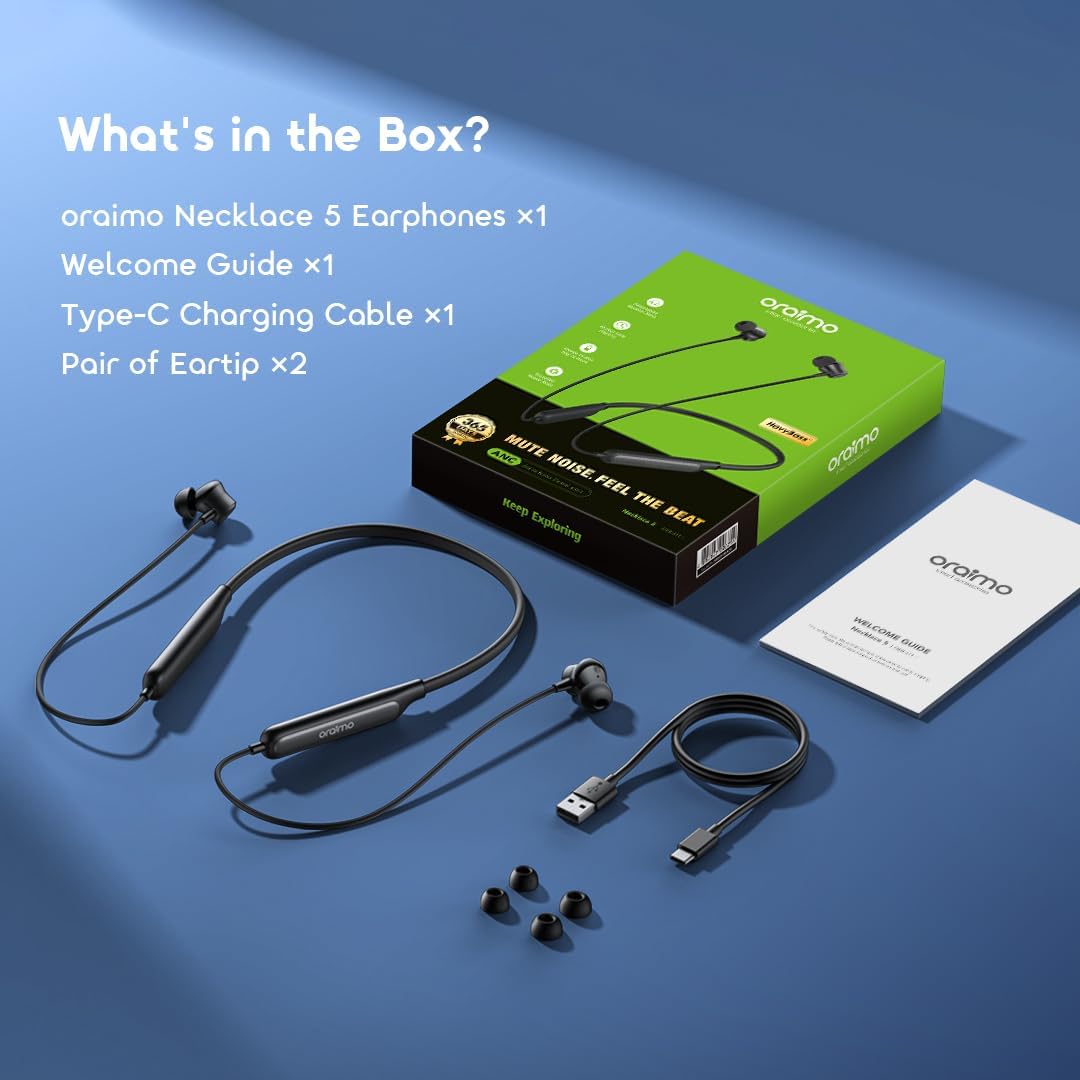
Figure 7.1: Battery performance, showing 40 hours playtime with ANC off and 28 hours with ANC on.
8. വാറൻ്റിയും പിന്തുണയും
8.1 വാറൻ്റി വിവരങ്ങൾ
Your Oraimo Necklace 5 ANC Wireless Neckband Earphones come with a ഒരു വർഷത്തെ വാറൻ്റി വാങ്ങിയ തീയതി മുതൽ. ഈ വാറന്റി നിർമ്മാണ വൈകല്യങ്ങൾ ഉൾക്കൊള്ളുകയും സാധാരണ ഉപയോഗത്തിൽ നിങ്ങളുടെ ഉൽപ്പന്നം ഉദ്ദേശിച്ച രീതിയിൽ പ്രവർത്തിക്കുന്നുവെന്ന് ഉറപ്പാക്കുകയും ചെയ്യുന്നു.
വാറൻ്റി ക്ലെയിമുകൾക്കായി നിങ്ങളുടെ വാങ്ങിയതിൻ്റെ തെളിവ് സൂക്ഷിക്കുക.
8.2 ഉപഭോക്തൃ പിന്തുണ
For further assistance, technical support, or warranty inquiries, please visit the official Oraimo website or contact their customer service department. Contact details can typically be found on the product packaging or the official Oraimo support page.