
1. ആമുഖം
Thank you for choosing the Skyworth 86-inch Canvas Elite™ Art TV QD-Mini LED. This television combines advanced display technology with an elegant design, offering a premium viewing and art display experience. Featuring QD-Mini LED, 4K UHD resolution, a 144Hz refresh rate, and the OmniView Matte Screen™, this TV is designed for exceptional picture quality and a glare-free art gallery aesthetic. This manual provides essential information for setting up, operating, maintaining, and troubleshooting your new television.
2. ബോക്സിൽ എന്താണുള്ളത്?
Carefully unpack your television and check for the following items:

ചിത്രം: കഴിഞ്ഞുview of the 86-inch TV dimensions, available input/output ports, and a list of included accessories.
- Skyworth 86-inch Canvas Elite™ Art TV
- നിർദ്ദേശ മാനുവൽ (ഈ പ്രമാണം)
- പവർ കോർഡ്
- Base Screws (for stand installation)
- റിമോട്ട് കൺട്രോൾ
- റിമോട്ട് കൺട്രോൾ ബാറ്ററികൾ (x2)
3. സജ്ജീകരണം
3.1 അൺപാക്കിംഗും പ്ലേസ്മെന്റും
Remove the TV from its packaging. It is recommended that two people handle the 86-inch TV due to its size and weight. Place the TV on a stable, level surface or mount it securely on a wall.
3.2 സ്റ്റാൻഡ് ഇൻസ്റ്റലേഷൻ (ഓപ്ഷണൽ)
If using the included stand, attach the stand bases to the bottom of the TV using the provided screws. Ensure all screws are tightened securely to prevent the TV from tipping.
3.3 വാൾ മൗണ്ടിംഗ് (ഓപ്ഷണൽ)
The TV is compatible with a 200x200 VESA mount standard. Use a compatible wall mount bracket (sold separately) and follow the instructions provided with the wall mount. Ensure the wall can support the TV's weight.
3.4 ഉപകരണങ്ങൾ ബന്ധിപ്പിക്കുന്നു
Connect your external devices to the TV's input ports. Refer to the diagram below for port locations and types:
ചിത്രം: വിശദമായത് view of the TV's rear panel showing various input and output ports.
- RF Input (Antenna): x1 for connecting an antenna or cable TV.
- കോമ്പോസിറ്റ് (AV): x1 for older devices.
- എച്ച്ഡിഎംഐ: x3 for high-definition devices like Blu-ray players, gaming consoles, or set-top boxes.
- USB: x2 for connecting USB storage devices.
- ഇയർഫോൺ ജാക്ക്: x1 for headphones.
- ഇഥർനെറ്റ് ഇൻപുട്ട്: x1 for wired network connection.
- SPDIF Output (Optical/Coaxial): x1 for digital audio output to sound systems.
3.5 പവർ കണക്ഷൻ
Connect the power cord to the TV's power input and then plug it into a wall outlet. The TV will enter standby mode.
3.6 പ്രാരംഭ സജ്ജീകരണം
Press the power button on the remote control to turn on the TV. Follow the on-screen instructions to complete the initial setup, including language selection, network connection, and Google TV account login.
4. പ്രവർത്തന നിർദ്ദേശങ്ങൾ
4.1 ഗൂഗിൾ ടിവി ഇന്റർഫേസ്
Your Skyworth Canvas Elite™ Art TV runs on the Google TV platform, providing access to a vast library of streaming services, apps, and personalized content recommendations. Use the remote control to navigate the interface, search for content, and manage your settings.
4.2 Art Mode and OmniView Matte Screen™
Transform your TV into a gallery-quality art display with Art Mode. The OmniView Matte Screen™ technology minimizes glare and reflections, providing an authentic art viewഅനുഭവം.

Image: The TV in Art Mode, showcasing a painting with a description of accessing over 400 iconic free artworks.
Access the Art Gallery feature to browse and select from hundreds of iconic artworks. The TV's design also integrates seamlessly into your living space, eliminating the need for external boxes and wires.

Image: Comparison highlighting the 'All-in-One Design' of the Canvas Elite Art TV, which eliminates messy wires and separate components.
4.3 ചിത്രത്തിന്റെ ഗുണനിലവാര ക്രമീകരണങ്ങൾ
Your TV features QD-Mini LED technology, 4K UHD resolution, and a 144Hz refresh rate for superior visuals. Adjust picture settings in the TV menu to optimize brightness, contrast, color, and motion for different content types.

Image: Visual comparison demonstrating the clarity of a 144Hz refresh rate versus 60Hz, emphasizing smooth motion for gaming and fast-paced content.
The QD-Mini LED panel with thousands of dimming zones and Quantum Dots delivers deep contrast and rich colors.
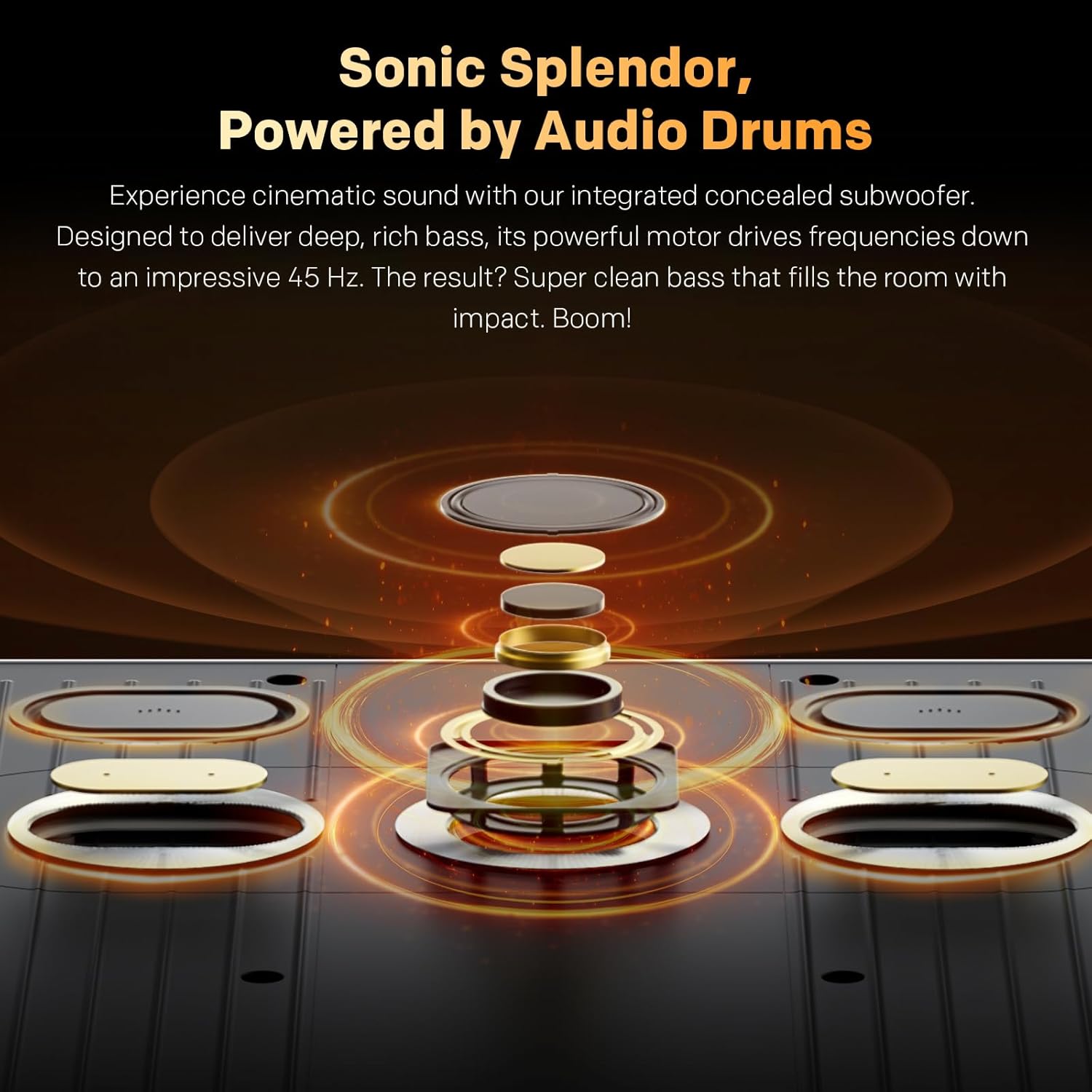
Image: Explanation of Quantum Dot Brilliance, showing how a special silica (glass-like) QD shield protects quantum dots for long-lasting vibrant colors.

Image: Illustration of QD-Mini LED technology, highlighting maximum brightness with deep contrast and the OmniView Matte Screen™ for superior viewing.
The OmniView Matte Screen™ provides an anti-glare, clear, wide-view experience, ensuring comfortable viewing from any angle and in various lighting conditions.

Image: Breakdown of the OmniView Matte Screen™ layers, explaining how it achieves true visual freedom from any seat, in any light.
4.4 ഓഡിയോ ക്രമീകരണങ്ങൾ
The TV features built-in speakers with Dolby Atmos support and an integrated concealed subwoofer for cinematic sound. Adjust audio modes and equalizer settings to suit your preferences.

Image: Diagram illustrating the integrated concealed subwoofer, designed to deliver deep, rich bass down to 45 Hz.
4.5 കണക്റ്റിവിറ്റി
Utilize Bluetooth 5.0 for connecting wireless headphones, soundbars, or other compatible accessories. Connect to your home network via Wi-Fi or the Ethernet port for internet access and streaming.
5. പരിപാലനം
5.1 സ്ക്രീൻ ക്ലീനിംഗ്
സ്ക്രീൻ വൃത്തിയാക്കാൻ, മൃദുവായ, ലിന്റ് രഹിത തുണി ഉപയോഗിച്ച് സൌമ്യമായി തുടയ്ക്കുക. കഠിനമായ പാടുകൾക്ക്, ചെറുതായി dampതുണിയിൽ വെള്ളം അല്ലെങ്കിൽ ഒരു പ്രത്യേക സ്ക്രീൻ ക്ലീനർ ഉപയോഗിക്കുക. കഠിനമായ രാസവസ്തുക്കൾ, ഉരച്ചിലുകൾ ഉള്ള വസ്തുക്കൾ അല്ലെങ്കിൽ സ്ക്രീനിൽ നേരിട്ട് ദ്രാവകം തളിക്കുന്നത് ഒഴിവാക്കുക.
5.2 പൊതു പരിചരണം
- Dust the TV regularly with a soft, dry cloth.
- ടിവിക്ക് ചുറ്റും ശരിയായ വായുസഞ്ചാരം ഉറപ്പാക്കുക, അങ്ങനെ അമിതമായി ചൂടാകുന്നത് തടയുക. വെന്റിലേഷൻ ദ്വാരങ്ങൾ അടയ്ക്കരുത്.
- ടിവി നേരിട്ട് സൂര്യപ്രകാശം ഏൽക്കുന്ന സ്ഥലങ്ങളിലോ താപ സ്രോതസ്സുകൾക്ക് സമീപമോ വയ്ക്കുന്നത് ഒഴിവാക്കുക.
- ഇടിമിന്നൽ ഉണ്ടാകുമ്പോഴോ അല്ലെങ്കിൽ ദീർഘനേരം ഉപയോഗിക്കാതിരിക്കുമ്പോഴോ ടിവി പവർ ഔട്ട്ലെറ്റിൽ നിന്ന് ഊരിമാറ്റുക.
6. പ്രശ്നപരിഹാരം
നിങ്ങളുടെ ടിവിയിൽ പ്രശ്നങ്ങൾ നേരിടുകയാണെങ്കിൽ, ഇനിപ്പറയുന്ന പൊതുവായ പ്രശ്നങ്ങളും പരിഹാരങ്ങളും പരിശോധിക്കുക:
- ശക്തിയില്ല:
- Check if the power cord is securely connected to the TV and the wall outlet.
- മറ്റൊരു ഉപകരണം പ്ലഗ് ഇൻ ചെയ്ത് വാൾ ഔട്ട്ലെറ്റ് പ്രവർത്തിക്കുന്നുണ്ടെന്ന് ഉറപ്പാക്കുക.
- റിമോട്ട് മാത്രമല്ല, ടിവിയിലെ പവർ ബട്ടൺ തന്നെ അമർത്തുക.
- ചിത്രമോ ശബ്ദമോ ഇല്ല:
- ശരിയായ ഇൻപുട്ട് ഉറവിടം തിരഞ്ഞെടുത്തിട്ടുണ്ടെന്ന് ഉറപ്പാക്കുക (ഉദാ. HDMI 1, AV).
- ടിവിക്കും ബാഹ്യ ഉപകരണങ്ങൾക്കും ഇടയിലുള്ള എല്ലാ കേബിൾ കണക്ഷനുകളും പരിശോധിക്കുക.
- വോളിയം മ്യൂട്ട് ചെയ്തിട്ടില്ലെന്നോ പൂജ്യമായി സജ്ജീകരിച്ചിട്ടില്ലെന്നോ ഉറപ്പാക്കുക.
- റിമോട്ട് കൺട്രോൾ പ്രവർത്തിക്കുന്നില്ല:
- റിമോട്ട് കൺട്രോളിൽ ബാറ്ററികൾ മാറ്റിസ്ഥാപിക്കുക.
- റിമോട്ടിനും ടിവിയുടെ ഐആർ സെൻസറിനും ഇടയിൽ തടസ്സങ്ങളൊന്നുമില്ലെന്ന് ഉറപ്പാക്കുക.
- നെറ്റ്വർക്ക് കണക്ഷൻ പ്രശ്നങ്ങൾ:
- നിങ്ങളുടെ റൂട്ടറും മോഡവും പുനരാരംഭിക്കുക.
- ടിവി മെനുവിൽ വൈഫൈ പാസ്വേഡും നെറ്റ്വർക്ക് ക്രമീകരണങ്ങളും പരിശോധിക്കുക.
- വയർഡ് കണക്ഷൻ ഉപയോഗിക്കുകയാണെങ്കിൽ, ഇതർനെറ്റ് കേബിൾ ശരിയായി ബന്ധിപ്പിച്ചിട്ടുണ്ടെന്ന് ഉറപ്പാക്കുക.
- ചിത്ര ഗുണനിലവാര പ്രശ്നങ്ങൾ (ഉദാ: മങ്ങിയത്, വികലമായത്):
- Check the resolution settings of your external device and the TV.
- Ensure cables are not damaged or loose.
- Reset picture settings to default in the TV menu.
For persistent issues, please contact Skyworth customer support.
7 സ്പെസിഫിക്കേഷനുകൾ
| ഫീച്ചർ | സ്പെസിഫിക്കേഷൻ |
|---|---|
| സ്ക്രീൻ വലിപ്പം | 86 ഇഞ്ച് |
| ബ്രാൻഡ് | സ്കൈവർത്ത് |
| ഡിസ്പ്ലേ ടെക്നോളജി | ക്യുഡി-മിനി എൽഇഡി |
| റെസലൂഷൻ | 4K UHD (2160p) |
| പുതുക്കിയ നിരക്ക് | 144 Hz |
| പീക്ക് തെളിച്ചം | 2000 നിറ്റ് |
| പ്രത്യേക ഫീച്ചർ | Built-In Speaker, OmniView Matte Screen™, Google TV |
| ഉൾപ്പെടുത്തിയ ഘടകങ്ങൾ | Power Adapter, Remote Control, Base Screws |
| കണക്റ്റിവിറ്റി ടെക്നോളജി | ബ്ലൂടൂത്ത് 5.0, വൈ-ഫൈ, ഇതർനെറ്റ് |
| വീക്ഷണാനുപാതം | 16:9 |
| Product Dimensions (without base) | 192.67 cm (W) x 111.31 cm (H) x 3.62 cm (D) |
| ഭാരം (അടിസ്ഥാനമില്ലാതെ) | 52.9 കി.ഗ്രാം |
| VESA മൗണ്ട് സ്റ്റാൻഡേർഡ് | 200x200 മി.മീ |
8. വാറൻ്റിയും പിന്തുണയും
For warranty information, please refer to the warranty card included with your product or visit the official Skyworth website. Skyworth offers customer support for any inquiries or technical assistance you may require.
For returns, a 30-day easy return policy is typically available. Please check your purchase details for specific return instructions.
ബന്ധപ്പെടാനുള്ള വിവരങ്ങൾ: Please visit the Skyworth NA webഏറ്റവും പുതിയ ഉപഭോക്തൃ പിന്തുണ കോൺടാക്റ്റ് വിശദാംശങ്ങൾക്കായുള്ള സൈറ്റ്.