
ആമുഖം
Thank you for choosing the Eseesmart Sliding Door Smart Lock YL-D300. This manual provides comprehensive instructions for the installation, operation, maintenance, and troubleshooting of your new smart lock. Please read this manual carefully before installation and use to ensure proper function and security.
ഉൽപ്പന്നം കഴിഞ്ഞുview
The Eseesmart YL-D300 is a versatile smart lock designed for sliding glass doors, patio doors, and aluminum alloy doors. It offers multiple unlocking methods for enhanced convenience and security.

Image: Eseesmart Sliding Door Smart Lock YL-D300, showing the sleek black design and integrated keypad/fingerprint reader.
സജ്ജീകരണവും ഇൻസ്റ്റാളേഷനും
Careful installation is crucial for the optimal performance of your smart lock. Please follow these steps precisely.
അനുയോജ്യത ആവശ്യകതകൾ
Before installation, verify that your door meets the following specifications:
- വാതിൽ കനം: 13/15 inches to 4-3/4 inches (22mm to 120mm)
- Door Frame Width: Must be at least 1.6 inches (41mm) wide
- Ensure the 2085 Mortise lock is compatible with your door's existing mortise or prepare for necessary modifications.

Image: Diagram illustrating door thickness and frame width requirements for installation.

Image: Detailed dimensions of the 2085 Mortise lock and examples of compatible sliding glass, patio, and aluminum doors. Note: Extra drilling may be required.
ഉൾപ്പെടുത്തിയ ഘടകങ്ങൾ
പാക്കേജിൽ എല്ലാ ഘടകങ്ങളും ഉണ്ടെന്ന് ഉറപ്പാക്കുക:
- 1 x Sliding Glass Door Lock (All Parts)
- 1 x ഉപയോക്തൃ മാനുവൽ
- 1 x സ്ക്രൂഡ്രൈവർ
- 2 x RFID കാർഡുകൾ
- 2 x മെക്കാനിക്കൽ കീകൾ
ഇൻസ്റ്റലേഷൻ ഘട്ടങ്ങൾ
The lock features a reversible handle, allowing seamless use for both left and right-opening doors. Refer to the detailed diagrams in the included paper manual for specific drilling and mounting instructions.
- വാതിൽ തയ്യാറാക്കുക: Ensure the door frame and mortise area are clean and free of obstructions. If replacing an old lock, remove it completely.
- മോർട്ടൈസ് ഇൻസ്റ്റാൾ ചെയ്യുക: Insert the 2085 Mortise into the door edge. Secure it with screws.
- Mount the Exterior Panel: Connect the necessary cables from the exterior panel through the door to the interior side. Position the exterior panel and secure it.
- Mount the Interior Panel: Connect the cables from the exterior panel to the interior panel. Align the interior panel and secure it to the door.
- ബാറ്ററികൾ ഇൻസ്റ്റാൾ ചെയ്യുക: Insert 4 AAA batteries (not included) into the battery compartment of the interior panel.
- ടെസ്റ്റ് പ്രവർത്തനം: After installation, test all mechanical and smart functions before closing the door.

Image: A person installing the Eseesmart Smart Lock, demonstrating the ease of the installation process.
പ്രവർത്തന നിർദ്ദേശങ്ങൾ
The Eseesmart YL-D300 offers five convenient ways to unlock your door.

Image: Visual representation of the five unlocking methods: Fingerprint, Password, Card, Mobile App, and Physical Key.
1. ഫിംഗർപ്രിൻ്റ് അൺലോക്ക്
The lock features an AI fingerprint sensor for fast and secure access. It supports up to 300 users.
- Enroll Fingerprints: Follow the instructions in the mobile app to add new fingerprints.
- അൺലോക്ക്: Place your registered finger on the fingerprint sensor. The lock will unlock in approximately 0.2 seconds if the fingerprint is recognized.

Image: Details on the AI fingerprint sensor, highlighting 0.2s unlock speed, self-learning AI, and AES-256 encrypted chip for security.
2. Passcode Unlock
You can set up multiple types of passcodes, including regular and one-time codes. The anti-peep function allows you to enter random digits before or after your actual code to prevent others from guessing it.
- പാസ്കോഡുകൾ സജ്ജമാക്കുക: Use the mobile app to create and manage passcodes.
- അൺലോക്ക്: Enter your passcode (with or without anti-peep digits) followed by the '#' key.

Image: Illustration of the anti-peep password feature, showing how to embed your actual code within random digits, and icons for regular and one-time passwords.
3. RFID Card Unlock
Use the provided RFID cards for quick and easy access.
- Register Cards: Follow the app instructions to register the RFID cards.
- അൺലോക്ക്: Present the registered RFID card to the card reader area on the lock.
4. Mobile App Unlock
The Eseesmart lock can be controlled via a mobile application (e.g., Tuya app) for remote unlocking, managing users, and viewആക്സസ് റെക്കോർഡുകൾ എടുക്കുന്നു.
- അപ്ലിക്കേഷൻ ഡൗൺലോഡുചെയ്യുക: Download the recommended smart lock application from your device's app store.
- പെയർ ലോക്ക്: Follow the in-app instructions to pair your smart lock via Bluetooth.
- റിമോട്ട് അൺലോക്ക്: From the app interface, press the unlock button. For remote unlock when not near the lock, press "9" + "#" on the lock keypad to activate remote unlock mode, then use the app.

ചിത്രം: കഴിഞ്ഞുview of the mobile app's capabilities, including remote unlock, access logs, alarm notifications, and real-time battery status.

Image: A user initiating remote unlock via the mobile app after pressing '9' and '#' on the lock keypad.
5. മെക്കാനിക്കൽ കീ അൺലോക്ക്
In case of emergencies or battery depletion, you can always use the mechanical backup keys.
- Access Keyhole: Locate the hidden keyhole on the exterior panel.
- അൺലോക്ക്: മെക്കാനിക്കൽ കീ തിരുകുക, വാതിൽ അൺലോക്ക് ചെയ്യാൻ തിരിയുക.
മെയിൻ്റനൻസ്
Regular maintenance ensures the longevity and reliable operation of your Eseesmart smart lock.
ബാറ്ററി മാനേജ്മെൻ്റ്
The lock is designed for low power consumption, offering up to 8 months of battery life on 4 AAA batteries.
- കുറഞ്ഞ ബാറ്ററി മുന്നറിയിപ്പ്: The lock will provide an audible and visual warning when battery levels are low. Replace batteries promptly.
- അടിയന്തര പവർ: In case of complete battery depletion, connect a power bank via the Type-C emergency charging port on the exterior panel to temporarily power the lock.
- ബാറ്ററി തരം: Use 4 AAA alkaline batteries. Do not mix old and new batteries or different battery types.

Image: Features related to battery life, including 8-month standby, low battery alarm, emergency Type-C charging port, and mechanical key backup.

Image: Close-up of the Type-C emergency charging port on the smart lock.
വൃത്തിയാക്കൽ
നിങ്ങളുടെ ലോക്കിന്റെ രൂപഭാവവും പ്രവർത്തനക്ഷമതയും നിലനിർത്താൻ:
- മൃദുവായതും ഉണങ്ങിയതുമായ തുണി ഉപയോഗിച്ച് ലോക്ക് പ്രതലം തുടയ്ക്കുക.
- അബ്രാസീവ് ക്ലീനറുകളോ, ലായകങ്ങളോ, കഠിനമായ രാസവസ്തുക്കളോ ഉപയോഗിക്കരുത്, കാരണം ഇവ ഫിനിഷിനും ഇലക്ട്രോണിക് ഘടകങ്ങൾക്കും കേടുവരുത്തും.
- മികച്ച പ്രകടനത്തിനായി ഫിംഗർപ്രിന്റ് സെൻസർ വൃത്തിയായും വരണ്ടതുമായി സൂക്ഷിക്കുക.
Durability and Environmental Conditions
The Eseesmart YL-D300 is built for durability and can withstand various environmental conditions.
- വാട്ടർപ്രൂഫ് റേറ്റിംഗ്: പൊടിയിൽ നിന്നും താഴ്ന്ന മർദ്ദത്തിലുള്ള വാട്ടർ ജെറ്റുകളിൽ നിന്നും സംരക്ഷണം നൽകുന്ന IP65.
- പ്രവർത്തന താപനില: -13 ° F മുതൽ 149 ° F വരെ (-25 ° C മുതൽ 65 ° C വരെ).
- ജീവിതകാലയളവ്: Designed to endure 15,000 lock/unlock cycles.
- Weight Test: Passes a 250 lb weight test.
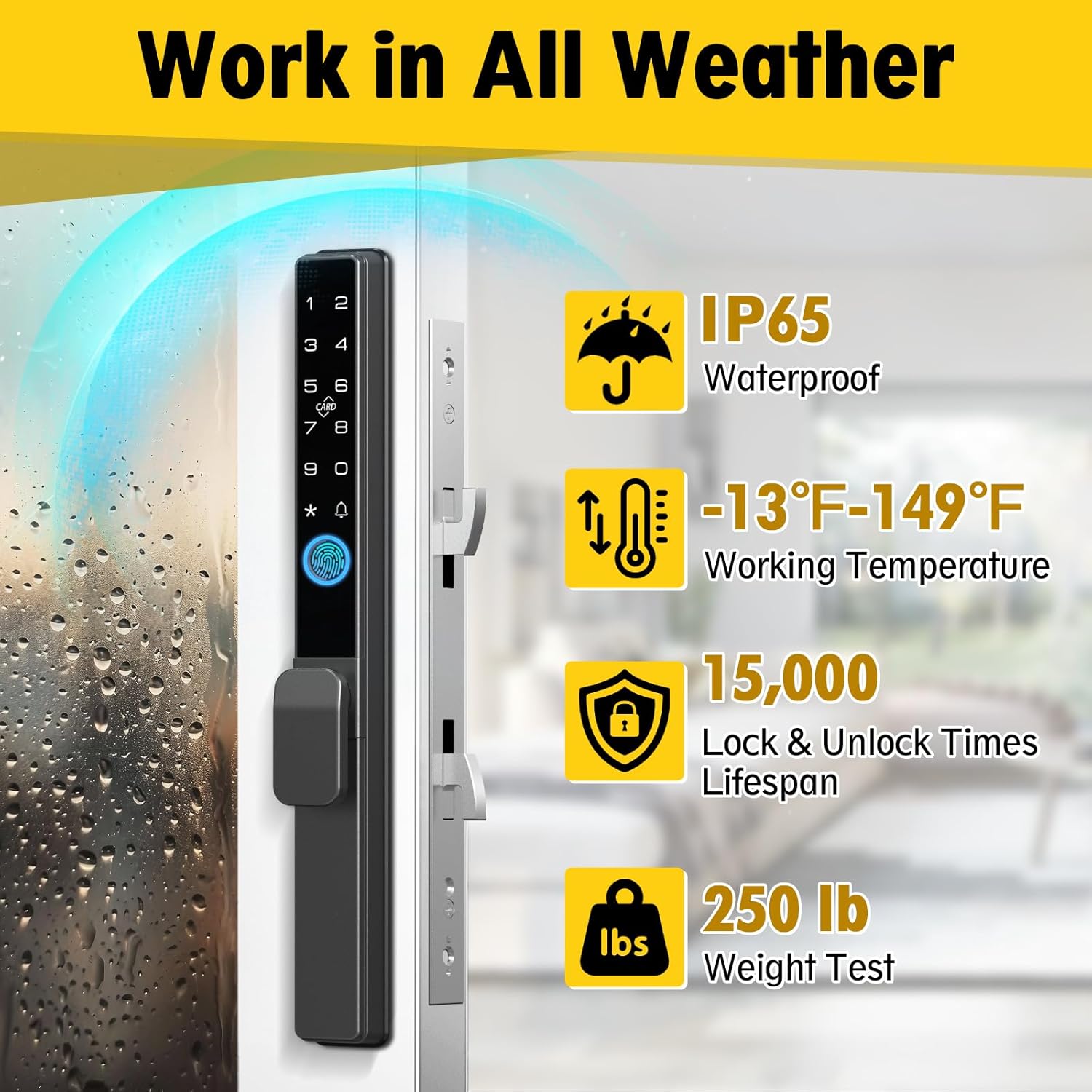
Image: The smart lock shown with water droplets, illustrating its IP65 waterproof rating, alongside icons for operating temperature range, lock/unlock cycle lifespan, and weight test.
ട്രബിൾഷൂട്ടിംഗ്
If you encounter issues with your smart lock, refer to the following common problems and solutions.
| പ്രശ്നം | സാധ്യമായ കാരണം | പരിഹാരം |
|---|---|---|
| ലോക്ക് പ്രതികരിക്കുന്നില്ല | ഡെഡ് ബാറ്ററികൾ | Replace batteries or use Type-C emergency power. |
| വിരലടയാളം തിരിച്ചറിഞ്ഞില്ല | Fingerprint sensor dirty; unregistered fingerprint; improper placement | Clean sensor; ensure finger is registered; place finger flat on sensor. |
| പാസ്കോഡ് പ്രവർത്തിക്കുന്നില്ല | Incorrect passcode; anti-peep digits not used correctly | Verify passcode; ensure correct entry sequence with anti-peep digits. |
| App cannot connect to lock | Bluetooth off; app not paired; lock out of range; app glitch | Ensure Bluetooth is on; re-pair lock in app; move closer to lock; restart app/phone. |
| Lock makes an alarm sound | Low battery; multiple incorrect entries; attempted forced entry | Check battery level; use correct unlock method; investigate for tampഎറിംഗ്. |

Image: A visual representation of the lock's intrusion-proof alert system, showing a red alarm icon over a person attempting to tamper with the lock.
സ്പെസിഫിക്കേഷനുകൾ
| ഫീച്ചർ | വിശദാംശങ്ങൾ |
|---|---|
| ബ്രാൻഡ് | എസെസ്മാർട്ട് |
| മോഡൽ നമ്പർ | YL-D300 |
| ലോക്ക് തരം | Sliding Glass Door Lock |
| അൺലോക്ക് ചെയ്യാനുള്ള വഴികൾ | 5-in-1 (Fingerprint, Passcode, Mobile App, RFID Card, Mechanical Key) |
| മെറ്റീരിയൽ | സിങ്ക് |
| നിറം | കറുപ്പ് |
| ഇനത്തിന്റെ അളവുകൾ (L x W x H) | 1.26 x 0.9 x 12.6 ഇഞ്ച് (32 x 23 x 320 മിമി) |
| ഇനത്തിൻ്റെ ഭാരം | 4.75 പൗണ്ട് |
| ശുപാർശ ചെയ്യുന്ന വാതിൽ കനം | 13/15" to 4-3/4" (22mm to 120mm) |
| Recommended Door Frame Width | ≥1.6" (41mm) |
| കണക്റ്റിവിറ്റി പ്രോട്ടോക്കോൾ | ബ്ലൂടൂത്ത് |
| നിയന്ത്രണ രീതി | ആപ്പ് (ആൻഡ്രോയിഡ്, iOS) |
| വാട്ടർപ്രൂഫ് റേറ്റിംഗ് | IP65 |
| പ്രവർത്തന താപനില | -13°F മുതൽ 149°F വരെ (-25°C മുതൽ 65°C വരെ) |
| ബാറ്ററി ലൈഫ് | 8 മാസം വരെ (4 AAA ബാറ്ററികൾ) |
വാറൻ്റിയും പിന്തുണയും
Eseesmart is committed to providing reliable products and excellent customer service.
വാറൻ്റി വിവരങ്ങൾ
- ഉൽപ്പന്ന വാറൻ്റി: വാങ്ങിയ തീയതി മുതൽ 24 മാസ വാറന്റി.
- Replacement/Refund: 12-month replacement or refund service for eligible issues.
സാങ്കേതിക സഹായം
We offer lifetime free technical support for your Eseesmart smart lock. If you have any questions, require assistance with installation, operation, or troubleshooting, please do not hesitate to contact us.
- ഇമെയിൽ: esmartlock@outlook.com