
Ulefone RugKing Pad Pro
Ulefone RugKing Pad Pro Android 16 Rugged Tablet User Manual
Model: RugKing Pad Pro | Brand: Ulefone
1. ആമുഖം
This manual provides essential instructions for setting up, operating, and maintaining your Ulefone RugKing Pad Pro rugged tablet. Please read this manual thoroughly before using the device to ensure proper function and longevity.
2. പാക്കേജ് ഉള്ളടക്കം
നിങ്ങളുടെ ഉൽപ്പന്ന പാക്കേജിൽ എല്ലാ ഇനങ്ങളും ഉണ്ടെന്ന് ഉറപ്പാക്കുക:
- Ulefone RugKing Pad Pro Tablet x 1
- AC Charger (100~240V) x 1
- Type-C Data Cable (100 cm) x 1
- Protective Film (Pre-installed) x 1
- Metal Pry Opener x 1
- Portable Strap x 1
- സ്ക്രൂകൾ x 2
- Multilingual User Manual x 1
- Charging Instruction Card x 1
- Safety Warning Declaration x 1

Figure 2.1: Contents of the Ulefone RugKing Pad Pro package.
3. ഉൽപ്പന്നം കഴിഞ്ഞുview
The Ulefone RugKing Pad Pro is a rugged tablet designed for durability and performance. Familiarize yourself with its physical components.
3.1 ഭൗതിക ഘടകങ്ങൾ
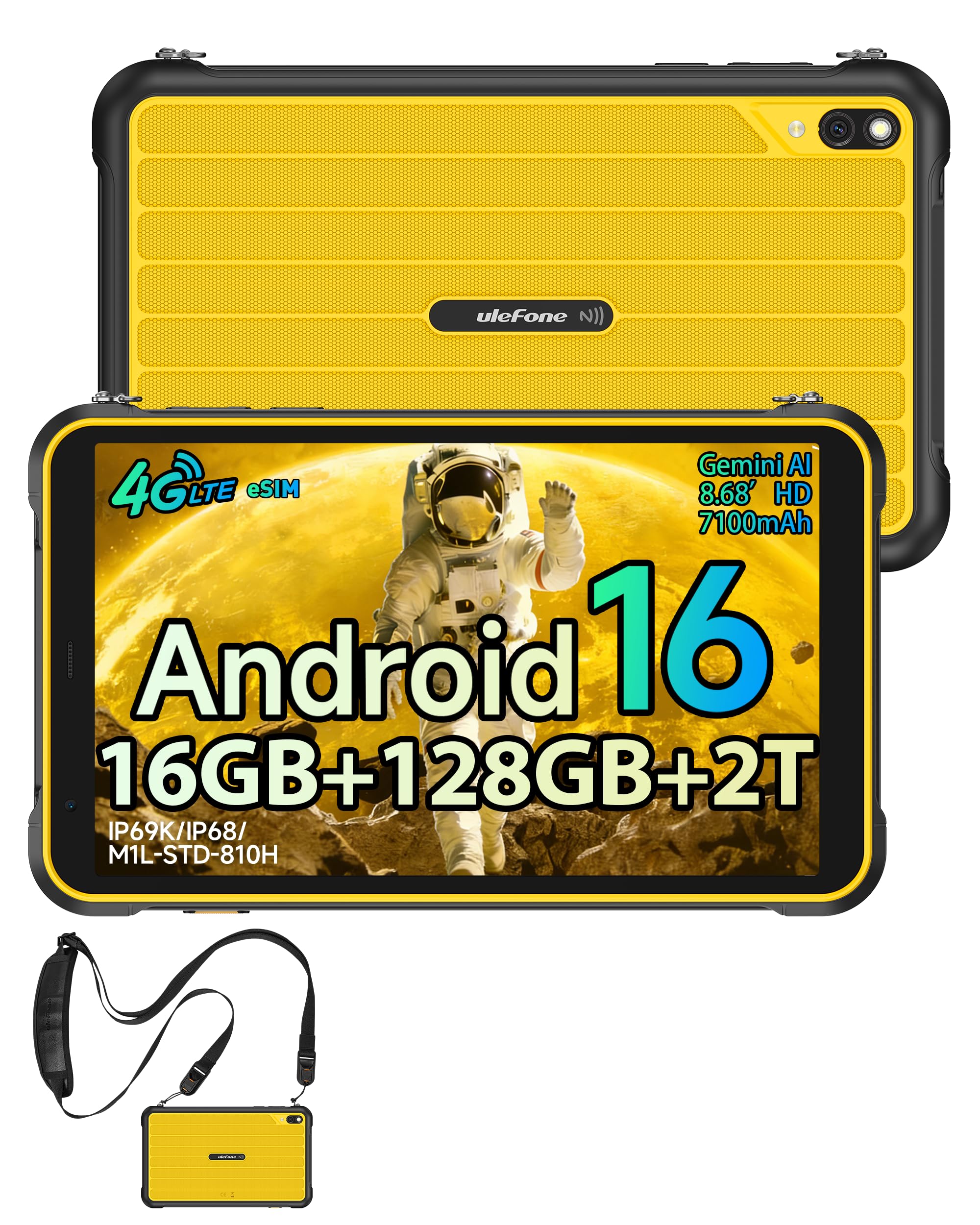
ചിത്രം 3.1: മുൻഭാഗം view of the Ulefone RugKing Pad Pro.

ചിത്രം 3.2: വശം view with buttons and ports.
- ഡിസ്പ്ലേ: 8.68-inch, 90Hz refresh rate, Corning Gorilla Glass.
- പവർ ബട്ടൺ: വശത്ത് സ്ഥിതിചെയ്യുന്നു, ഉപകരണം ഓൺ/ഓഫ് ചെയ്യാനോ ഉണർത്താനോ ഉറങ്ങാനോ ഉപയോഗിക്കുന്നു.
- വോളിയം ബട്ടണുകൾ: ഓഡിയോ ലെവലുകൾ ക്രമീകരിക്കുക.
- യുഎസ്ബി ടൈപ്പ്-സി പോർട്ട്: ചാർജിംഗിനും ഡാറ്റ കൈമാറ്റത്തിനും.
- സ്പീക്കർ ഗ്രിൽസ്: Dual stereo speakers for audio output.
- ക്യാമറ: 16MP പിൻ ക്യാമറ, 8MP മുൻ ക്യാമറ.
- ഫ്ലാഷ്ലൈറ്റ്: Integrated 133 lumen Super Torch.
- സിം/മൈക്രോഎസ്ഡി കാർഡ് സ്ലോട്ട്: Supports dual SIM and up to 2TB microSD expansion.
- uSmart എക്സ്പാൻഷൻ കണക്റ്റർ: For compatible peripherals like endoscopes.
- 3.5 എംഎം ഹെഡ്ഫോൺ ജാക്ക്: For audio accessories.
4. സജ്ജീകരണം
4.1 പ്രാരംഭ പവർ ഓൺ
- അമർത്തിപ്പിടിക്കുക പവർ ബട്ടൺ until the Ulefone logo appears.
- നിങ്ങളുടെ ഭാഷ, പ്രദേശം എന്നിവ തിരഞ്ഞെടുത്ത് ഒരു വൈഫൈ നെറ്റ്വർക്കിലേക്ക് കണക്റ്റുചെയ്യുന്നതിന് ഓൺ-സ്ക്രീൻ നിർദ്ദേശങ്ങൾ പാലിക്കുക.
- ഗൂഗിൾ പ്ലേ സ്റ്റോറും മറ്റ് സേവനങ്ങളും ആക്സസ് ചെയ്യുന്നതിന് നിങ്ങളുടെ ഗൂഗിൾ അക്കൗണ്ട് ഉപയോഗിച്ച് സൈൻ ഇൻ ചെയ്യുക അല്ലെങ്കിൽ പുതിയൊരെണ്ണം സൃഷ്ടിക്കുക.
4.2 SIM Card and eSIM Setup
The RugKing Pad Pro supports dual physical SIM cards and eSIM functionality for 4G LTE connectivity.

Figure 4.1: Triple card slot for SIM and MicroSD.
4.2.1 Physical SIM Card Installation
- ടാബ്ലെറ്റിന്റെ വശത്ത് സിം കാർഡ് ട്രേ കണ്ടെത്തുക.
- Use the provided metal pry opener to eject the tray.
- Place your Nano-SIM cards into the designated slots.
- ടാബ്ലെറ്റിലേക്ക് ട്രേ ശ്രദ്ധാപൂർവ്വം വീണ്ടും തിരുകുക.
4.2.2 ഇ-സിം ആക്ടിവേഷൻ
To activate eSIM, navigate to ക്രമീകരണം > നെറ്റ്വർക്കും ഇന്റർനെറ്റും > സിമ്മുകൾ and follow the instructions to add a new mobile plan. You will typically need a QR code or activation code from your network provider.

Figure 4.2: eSIM connectivity feature.
5. പ്രവർത്തന നിർദ്ദേശങ്ങൾ
5.1 ആൻഡ്രോയിഡ് 16 ഓപ്പറേറ്റിംഗ് സിസ്റ്റം
The RugKing Pad Pro runs on Android 16, offering a dynamic and fluid user interface with enhanced security and usability features. Enjoy desktop-like window views for multitasking and smarter notification management.

Figure 5.1: Android 16 user interface.
5.2 പ്രദർശനവും ഇടപെടലും
The 8.68-inch display with a 90Hz refresh rate provides smooth navigation and streaming. With 860 nits peak brightness, the screen is readable even in bright sunlight. Corning Gorilla Glass offers enhanced scratch resistance.

Figure 5.2: Display features including 90Hz refresh rate and Gorilla Glass.
5.2.1 ഗ്ലൗ മോഡ്
For use in cold environments or industrial settings, enable Glove Mode in settings to allow touch input while wearing gloves. Note that some leather gloves may not be compatible due to material differences.

Figure 5.3: Tablet operation with gloves enabled.
5.3 Camera and Flashlight
The tablet features a 16MP rear camera for clear photos and document scanning, and an 8MP front camera for video calls. The integrated 133 lumen Super Torch provides bright illumination in low-light conditions.

Figure 5.4: Camera and Super Torch features.
5.4 കണക്റ്റിവിറ്റിയും നാവിഗേഷനും
- 4G LTE: Stay connected with dual SIM or eSIM.
- NFC: Supports Google Pay and other NFC functions for identification and authentication.
- ജിപിഎസ്: Integrated GPS, GLONASS, BeiDou, and Galileo for accurate navigation.
- വൈഫൈ: Supports 802.11b/g/n standards.
- ബ്ലൂടൂത്ത്: വയർലെസ് ആക്സസറികൾ ബന്ധിപ്പിക്കുന്നതിന്.

Figure 5.5: NFC enabled device for various applications.

Figure 5.6: GPS navigation in a vehicle.
5.5 പ്രത്യേക സവിശേഷതകൾ
- ഇഷ്ടാനുസൃത കീ: Assign specific functions to a programmable key for quick access.
- മുഖം തിരിച്ചറിയൽ: Unlock your device using facial recognition.
- എഫ്എം റേഡിയോ: Listen to FM radio without headphones.
- uSmart എക്സ്പാൻഷൻ കണക്റ്റർ: Connect compatible external peripherals such as endoscopes (uSmart E01, E02) or digital microscopes (uSmart C01).

Figure 5.7: uSmart expansion connector and peripherals.
6. ഈട് സവിശേഷതകൾ
The RugKing Pad Pro is built to withstand extreme conditions, certified with IP68, IP69K, and MIL-STD-810H standards.
- IP68: Dustproof and resistant to continuous immersion in water up to 2 meters for 30 minutes.
- IP69K: Protected against high-pressure, high-temperature jet sprays.
- മിൽ-എസ്ടിഡി-810എച്ച്: Military-grade standard ensuring reliable resistance to shocks, vibrations, and extreme temperatures.

Figure 6.1: Rugged design and certifications.

Figure 6.2: Dust, water, and drop resistance tests.
7. ബാറ്ററി മാനേജ്മെന്റ്
The RugKing Pad Pro is equipped with a 7100 mAh battery, offering extended usage. It supports 492 hours of standby time or 10 hours of video playback on a single charge.
7.1 ചാർജിംഗ്
- സ്റ്റാൻഡേർഡ് ചാർജിംഗ്: Connect the provided Type-C cable and AC charger to the tablet.
- പോഗോ പിൻ ചാർജിംഗ്: The tablet is compatible with Pogo Pin charging docks (sold separately) for convenient charging.
- Reverse Charging (OTG): Use the tablet as a power bank to charge other devices via an OTG cable (sold separately).

Figure 7.1: Battery capacity and charging methods.
8. സംഭരണവും പ്രകടനവും
Powered by an Unisoc T7250 Octa-core processor, the RugKing Pad Pro handles complex applications and demanding tasks efficiently. It comes with 16GB RAM (8GB physical + 8GB virtual) and 128GB internal storage, expandable up to 2TB via microSD card.

Figure 8.1: Octa-core processor for uninterrupted flow.

Figure 8.2: Memory and storage specifications.
*MicroSD card is sold separately for storage expansion. Dynamic RAM activation is user-configurable in Settings.
9. പരിപാലനം
9.1 ഉപകരണം വൃത്തിയാക്കുന്നു
- സ്ക്രീനും ബോഡിയും വൃത്തിയാക്കാൻ മൃദുവായ, ലിന്റ് രഹിത തുണി ഉപയോഗിക്കുക.
- കഠിനമായ അഴുക്കിന്, ചെറുതായി dampതുണിയിൽ വെള്ളം ഒഴിക്കുക. കഠിനമായ രാസവസ്തുക്കളോ ഉരച്ചിലുകളോ ഉള്ള വസ്തുക്കൾ ഒഴിവാക്കുക.
- Ensure all port covers are securely closed before cleaning with liquids to maintain water resistance.
9.2 സോഫ്റ്റ്വെയർ അപ്ഡേറ്റുകൾ
Regularly check for software updates to ensure optimal performance, security, and access to new features. Navigate to ക്രമീകരണങ്ങൾ > സിസ്റ്റം > സിസ്റ്റം അപ്ഡേറ്റ് ലഭ്യമായ അപ്ഡേറ്റുകൾ പരിശോധിച്ച് ഇൻസ്റ്റാൾ ചെയ്യാൻ.
9.3 സ്റ്റോറേജ് മാനേജ്മെൻ്റ്
ആനുകാലികമായി റീview your stored files and applications. Delete unnecessary data to free up space and maintain device speed. Utilize the microSD card slot for large media files.
10. പ്രശ്നപരിഹാരം
| പ്രശ്നം | പരിഹാരം |
|---|---|
| ഉപകരണം പവർ ഓണാക്കുന്നില്ല. | ബാറ്ററി ചാർജ്ജ് ചെയ്തിട്ടുണ്ടെന്ന് ഉറപ്പാക്കുക. ചാർജർ കണക്റ്റ് ചെയ്ത് വീണ്ടും പവർ ചെയ്യാൻ ശ്രമിക്കുന്നതിന് മുമ്പ് കുറച്ച് മിനിറ്റ് കാത്തിരിക്കുക. |
| സ്ക്രീൻ പ്രതികരിക്കുന്നില്ല. | Perform a forced restart by holding the Power button for 10-15 seconds. If the issue persists, ensure Glove Mode is not causing interference if not needed. |
| Wi-Fi-ലേക്ക് കണക്റ്റ് ചെയ്യാൻ കഴിയില്ല. | Check if Wi-Fi is enabled in settings. Restart your router and the tablet. Verify the Wi-Fi password. |
| സിം കാർഡ് കണ്ടെത്തിയില്ല. | ട്രേയിൽ സിം കാർഡ് ശരിയായി ചേർത്തിട്ടുണ്ടെന്ന് ഉറപ്പാക്കുക. ടാബ്ലെറ്റ് പുനരാരംഭിക്കുക. നിങ്ങളുടെ കാരിയറുമായി സിം കാർഡ് സജീവമാണോയെന്ന് പരിശോധിക്കുക. |
| ബാറ്ററി പെട്ടെന്ന് തീരുന്നു. | Reduce screen brightness, close unused apps, disable unnecessary connectivity features (Bluetooth, GPS, Wi-Fi) when not in use. Check for background app activity. |
11 സ്പെസിഫിക്കേഷനുകൾ
| ഫീച്ചർ | വിശദാംശങ്ങൾ |
|---|---|
| മോഡലിൻ്റെ പേര് | Ulefone RugKing Pad Pro |
| ഓപ്പറേറ്റിംഗ് സിസ്റ്റം | ആൻഡ്രോയിഡ് 16 |
| പ്രോസസ്സർ | യൂണിസോക്ക് T7250 ഒക്ടാ-കോർ |
| റാം | 16 ജിബി (8 ജിബി ഫിസിക്കൽ + 8 ജിബി വെർച്വൽ) |
| ആന്തരിക സംഭരണം | 128 ജിബി |
| വികസിപ്പിക്കാവുന്ന സംഭരണം | Up to 2 TB via microSD |
| ഡിസ്പ്ലേ വലിപ്പം | 8.68 ഇഞ്ച് |
| ഡിസ്പ്ലേ റെസല്യൂഷൻ | 1400x800 പിക്സലുകൾ (HD+) |
| പുതുക്കിയ നിരക്ക് | 90 Hz |
| ഡിസ്പ്ലേ സംരക്ഷണം | കോർണിംഗ് ഗൊറില്ല ഗ്ലാസ് |
| പിൻ ക്യാമറ | 16 എം.പി |
| മുൻ ക്യാമറ | 8 എം.പി |
| വീഡിയോ റെക്കോർഡിംഗ് | FHD 1080p |
| ബാറ്ററി ശേഷി | 7100 mAh (ലിഥിയം പോളിമർ) |
| ബാറ്ററി ലൈഫ് (ശരാശരി) | 13 Days (standby), 10 Hours (video playback) |
| കണക്റ്റിവിറ്റി | 4G LTE (Dual SIM, eSIM), Wi-Fi (802.11b/g/n), Bluetooth, NFC |
| നാവിഗേഷൻ | GPS, GLONASS, BeiDou, ഗലീലിയോ |
| ഈട് റേറ്റിംഗുകൾ | IP68, IP69K, MIL-STD-810H |
| സുരക്ഷാ സവിശേഷതകൾ | മുഖം ഐഡി |
| അളവുകൾ (L x W x T) | 20 x 10 x 1 സെ.മീ |
| ഭാരം | 450 ഗ്രാം |
12. വാറൻ്റിയും പിന്തുണയും
12.1 വാറൻ്റി വിവരങ്ങൾ
The Ulefone RugKing Pad Pro comes with a 2 വർഷത്തെ നിർമ്മാതാവിന്റെ വാറന്റി. സാധാരണ ഉപയോഗത്തിലുള്ള മെറ്റീരിയലുകളിലെയും നിർമ്മാണത്തിലെയും വൈകല്യങ്ങൾ ഈ വാറന്റി ഉൾക്കൊള്ളുന്നു. വാറന്റി ക്ലെയിമുകൾക്കായി നിങ്ങളുടെ വാങ്ങലിന്റെ തെളിവ് സൂക്ഷിക്കുക.


Figure 12.1: Ulefone brand and 2-year warranty indication.
12.2 ഉപഭോക്തൃ പിന്തുണ
For technical assistance, warranty claims, or further inquiries, please contact Ulefone customer support. A service center is available in Europe.
- Refer to the official Ulefone webബന്ധപ്പെടാനുള്ള വിശദാംശങ്ങൾക്കുള്ള സൈറ്റ്.
- Consult the "Multilingual User Manual" included in your package for additional information.
- The tablet includes a "Service Center 2.0" application for intelligent support.
Ask a question about this manual
Ask about setup, troubleshooting, compatibility, parts, safety, or missing instructions. Manuals+ will review the question and use this page’s manual context to help answer it.