
ആമുഖം
This manual provides comprehensive instructions for the safe and effective use of your AstroAI ASIM4K0R Multimeter Tester. Please read this manual thoroughly before operation and retain it for future reference.
സുരക്ഷാ വിവരങ്ങൾ
The AstroAI M4K0R Multimeter is designed to troubleshoot a variety of automotive and household electrical problems safely and accurately. It features double ceramic fuses for anti-burn protection and is rated for overvoltage category III 600V safety standards. The silicone cover provides protection against damage and electric shocks. Always follow standard electrical safety procedures when using this device.
ഉൽപ്പന്ന സവിശേഷതകൾ
- വിശാലമായ ആപ്ലിക്കേഷൻ: Accurately measures AC/DC voltage up to 600V, current up to 10A, and resistance up to 40MΩ.
- Versatile Testing: Includes continuity test, diode test, battery test (1.5V, 9V, 12V modes), and live wire test.
- നോൺ-കോൺടാക്റ്റ് വോളിയംtagഇ (എൻസിവി): എസി വോളിയം സുരക്ഷിതമായി കണ്ടെത്തുന്നുtage without test leads, providing audible and visual alarms (red for strong signal, quick beep).
- ചിന്തനീയമായ ഡിസൈൻ: Features Data Hold, Max value display, Auto Shut-off, low battery indicator, and continuity buzzer.
- മെച്ചപ്പെടുത്തിയ വായനാക്ഷമത: LCD backlit screen and built-in flashlight for clear readings in dim areas.
- സുരക്ഷാ ഉറപ്പ്: Double ceramic fuse protection and overvoltage category III 600V safety standards.
പാക്കേജ് ഉള്ളടക്കം
- AstroAI 4000 Counts Multimeter
- ഉപയോക്തൃ മാനുവൽ
- ടെസ്റ്റ് ലീഡുകളുടെ ജോടി
- 2 AAA ബാറ്ററികൾ (ഉൾപ്പെട്ടിരിക്കുന്നു)

Figure 1: The AstroAI Multimeter comes with a user manual, a pair of test leads, and the multimeter unit itself.
ഉൽപ്പന്നം കഴിഞ്ഞുview
Familiarize yourself with the components of your AstroAI Multimeter:

ചിത്രം 2: വിശദമായി view of the AstroAI Multimeter with key components labeled for easy identification and use.
- NCV Detector: നോൺ-കോൺടാക്റ്റ് വോളിയത്തിന്tagഇ കണ്ടെത്തൽ.
- ഫ്ലാഷ്ലൈറ്റ്: Illuminates work area.
- ഇൻഡിക്കേറ്റർ ലൈറ്റ്: Provides visual feedback for NCV and battery tests.
- LCD സ്ക്രീൻ: അളക്കൽ വായനകൾ പ്രദർശിപ്പിക്കുന്നു.
- ഹോൾഡ് ബട്ടൺ: ഡിസ്പ്ലേയിലെ നിലവിലെ റീഡിംഗ് മരവിപ്പിക്കുന്നു.
- പരമാവധി ബട്ടൺ: Displays the maximum measured value.
- FUNC ബട്ടൺ: Switches between different functions within a rotary switch setting (e.g., AC/DC voltagഒപ്പം).
- Backlight Button/Flashlight Button: Activates screen backlight and flashlight.
- റോട്ടറി സ്വിച്ച്: ആവശ്യമുള്ള അളക്കൽ പ്രവർത്തനം തിരഞ്ഞെടുക്കുന്നു.
- 10A Terminal: ഉയർന്ന കറന്റ് അളവുകൾക്കുള്ള ഇൻപുട്ട്.
- COM ടെർമിനൽ: എല്ലാ അളവുകൾക്കുമുള്ള പൊതുവായ (നെഗറ്റീവ്) ഇൻപുട്ട്.
- ഇൻപുട്ട് ടെർമിനൽ: Positive input for most voltage, resistance, capacitance, and milliampere measurements.
സജ്ജമാക്കുക
ബാറ്ററി ഇൻസ്റ്റാളേഷൻ
The multimeter comes with two 1.5V AAA batteries already installed. If replacement is needed, open the battery compartment on the back of the device, insert new batteries with correct polarity, and secure the cover.
ടെസ്റ്റ് ലീഡുകൾ ബന്ധിപ്പിക്കുന്നു
Insert the black test lead into the COM terminal and the red test lead into the appropriate input terminal based on your desired measurement (e.g., VΩmA for voltage, resistance, or low current; 10A for high current).
പ്രവർത്തന നിർദ്ദേശങ്ങൾ
വാല്യംtagഇ മെഷർമെന്റ് (എസി/ഡിസി)
Turn the rotary switch to the 'V' position. The meter will automatically detect AC or DC voltage. Use the FUNC button to manually switch if needed. Connect the test leads across the circuit or component to measure voltage.

Figure 3: The multimeter is shown measuring AC voltage from a wall outlet and DC voltage from a car battery, demonstrating its versatile use.
Current Measurement (AC/DC)
For current up to 10A, turn the rotary switch to the '10A' position. For milliampere current, use the 'mA' position. Use the FUNC button to select AC or DC. Connect the multimeter in series with the circuit to measure current.

Figure 4: The multimeter is used to measure current in an electronic circuit, illustrating its application for current analysis.
Resistance and Capacitance Measurement
Turn the rotary switch to the 'Ω' (Ohms) position for resistance or 'F' (Farad) for capacitance. Use the FUNC button to select between these modes. Connect the test leads across the component to measure.
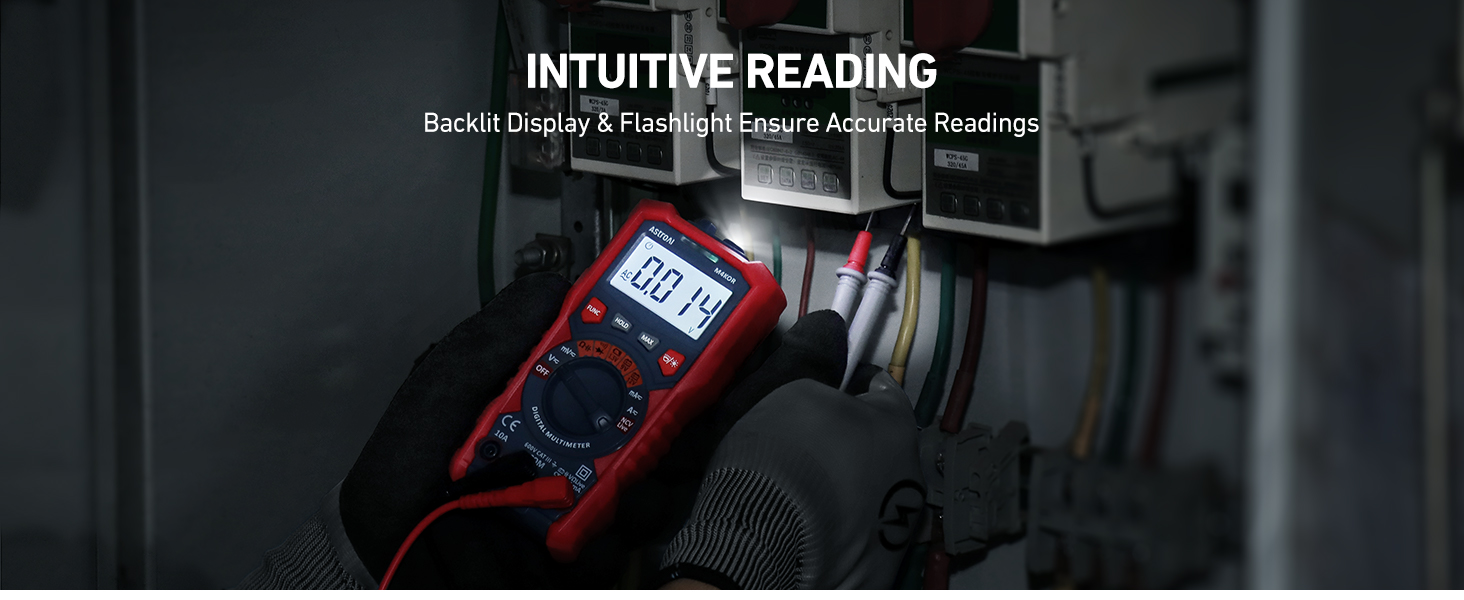
Figure 5: The multimeter measures resistance on a circuit board, demonstrating its capability for component testing.
ഡയോഡും കണ്ടിന്യൂറ്റി ടെസ്റ്റും
Turn the rotary switch to the diode/continuity symbol. Use the FUNC button to select between diode test and continuity test. For continuity, the buzzer will sound if resistance is below a certain threshold. For diode test, it measures the forward voltagഇ ഡ്രോപ്പ്.
Battery Test (1.5V, 9V, 12V)
ആവശ്യമുള്ള ബാറ്ററി വോളിയം തിരഞ്ഞെടുക്കുകtage (1.5V, 9V, or 12V) on the rotary switch. Connect the test leads to the battery terminals. The multimeter's indicator light will turn red for low voltage and green for sufficient voltage.

Figure 6: The multimeter is shown testing 1.5V, 9V, and 12V batteries, providing quick and accurate battery status.
നോൺ-കോൺടാക്റ്റ് വോളിയംtage (NCV) Test
Turn the rotary switch to the 'NCV' position. Hold the NCV detector near the object to be tested. The meter will emit a quick beep and the red indicator light will turn on if a strong AC signal is detected.

Figure 7: The multimeter's NCV function is demonstrated near a wall outlet, indicating voltagനേരിട്ടുള്ള സമ്പർക്കമില്ലാതെ സാന്നിധ്യം.
ലൈവ് വയർ ടെസ്റ്റ്
Turn the rotary switch to the 'Live' position. Use the red test lead to probe the wire. The meter will indicate if the wire is live.

Figure 8: The multimeter is used to test for live wires in an electrical outlet, ensuring safety during electrical work.
ബാക്ക്ലൈറ്റും ടോർച്ചും
Press the Backlight/Flashlight button to activate the screen backlight for improved visibility in low-light conditions. Long press the same button to turn on the built-in flashlight.

Figure 9: The multimeter's backlight and flashlight features are shown in use, providing clear readings and illumination in dark spaces.
മെയിൻ്റനൻസ്
- ഉപകരണം വൃത്തിയുള്ളതും ഉണങ്ങിയതുമായി സൂക്ഷിക്കുക.
- സ്ക്രീനിൽ ബാറ്ററി കുറവാണെന്ന് കാണിക്കുമ്പോൾ ബാറ്ററികൾ മാറ്റി സ്ഥാപിക്കുക.
- Store the multimeter in a cool, dry place when not in use.
ട്രബിൾഷൂട്ടിംഗ്
If the multimeter is not functioning as expected, ensure the batteries are correctly installed and charged. Check the test leads for any damage or loose connections. If issues persist, refer to the detailed user manual or contact AstroAI customer support.
സ്പെസിഫിക്കേഷനുകൾ
| സ്പെസിഫിക്കേഷൻ | മൂല്യം |
|---|---|
| ബ്രാൻഡ് | ആസ്ട്രോഎഐ |
| മോഡൽ നമ്പർ | ASIM4K0R |
| പവർ ഉറവിടം | ബാറ്ററി പവർഡ് (2 AAA ബാറ്ററികൾ ഉൾപ്പെടുന്നു) |
| ശൈലി | ഓട്ടോ-റേഞ്ചിംഗ് |
| നിറം | Multicolored-Test Kit |
| ഇനത്തിൻ്റെ ഭാരം | 219 ഗ്രാം (7.7 ഔൺസ്) |
| അളവുകൾ (L x W x H) | 5.87 x 2.8 x 1.38 ഇഞ്ച് |
| പരമാവധി ഓപ്പറേറ്റിംഗ് വോളിയംtage | 600 വോൾട്ട് |
| ഉയർന്ന താപനില റേറ്റിംഗ് | 40 ഡിഗ്രി സെൽഷ്യസ് |
| യു.പി.സി | 810074980166 |
വാറൻ്റിയും പിന്തുണയും
AstroAI products typically come with a 3-year warranty. For warranty claims, technical support, or any inquiries, please contact AstroAI customer service. Refer to the user manual for specific contact details.