
ആമുഖം
Welcome to your new Memorex 11-inch Android 14 Tablet Bundle. This comprehensive guide provides detailed instructions to help you set up, operate, maintain, and troubleshoot your device and its included accessories. Please read this manual thoroughly to ensure optimal performance and longevity of your product.
ബോക്സിൽ എന്താണുള്ളത്
അൺബോക്സിംഗ് ചെയ്യുമ്പോൾ, ഇനിപ്പറയുന്ന എല്ലാ ഇനങ്ങളും നിലവിലുണ്ടെന്ന് ദയവായി പരിശോധിക്കുക:
- Memorex 11-inch Tablet
- ബ്ലൂടൂത്ത് കീബോർഡ്
- വയർലെസ് ഹെഡ്ഫോണുകൾ
- സ്റ്റാൻഡോടുകൂടിയ സംരക്ഷണ കേസ്
- AC Adapter Charger & Cable
- നിർദ്ദേശ മാനുവൽ (ഈ പ്രമാണം)
- ദ്രുത ആരംഭ ഗൈഡ്

Image: The Memorex 11-inch tablet with its accompanying Bluetooth keyboard and wireless headphones, set up on a table in a living room environment.
സജ്ജമാക്കുക
1. പ്രാരംഭ ചാർജിംഗ്
Before first use, fully charge your tablet. Connect the provided AC adapter and cable to the tablet's charging port and plug it into a power outlet. The battery indicator on the screen will show charging status.
2. പവർ ഓൺ/ഓഫ്
- പവർ ഓണാക്കാൻ: Press and hold the Power button located on the side of the tablet until the Memorex logo appears.
- പവർ ഓഫ് ചെയ്യാൻ: പവർ ബട്ടൺ അമർത്തിപ്പിടിക്കുക, തുടർന്ന് സ്ക്രീനിൽ ദൃശ്യമാകുന്ന ഓപ്ഷനുകളിൽ നിന്ന് 'പവർ ഓഫ്' തിരഞ്ഞെടുക്കുക.
- പുനരാരംഭിക്കാൻ: പവർ ബട്ടൺ അമർത്തിപ്പിടിക്കുക, തുടർന്ന് ഓപ്ഷനുകളിൽ നിന്ന് 'പുനരാരംഭിക്കുക' തിരഞ്ഞെടുക്കുക.
3. പ്രാരംഭ ആൻഡ്രോയിഡ് സജ്ജീകരണം
Follow the on-screen prompts to complete the initial setup of your Android 14 operating system. This typically includes selecting your language, connecting to a Wi-Fi network, and signing in with or creating a Google account.
4. Connecting Bluetooth Accessories
Your tablet bundle includes a Bluetooth Keyboard and Wireless Headphones. To connect them:
- Ensure the accessory (keyboard or headphones) is charged and in pairing mode (refer to the accessory's specific instructions if needed).
- നിങ്ങളുടെ ടാബ്ലെറ്റിൽ, ഇതിലേക്ക് പോകുക ക്രമീകരണങ്ങൾ > ബന്ധിപ്പിച്ച ഉപകരണങ്ങൾ > ബ്ലൂടൂത്ത്.
- ബ്ലൂടൂത്ത് ഓണാക്കുക On.
- The tablet will scan for available devices. Select the name of your Bluetooth Keyboard or Wireless Headphones from the list.
- ജോടിയാക്കൽ പ്രക്രിയ പൂർത്തിയാക്കാൻ ഏതെങ്കിലും ഓൺ-സ്ക്രീൻ നിർദ്ദേശങ്ങൾ പാലിക്കുക.
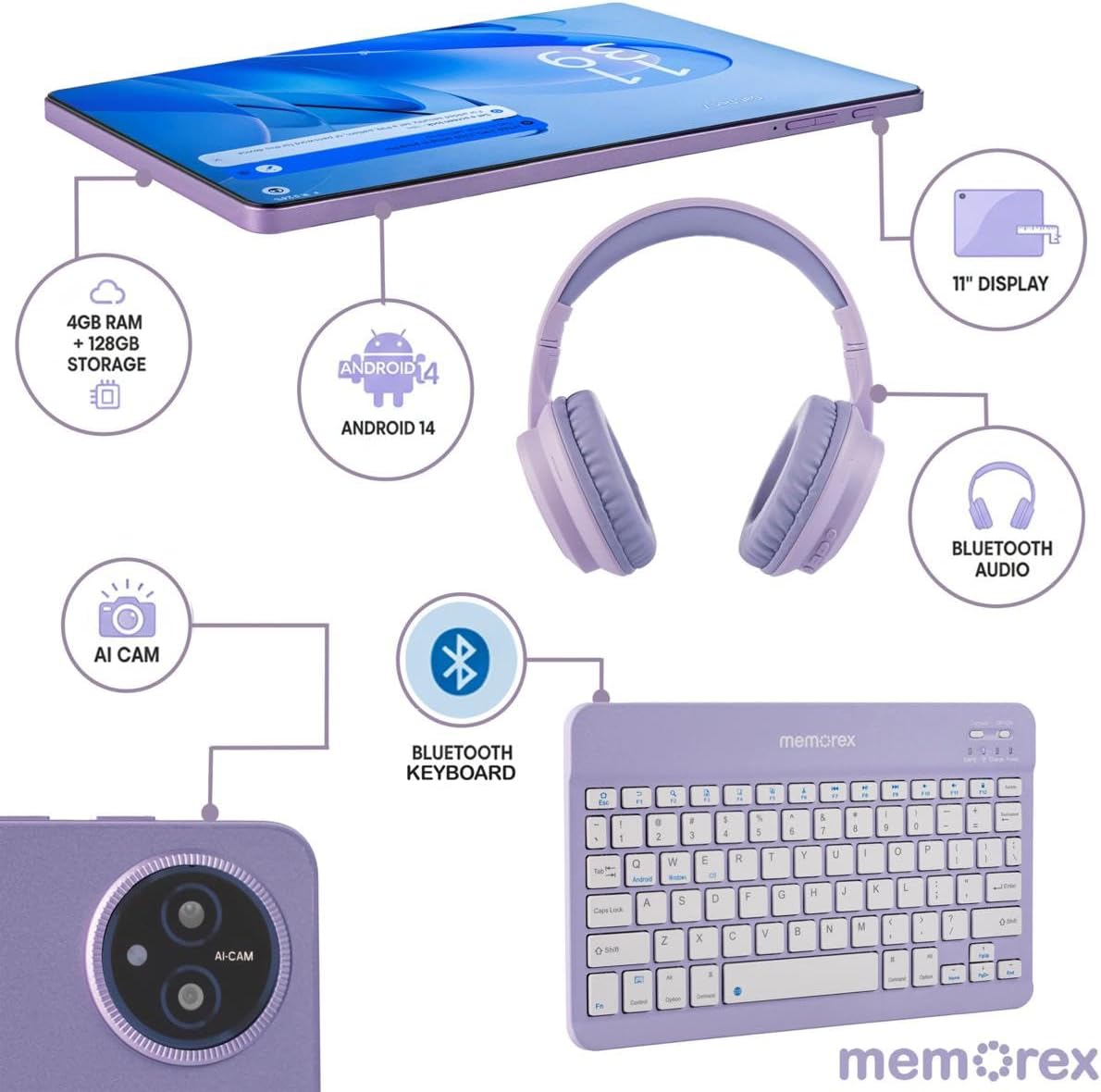
Image: A visual representation of the Memorex tablet and its accessories, including the Bluetooth keyboard and headphones, illustrating their connection points and features.
പ്രവർത്തന നിർദ്ദേശങ്ങൾ
1. അടിസ്ഥാന നാവിഗേഷൻ
Your tablet features an 11-inch FHD IPS touchscreen. Navigate by tapping, swiping, pinching, and spreading fingers on the display. The Android 14 interface is intuitive, allowing you to access apps, settings, and notifications easily.
2. Using the Bluetooth Keyboard
Once paired, the Bluetooth keyboard functions like a standard computer keyboard. It can be used for typing documents, emails, and navigating the tablet's interface more efficiently. Ensure the keyboard is powered on and connected via Bluetooth.
3. ക്യാമറ പ്രവർത്തനം
The tablet is equipped with an 8MP front camera and a 13MP rear camera. To use the camera:
- നിങ്ങളുടെ ഹോം സ്ക്രീനിൽ നിന്നോ ആപ്പ് ഡ്രോയറിൽ നിന്നോ ക്യാമറ ആപ്പ് തുറക്കുക.
- മുൻ ക്യാമറയും പിൻ ക്യാമറയും തമ്മിൽ മാറാൻ ക്യാമറ ഐക്കണിൽ ടാപ്പ് ചെയ്യുക.
- ഫോട്ടോകൾ എടുക്കാൻ ഷട്ടർ ബട്ടൺ ടാപ്പ് ചെയ്യുക അല്ലെങ്കിൽ വീഡിയോ റെക്കോർഡിംഗ് ആരംഭിക്കുക/നിർത്തുക.
4. സ്റ്റോറേജ് മാനേജ്മെൻ്റ്
Your tablet comes with 128GB of internal storage. If more storage is needed, you can expand it using a microSD card (sold separately). Insert the microSD card into the designated slot on the tablet.
5. ബാറ്ററി ഉപയോഗ നുറുങ്ങുകൾ
The 6000 mAh battery provides extended usage. To maximize battery life:
- സ്ക്രീൻ തെളിച്ചം സുഖകരമായ തലത്തിലേക്ക് ക്രമീകരിക്കുക.
- പശ്ചാത്തലത്തിൽ പ്രവർത്തിക്കുന്ന ഉപയോഗിക്കാത്ത ആപ്ലിക്കേഷനുകൾ അടയ്ക്കുക.
- ഉപയോഗത്തിലില്ലാത്തപ്പോൾ വൈ-ഫൈ, ബ്ലൂടൂത്ത് എന്നിവ ഓഫാക്കുക.
- ക്രമീകരണങ്ങളിൽ ബാറ്ററി സേവർ മോഡ് പ്രവർത്തനക്ഷമമാക്കുക.

Image: A user comfortably operating the Memorex tablet with its keyboard and headphones, demonstrating its use for work or entertainment.
മെയിൻ്റനൻസ്
1. ഉപകരണം വൃത്തിയാക്കൽ
ടാബ്ലെറ്റ് സ്ക്രീനും ബോഡിയും വൃത്തിയാക്കാൻ മൃദുവായ, ലിന്റ് രഹിത തുണി ഉപയോഗിക്കുക. കഠിനമായ പാടുകൾക്ക്, ചെറുതായി ഡി.ampതുണിയിൽ വെള്ളം അല്ലെങ്കിൽ സ്ക്രീൻ-സേഫ് ക്ലീനിംഗ് ലായനി ഉപയോഗിക്കുക. കഠിനമായ രാസവസ്തുക്കളോ ഉരച്ചിലുകളോ ഉള്ള വസ്തുക്കൾ ഒഴിവാക്കുക.
2. സോഫ്റ്റ്വെയർ അപ്ഡേറ്റുകൾ
നിങ്ങളുടെ ടാബ്ലെറ്റിൽ ഏറ്റവും പുതിയ സവിശേഷതകൾ, സുരക്ഷാ പാച്ചുകൾ, പ്രകടന മെച്ചപ്പെടുത്തലുകൾ എന്നിവ ഉറപ്പാക്കാൻ സിസ്റ്റം അപ്ഡേറ്റുകൾ പതിവായി പരിശോധിച്ച് ഇൻസ്റ്റാൾ ചെയ്യുക. പോകുക ക്രമീകരണങ്ങൾ > സിസ്റ്റം > സിസ്റ്റം അപ്ഡേറ്റ്.
3. ബാറ്ററി പരിചരണം
To prolong battery lifespan, avoid extreme temperatures and do not leave the tablet fully discharged for extended periods. It is recommended to keep the battery charge between 20% and 80% for optimal health.
4. സ്റ്റോറേജ് ഒപ്റ്റിമൈസേഷൻ
ആനുകാലികമായി റീview അനാവശ്യമായത് ഇല്ലാതാക്കുക files, apps, and media to free up storage space and maintain tablet performance. Utilize cloud storage services for backups of important data.
ട്രബിൾഷൂട്ടിംഗ്
This section addresses common issues you might encounter with your Memorex tablet.
| പ്രശ്നം | പരിഹാരം |
|---|---|
| ടാബ്ലെറ്റ് ഓണാക്കുന്നില്ല | Ensure the tablet is charged. Connect to the AC adapter and wait a few minutes before attempting to power on again. If still unresponsive, perform a forced restart by holding the power button for 10-15 seconds. |
| വൈഫൈ കണക്റ്റിവിറ്റി പ്രശ്നങ്ങൾ | ക്രമീകരണങ്ങളിൽ വൈഫൈ പ്രവർത്തനക്ഷമമാക്കിയിട്ടുണ്ടോയെന്ന് പരിശോധിക്കുക. നിങ്ങളുടെ വൈഫൈ റൂട്ടർ പുനരാരംഭിക്കുക. നെറ്റ്വർക്ക് മറന്ന് വീണ്ടും കണക്റ്റുചെയ്യുക. നിങ്ങൾ വൈഫൈ സിഗ്നലിന്റെ പരിധിയിലാണെന്ന് ഉറപ്പാക്കുക. |
| ബ്ലൂടൂത്ത് ഉപകരണം ജോടിയാക്കുന്നില്ല | Ensure the Bluetooth accessory is in pairing mode and fully charged. Turn Bluetooth off and on again on the tablet. Make sure no other devices are connected to the accessory. |
| മന്ദഗതിയിലുള്ള പ്രകടനം | Close unused apps. Clear cache for frequently used apps. Check available storage space and delete unnecessary files. Restart the tablet. |
| വേഗത്തിലുള്ള ബാറ്ററി ചോർച്ച | Reduce screen brightness. Disable Wi-Fi/Bluetooth when not in use. Identify and close power-intensive apps. Check battery usage in settings to pinpoint culprits. |
സ്പെസിഫിക്കേഷനുകൾ
Key technical specifications for your Memorex MXTAB11 Tablet Bundle:
- ബ്രാൻഡ്: മെമോറെക്സ്
- മോഡലിൻ്റെ പേര്: 11-inch Tablet PC
- മോഡൽ നമ്പർ: MXTAB11
- ഓപ്പറേറ്റിംഗ് സിസ്റ്റം: ആൻഡ്രോയിഡ് 14
- പ്രോസസ്സർ: ARM Cortex-A523 Octa-Core Processor, 2 GHz
- റാം: 4 ജിബി
- ആന്തരിക സംഭരണം: 128 ജിബി
- വികസിപ്പിക്കാവുന്ന സംഭരണം: microSD compatible
- സ്ക്രീൻ വലിപ്പം: 11 ഇഞ്ച്
- ഡിസ്പ്ലേ റെസല്യൂഷൻ: 1200 x 1920 പിക്സലുകൾ (FHD IPS)
- പിൻ ക്യാമറ: 13 എം.പി
- മുൻ ക്യാമറ: 8 എം.പി
- ബാറ്ററി ശേഷി: 6000 മില്ലിamp മണിക്കൂറുകൾ
- കണക്റ്റിവിറ്റി: Wi-Fi (802.11ac, 802.11ax), Bluetooth, USB
- Human-Interface Input: ടച്ച് സ്ക്രീൻ
- നിറം: കറുപ്പ്

Image: An infographic detailing the core specifications of the Memorex tablet, including storage, RAM, build material, connectivity, and battery capacity.
വാറൻ്റിയും പിന്തുണയും
1. വാറൻ്റി വിവരങ്ങൾ
Your Memorex MXTAB11 Tablet Bundle is covered by a 1-വർഷ പരിമിത വാറൻ്റി. This warranty covers manufacturing defects and workmanship under normal use. Please retain your proof of purchase for warranty claims. The warranty does not cover damage caused by misuse, accidents, unauthorized repairs, or normal wear and tear.
2. ഉപഭോക്തൃ പിന്തുണ
For technical assistance, troubleshooting beyond this manual, or warranty inquiries, please contact Memorex customer support. Refer to the contact information provided in your product packaging or visit the official Memorex webപിന്തുണാ ഉറവിടങ്ങൾക്കായുള്ള സൈറ്റ്.