
1. ആമുഖം
The Bigme B7 Pro Color e-Reader is an advanced Android E-Ink tablet designed for an enhanced reading, note-taking, and multimedia experience. It features a 7-inch Kaleido 3 color e-ink display, an upgraded MediaTek Dimensity 1080 octa-core processor, 8GB RAM, and 256GB internal storage. This device supports 4G connectivity, borderless handwriting with a magnetic stylus, and operates on Android 14. This manual provides essential information for setting up, operating, maintaining, and troubleshooting your device.
2. ബോക്സിൽ എന്താണുള്ളത്?
Upon unboxing your Bigme B7 Pro, please verify that all the following items are included:
- 1 x Bigme B7 Pro Color e-Reader Tablet
- 1 x Magnetic Handwriting Pen (Stylus)
- 1 x യുഎസ്ബി ടൈപ്പ്-സി ചാർജിംഗ് കേബിൾ
- 1 x ഉപയോക്തൃ മാനുവൽ (ഈ പ്രമാണം)
- 1 x Giftbox

Figure 2.1: Contents of the Bigme B7 Pro package, including the e-reader, stylus, charging cable, and user manual.
3. ഡിവൈസ് ഓവർview
Familiarize yourself with the physical components of your Bigme B7 Pro e-Reader.
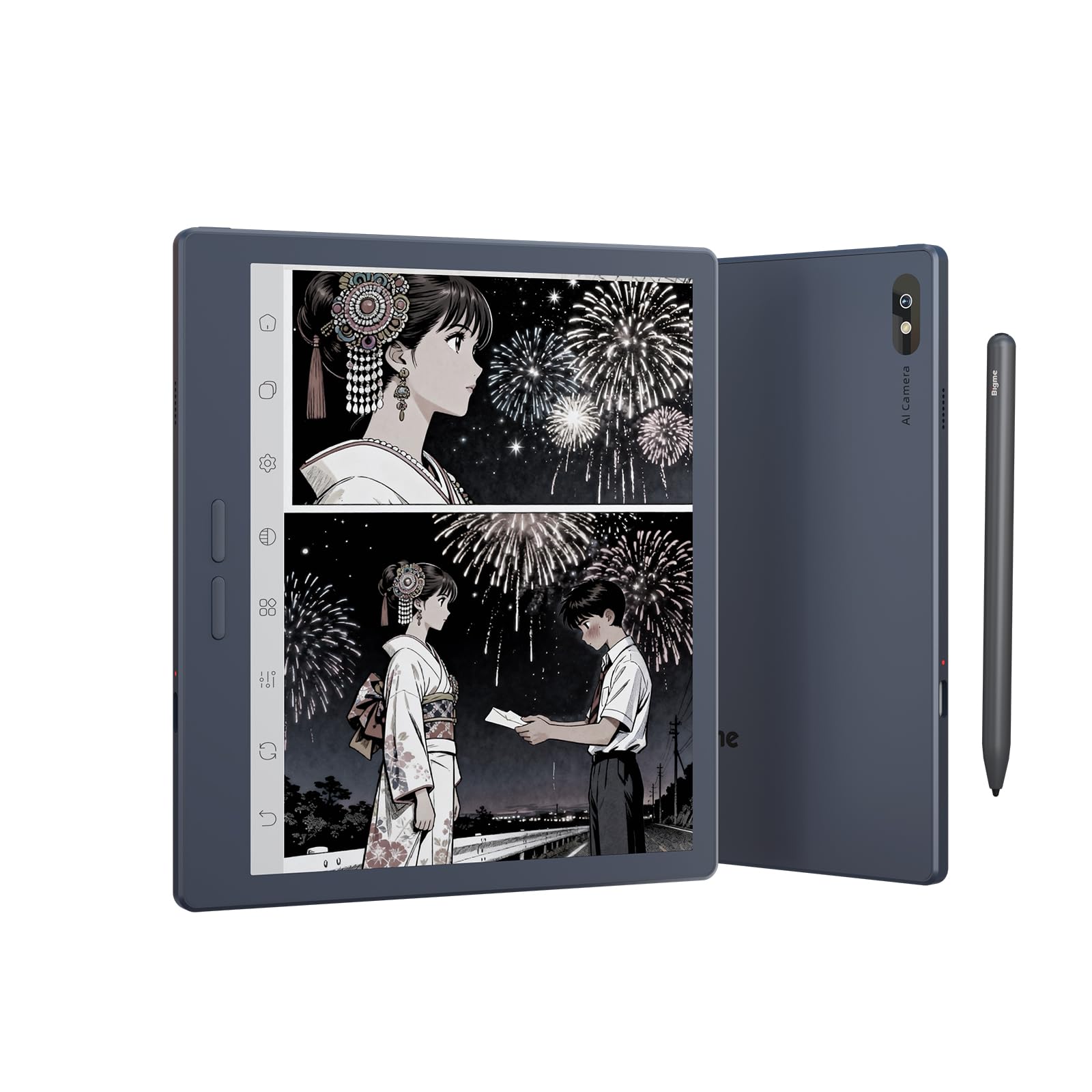
ചിത്രം 3.1: മുൻഭാഗം view of the Bigme B7 Pro Color e-Reader, showcasing യുടെ 7 ഇഞ്ച് ഡിസ്പ്ലേ.

ചിത്രം 3.2: പിൻഭാഗം view of the Bigme B7 Pro Color e-Reader, highlighting the 5MP AI camera.
3.1. ഫിസിക്കൽ ബട്ടണുകളും പോർട്ടുകളും
- പവർ ബട്ടൺ: Located on the side, press and hold to power on/off or restart.
- യുഎസ്ബി-സി പോർട്ട്: ചാർജിംഗിനും ഡാറ്റ കൈമാറ്റത്തിനും.
- സിം കാർഡ് സ്ലോട്ട്: For 4G connectivity (Nano SIM).
- മൈക്രോ എസ്ഡി കാർഡ് സ്ലോട്ട്: 2TB വരെ സംഭരണശേഷി വർദ്ധിപ്പിക്കുന്നതിന്.
4. പ്രാരംഭ സജ്ജീകരണം
4.1 ഉപകരണം ചാർജ് ചെയ്യുന്നു
Before first use, fully charge your Bigme B7 Pro using the provided USB-C cable and a compatible power adapter. The charging indicator will show the charging status.
4.2. പവർ ഓൺ/ഓഫ്
- To power on: Press and hold the Power button until the Bigme logo appears.
- പവർ ഓഫ് ചെയ്യാൻ: പവർ ബട്ടൺ അമർത്തിപ്പിടിക്കുക, തുടർന്ന് ഓപ്ഷനുകളിൽ നിന്ന് "പവർ ഓഫ്" തിരഞ്ഞെടുക്കുക.
- പുനരാരംഭിക്കാൻ: പവർ ബട്ടൺ അമർത്തിപ്പിടിക്കുക, തുടർന്ന് ഓപ്ഷനുകളിൽ നിന്ന് "പുനരാരംഭിക്കുക" തിരഞ്ഞെടുക്കുക.
4.3. പ്രാരംഭ കോൺഫിഗറേഷൻ
Follow the on-screen prompts to complete the initial setup, which typically includes:
- ഭാഷ തിരഞ്ഞെടുക്കൽ: നിങ്ങൾ തിരഞ്ഞെടുത്ത ഭാഷ തിരഞ്ഞെടുക്കുക.
- Wi-Fi കണക്ഷൻ: Connect to a Wi-Fi network to access online features and updates.
- Google അക്കൗണ്ട്: Sign in with your Google account to access the Google Play Store and other services.
- SIM Card Insertion (Optional): If using 4G connectivity, insert a Nano SIM card into the designated slot.
5. പ്രവർത്തന നിർദ്ദേശങ്ങൾ
5.1. Display and Refresh Rate
The Bigme B7 Pro features a 7-inch 300PPI E-ink Kaleido 3 color display, offering a paper-like reading experience with zero blue light and flicker-free technology. It supports an ultra-fast refresh rate (up to 43FPS) for smoother video and animation playback.

Figure 5.1: The device displaying video content, illustrating its ultra-fast refresh rate for smooth playback.
The device also includes a 36-level adjustable dual front light mode, allowing comfortable reading in various lighting conditions, day or night.
5.2. നാവിഗേഷനും ഉപയോക്തൃ ഇന്റർഫേസും
Navigate the device using its responsive touchscreen. The Android 14 operating system provides a familiar interface.
5.3. Reading eBooks
Open your preferred e-book application to access your library. The device supports multiple reading formats. Adjust font size, contrast, and other display settings for optimal reading comfort.
5.4. Note-Taking and Stylus Functionality
The included magnetic stylus enables precise note-taking, document annotation, and creative tasks. The device supports borderless handwriting, allowing you to write freely across the screen without restrictions.

Figure 5.2: The e-reader screen showing freehand drawing and notes created with the stylus, illustrating borderless handwriting.
5.5. App Usage and Connectivity
Running on Android 14, the Bigme B7 Pro allows access to the Google Play Store for downloading various third-party applications.
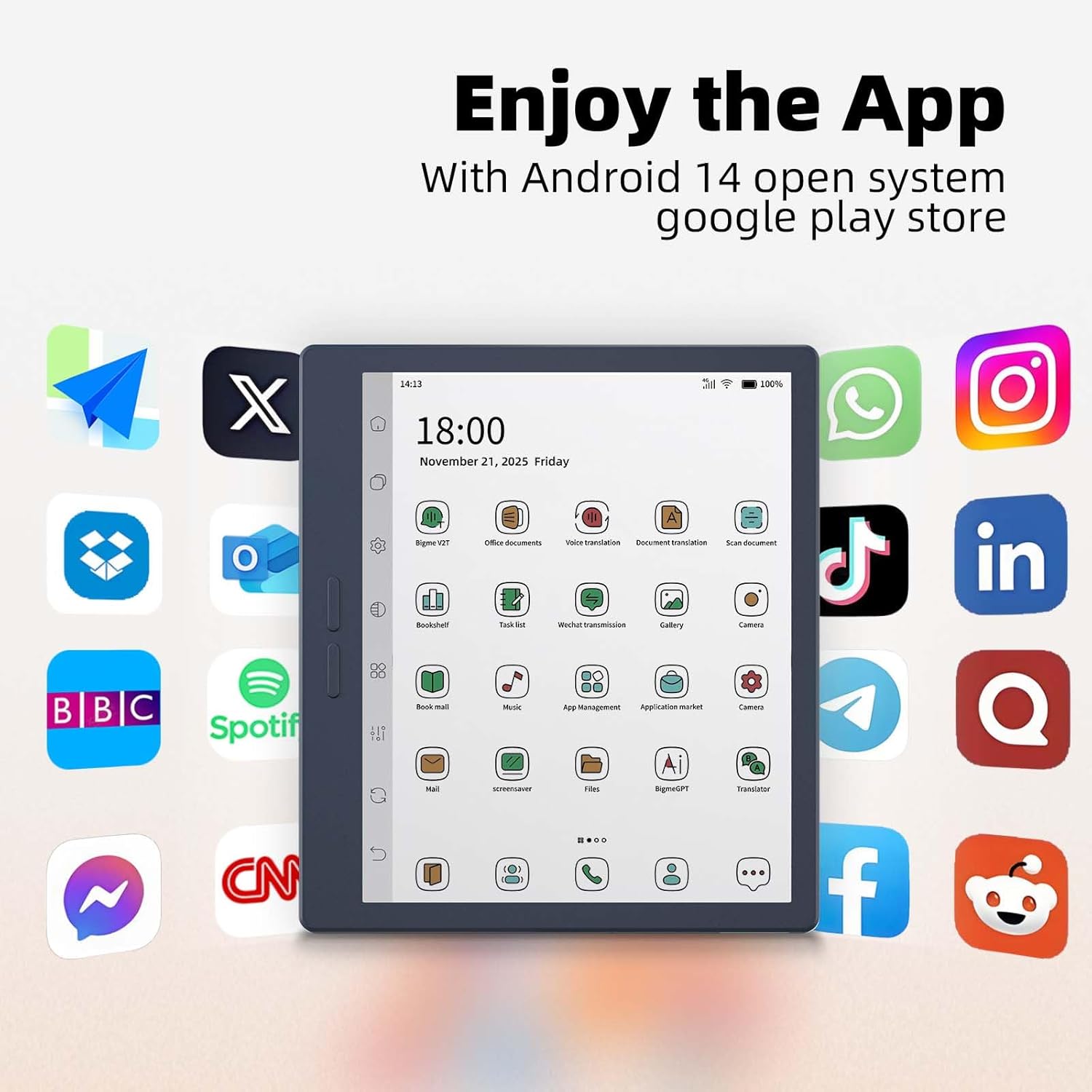
Figure 5.3: The e-reader's home screen showing a grid of popular Android application icons, indicating broad app compatibility.
The device supports Wi-Fi and Bluetooth for wireless connections. Additionally, its 4G global all-network support (Nano SIM) ensures you remain connected even without Wi-Fi.

Figure 5.4: A person using the Bigme B7 Pro for a call, demonstrating its 4G global connectivity feature.
5.6. വിപുലമായ സവിശേഷതകൾ
- 5MP പിൻ ക്യാമറ: Supports video conferencing, OCR text recognition, and document scanning.
- AI സവിശേഷതകൾ: Includes call recording to text, intelligent audiobook organization, multi-AI GPT summarization, voice translation, and Q&A.
- ഹൈ-ഫൈ സൗണ്ട് ക്വാളിറ്റി: Enhances audio experiences.
Figure 5.5: The e-reader showcasing its multifunction usage, including video conferencing, OCR text recognition, and document scanning capabilities.
5.7. പ്രകടനവും സംഭരണവും
Equipped with a MediaTek Dimensity 1080 Octa-core processor (2.6GHz), 8GB RAM, and 256GB internal storage, the device ensures smooth performance. Storage can be expanded up to 2TB via a Micro SD card (not included).

Figure 5.6: Diagram illustrating the Bigme B7 Pro's upgraded MediaTek Dimensity 1080 octa-core CPU, 8GB RAM, and 256GB ROM for enhanced performance.
6. പരിപാലനം
6.1. ഉപകരണം വൃത്തിയാക്കൽ
- സ്ക്രീനും ബോഡിയും മൃദുവായതും ലിന്റ് രഹിതവുമായ ഒരു തുണി ഉപയോഗിച്ച് മൃദുവായി തുടയ്ക്കുക.
- കഠിനമായ രാസവസ്തുക്കൾ, അബ്രസീവ് ക്ലീനറുകൾ, അല്ലെങ്കിൽ അമിതമായ ഈർപ്പം എന്നിവ ഉപയോഗിക്കുന്നത് ഒഴിവാക്കുക.
6.2. ബാറ്ററി പരിചരണം
- ഉപകരണം പതിവായി ചാർജ് ചെയ്യുക, എന്നാൽ ദീർഘനേരം പൂർണ്ണമായും ഡിസ്ചാർജ് ചെയ്യുന്നത് ഒഴിവാക്കുക.
- ഉപകരണത്തെ അങ്ങേയറ്റത്തെ താപനിലയിൽ തുറന്നുകാട്ടരുത്.
6.3. സോഫ്റ്റ്വെയർ അപ്ഡേറ്റുകൾ
Periodically check for and install software updates to ensure optimal performance and access to new features. Updates can usually be found in the device's settings menu.
6.4. സ്റ്റോറേജ് മാനേജ്മെൻ്റ്
അനാവശ്യമായവ ഇല്ലാതാക്കിക്കൊണ്ട് നിങ്ങളുടെ ഉപകരണത്തിന്റെ സംഭരണം പതിവായി കൈകാര്യം ചെയ്യുക. files or applications. Utilize the Micro SD card slot for additional storage if needed.
7. പ്രശ്നപരിഹാരം
7.1. ഉപകരണം ഓണാക്കുന്നില്ല
- Ensure the device is sufficiently charged. Connect it to a power source for at least 30 minutes.
- പവർ ബട്ടൺ 10-15 സെക്കൻഡ് അമർത്തിപ്പിടിച്ചുകൊണ്ട് നിർബന്ധിതമായി റീബൂട്ട് ചെയ്യുക.
7.2. സ്ക്രീൻ പ്രതികരിക്കുന്നില്ല
- ഉപകരണം പുനരാരംഭിക്കുക.
- സ്ക്രീൻ വൃത്തിയുള്ളതും അവശിഷ്ടങ്ങൾ ഇല്ലാത്തതുമാണെന്ന് ഉറപ്പാക്കുക.
7.3. വൈഫൈ കണക്റ്റിവിറ്റി പ്രശ്നങ്ങൾ
- Toggle Wi-Fi off and on in the settings.
- നിങ്ങളുടെ വൈഫൈ റൂട്ടർ പുനരാരംഭിക്കുക.
- നെറ്റ്വർക്ക് മറന്ന് വീണ്ടും കണക്റ്റുചെയ്യുക.
7.4. Applications Crashing or Freezing
- ആപ്ലിക്കേഷൻ അടച്ച് വീണ്ടും തുറക്കുക.
- Clear the app's cache and data in device settings.
- ആപ്ലിക്കേഷൻ അൺഇൻസ്റ്റാൾ ചെയ്ത് വീണ്ടും ഇൻസ്റ്റാൾ ചെയ്യുക.
- ഉപകരണത്തിന്റെ സോഫ്റ്റ്വെയർ കാലികമാണെന്ന് ഉറപ്പാക്കുക.
7.5. ഫാക്ടറി റീസെറ്റ്
പ്രശ്നങ്ങൾ നിലനിൽക്കുകയാണെങ്കിൽ, ഫാക്ടറി റീസെറ്റ് വഴി അവ പരിഹരിക്കപ്പെട്ടേക്കാം. മുന്നറിയിപ്പ്: This will erase all data on your device. Back up important files before proceeding. Navigate to Settings > System > Reset options > Erase all data (factory reset).
8 സ്പെസിഫിക്കേഷനുകൾ
| ബ്രാൻഡ് | ബിഗ്മെ |
| മോഡലിൻ്റെ പേര് | B7 പ്രോ |
| ഡിസ്പ്ലേ ടെക്നോളജി | Color E-Ink Kaleido 3 display |
| സ്ക്രീൻ വലിപ്പം | 7 ഇഞ്ച് |
| റെസലൂഷൻ | 300 പിപിഐ |
| പ്രോസസ്സർ | MediaTek Dimensity 1080 Octa-core (2.6GHz) |
| മെമ്മറി (റാം) | 8 ജിബി |
| സംഭരണം (ROM) | 256 ജിബി |
| വികസിപ്പിക്കാവുന്ന സംഭരണം | Up to 2TB via Micro SD card (not included) |
| ഓപ്പറേറ്റിംഗ് സിസ്റ്റം | ആൻഡ്രോയിഡ് 14 |
| കണക്റ്റിവിറ്റി ടെക്നോളജി | Bluetooth, Wi-Fi, 4G (Nano SIM) |
| ക്യാമറ | 5-megapixel Rear Camera |
| മനുഷ്യ-ഇൻ്റർഫേസ് ഇൻപുട്ട് | Touchscreen, Stylus |
| നിറം | നീല1 |
| ഉൽപ്പന്ന അളവുകൾ (L x W x Th) | 6.13"L x 5.32"W x 0.21"Th |
| ഇനത്തിൻ്റെ ഭാരം | 175 ഗ്രാം |
| ഉൾപ്പെടുത്തിയ ഘടകങ്ങൾ | Color e-reader Tablet, Smart stylus, Charging cable, User manual, Giftbox |
9. വാറൻ്റിയും പിന്തുണയും
9.1. ഉൽപ്പന്ന വാറൻ്റി
The Bigme B7 Pro Color e-Reader comes with a 1 വർഷത്തെ നിർമ്മാതാവിന്റെ വാറന്റി വാങ്ങിയ തീയതി മുതൽ. സാധാരണ ഉപയോഗത്തിലുള്ള മെറ്റീരിയലുകളിലെയും ജോലികളിലെയും വൈകല്യങ്ങൾ ഈ വാറന്റി ഉൾക്കൊള്ളുന്നു. വാറന്റി ക്ലെയിമുകൾക്കായി നിങ്ങളുടെ വാങ്ങിയതിന്റെ തെളിവ് സൂക്ഷിക്കുക.
9.2. ഉപഭോക്തൃ പിന്തുണ
Should you encounter any questions, issues, or require assistance with your Bigme B7 Pro, please contact our customer service team. We are committed to providing friendly and helpful support to resolve any problems you may experience. Refer to the contact information provided with your purchase or on the official Bigme website for support channels.