
1. ആമുഖം
വാങ്ങിയതിന് നന്ദി.asing the ThruNite T5 Rechargeable EDC Flashlight. This manual provides essential information for the safe and efficient operation, maintenance, and troubleshooting of your device. Please read it thoroughly before use and retain it for future reference.
2. പാക്കേജ് ഉള്ളടക്കം
- ThruNite T5 Flashlight
- ബിൽറ്റ്-ഇൻ ബാറ്ററി
- USB-C ചാർജിംഗ് കേബിൾ
- കീ റിംഗ്
3. ഉൽപ്പന്ന സവിശേഷതകൾ
- ഇരട്ട പ്രകാശ സ്രോതസ്സ്: Features both White LED (up to 523 lumens) and RGB LEDs (Red, Green, Blue).
- ഒന്നിലധികം മോഡുകൾ: 6 White light modes (Firefly, Low, Medium, High, Turbo, Strobe) and various RGB modes (Steady-on, Signal, SOS, Red/Blue Warning Strobe).
- 180° കറങ്ങുന്ന തല: Allows for flexible illumination angles.
- കാന്തിക അടിത്തറ: Provides hands-free operation by attaching to metal surfaces.
- സംയോജിത ക്ലിപ്പ്: For secure attachment to hat brims, pockets, or backpack straps.
- USB-C റീചാർജ് ചെയ്യാവുന്നത്: Fast charging capability, fully charged in approximately 1.4 hours.
- അൾട്രാ കോംപാക്റ്റ് ഡിസൈൻ: ഫ്ലാറ്റ് പ്രോfile for easy everyday carry.
- പരുക്കൻ നിർമ്മാണം: Crafted from aircraft-grade aluminum for durability and impact resistance.
- ലോക്കൗട്ട് മോഡ്: ആകസ്മികമായ സജീവമാക്കൽ തടയുന്നു.
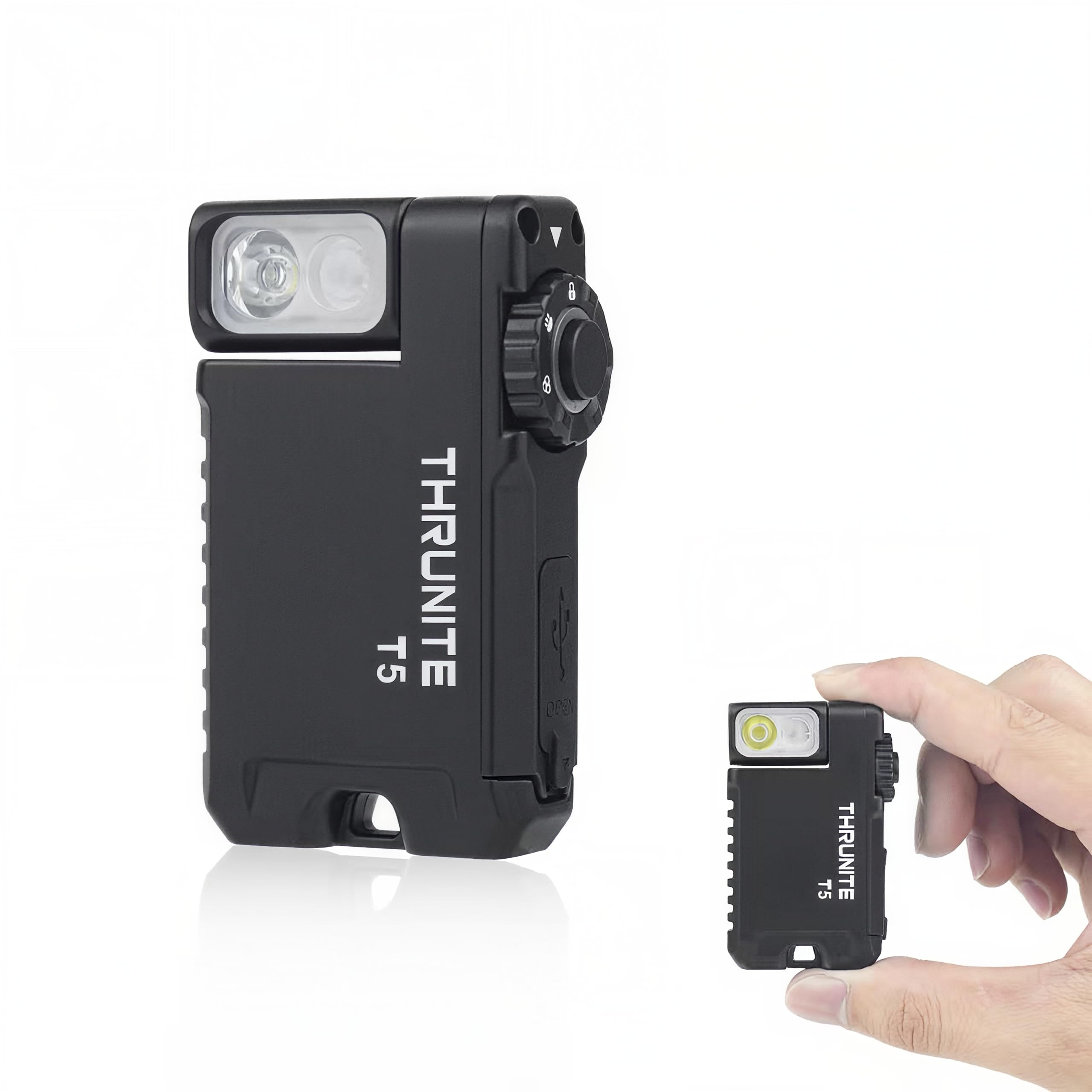
Image: ThruNite T5 Flashlight showcasing its compact size, rotating head, and magnetic base.
4. സജ്ജീകരണവും പ്രാരംഭ ചാർജും
Before first use, it is recommended to fully charge your ThruNite T5 flashlight.
- Locate the USB-C charging port on the side of the flashlight.
- Gently lift the rubber cover to expose the port.
- Connect the provided USB-C charging cable to the flashlight and a compatible USB power source (e.g., wall adapter, computer USB port).
- The indicator light will show charging status. Refer to the 'Charging' section for details.
- പൂർണ്ണമായി ചാർജ് ചെയ്തുകഴിഞ്ഞാൽ, കേബിൾ വിച്ഛേദിച്ച് റബ്ബർ കവർ സുരക്ഷിതമായി അടയ്ക്കുക, അങ്ങനെ ജല പ്രതിരോധം നിലനിർത്താൻ കഴിയും.

Image: The ThruNite T5 flashlight being charged via its USB-C port.
5. പ്രവർത്തന നിർദ്ദേശങ്ങൾ
The ThruNite T5 features a rotary switch for mode selection and a main button for activation and brightness adjustments.
5.1 Rotary Switch Functions
- ലോക്ക് സ്ഥാനം: ആകസ്മികമായ സജീവമാക്കൽ തടയുന്നു.
- White Light Position: Activates the White LED modes.
- RGB Light Position: Activates the RGB LED modes.
5.2 വൈറ്റ് ലൈറ്റ് ഓപ്പറേഷൻ
- ഓൺ/ഓഫ് ചെയ്യുക: From the White Light position, single click the main button.
- Change Brightness (Low/Med/High): With the light ON in White Light mode, press and hold the main button to cycle through Low, Medium, and High. Release to select.
- Firefly Mode: With the light OFF in White Light mode, press and hold the main button for 1 second.
- ടർബോ മോഡ്: Double click the main button from any White Light mode (including OFF).
- സ്ട്രോബ് മോഡ്: Triple click the main button from any White Light mode (including OFF).
5.3 RGB Light Operation
- ഓൺ/ഓഫ് ചെയ്യുക: From the RGB Light position, single click the main button.
- Change Color (Red/Green/Blue Steady-on): With the light ON in RGB Light mode, press and hold the main button to cycle through Red, Green, and Blue steady-on. Release to select.
- Signal Mode (Red/Green/Blue): With the light OFF in RGB Light mode, press and hold the main button for 1 second.
- Red/Blue Warning Strobe: Double click the main button from any RGB Light mode (including OFF).
- SOS Mode (Red/Green/Blue): Triple click the main button from any RGB Light mode (including OFF).
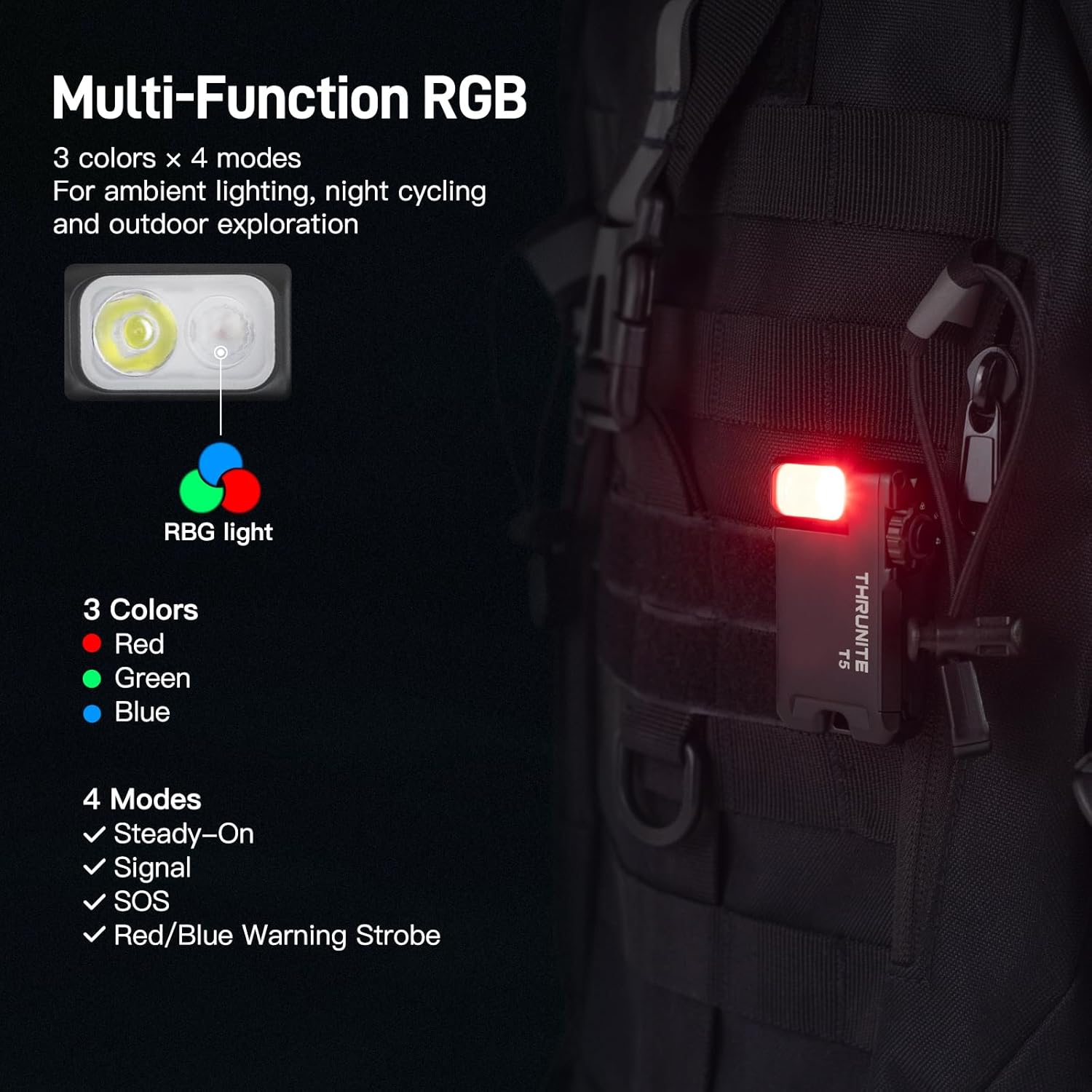
Image: The ThruNite T5 flashlight demonstrating its multi-function RGB light modes.
Video: A user demonstrating the various light modes and controls of the ThruNite T5 flashlight.
6. Magnetic Base and Rotating Head
The ThruNite T5 is designed for versatile hands-free use:
- കാന്തിക അടിത്തറ: The powerful magnetic base allows the flashlight to securely attach to any steel surface, providing stable, multi-angle illumination for tasks like car repairs or working in server rooms.
- 180° കറങ്ങുന്ന തല: The head of the flashlight can rotate 180 degrees, enabling you to direct the light precisely where needed, whether it's clipped to your hat, pocket, or a metal surface.

Image: The ThruNite T5 flashlight utilizing its magnetic base for hands-free lighting during a repair task.

Image: The 180-degree rotating head of the ThruNite T5 flashlight, demonstrating its flexibility.
7. ലോക്കൗട്ട് മോഡ്
To prevent accidental activation and preserve battery life, use the Lockout Mode:
- എന്നതിലേക്ക് സ്വിച്ച് തിരിക്കുക ലോക്ക് സ്ഥാനം (indicated by a lock icon).
- In this position, the main button will not activate the light.
- To exit Lockout Mode, rotate the switch to either the White Light or RGB Light position.
8. പരിപാലനം
Proper maintenance ensures the longevity and optimal performance of your ThruNite T5 flashlight:
- വൃത്തിയാക്കൽ: Wipe the flashlight with a clean, soft cloth. Avoid using harsh chemicals or abrasive materials.
- ജല പ്രതിരോധം: Ensure the USB-C port cover is securely closed to maintain its waterproof rating. Do not submerge the flashlight if the cover is open.
- സംഭരണം: നേരിട്ടുള്ള സൂര്യപ്രകാശത്തിൽ നിന്നും തീവ്രമായ താപനിലയിൽ നിന്നും അകലെ തണുത്തതും വരണ്ടതുമായ സ്ഥലത്ത് ഫ്ലാഷ്ലൈറ്റ് സൂക്ഷിക്കുക.
- ബാറ്ററി കെയർ: For long-term storage, charge the battery to approximately 50% every few months to prevent deep discharge.
9. പ്രശ്നപരിഹാരം
If you encounter issues with your ThruNite T5, try the following steps:
- ലൈറ്റ് ഓണാക്കുന്നില്ല:
- Check if the rotary switch is in the ലോക്ക് സ്ഥാനം. Rotate it to White Light or RGB Light.
- Ensure the battery is charged. Connect the flashlight to a power source using the USB-C cable.
- ഇടയ്ക്കിടെയുള്ള പ്രവർത്തനം:
- ബാറ്ററി പൂർണ്ണമായി ചാർജ് ചെയ്തിട്ടുണ്ടെന്ന് ഉറപ്പാക്കുക.
- Check for any debris or obstruction around the main button or rotary switch.
- ചാർജിംഗ് പ്രശ്നങ്ങൾ:
- Verify the USB-C cable is properly connected to both the flashlight and the power source.
- മറ്റൊരു USB-C കേബിളോ പവർ അഡാപ്റ്ററോ പരീക്ഷിച്ചുനോക്കൂ.
If problems persist, please contact ThruNite customer support.
10 സ്പെസിഫിക്കേഷനുകൾ
| ഫീച്ചർ | വിശദാംശങ്ങൾ |
|---|---|
| വെളുത്ത തെളിച്ചം | 523 Lumens വരെ |
| പ്രകാശ സ്രോതസ്സ് തരം | LED (White & RGB) |
| പവർ ഉറവിടം | ബാറ്ററിയിൽ പ്രവർത്തിക്കുന്ന (ലിഥിയം പോളിമർ) |
| ബാറ്ററി തരം | 1 നിലവാരമില്ലാത്ത ബാറ്ററി (ഉൾപ്പെടുത്തിയിരിക്കുന്നു) |
| പ്രവർത്തനസമയം | 188 മണിക്കൂർ വരെ |
| മെറ്റീരിയൽ | എയർക്രാഫ്റ്റ്-ഗ്രേഡ് അലൂമിനിയം |
| ജല പ്രതിരോധ നില | Waterproof (IPX-6) |
| ഇനത്തിൻ്റെ ഭാരം | 2.24 ഔൺസ് (65 ഗ്രാം) |
| ഇനത്തിന്റെ അളവുകൾ (L x W x H) | 2.44" x 1.53" x 0.71" (62mm x 39mm x 18mm) |
| പ്രത്യേക സവിശേഷതകൾ | Adjustable Light Modes, Keychain, Lightweight, Magnetic Base, Rechargeable, 180° Rotating Head |
11. വാറൻ്റിയും പിന്തുണയും
ThruNite stands behind the quality of its products.
- വാറൻ്റി: The ThruNite T5 comes with an industry-leading 2-year replacement service.
- ഉപഭോക്തൃ പിന്തുണ: For any questions, concerns, or warranty claims, please contact ThruNite customer service through their official webഉൽപ്പന്നം വാങ്ങിയ സൈറ്റ് അല്ലെങ്കിൽ റീട്ടെയിലർ.