
1. ആമുഖം
The Reboot RB360 Series is a versatile 7-in-1 multi-function welding and plasma cutting machine designed for various applications, from DIY projects to professional workshop use. It supports multiple processes including MIG (Gas/Gasless), MMA (Stick), TIG Lift, Plasma Cutting, Spot Welding, and Aluminum Welding. This manual provides essential information for safe operation, setup, maintenance, and troubleshooting.
2 സുരക്ഷാ വിവരങ്ങൾ
WARNING: Welding and plasma cutting can be dangerous. Always follow safety precautions to prevent injury or death.
- വെൽഡിംഗ് ഹെൽമെറ്റ്, കയ്യുറകൾ, സംരക്ഷണ വസ്ത്രങ്ങൾ എന്നിവയുൾപ്പെടെ ഉചിതമായ വ്യക്തിഗത സംരക്ഷണ ഉപകരണങ്ങൾ (പിപിഇ) എപ്പോഴും ധരിക്കുക.
- പുക ശ്വസിക്കുന്നത് ഒഴിവാക്കാൻ ശരിയായ വായുസഞ്ചാരം ഉറപ്പാക്കുക.
- Never operate the machine in wet conditions or near flammable materials.
- Ensure the workpiece is properly grounded.
- ഏതെങ്കിലും അറ്റകുറ്റപ്പണികൾ നടത്തുന്നതിനോ ആക്സസറികൾ മാറ്റുന്നതിനോ മുമ്പ് വൈദ്യുതി വിച്ഛേദിക്കുക.
- കുട്ടികളെയും അനധികൃത വ്യക്തികളെയും പ്രവർത്തന മേഖലയിൽ നിന്ന് അകറ്റി നിർത്തുക.
3. പാക്കേജ് ഉള്ളടക്കം
അൺപാക്ക് ചെയ്യുമ്പോൾ, താഴെ ലിസ്റ്റ് ചെയ്തിരിക്കുന്ന എല്ലാ ഇനങ്ങളും ഉണ്ടെന്നും കേടുപാടുകൾ സംഭവിച്ചിട്ടില്ലെന്നും ഉറപ്പാക്കുക:
- Reboot RB360 Multi-functional Machine x 1
- ഗ്രൗണ്ട് Clamp (6.5ft) x 1
- Electrode Holder (6.5ft) x 1
- Welding Rod x 10
- Gas Hose x 1
- ഉപയോക്തൃ മാനുവൽ x 1
- Air Adapter/Rubber Gasket x 1
- Non-HF Cutting Gun (13.1ft) x 1
- Insulation Ring x 1
- Electrodes x 2
- നോസിലുകൾ x 2
- റെഞ്ച് x 1

Image: All components included in the Reboot RB360 package.
4. ഉൽപ്പന്നം കഴിഞ്ഞുview
The Reboot RB360 is a compact and powerful multi-process machine. It features a user-friendly control panel and supports dual voltage (120V/240V) operation.

Image: The Reboot RB360 machine highlighting its 7-in-1 capabilities.
നിയന്ത്രണ പാനൽ ആമുഖം

Image: Labeled diagram of the RB360 control panel.
- നിലവിലെ ഡിസ്പ്ലേ: Shows the welding/cutting current.
- വാല്യംtage / Parameter Display: വോളിയം കാണിക്കുന്നുtage or other selected parameters.
- മോഡ് സ്വിച്ചിംഗ്: Select between MIG, MMA, TIG Lift, and Plasma Cut modes.
- Welding Wire Diameter Selection: For MIG mode, select appropriate wire diameter.
- Gas Selector: Choose gas type for MIG/TIG.
- ഫംഗ്ഷൻ തിരഞ്ഞെടുക്കൽ: Additional function settings.
- നിലവിലെ നിയന്ത്രണം: Adjust welding/cutting current.
- വാല്യംtagഇ നിയന്ത്രണം: വെൽഡിംഗ് വോള്യം ക്രമീകരിക്കുകtage.
- Overheat Alert: Indicator for overheating.
- MMA Settings: Specific settings for MMA mode.
- Synergic / Manual MIG: Switch between synergic (automatic) and manual MIG settings.
5. സജ്ജീകരണം
പൊതുവായ കണക്ഷനുകൾ
- പവർ കണക്ഷൻ: Connect the machine to a suitable 120V or 240V power outlet. The machine automatically detects the voltage.
- ഗ്രൗണ്ട് Clamp: Always connect the ground clamp വർക്ക്പീസിലേക്ക് സുരക്ഷിതമായി ഉറപ്പിക്കുക.
- Air Compressor (for Plasma Cutting): Connect an air compressor to the machine's air inlet. Ensure the air pressure is set to approximately 60 PSI for optimal cutting performance.
- Gas Cylinder (for MIG/TIG): For MIG (Gas) and TIG welding, connect the appropriate gas cylinder (e.g., Argon for TIG, mixed gas for MIG) to the machine via the gas hose.

Image: Function Introduction - Connection points on the RB360.
6. പ്രവർത്തന നിർദ്ദേശങ്ങൾ
The RB360 offers multiple welding and cutting processes. Select the desired mode using the control panel.
6.1. എംഎംഎ (സ്റ്റിക്ക്) വെൽഡിംഗ്
This mode is suitable for various metals and outdoor use due to its wind resistance. It features Hot Start for easy ignition, Arc Force for a stable arc, and Anti-Stick to prevent electrode sticking.
- ഗ്രൗണ്ട് cl കണക്ട് ചെയ്യുകamp to the negative terminal and the electrode holder to the positive terminal.
- Select MMA mode on the control panel.
- Adjust the current (e.g., 100A for 2.5mm electrode, 130A for 3.2mm electrode).
- Maintain a consistent speed and pressure during welding.
Video: Demonstration of MMA (Stick) welding with the Reboot RB360.

Image: Stick welding in progress using the RB360.
6.2. TIG Lift Welding
For precise welding, especially on stainless steel. Requires pure Argon gas and a TIG torch (optional accessory).
- ഗ്രൗണ്ട് cl കണക്ട് ചെയ്യുകamp to the positive terminal and the TIG torch to the negative terminal.
- Connect the pure Argon gas cylinder to the machine.
- Select TIG Lift mode and adjust the current (e.g., 120A for 5mm stainless steel).
- Use a stainless steel filler wire (e.g., 2.0mm).
Video: Demonstration of TIG Lift welding with the Reboot RB360.

Image: TIG Lift welding in progress using the RB360.
6.3. MIG Welding (Gas/Gasless)
The RB360 supports both gas MIG and flux-cored (gasless) MIG welding. It offers both synergic and manual modes for flexibility.
- ഗ്രൗണ്ട് cl കണക്ട് ചെയ്യുകamp to the negative terminal and the MIG torch to the positive terminal.
- For gas MIG, connect a mixed gas or CO2 cylinder. For gasless MIG, no gas connection is needed.
- Install the appropriate welding wire (e.g., 1.0mm solid wire for gas MIG).
- Select MIG mode and choose between Synergic (SYN) or Manual (NON SYN) operation.
- Adjust current and voltage as needed (e.g., 100A, 17.6V for 3mm plate).
Video: Demonstration of MIG welding with the Reboot RB360.

Image: Synergic MIG and Manual MIG operation with the RB360.
6.4. Plasma Cutting
The low-frequency plasma torch provides clean and smooth cuts on various metals up to 16mm thickness.
- ഗ്രൗണ്ട് cl കണക്ട് ചെയ്യുകamp to the positive terminal and the plasma cutting torch to the negative terminal.
- Ensure the air compressor is connected and providing 60 PSI pressure.
- Select Plasma Cut mode and adjust the current (e.g., 30A for 16mm carbon steel).
- Move the torch steadily across the material for a clean cut.
Video: Demonstration of Plasma Cutting with the Reboot RB360.

Image: Plasma cutting in action, demonstrating the RB360's cutting capacity.
6.5. Aluminum Welding
Achieve clean and quality aluminum welds with an optional spool gun (sold separately).
- Connect the spool gun to the machine.
- Select the appropriate mode and settings for aluminum welding.
- Use suitable aluminum welding wire.
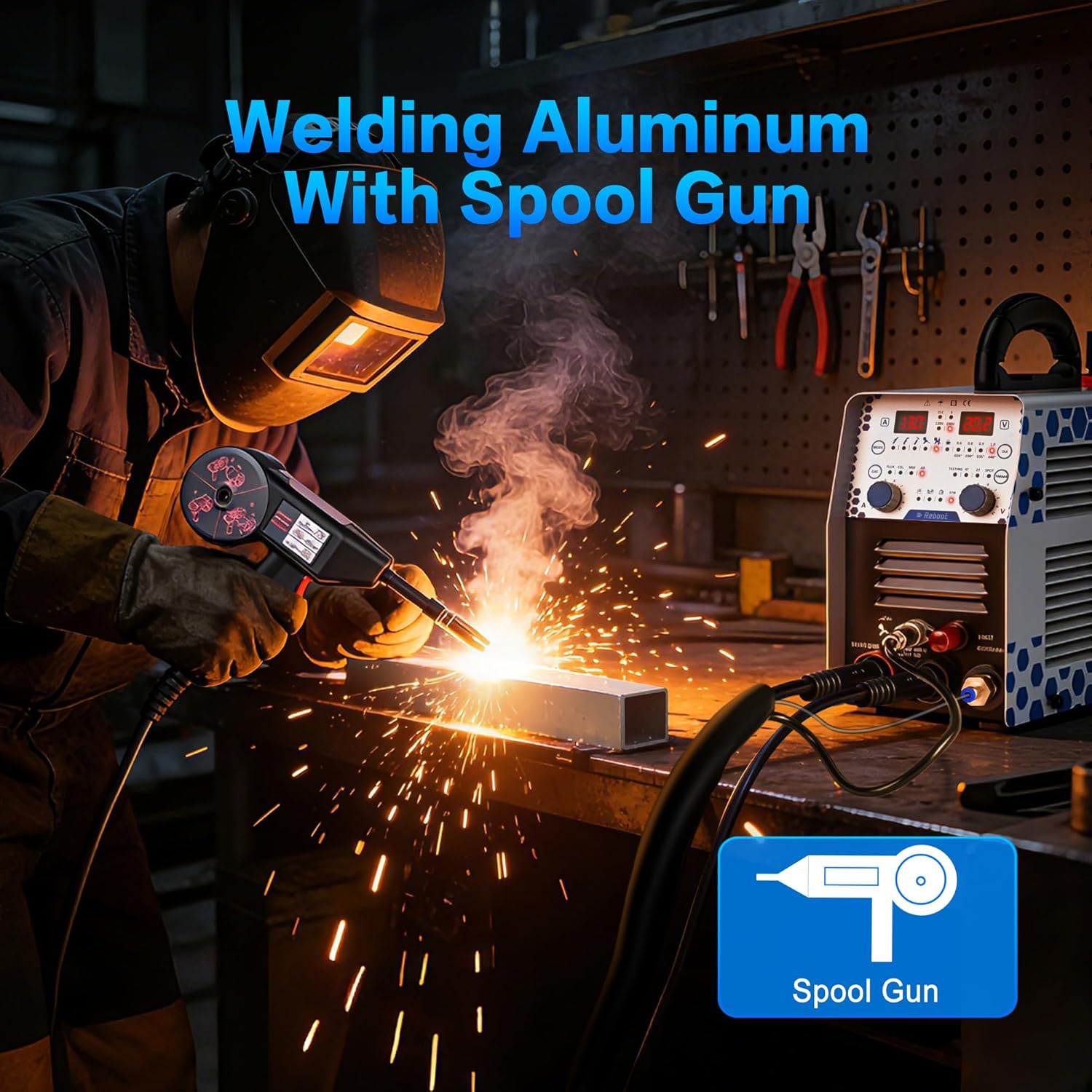
Image: Aluminum welding using the RB360 with an optional spool gun.
6.6. Spot Welding
The spot welding function helps prevent perforation on thin sheet metal, ideal for bodywork and assembly.
- Select the spot welding mode on the control panel.
- Adjust parameters for the specific material thickness.
7. പരിപാലനം
Regular maintenance ensures the longevity and optimal performance of your RB360 machine.
- വൃത്തിയാക്കൽ: Regularly clean the machine's exterior and ventilation openings to prevent dust and debris buildup. Use a soft, dry cloth.
- കേബിളുകളും കണക്ഷനുകളും പരിശോധിക്കുക: Inspect all cables, torches, and connections for wear, damage, or loose fittings before each use. Replace any damaged components immediately.
- ഉപഭോഗവസ്തുക്കൾ: Regularly check and replace plasma torch nozzles, electrodes, and contact tips as they wear out to maintain optimal performance.
- Air Filter (for Plasma): If applicable, clean or replace the air filter on the compressor or machine to ensure clean air supply for plasma cutting.
8. പ്രശ്നപരിഹാരം
This section addresses common issues you might encounter with your RB360 machine.
| പ്രശ്നം | സാധ്യമായ കാരണം | പരിഹാരം |
|---|---|---|
| ശക്തിയില്ല | Loose power cable, tripped circuit breaker, faulty power outlet. | Check power connections, reset circuit breaker, try a different outlet. |
| ആർക്ക് ഇല്ല/മോശം ആർക്ക് സ്ഥിരത | Improper grounding, incorrect settings, worn consumables, faulty torch. | Ensure proper ground connection, verify settings (current, voltage, gas), replace worn electrodes/nozzles, inspect torch. |
| Overheat alert (red light) | Prolonged use, insufficient ventilation, blocked air vents. | Allow machine to cool down, ensure adequate ventilation, clear any blocked air vents. The machine has an auto-break reminder after 40 minutes of continuous use. |
| Poor cut quality (Plasma) | Incorrect air pressure, worn plasma consumables, too fast/slow travel speed. | Adjust air pressure to 60 PSI, replace nozzle/electrode, adjust cutting speed. |

Image: Human-centered design with an auto-break reminder on the RB360.
9 സ്പെസിഫിക്കേഷനുകൾ
| ഫീച്ചർ | വിശദാംശങ്ങൾ |
|---|---|
| നിർമ്മാതാവ് | Reboot-EU |
| പാക്കേജ് അളവുകൾ | 50 x 36 x 30 സെ.മീ; 9.1 കിലോഗ്രാം |
| മോഡൽ നമ്പർ | PT-40 (RB360 Series) |
| പവർ സോഴ്സ് തരം | എസി/ഡിസി |
| വാല്യംtage | 120V/240V (ഡ്യുവൽ വോളിയംtage) |
| Plasma Cutting Capacity | Up to 16 mm (30A) |
| MMA വെൽഡിംഗ് കറന്റ് | 130എ |
| ബാറ്ററികൾ ആവശ്യമാണ് | ഇല്ല |
10. വാറൻ്റിയും പിന്തുണയും
Reboot is committed to providing reliable support for its products. For any issues or spare parts, please contact customer service.
- ഉപഭോക്തൃ പിന്തുണ: Fast assistance is available for any problems or questions.
- യന്ത്രഭാഗങ്ങൾ: Over 50 common original accessories (such as nozzles and electrodes) are available to ensure the continuity of your projects.
കൂടുതൽ സഹായത്തിന്, ദയവായി സന്ദർശിക്കുക Reboot Brand Store അല്ലെങ്കിൽ നിങ്ങളുടെ റീട്ടെയിലറെ ബന്ധപ്പെടുക.