
1. ആമുഖം
Thank you for choosing the GOBOULT Tenet TWS Earbuds. This manual provides essential information to help you set up, operate, and maintain your earbuds for an optimal audio experience. Please read this manual thoroughly before use and retain it for future reference.
ബോക്സിൽ എന്താണുള്ളത്
- GOBOULT Tenet TWS Earbuds (Left and Right)
- ചാർജിംഗ് കേസ്
- യുഎസ്ബി ടൈപ്പ്-സി ചാർജിംഗ് കേബിൾ
- ഇയർ കുഷ്യനുകൾ (വിവിധ വലുപ്പങ്ങൾ)
- ഉപയോക്തൃ മാനുവൽ
- വാറൻ്റി കാർഡ്
2. ഉൽപ്പന്നം കഴിഞ്ഞുview
Familiarize yourself with the components of your GOBOULT Tenet TWS Earbuds and charging case.
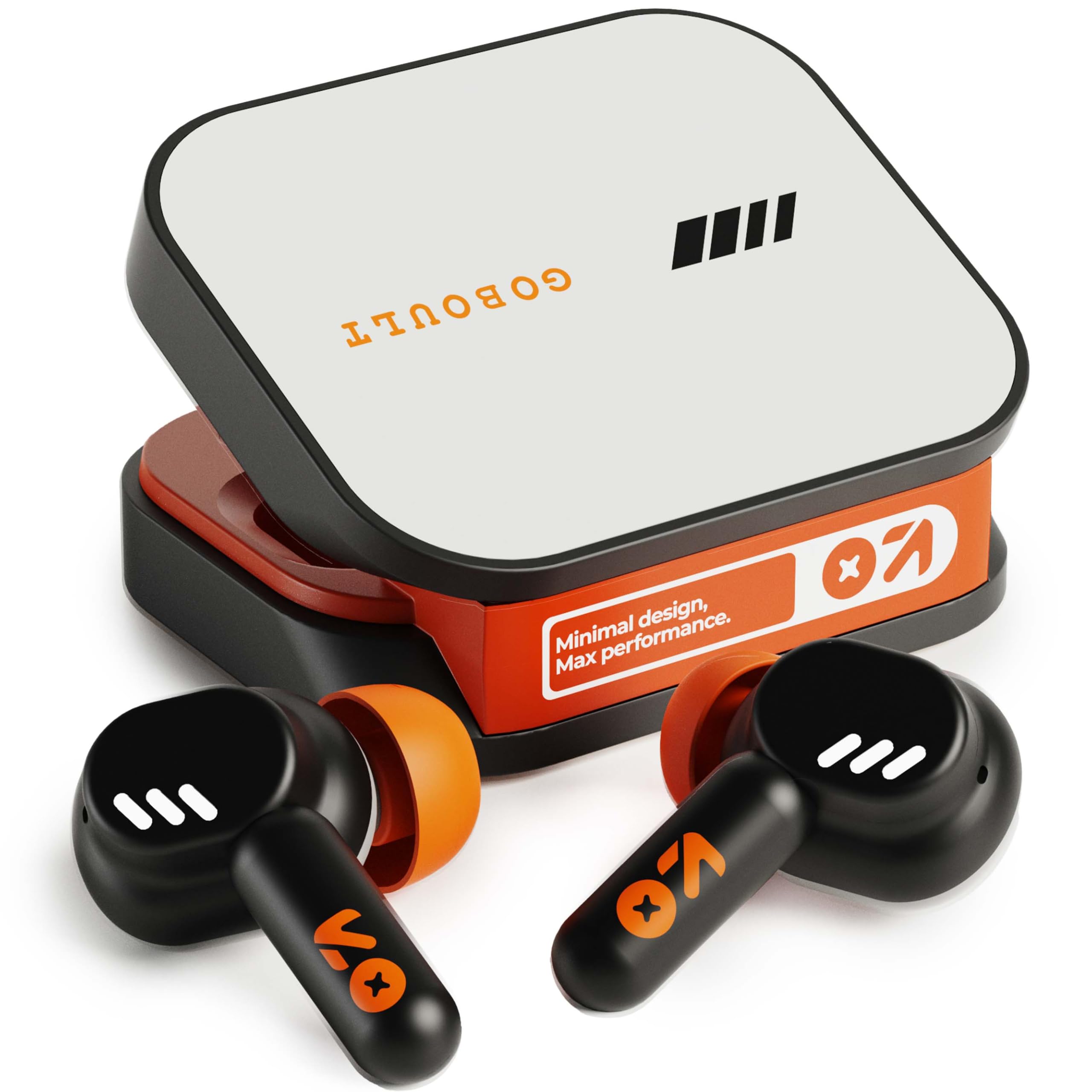
Image: GOBOULT Tenet TWS Earbuds in their charging case, showcasing the Turbo Orange color variant.

ചിത്രം: വിവിധം views of the GOBOULT Tenet charging case, highlighting its minimal design and Type-C charging port.
പ്രധാന സവിശേഷതകൾ
- 75 മണിക്കൂർ ആകെ കളിസമയം: ദീർഘനേരം ഉപയോഗിക്കുന്നതിനായി ബാറ്ററി ലൈഫ് വർദ്ധിപ്പിച്ചു.
- ഫാസ്റ്റ് ചാർജിംഗ്: 10 minutes of charge provides up to 120 minutes of playtime.
- Amp ആപ്പ് പിന്തുണ: Customize EQ settings and controls via the dedicated application.
- ക്വാഡ് മൈക്ക് ഇഎൻസി: വ്യക്തമായ കോളുകൾക്ക് പാരിസ്ഥിതിക ശബ്ദ റദ്ദാക്കൽ.
- 13 എംഎം ഡൈനാമിക് ഡ്രൈവറുകൾ: Delivers deep bass and balanced audio.
- ഇരട്ട ഉപകരണ കണക്റ്റിവിറ്റി: ജോടിയാക്കിയ രണ്ട് ഉപകരണങ്ങൾക്കിടയിൽ സുഗമമായി മാറുക.
- ബ്ലൂടൂത്ത് 5.4: Stable connection with low latency.
- IPX5 വാട്ടർ റെസിസ്റ്റൻ്റ്: Splash and sweat-ready design.
3. സജ്ജീകരണം
3.1 ഇയർബഡുകളും കേസും ചാർജ് ചെയ്യുന്നു
ആദ്യമായി ഉപയോഗിക്കുന്നതിന് മുമ്പ്, ഇയർബഡുകളും ചാർജിംഗ് കേസും പൂർണ്ണമായും ചാർജ് ചെയ്യുക.
- ഇയർബഡുകൾ ചാർജിംഗ് കേസിൽ വയ്ക്കുക. അവ ശരിയായി സ്ഥാപിച്ചിട്ടുണ്ടെന്ന് ഉറപ്പാക്കുക.
- Connect the USB Type-C charging cable to the charging port on the case and plug the other end into a power source.
- The LED indicator on the case will show charging status. Once fully charged, the indicator will change or turn off depending on the model.
ഫാസ്റ്റ് ചാർജിംഗ്: A 10-minute charge provides approximately 120 minutes of playtime.

Image: The GOBOULT Tenet earbuds in their charging case, connected via a Type-C cable, illustrating the charging process and fast charging capability.
3.2 ഒരു ഉപകരണവുമായി ജോടിയാക്കൽ
For first-time use, follow these steps to pair your earbuds with your device.
- ചാർജിംഗ് കേസ് തുറക്കുക. ഇയർബഡുകൾ സ്വയമേവ ഓണാകുകയും ജോടിയാക്കൽ മോഡിലേക്ക് പ്രവേശിക്കുകയും ചെയ്യും.
- നിങ്ങളുടെ ഉപകരണത്തിൽ (സ്മാർട്ട്ഫോൺ, ടാബ്ലെറ്റ്, ലാപ്ടോപ്പ്), ബ്ലൂടൂത്ത് പ്രവർത്തനക്ഷമമാക്കുക.
- ഇതിനായി തിരയുക available Bluetooth devices and select "GOBOULT Tenet" from the list.
- കണക്റ്റുചെയ്തുകഴിഞ്ഞാൽ, ഒരു വോയ്സ് പ്രോംപ്റ്റ് വിജയകരമായ ജോടിയാക്കൽ സ്ഥിരീകരിക്കും.
ഇരട്ട ഉപകരണ കണക്റ്റിവിറ്റി: The earbuds support simultaneous connection to two devices. After pairing with the first device, disable Bluetooth on it. Pair with the second device. Then, re-enable Bluetooth on the first device. The earbuds should now be connected to both, allowing seamless switching.

Image: The GOBOULT Tenet earbuds and case positioned between a smartphone and a laptop, illustrating the dual device connectivity feature.
4. പ്രവർത്തന നിർദ്ദേശങ്ങൾ
4.1 പവർ ഓൺ/ഓഫ്
- പവർ ഓൺ: Open the charging case, or long-press the touch area on both earbuds for 3 seconds.
- പവർ ഓഫ്: Place the earbuds back into the charging case and close the lid, or long-press the touch area on both earbuds for 5 seconds.
4.2 ടച്ച് നിയന്ത്രണങ്ങൾ
The GOBOULT Tenet earbuds feature intuitive touch controls for various functions.

Image: A close-up of an earbud in an ear, detailing the touch control functions for music, calls, and activation of AI assistance.
| ഫംഗ്ഷൻ | ആക്ഷൻ |
|---|---|
| സംഗീതം പ്ലേ ചെയ്യുക/താൽക്കാലികമായി നിർത്തുക | ഏതെങ്കിലും ഇയർബഡിൽ ഒറ്റ ടാപ്പ് ചെയ്യുക |
| അടുത്ത ട്രാക്ക് | വലതുവശത്തെ ഇയർബഡിൽ രണ്ടുതവണ ടാപ്പ് ചെയ്യുക |
| മുമ്പത്തെ ട്രാക്ക് | ഇടതുവശത്തെ ഇയർബഡിൽ രണ്ടുതവണ ടാപ്പ് ചെയ്യുക |
| ഉത്തരം / കോൾ അവസാനിപ്പിക്കുക | ഏതെങ്കിലും ഇയർബഡിൽ ഒറ്റ ടാപ്പ് ചെയ്യുക |
| കോൾ നിരസിക്കുക | ഇയർബഡുകളിൽ ഏതെങ്കിലുമൊന്നിൽ 2 സെക്കൻഡ് ദീർഘനേരം അമർത്തിപ്പിടിക്കുക |
| വോയ്സ് അസിസ്റ്റന്റ് (സിരി/ഗൂഗിൾ അസിസ്റ്റന്റ്) സജീവമാക്കുക | ഇയർബഡുകളിലൊന്നിൽ മൂന്ന് തവണ ടാപ്പ് ചെയ്യുക |
| Toggle Gaming Mode (Combat Mode) | Quadruple tap on either earbud |
4.3 GOBOULT Amp ആപ്പ് പിന്തുണ
Enhance your listening experience by downloading the GOBOULT Amp App. The app allows for personalized audio settings and controls.
- Custom EQ Modes: Adjust audio frequencies to your preference.
- Rename Earbuds: Personalize the Bluetooth name of your earbuds.
- Tailored Widgets: Access quick controls and information.
- വെള്ളം പുറന്തള്ളൽ: Utilize this feature to clear water from the earbuds after exposure.

Image: A smartphone displaying the GOBOULT Amp App interface with equalizer settings, alongside the earbuds, demonstrating app customization.
4.4 ഇയർബഡുകൾ ധരിക്കൽ
ഒപ്റ്റിമൽ ശബ്ദ നിലവാരത്തിനും സുഖത്തിനും, ശരിയായ ഫിറ്റ് ഉറപ്പാക്കുക.
- Select the ear tips that best fit your ear canal. Experiment with different sizes for the best seal.
- Gently insert the earbud into your ear, then twist it slightly to secure a snug fit. The "Vacuum Lock Earshell" design is engineered for an air-tight seal.

Image: Diagrams and an illustration showing the proper way to wear the GOBOULT Tenet earbuds for a secure and comfortable fit, highlighting the Vacuum Lock Earshell technology.
4.5 Combat Gaming Mode (Low Latency)
Activate Combat Gaming Mode for a low-latency audio experience, ideal for gaming.
- സജീവമാക്കൽ: ഏതെങ്കിലും ഇയർബഡിൽ നാലിരട്ടി ടാപ്പ് ചെയ്യുക.
- This mode reduces audio delay to approximately 45ms, providing synchronized sound with on-screen action.
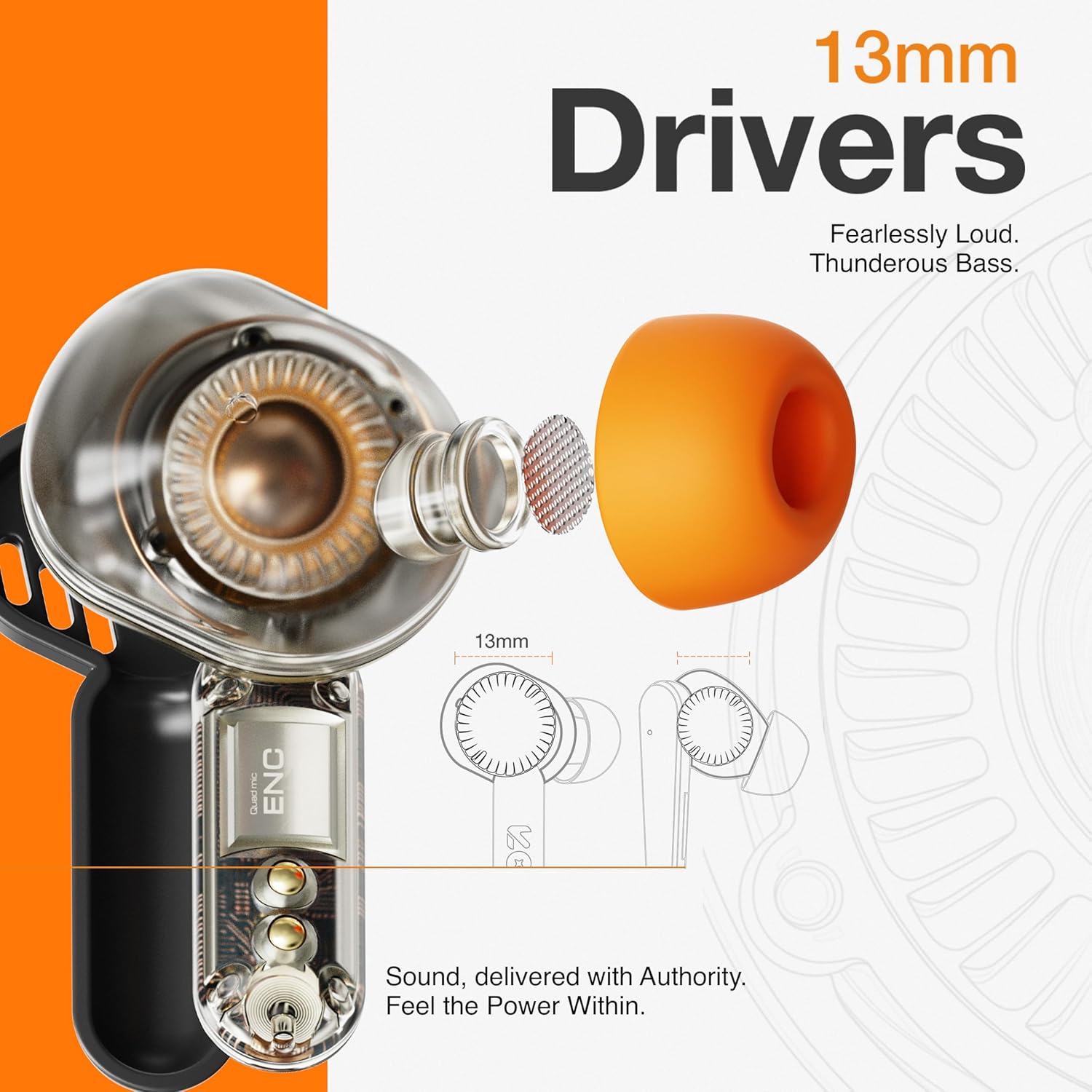
Image: The GOBOULT Tenet earbuds and charging case next to a smartphone and game controller, illustrating Bluetooth 5.4 connectivity and the 45ms ultra-low latency Combat Gaming Mode.
5. പരിപാലനം
5.1 വൃത്തിയാക്കൽ
പതിവായി വൃത്തിയാക്കുന്നത് ശബ്ദ നിലവാരവും ശുചിത്വവും നിലനിർത്താൻ സഹായിക്കുന്നു.
- ഇയർബഡുകളും ചാർജിംഗ് കെയ്സും തുടയ്ക്കാൻ മൃദുവായതും ഉണങ്ങിയതും ലിന്റ് രഹിതവുമായ ഒരു തുണി ഉപയോഗിക്കുക.
- ചെവിയുടെ അറ്റം നീക്കം ചെയ്ത് നേരിയ സോപ്പും വെള്ളവും ഉപയോഗിച്ച് വൃത്തിയാക്കുക, തുടർന്ന് വീണ്ടും ഘടിപ്പിക്കുന്നതിന് മുമ്പ് നന്നായി ഉണക്കുക.
- Use a cotton swab or a small, soft brush to gently clean the speaker mesh and charging contacts.
- ഉരച്ചിലുകൾ ഉള്ള വസ്തുക്കൾ, മദ്യം, കെമിക്കൽ ക്ലീനറുകൾ എന്നിവ ഉപയോഗിക്കുന്നത് ഒഴിവാക്കുക.
5.2 സംഭരണം
ഉപയോഗത്തിലില്ലാത്തപ്പോൾ, ഇയർബഡുകൾ സംരക്ഷിക്കുന്നതിനും ചാർജ്ജ് ചെയ്ത നിലയിൽ നിലനിർത്തുന്നതിനും അവ ചാർജിംഗ് കേസിൽ സൂക്ഷിക്കുക.
- തീവ്രമായ താപനിലയിൽ നിന്നും നേരിട്ടുള്ള സൂര്യപ്രകാശത്തിൽ നിന്നും അകന്ന്, തണുത്തതും വരണ്ടതുമായ സ്ഥലത്ത് സൂക്ഷിക്കുക.
5.3 ജല പ്രതിരോധം
The GOBOULT Tenet earbuds are IPX5 water resistant, meaning they are protected against low-pressure water jets from any direction. This makes them suitable for workouts and light rain.
- ഇയർബഡുകൾ വെള്ളത്തിൽ മുക്കരുത്.
- ചാർജിംഗ് കേസ് ജലത്തെ പ്രതിരോധിക്കുന്നില്ല.
- If earbuds get wet, dry them thoroughly before placing them back in the charging case.
6. പ്രശ്നപരിഹാരം
If you encounter issues with your earbuds, refer to the following common solutions.
| പ്രശ്നം | പരിഹാരം |
|---|---|
| ഇയർബഡുകൾ ജോടിയാക്കുന്നില്ല | Ensure earbuds are charged. Turn off and on Bluetooth on your device. Forget "GOBOULT Tenet" from your device's Bluetooth list and re-pair. |
| ഒരു ഇയർബഡ് മാത്രമേ പ്രവർത്തിക്കൂ | Place both earbuds back in the case, close the lid, then open again. Ensure both earbuds are charged. Perform a factory reset if the issue persists. |
| കുറഞ്ഞ ശബ്ദം അല്ലെങ്കിൽ മോശം ശബ്ദ നിലവാരം | Adjust volume on both earbuds and your connected device. Ensure ear tips provide a snug fit. Clean earbud speaker meshes. Check EQ settings in the Amp ആപ്പ്. |
| ഇയർബഡുകൾ ചാർജ് ചെയ്യുന്നില്ല | Ensure charging cable is securely connected. Check if the charging port is clean. Verify the power source is working. Ensure earbuds are correctly seated in the case. |
| കണക്റ്റിവിറ്റി ഇടയ്ക്കിടെ കുറയുന്നു | Ensure your device is within the 10-meter Bluetooth range. Avoid obstacles between earbuds and device. Disconnect from other Bluetooth devices. |
6.1 ഫാക്ടറി റീസെറ്റ്
If issues persist, a factory reset may resolve them. Refer to the specific reset procedure in the Amp App or contact customer support.
7 സ്പെസിഫിക്കേഷനുകൾ
Technical specifications for the GOBOULT Tenet TWS Earbuds.
| ഫീച്ചർ | വിശദാംശങ്ങൾ |
|---|---|
| ബ്രാൻഡ് | ഗോബോൾട്ട് |
| മോഡലിൻ്റെ പേര് | Tenet (Airbass Earbuds) |
| ചെവി പ്ലേസ്മെൻ്റ് | ചെവിയിൽ |
| ശബ്ദ നിയന്ത്രണം | Environmental Noise Cancellation (ENC), Sound Isolation |
| ബ്ലൂടൂത്ത് പതിപ്പ് | 5.4 |
| ബ്ലൂടൂത്ത് ശ്രേണി | 10 മീറ്റർ |
| ഓഡിയോ ഡ്രൈവർ വലിപ്പം | 13 മില്ലിമീറ്റർ |
| ഫ്രീക്വൻസി പ്രതികരണം | 20 ഹെർട്സ് - 20,000 ഹെർട്സ് |
| ബാറ്ററി ശരാശരി ആയുസ്സ് | 75 Hours (Total Playtime) |
| ബാറ്ററി ചാർജ് സമയം | 10 Minutes (for 120 mins playtime) |
| നിയന്ത്രണ രീതി | സ്പർശിക്കുക |
| ജല പ്രതിരോധ നില | IPX5 (വാട്ടർ റെസിസ്റ്റൻ്റ്) |
| അനുയോജ്യമായ ഉപകരണങ്ങൾ | Desktops, Gaming Consoles, Laptops, Smart Watch, Tablets |
| ഇനത്തിൻ്റെ ഭാരം | 54.5 Grams (Carrying Case Weight) |
| എൻക്ലോഷർ മെറ്റീരിയൽ | പ്ലാസ്റ്റിക് |
8. വാറൻ്റിയും പിന്തുണയും
8.1 വാറൻ്റി വിവരങ്ങൾ
The GOBOULT Tenet TWS Earbuds come with a 1 വർഷത്തെ നിർമ്മാതാവിന്റെ വാറന്റി വാങ്ങിയ തീയതി മുതൽ. ഈ വാറന്റി നിർമ്മാണ വൈകല്യങ്ങൾ ഉൾക്കൊള്ളുന്നു. വാറന്റി ക്ലെയിമുകൾക്കായി നിങ്ങളുടെ വാങ്ങിയതിന്റെ തെളിവ് സൂക്ഷിക്കുക.
ദുരുപയോഗം, അപകടങ്ങൾ, അനധികൃത പരിഷ്കാരങ്ങൾ, അല്ലെങ്കിൽ സാധാരണ തേയ്മാനം എന്നിവ മൂലമുണ്ടാകുന്ന നാശനഷ്ടങ്ങൾക്ക് വാറന്റി പരിരക്ഷ നൽകുന്നില്ല.
8.2 ഉപഭോക്തൃ പിന്തുണ
For any product-related queries, technical assistance, or warranty claims, please contact GOBOULT customer support through the official webസൈറ്റ് അല്ലെങ്കിൽ നിങ്ങളുടെ വാറന്റി കാർഡിൽ നൽകിയിരിക്കുന്ന ബന്ധപ്പെടാനുള്ള വിവരങ്ങൾ.