
ആമുഖം
വാങ്ങിയതിന് നന്ദി.asing the Ewin Wireless Foldable Bluetooth Keyboard. This compact and versatile keyboard is designed for enhanced productivity across multiple devices, featuring a JIS Japanese layout, an integrated touchpad, and multi-device pairing capabilities. This manual will guide you through its setup, operation, and maintenance to ensure optimal performance.
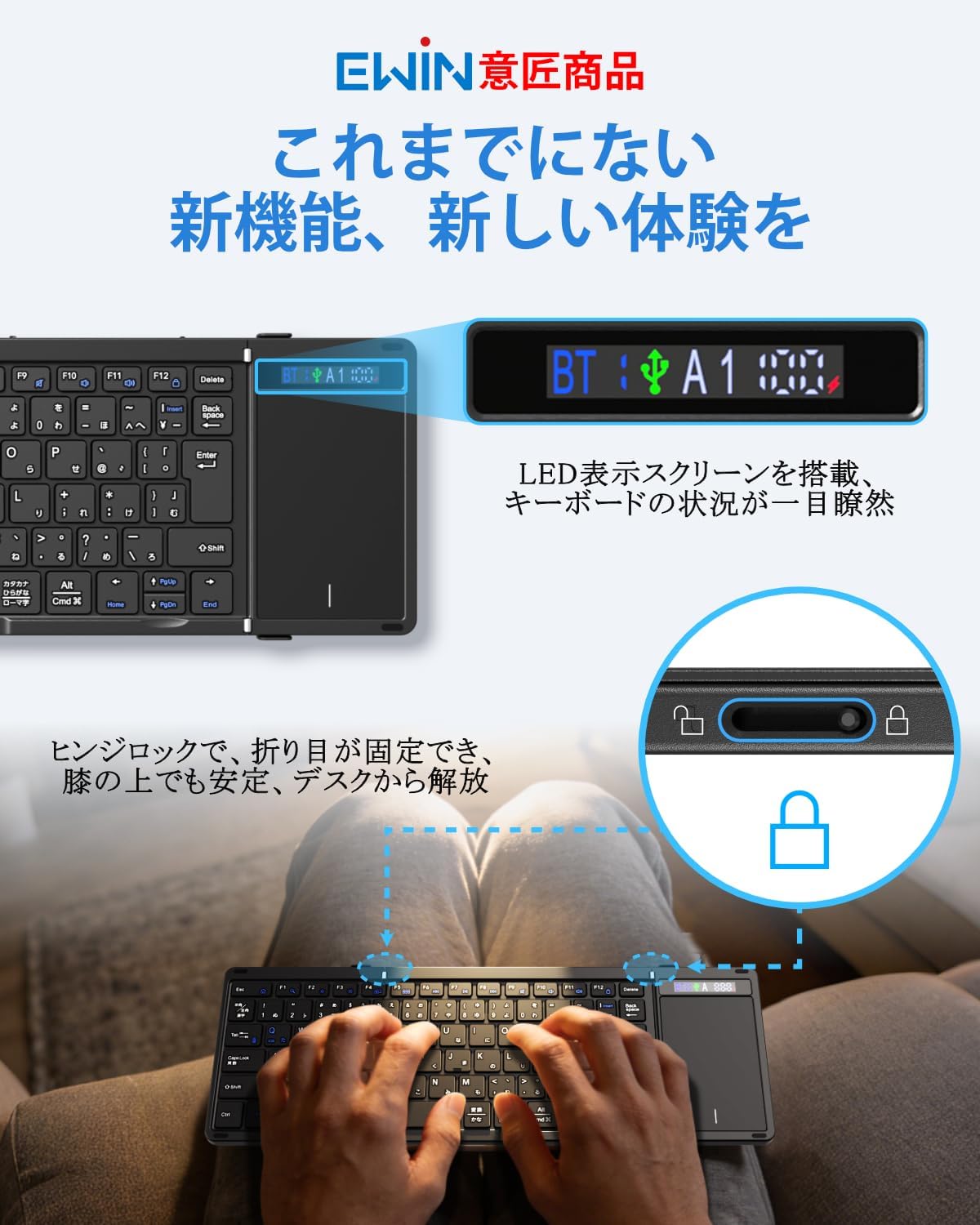
Image: The Ewin Wireless Foldable Bluetooth Keyboard, showcasing its compact, folded form and its full-size, unfolded layout with an integrated touchpad.
1. സജ്ജീകരണം
1.1 പാക്കേജ് ഉള്ളടക്കം
പാക്കേജിൽ എല്ലാ ഇനങ്ങളും ഉണ്ടെന്ന് ഉറപ്പാക്കുക:
- Ewin Wireless Foldable Bluetooth Keyboard
- USB-C ചാർജിംഗ് കേബിൾ
- ഇൻസ്ട്രക്ഷൻ മാനുവൽ

Image: The Ewin keyboard, USB-C cable, and instruction manual as typically found in the product package.
1.2 കീബോർഡ് ചാർജ് ചെയ്യുന്നു
Before first use, fully charge the keyboard. Connect the supplied USB-C cable to the keyboard's charging port and the other end to a USB power source (e.g., computer, USB wall adapter). The display screen will indicate charging status.

Image: A close-up of the keyboard's USB-C port with a charging cable connected, illustrating the charging process.
1.3 പവർ ഓൺ/ഓഫ്
Unfold the keyboard to automatically power it on. Fold the keyboard to power it off and protect the keys. The hinge lock mechanism ensures stability when unfolded.

Image: The Ewin keyboard in its unfolded state, highlighting the display screen for connection and battery status, and a detail of the hinge lock for stable typing.
1.4 ബ്ലൂടൂത്ത് ജോടിയാക്കൽ
The keyboard supports multi-device pairing (up to 3 devices via Bluetooth). To pair:
- കീബോർഡ് ഓൺ ചെയ്യാൻ അത് തുറക്കുക.
- അമർത്തുക fn + A (for Device 1), എഫ്എൻ + എസ് (for Device 2), or Fn + D (for Device 3) to select a pairing channel. The corresponding indicator on the display screen will flash.
- On your device (smartphone, tablet, PC), enable Bluetooth and search for "Ewin Keyboard".
- Select "Ewin Keyboard" from the list of available devices to connect. The indicator on the keyboard's display will stop flashing once connected.
- ജോടിയാക്കിയ ഉപകരണങ്ങൾക്കിടയിൽ മാറാൻ, അമർത്തുക Fn + A/S/D for the desired device.

Image: The Ewin keyboard demonstrating multi-device pairing with a tablet, smartphone, and laptop, showing seamless switching capability.

Image: A diagram illustrating how to switch between three paired Bluetooth devices using Fn+A, Fn+S, and Fn+D keys.
1.5 വയർഡ് കണക്ഷൻ
The keyboard also supports a wired connection. Connect the USB-C cable from the keyboard to your computer's USB port. This allows for typing while charging.
Image: The Ewin keyboard connected to a desktop computer via a USB-C cable, demonstrating wired usage.
1.6 ഓപ്പറേറ്റിംഗ് സിസ്റ്റം സ്വിച്ചിംഗ്
To optimize key functions for your operating system, press the following combinations:
- Fn + Q for iOS/iPadOS
- Fn + W വിൻഡോസിനായി
- Fn + E ആൻഡ്രോയിഡിനായി
- എഫ്എൻ + ആർ macOS-ന്
2. കീബോർഡ് പ്രവർത്തിപ്പിക്കൽ
2.1 കീബോർഡ് ലേഔട്ടും ഫംഗ്ഷൻ കീകളും
The keyboard features a JIS standard Japanese layout with a large inverted L-shaped Enter key and symmetrical Shift keys for comfortable typing. It includes 13 dedicated function keys for various shortcuts.

ചിത്രം: വിശദമായ ഒരു ചിത്രം view of the Ewin keyboard's JIS Japanese layout, showing the placement of the large Enter key, symmetrical Shift keys, and 13 function keys. The scissor-switch mechanism is also illustrated.
The keys utilize a scissor-switch mechanism, similar to laptop keyboards, providing a responsive and quiet typing experience with a 19mm key pitch.
2.2 ടച്ച്പാഡ് പ്രവർത്തനം
The integrated high-precision touchpad supports multi-touch gestures, eliminating the need for an external mouse. Refer to the following gestures:
- One-finger tap: ഇടത് ക്ലിക്ക്
- One-finger slide: കഴ്സർ ചലനം
- Two-finger slide (up/down): സ്ക്രോൾ ചെയ്യുക
- Two-finger slide (left/right): തിരശ്ചീന സ്ക്രോൾ
- പിഞ്ച് ഇൻ/ഔട്ട്: Zoom (OS dependent)

Image: The keyboard's touchpad with visual guides for common gestures: single-finger tap for left-click, single-finger slide for cursor movement, two-finger vertical slide for scrolling, and two-finger horizontal slide for side-to-side navigation.
To temporarily disable the touchpad and prevent accidental input, press Fn + സ്പേസ്. Press again to re-enable.
2.3 ഡിസ്പ്ലേ സ്ക്രീൻ
The integrated display screen provides real-time information on the keyboard's status, including:
- Bluetooth connection status (BT)
- Active device channel (A1, A2, A3)
- ബാറ്ററി ലെവൽ ഇൻഡിക്കേറ്റർ
This allows for quick confirmation of your connection and power status.
3. പരിപാലനം
3.1 വൃത്തിയാക്കൽ
To clean the keyboard, gently wipe the surface with a soft, dry cloth. For stubborn dirt, a slightly damp തുണി ഉപയോഗിക്കാം, തുടർന്ന് ഉടനടി ഉണക്കുക. കഠിനമായ രാസവസ്തുക്കളോ ഉരച്ചിലുകളോ ഉള്ള വസ്തുക്കൾ ഉപയോഗിക്കുന്നത് ഒഴിവാക്കുക.
The back of the keyboard is equipped with high-grade PU leather, which is dirt-resistant and protects against scratches and slips.

Image: The reverse side of the Ewin keyboard, highlighting its premium PU leather finish designed for durability and protection against dirt and scratches.
3.2 ബാറ്ററി കെയർ
The keyboard has a built-in 500mAh large-capacity battery, providing up to 70 hours of continuous use. It supports Type-C fast charging.
- ബാറ്ററി ലെവൽ പരിശോധിക്കാൻ, അമർത്തുക Fn + ടാബ്. The display screen will show the current battery status.
- The keyboard features an automatic sleep function. If inactive for 20 minutes, it will enter sleep mode to conserve power. Press any key to wake it up.
Image: An illustration detailing the keyboard's 500mAh battery, 70-hour continuous use, Type-C charging, and the Fn+Tab shortcut to check battery status, along with the 20-minute auto-sleep function.
4. പ്രശ്നപരിഹാരം
| പ്രശ്നം | സാധ്യമായ കാരണം | പരിഹാരം |
|---|---|---|
| കീബോർഡ് ഓണാക്കുന്നില്ല. | Low battery or not unfolded correctly. | Charge the keyboard fully. Ensure the keyboard is fully unfolded. |
| ബ്ലൂടൂത്ത് വഴി കണക്റ്റ് ചെയ്യാനാവുന്നില്ല. | കീബോർഡ് ജോടിയാക്കൽ മോഡിൽ ഇല്ല, ഉപകരണം ബ്ലൂടൂത്ത് ഓഫാണ്, അല്ലെങ്കിൽ ഇടപെടൽ. | Ensure keyboard is in pairing mode (indicator flashing). Check device Bluetooth settings. Move closer to the device. Try re-pairing. |
| കീകൾ പ്രതികരിക്കുന്നില്ല അല്ലെങ്കിൽ തെറ്റായി ടൈപ്പ് ചെയ്യുന്നില്ല. | Incorrect OS mode selected or temporary software glitch. | Switch to the correct OS mode (എഫ്എൻ + ചോദ്യം/വെളുപ്പ്/ഇ/ആർ). Restart the keyboard and device. |
| Touchpad is not working. | Touchpad disabled or OS incompatibility. | അമർത്തുക Fn + സ്പേസ് to enable the touchpad. Some advanced gestures may be OS-dependent. |
| Keyboard frequently disconnects. | Low battery, too far from device, or interference. | Charge the keyboard. Ensure it is within 10 meters of the device. Minimize interference from other wireless devices. |
5 സ്പെസിഫിക്കേഷനുകൾ
| ഫീച്ചർ | വിശദാംശങ്ങൾ |
|---|---|
| ബ്രാൻഡ് | Ewin |
| മോഡൽ നമ്പർ | EW-TKB304 |
| കണക്റ്റിവിറ്റി ടെക്നോളജി | Bluetooth 5.2, USB-C (Wired) |
| കീബോർഡ് വിവരണം | Foldable, Bluetooth & Wired, Display Screen, Hinge Lock, JIS Japanese Layout, Multi-pairing, Touchpad, Compact, Lightweight, Silent |
| അനുയോജ്യമായ ഉപകരണങ്ങൾ | Smartphones, Tablets, Laptops, PCs (iOS, Windows, Android, macOS) |
| പ്രത്യേക സവിശേഷതകൾ | Trackpad, Rechargeable, Foldable, Lightweight, Silent |
| നിറം | കറുപ്പ് |
| ശൈലി | Foldable, Compact, Thin, Lightweight, Portable |
| ഉൽപ്പന്ന അളവുകൾ (L x W x H) | 34.3 x 11.9 x 1 സെ.മീ (തുറക്കാത്തത്) |
| മെറ്റീരിയൽ | ABS (Exterior), Polycarbonate (Keyplate) |
| കീകളുടെ എണ്ണം | 90 |
| കീബോർഡ് ലേഔട്ട് | QWERTY (JIS Japanese) |
| സ്വിച്ച് തരം | കത്രിക-സ്വിച്ച് |
| ബാറ്ററി ശേഷി | 500mAh |
| തുടർച്ചയായ ഉപയോഗ സമയം | 70 മണിക്കൂർ വരെ |
| ഭാരം | 314 ഗ്രാം |
6. വാറൻ്റിയും പിന്തുണയും
6.1 വാറൻ്റി വിവരങ്ങൾ
This product comes with a 1-year manufacturer's warranty from the date of purchase. Please retain your proof of purchase for warranty claims. The warranty covers defects in materials and workmanship under normal use.
6.2 ഉപഭോക്തൃ പിന്തുണ
For any questions, technical assistance, or warranty inquiries, please contact Ewin customer support through the retailer where you purchased the product or refer to the contact information provided on the official Ewin webസൈറ്റ്.