
ആമുഖം
Thank you for choosing GOBOULT Tenet TWS Earbuds. This manual provides essential information for setting up, operating, and maintaining your earbuds. Please read it carefully before use to ensure optimal performance and longevity of your device.

ചിത്രം: കഴിഞ്ഞുview of GOBOULT Tenet TWS Earbuds features.
ബോക്സിൽ എന്താണുള്ളത്
- GOBOULT Tenet TWS Earbuds (Left and Right)
- ചാർജിംഗ് കേസ്
- യുഎസ്ബി ടൈപ്പ്-സി ചാർജിംഗ് കേബിൾ
- ഇയർ കുഷ്യനുകൾ (വിവിധ വലുപ്പങ്ങൾ)
- ഉപയോക്തൃ മാനുവൽ
- വാറൻ്റി കാർഡ്
ഉൽപ്പന്നം കഴിഞ്ഞുview
The GOBOULT Tenet TWS Earbuds are designed for a seamless audio experience with advanced features.
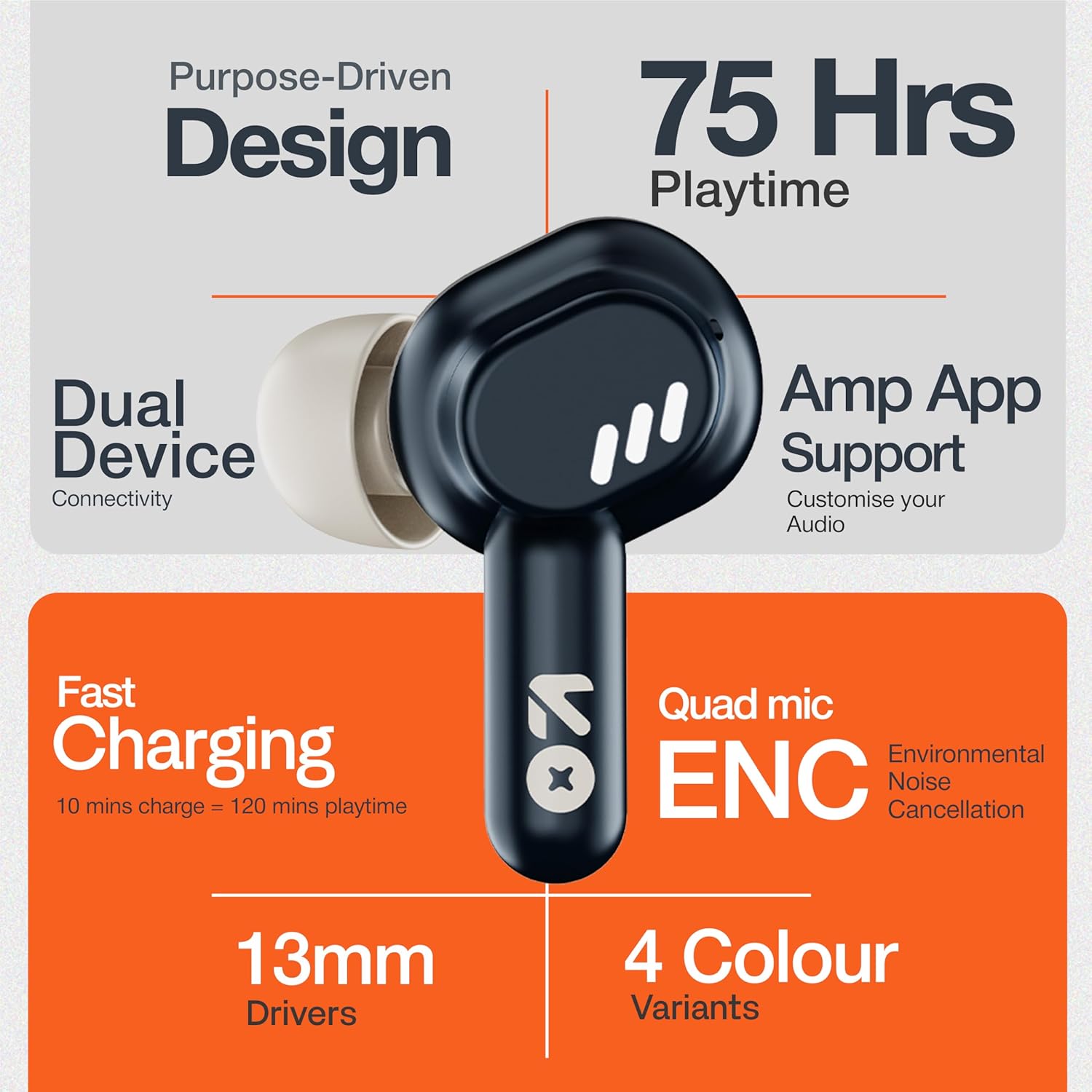
Image: GOBOULT Tenet TWS Earbuds and Charging Case.
ഘടകങ്ങൾ:
- ഇയർബഡുകൾ: ടച്ച് കൺട്രോൾ പ്രതലങ്ങളും ബിൽറ്റ്-ഇൻ മൈക്രോഫോണുകളുമുള്ള ഇടതും വലതും ഇയർബഡുകൾ.
- ചാർജിംഗ് കേസ്: Stores and charges the earbuds, featuring a USB Type-C port for charging.
- LED സൂചകങ്ങൾ: On both earbuds and the charging case to show battery status and pairing mode.

Image: Quad Mic Environmental Noise Cancellation (ENC) technology.
സജ്ജമാക്കുക
1. ഇയർബഡുകളും കേസും ചാർജ് ചെയ്യുന്നു
ആദ്യമായി ഉപയോഗിക്കുന്നതിന് മുമ്പ്, ഇയർബഡുകളും ചാർജിംഗ് കേസും പൂർണ്ണമായും ചാർജ് ചെയ്യുക.
- ഇയർബഡുകൾ ചാർജിംഗ് കേസിൽ വയ്ക്കുക. അവ ശരിയായി സ്ഥാപിച്ചിട്ടുണ്ടെന്ന് ഉറപ്പാക്കുക.
- യുഎസ്ബി ടൈപ്പ്-സി ചാർജിംഗ് കേബിൾ കേസിലെ ചാർജിംഗ് പോർട്ടിലേക്കും ഒരു പവർ സ്രോതസ്സിലേക്കും ബന്ധിപ്പിക്കുക.
- The LED indicator on the case will show charging status. A full charge typically takes approximately 1.5 hours.
ഫാസ്റ്റ് ചാർജിംഗ്: A 10-minute charge provides up to 120 minutes of playtime.

Image: Charging the GOBOULT Tenet TWS Earbuds.
2. ഒരു ഉപകരണവുമായി ജോടിയാക്കൽ
- Open the charging case. The earbuds will automatically enter pairing mode, indicated by flashing LED lights.
- നിങ്ങളുടെ ഉപകരണത്തിൽ (സ്മാർട്ട്ഫോൺ, ടാബ്ലെറ്റ്, ലാപ്ടോപ്പ്), ബ്ലൂടൂത്ത് പ്രവർത്തനക്ഷമമാക്കുക.
- ഇതിനായി തിരയുക "GOBOULT Tenet" in the list of available Bluetooth devices and select it to connect.
- Once connected, the earbud LEDs will stop flashing.
ഇരട്ട ഉപകരണ കണക്റ്റിവിറ്റി: The earbuds support simultaneous connection to two devices. After pairing with the first device, connect to the second device. The earbuds will intelligently switch between them.

Image: Dual Device Connectivity.
3. Amp ആപ്പ് പിന്തുണ
Enhance your listening experience by downloading the GOBOULT Amp App. The app allows for custom EQ settings, control customization, and other audio preferences.
- Download the "GOBOULT Amp" app from your device's app store.
- Open the app and follow the on-screen instructions to connect your Tenet earbuds.

Image: GOBOULT Amp App for custom audio tuning.
പ്രവർത്തന നിർദ്ദേശങ്ങൾ
ഇയർബഡുകൾ ധരിക്കുന്നു
Insert the earbuds gently into your ears and rotate them slightly to find a comfortable and secure fit. Choose the appropriate ear cushion size for optimal sound quality and comfort.
പവർ ഓൺ/ഓഫ്
- പവർ ഓൺ: ചാർജിംഗ് കേസ് തുറക്കുക, അല്ലെങ്കിൽ രണ്ട് ഇയർബഡുകളിലെയും ടച്ച് കൺട്രോൾ ഏരിയ 3 സെക്കൻഡ് ദീർഘനേരം അമർത്തുക.
- പവർ ഓഫ്: ഇയർബഡുകൾ ചാർജിംഗ് കെയ്സിലേക്ക് തിരികെ വയ്ക്കുക, ലിഡ് അടയ്ക്കുക, അല്ലെങ്കിൽ രണ്ട് ഇയർബഡുകളിലെയും ടച്ച് കൺട്രോൾ ഏരിയ 5 സെക്കൻഡ് ദീർഘനേരം അമർത്തുക.
ടച്ച് നിയന്ത്രണങ്ങൾ
The GOBOULT Tenet TWS Earbuds feature intuitive touch controls on each earbud.

Image: Touch Controls and AI Assistant.
| ആക്ഷൻ | ഇടത് ഇയർബഡ് | വലത് ഇയർബഡ് |
|---|---|---|
| സംഗീതം പ്ലേ ചെയ്യുക/താൽക്കാലികമായി നിർത്തുക | ഒറ്റ ടാപ്പ് | ഒറ്റ ടാപ്പ് |
| അടുത്ത ട്രാക്ക് | രണ്ടുതവണ ടാപ്പ് ചെയ്യുക | രണ്ടുതവണ ടാപ്പ് ചെയ്യുക |
| മുമ്പത്തെ ട്രാക്ക് | ട്രിപ്പിൾ ടാപ്പ് | ട്രിപ്പിൾ ടാപ്പ് |
| ഉത്തരം / കോൾ അവസാനിപ്പിക്കുക | ഒറ്റ ടാപ്പ് | ഒറ്റ ടാപ്പ് |
| കോൾ നിരസിക്കുക | ദീർഘനേരം അമർത്തുക (2സെ) | ദീർഘനേരം അമർത്തുക (2സെ) |
| വോയ്സ് അസിസ്റ്റൻ്റ് സജീവമാക്കുക | ദീർഘനേരം അമർത്തുക (2സെ) | ദീർഘനേരം അമർത്തുക (2സെ) |
മെയിൻ്റനൻസ്
വൃത്തിയാക്കൽ
- ഇയർബഡുകളും ചാർജിംഗ് കെയ്സും മൃദുവായതും ഉണങ്ങിയതും ലിന്റ് രഹിതവുമായ തുണി ഉപയോഗിച്ച് പതിവായി വൃത്തിയാക്കുക.
- കഠിനമായ രാസവസ്തുക്കൾ, ക്ലീനിംഗ് ലായകങ്ങൾ അല്ലെങ്കിൽ ശക്തമായ ഡിറ്റർജന്റുകൾ ഉപയോഗിക്കരുത്.
- ശരിയായ ചാർജിംഗ് ഉറപ്പാക്കാൻ ഇയർബഡുകളിലെയും കേസിലെയും ചാർജിംഗ് കോൺടാക്റ്റുകൾ വൃത്തിയാക്കുക.
സംഭരണം
- ഉപയോഗത്തിലില്ലാത്തപ്പോൾ, ഇയർബഡുകൾ സംരക്ഷിക്കുന്നതിനും ചാർജ്ജ് ചെയ്ത നിലയിൽ നിലനിർത്തുന്നതിനും അവ ചാർജിംഗ് കേസിൽ സൂക്ഷിക്കുക.
- തീവ്രമായ താപനിലയിൽ നിന്നും നേരിട്ടുള്ള സൂര്യപ്രകാശത്തിൽ നിന്നും അകന്ന്, തണുത്തതും വരണ്ടതുമായ സ്ഥലത്ത് സൂക്ഷിക്കുക.
ജല പ്രതിരോധം
The GOBOULT Tenet TWS Earbuds are rated IPX5 വാട്ടർ റെസിസ്റ്റൻ്റ്, meaning they are protected against low-pressure water jets from any direction. This makes them suitable for workouts and light rain. However, they are not designed for swimming or submersion in water.
ട്രബിൾഷൂട്ടിംഗ്
If you encounter any issues with your GOBOULT Tenet TWS Earbuds, please refer to the following common solutions:
- ഇയർബഡുകൾ ജോടിയാക്കുന്നില്ല:
- രണ്ട് ഇയർബഡുകളും ചാർജ്ജ് ചെയ്തിട്ടുണ്ടെന്ന് ഉറപ്പാക്കുക.
- Place earbuds back in the case, close the lid, wait 5 seconds, then open again to re-enter pairing mode.
- നിങ്ങളുടെ ഉപകരണത്തിൽ ബ്ലൂടൂത്ത് ഓഫാക്കി ഓണാക്കുക.
- Forget/delete "GOBOULT Tenet" from your device's Bluetooth list and try pairing again.
- ഒരു ഇയർബഡ് മാത്രമേ പ്രവർത്തിക്കുന്നുള്ളൂ:
- രണ്ട് ഇയർബഡുകളും ചാർജ്ജ് ചെയ്തിട്ടുണ്ടെന്ന് ഉറപ്പാക്കുക.
- രണ്ട് ഇയർബഡുകളും ചാർജിംഗ് കെയ്സിലേക്ക് തിരികെ വയ്ക്കുക, ലിഡ് അടയ്ക്കുക, തുടർന്ന് അത് വീണ്ടും തുറക്കുക.
- Try resetting the earbuds (refer to the Amp App or GOBOULT support for specific reset instructions).
- ശബ്ദമില്ല അല്ലെങ്കിൽ കുറഞ്ഞ ശബ്ദം:
- നിങ്ങളുടെ ഉപകരണത്തിലെയും ഇയർബഡുകളിലെയും വോളിയം ലെവൽ പരിശോധിക്കുക.
- ഇയർബഡുകൾ നിങ്ങളുടെ ഉപകരണവുമായി ശരിയായി ബന്ധിപ്പിച്ചിട്ടുണ്ടെന്ന് ഉറപ്പാക്കുക.
- ഇയർബഡ് സ്പീക്കർ മെഷിലെ അവശിഷ്ടങ്ങൾ വൃത്തിയാക്കുക.
- ചാർജിംഗ് പ്രശ്നങ്ങൾ:
- ചാർജിംഗ് കേബിൾ കേസിലേക്കും പവർ സ്രോതസ്സിലേക്കും സുരക്ഷിതമായി ബന്ധിപ്പിച്ചിട്ടുണ്ടെന്ന് ഉറപ്പാക്കുക.
- ഇയർബഡുകളിലെയും കേസിനുള്ളിലെയും ചാർജിംഗ് കോൺടാക്റ്റുകൾ വൃത്തിയാക്കുക.
- വ്യത്യസ്തമായ ഒരു USB Type-C കേബിളും പവർ അഡാപ്റ്ററും പരീക്ഷിച്ചുനോക്കൂ.
If the issue persists, please contact GOBOULT customer support.
സ്പെസിഫിക്കേഷനുകൾ

Image: 13mm Dynamic Drivers for enhanced audio.
| ഫീച്ചർ | വിശദാംശങ്ങൾ |
|---|---|
| മോഡലിൻ്റെ പേര് | എയർബാസ് ഇയർബഡുകൾ |
| കണക്റ്റിവിറ്റി ടെക്നോളജി | ബ്ലൂടൂത്ത് 5.4 |
| ഓഡിയോ ഡ്രൈവർ വലിപ്പം | 13 എംഎം ഡൈനാമിക് ഡ്രൈവർ |
| ബാറ്ററി ലൈഫ് (ആകെ) | 75 മണിക്കൂർ വരെ |
| ഫാസ്റ്റ് ചാർജിംഗ് | 10 മിനിറ്റ് ചാർജ് = 120 മിനിറ്റ് പ്ലേടൈം |
| ചാർജിംഗ് പോർട്ട് | യുഎസ്ബി ടൈപ്പ്-സി |
| മൈക്രോഫോൺ | പരിസ്ഥിതി ശബ്ദ റദ്ദാക്കലുള്ള ക്വാഡ് മൈക്ക് (ENC) |
| ജല പ്രതിരോധം | IPX5 |
| നിയന്ത്രണ രീതി | സ്പർശിക്കുക |
| വോയ്സ് അസിസ്റ്റൻ്റ് | Built-In (Google Assistant, Siri) |
| ഇരട്ട ഉപകരണ ജോടിയാക്കൽ | പിന്തുണച്ചു |
| ഫ്രീക്വൻസി പ്രതികരണം | 20 KHz |
| സംവേദനക്ഷമത | 105 ഡി.ബി |
| ഇനത്തിൻ്റെ ഭാരം | 54.5 ഗ്രാം |
| ഉൽപ്പന്ന അളവുകൾ (കേസ്) | 6.7 x 2.2 x 5.6 സെ.മീ |
വാറൻ്റിയും പിന്തുണയും
വാറൻ്റി വിവരങ്ങൾ
The GOBOULT Tenet TWS Earbuds come with a 1 വർഷത്തെ നിർമ്മാതാവിൻ്റെ വാറൻ്റി വാങ്ങിയ തീയതി മുതൽ. ഈ വാറന്റി നിർമ്മാണ വൈകല്യങ്ങൾ ഉൾക്കൊള്ളുന്നു. വാറന്റി ക്ലെയിമുകൾക്കായി നിങ്ങളുടെ വാങ്ങിയതിന്റെ തെളിവ് സൂക്ഷിക്കുക.
ദുരുപയോഗം, അപകടങ്ങൾ, അനധികൃത പരിഷ്കാരങ്ങൾ, അല്ലെങ്കിൽ സാധാരണ തേയ്മാനം എന്നിവ മൂലമുണ്ടാകുന്ന നാശനഷ്ടങ്ങൾക്ക് വാറന്റി പരിരക്ഷ നൽകുന്നില്ല.
ഉപഭോക്തൃ പിന്തുണ
For any questions, technical assistance, or warranty claims, please contact GOBOULT customer support through their official webസൈറ്റ് അല്ലെങ്കിൽ നിങ്ങളുടെ വാറന്റി കാർഡിൽ നൽകിയിരിക്കുന്ന ബന്ധപ്പെടാനുള്ള വിവരങ്ങൾ.
Please have your product model number (Airbass Earbuds) and proof of purchase ready when contacting support.