
1. ഉൽപ്പന്നം കഴിഞ്ഞുview
The ATK N9 Tri-Mode Gaming Headset is designed for gamers requiring flexible connectivity, clear audio, and reliable communication across multiple devices. It supports 3.5 mm wired, 2.4G wireless, and Bluetooth connections, allowing seamless switching between gaming consoles, PC, and mobile devices. Stereo-tuned dynamic drivers deliver balanced sound, enhancing in-game audio cues such as footsteps, gunfire, and environmental effects. The detachable noise-canceling microphone improves voice clarity for team communication, online gaming, and voice calls. Its over-ear design, with soft ear cushions and an adjustable headband, ensures a comfortable fit for extended gaming sessions. The headset is compatible with PS5, PS4, PC, Nintendo Switch, and mobile devices. For Xbox Series X|S, audio and microphone functions are supported via the 3.5 mm wired connection.

2. പാക്കേജ് ഉള്ളടക്കം
താഴെ ലിസ്റ്റ് ചെയ്തിരിക്കുന്ന എല്ലാ ഇനങ്ങളും നിങ്ങളുടെ പാക്കേജിൽ ഉൾപ്പെടുത്തിയിട്ടുണ്ടെന്ന് ഉറപ്പാക്കുക:
- ATK N9 Pro/White Gaming Headset
- Detachable Noise-Canceling Microphone
- USB-C ചാർജിംഗ് കേബിൾ
- 3.5 എംഎം ഓഡിയോ കേബിൾ
- 2.4G Wireless USB Adapter
- ഉപയോക്തൃ മാനുവൽ (ഈ പ്രമാണം)

3. പ്രാരംഭ സജ്ജീകരണം
3.1. ഹെഡ്സെറ്റ് ചാർജ് ചെയ്യുന്നു
Before first use, fully charge the headset using the provided USB-C charging cable. Connect the USB-C end to the headset's charging port and the USB-A end to a compatible USB power source (e.g., PC, wall adapter). The LED indicator will show charging status.
3.2. മൈക്രോഫോൺ ഘടിപ്പിക്കുന്നു
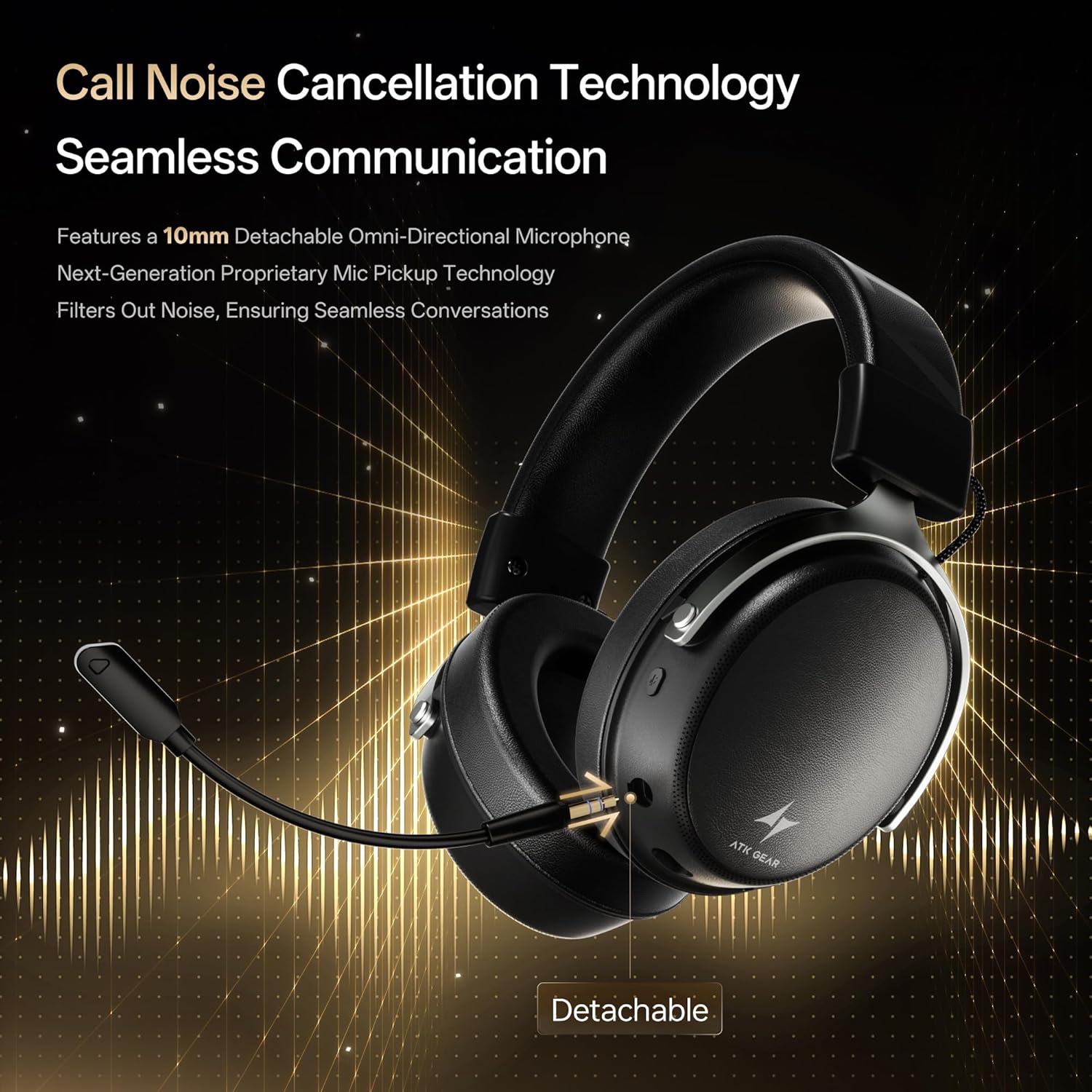
Insert the detachable boom microphone into the microphone port on the left earcup until it clicks into place. Ensure it is securely connected for optimal voice pickup.
3.3. കണക്റ്റിവിറ്റി ഓപ്ഷനുകൾ
The ATK N9 Pro/White headset offers three connectivity modes:
- 2.4G വയർലെസ് മോഡ്: For PC, PS4, PS5, and Nintendo Switch (docked mode).
- Plug the 2.4G wireless USB adapter into an available USB port on your device.
- ഹെഡ്സെറ്റിൽ പവർ.
- Switch the headset to 2.4G mode using the mode switch. The headset will automatically pair with the adapter.
- Adjust audio output settings on your device if necessary to select the headset.
- ബ്ലൂടൂത്ത് മോഡ്: For mobile devices, PC, and Nintendo Switch (handheld mode).
- Power on the headset and switch to Bluetooth mode. The LED indicator will flash, indicating pairing mode.
- On your device, go to Bluetooth settings and select "ATK N9 Pro" from the list of available devices.
- കണക്ട് ചെയ്തുകഴിഞ്ഞാൽ, LED ഇൻഡിക്കേറ്റർ സ്ഥിരമായ ഒരു പ്രകാശം കാണിക്കും.
- 3.5mm വയർഡ് മോഡ്: For Xbox Series X|S, PS4, PS5, PC, Nintendo Switch, and mobile devices.
- 3.5mm ഓഡിയോ കേബിളിന്റെ ഒരറ്റം ഹെഡ്സെറ്റിന്റെ 3.5mm ജാക്കുമായി ബന്ധിപ്പിക്കുക.
- Connect the other end to the 3.5mm audio port on your device (e.g., controller, PC audio jack).
- വയർലെസ് ഫംഗ്ഷനുകളെ മറികടന്ന് ഹെഡ്സെറ്റ് വയർഡ് മോഡിൽ പ്രവർത്തിക്കും.

4. പ്രവർത്തന നിർദ്ദേശങ്ങൾ
4.1. ഹെഡ്സെറ്റ് നിയന്ത്രണങ്ങൾ
The ATK N9 Pro/White headset features intuitive controls located on the earcups:
- പവർ ബട്ടൺ: Press and hold to power on/off. Short press for play/pause (in 2.4G/Bluetooth mode).
- മോഡ് സ്വിച്ച്: Toggle between 2.4G wireless, Bluetooth, and wired modes.
- വോളിയം കൂട്ടുകയോ കുറയ്ക്കുകയോ ചെയ്യുന്നതിനുള്ള വീൽ: ഓഡിയോ വോളിയം ക്രമീകരിക്കാൻ തിരിക്കുക.
- മൈക്രോഫോൺ മ്യൂട്ട് ബട്ടൺ: മൈക്രോഫോൺ നിശബ്ദമാക്കാൻ/അൺമ്യൂട്ടുചെയ്യാൻ അമർത്തുക.
- Spatial Audio Button: Press to activate/deactivate 3D Spatial Audio.
- Mic Monitoring Button: Press to enable/disable microphone monitoring (sidetone).
4.2. മൈക്രോഫോൺ ഉപയോഗം
The detachable noise-canceling microphone is designed for clear communication. Position the microphone approximately 1-2 inches from your mouth for optimal voice pickup. Use the microphone mute button on the headset to quickly mute your voice when needed.
4.3. ഫിറ്റ് ക്രമീകരിക്കൽ
The headset features an adjustable headband and soft ear cushions for comfort. Extend or retract the headband to achieve a snug yet comfortable fit. The earcups are designed to fully enclose your ears for passive noise isolation and comfort during long gaming sessions.
5 സാങ്കേതിക സവിശേഷതകൾ
| ഫീച്ചർ | സ്പെസിഫിക്കേഷൻ |
|---|---|
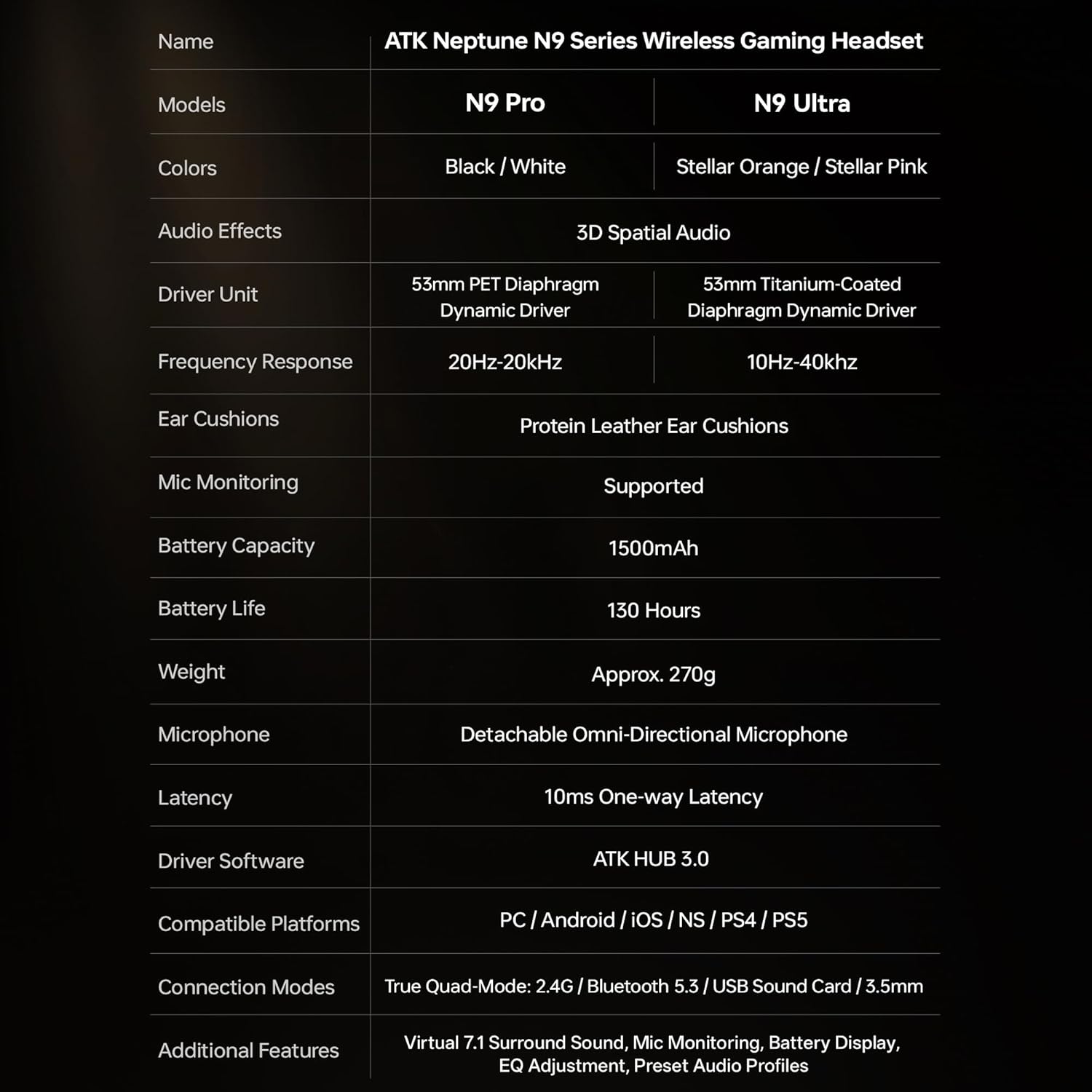
| മോഡലിൻ്റെ പേര് | ATK N9 Pro |
| കണക്റ്റിവിറ്റി | 3.5mm Wired, 2.4G Wireless, Bluetooth 5.3 |
| ഡ്രൈവർ തരം | ഡൈനാമിക് ഡ്രൈവർ |
| ഡ്രൈവർ വലിപ്പം | 53 മി.മീ |
| ഫ്രീക്വൻസി റേഞ്ച് | 20 ഹെർട്സ് - 20,000 ഹെർട്സ് |
| പ്രതിരോധം | 64 ഓം |
| മൈക്രോഫോൺ | Detachable Noise-Canceling Omni-Directional |
| ബാറ്ററി ശേഷി | 1500 mAh |
| ബാറ്ററി ലൈഫ് | 130 മണിക്കൂർ വരെ |
| Latency (2.4G) | 10 Milliseconds (one-way) |
| ഭാരം | 270 ഗ്രാം |
| ചെവി പ്ലേസ്മെൻ്റ് | ചെവിക്ക് മുകളിൽ |
| അനുയോജ്യമായ ഉപകരണങ്ങൾ | PS5, PS4, PC, Nintendo Switch, Mobile Devices, Xbox Series X|S (wired) |
| അധിക സവിശേഷതകൾ | 3D Spatial Audio, Mic Monitoring, Volume Control |

6. പരിചരണവും പരിപാലനവും
- വൃത്തിയാക്കൽ: ഹെഡ്സെറ്റ് വൃത്തിയാക്കാൻ മൃദുവായതും ഉണങ്ങിയതുമായ തുണി ഉപയോഗിക്കുക. കഠിനമായ രാസവസ്തുക്കളോ ഉരച്ചിലുകളോ ഉള്ള വസ്തുക്കൾ ഉപയോഗിക്കുന്നത് ഒഴിവാക്കുക.
- സംഭരണം: ഹെഡ്സെറ്റ് നേരിട്ട് സൂര്യപ്രകാശം ഏൽക്കാത്തതും ഉയർന്ന താപനില ഏൽക്കാത്തതുമായ ഒരു തണുത്ത വരണ്ട സ്ഥലത്ത് സൂക്ഷിക്കുക.
- ബാറ്ററി കെയർ: ബാറ്ററി ലൈഫ് വർദ്ധിപ്പിക്കാൻ, ഹെഡ്സെറ്റ് ഇടയ്ക്കിടെ പൂർണ്ണമായും ഡിസ്ചാർജ് ചെയ്യുന്നത് ഒഴിവാക്കുക. ദീർഘനേരം ഉപയോഗിച്ചിട്ടില്ലെങ്കിൽ പോലും പതിവായി ചാർജ് ചെയ്യുക.
- ജല പ്രതിരോധം: ഹെഡ്സെറ്റ് വെള്ളത്തെ പ്രതിരോധിക്കുന്നില്ല. ദ്രാവകങ്ങളുമായി സമ്പർക്കം പുലർത്തുന്നത് ഒഴിവാക്കുക.
7. പ്രശ്നപരിഹാരം
7.1. No Audio / Low Volume
- Ensure the headset is powered on and connected in the correct mode (2.4G, Bluetooth, or 3.5mm wired).
- ഹെഡ്സെറ്റിലെ വോളിയം വീലും നിങ്ങളുടെ ഉപകരണത്തിന്റെ വോളിയം ക്രമീകരണങ്ങളും പരിശോധിക്കുക.
- For wireless modes, ensure the headset is paired correctly and selected as the audio output device in your system settings.
- If using 3.5mm wired, ensure the cable is fully inserted into both the headset and the device.
7.2. മൈക്രോഫോൺ പ്രവർത്തിക്കുന്നില്ല.
- ഹെഡ്സെറ്റിൽ മൈക്രോഫോൺ സുരക്ഷിതമായി ഘടിപ്പിച്ചിട്ടുണ്ടെന്ന് ഉറപ്പാക്കുക.
- ഹെഡ്സെറ്റിലെ മൈക്രോഫോൺ മ്യൂട്ട് ബട്ടൺ പ്രവർത്തിച്ചിട്ടുണ്ടോയെന്ന് പരിശോധിക്കുക.
- Verify that the headset microphone is selected as the input device in your device's sound settings.
- For Xbox Series X|S, ensure you are using the 3.5mm wired connection for microphone support.
7.3. കണക്റ്റിവിറ്റി പ്രശ്നങ്ങൾ
- 2.4G വയർലെസ്: Ensure the USB adapter is firmly plugged in. Try a different USB port.
- ബ്ലൂടൂത്ത്: Ensure the headset is in pairing mode. Forget the device on your phone/PC and re-pair. Keep the headset within the 5-meter Bluetooth range.
- പൊതുവായത്: Power cycle both the headset and your connected device.
8. വാറൻ്റിയും പിന്തുണയും
8.1. വാറൻ്റി വിവരങ്ങൾ
The ATK N9 Pro/White Gaming Headset comes with a 6-മാസ വാറൻ്റി വാങ്ങിയ തീയതി മുതൽ. സാധാരണ ഉപയോഗത്തിലുള്ള നിർമ്മാണ വൈകല്യങ്ങളും പ്രവർത്തനക്ഷമതയും ഈ വാറന്റി ഉൾക്കൊള്ളുന്നു. ദുരുപയോഗം, അപകടങ്ങൾ, അനധികൃത പരിഷ്കാരങ്ങൾ, അല്ലെങ്കിൽ സാധാരണ തേയ്മാനം എന്നിവ മൂലമുണ്ടാകുന്ന നാശനഷ്ടങ്ങൾക്ക് ഇത് പരിരക്ഷ നൽകുന്നില്ല.
8.2. ഉപഭോക്തൃ പിന്തുണ
For further assistance, technical support, or warranty claims, please contact ATK customer service through the retailer where the product was purchased or visit the official ATK webപിന്തുണ ബന്ധപ്പെടാനുള്ള വിവരങ്ങൾക്കുള്ള സൈറ്റ്.
