
ആമുഖം
The Hunter ZenTech 44-inch smart ceiling fan combines modern design with advanced technology to provide efficient air circulation and adjustable lighting for indoor and covered outdoor spaces. This fan features a slim DC motor for quiet operation and energy efficiency, TrueLight LED technology for customizable lighting, and HunterSMART technology for seamless integration with smart home systems like Amazon Alexa, Google Assistant, and Apple HomeKit.
This manual provides detailed instructions for the safe installation, operation, and maintenance of your ZenTech ceiling fan. Please read all instructions carefully before beginning installation or use.
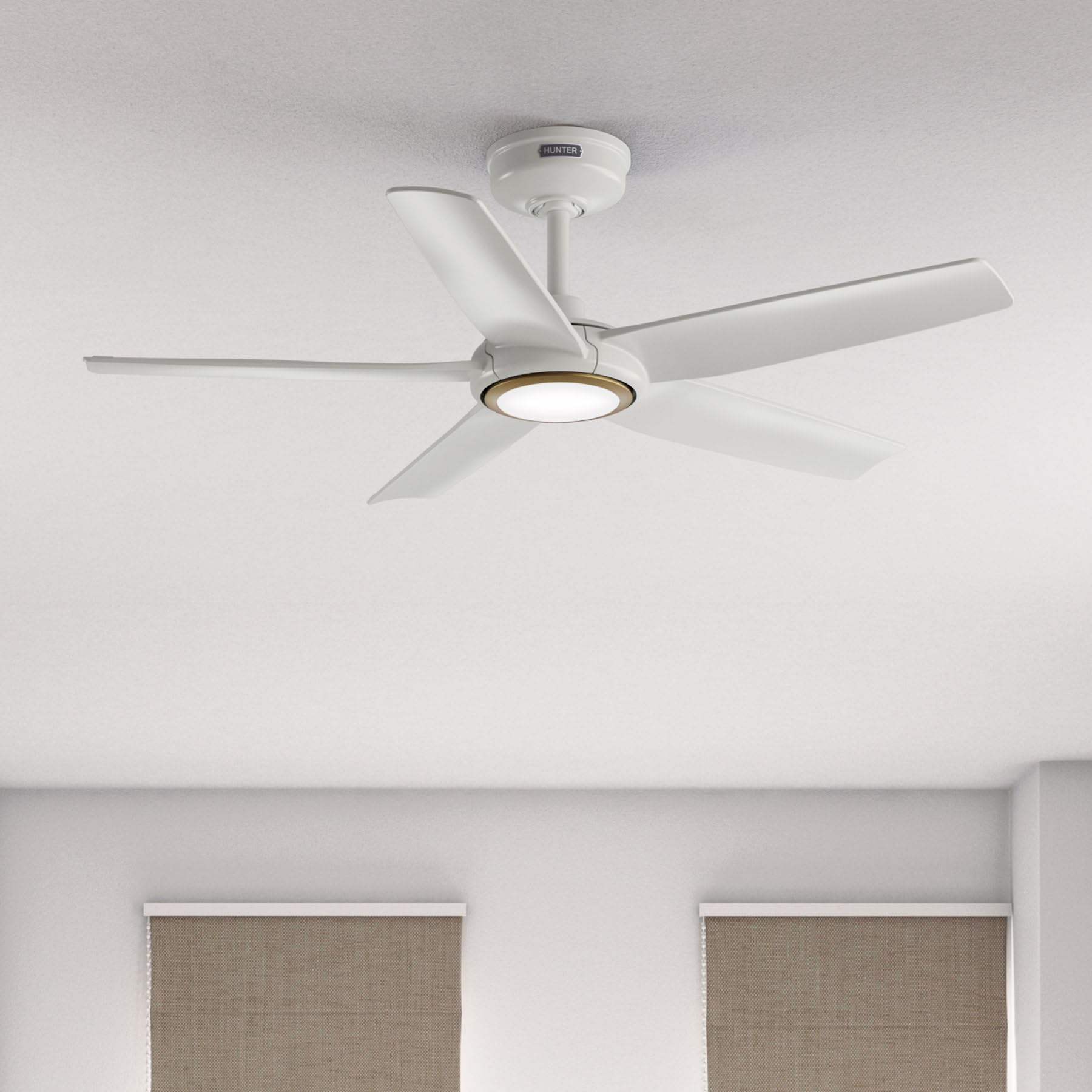
Image: Hunter ZenTech 44-inch ceiling fan in Fresh White, showcasing its sleek design and integrated LED light.
സുരക്ഷാ വിവരങ്ങൾ
To reduce the risk of electric shock, fire, or injury to persons, always follow these important safety precautions:
- Read all instructions before installing or using this fan.
- ഇൻസ്റ്റാളേഷൻ അല്ലെങ്കിൽ സർവീസ് ചെയ്യുന്നതിന് മുമ്പ് സർക്യൂട്ട് ബ്രേക്കറിൽ പവർ ഓഫ് ചെയ്തിട്ടുണ്ടെന്ന് ഉറപ്പാക്കുക.
- എല്ലാ വയറിംഗും ദേശീയ, പ്രാദേശിക ഇലക്ട്രിക്കൽ കോഡുകൾക്ക് അനുസൃതമായിരിക്കണം. വയറിംഗിൽ നിങ്ങൾക്ക് പരിചയമില്ലെങ്കിൽ, യോഗ്യതയുള്ള ഒരു ഇലക്ട്രീഷ്യനെ സമീപിക്കുക.
- ബ്ലേഡുകളുടെ പിൻവശത്തെ അരികിൽ നിന്ന് തറയിലേക്ക് കുറഞ്ഞത് 7 അടി (2.1 മീറ്റർ) അകലത്തിൽ ഫാൻ ഘടിപ്പിച്ചിരിക്കണം.
- ഫാനിന്റെ ഭാരം (ഏകദേശം 13.45 പൗണ്ട്) താങ്ങാൻ മൗണ്ടിംഗ് ഘടനയ്ക്ക് കഴിയുമെന്ന് ഉറപ്പാക്കുക.
- Do not operate the fan with damaged blades or any other damaged components.
- ഈ ഫാൻ ഡിamp-rated, suitable for indoor use and covered outdoor areas where exposure to moisture may occur. Do not expose to direct water spray.
സജ്ജീകരണവും ഇൻസ്റ്റാളേഷനും
Proper installation is crucial for the performance and safety of your ceiling fan. It is recommended to have a qualified electrician perform the installation.
പ്രീ-ഇൻസ്റ്റലേഷൻ പരിശോധനകൾ
- പാക്കിംഗ് ലിസ്റ്റ് അനുസരിച്ച് എല്ലാ ഘടകങ്ങളും ഉണ്ടെന്ന് ഉറപ്പാക്കുക.
- Ensure the electrical box is securely mounted and capable of supporting a ceiling fan.
- പ്രധാന സർക്യൂട്ട് ബ്രേക്കറിൽ പവർ ഓഫ് ചെയ്യുക.
ഫാൻ മൌണ്ട് ചെയ്യുന്നു
- Attach the mounting bracket to the ceiling electrical box using the provided screws.
- Assemble the downrod (6 inches included) to the motor housing. Factory-installed wiring and connectors are designed for downrods up to 24 inches. Do not extend or modify.
- ഫാൻ അസംബ്ലി ശ്രദ്ധാപൂർവ്വം ഉയർത്തി മൗണ്ടിംഗ് ബ്രാക്കറ്റിൽ തൂക്കിയിടുക.
ഇലക്ട്രിക്കൽ കണക്ഷനുകൾ
- Connect the fan's electrical wires to the household wiring according to the wiring diagram in the full instruction manual. Ensure all connections are secure.
- എല്ലാ വയറുകളും ഇലക്ട്രിക്കൽ ബോക്സിലേക്ക് ഭംഗിയായി ഇടുക.
Attaching Blades and Light Kit
- Securely attach the five fan blades to the motor housing.
- Install the LED light kit module. The fan includes in-box accessories for a personalized finish, including an interchangeable LED module, a no-light cap, and two trim ring options (one matching the fan finish and one in Luxe Gold).

Image: Hunter ZenTech ceiling fan installed in a modern living room, demonstrating its aesthetic integration into a home environment.

Image: Hunter ZenTech ceiling fan installed on a covered outdoor patio, highlighting its damp-rated suitability for outdoor use.
പ്രവർത്തന നിർദ്ദേശങ്ങൾ
Your ZenTech fan offers multiple control options for convenience.
റിമോട്ട് കൺട്രോൾ
A handheld remote control is included for basic fan and light functions:
- ഫാൻ വേഗത: Adjust between 6 speeds.
- ഫാൻ ദിശ: Reverse the fan direction for summer (downward airflow) or winter (upward airflow) operation.
- ലൈറ്റ് ഓൺ/ഓഫ്: Turn the LED light on or off.
- വെളിച്ചം കുറയ്ക്കൽ: LED ലൈറ്റിൻ്റെ തെളിച്ചം ക്രമീകരിക്കുക.
HunterSMART App Control
The HunterSMART app provides advanced control and customization options:
- Download the HunterSMART app from your device's app store.
- Follow the in-app instructions to connect your ZenTech fan to your home Wi-Fi network.
- Once connected, you can control fan speed, light brightness, and color temperature from your smartphone or tablet.
- Access additional features such as scheduling and custom settings.

Image: Diagram illustrating HunterSMART app interface and voice command examples for controlling the ceiling fan.
ശബ്ദ നിയന്ത്രണം
The ZenTech fan is compatible with leading smart home platforms:
- ആമസോൺ അലക്സ: Enable the Hunter skill in the Alexa app and link your HunterSMART account.
- Google അസിസ്റ്റൻ്റ്: Link your HunterSMART account through the Google Home app.
- ആപ്പിൾ ഹോംകിറ്റ്: Follow the pairing instructions in the Apple Home app.
Use voice commands such as "Alexa, turn on the living room fan" or "Hey Google, set the bedroom light to warm white."
TrueLight LED Lighting
The integrated TrueLight LED technology allows for fully adjustable lighting:
- Choose from 10 brightness levels to suit your needs.
- Adjust the color temperature between warm and cool tones to create the desired ambiance.

Image: Graphic illustrating the 'Clearly Brighter' TrueLight features, showing 10 levels of light and 10 color temperatures for adjustable LED lighting.
മെയിൻ്റനൻസ്
Regular maintenance ensures the longevity and optimal performance of your ZenTech ceiling fan.
വൃത്തിയാക്കൽ
- ഫാൻ ബ്ലേഡുകൾ: Wipe the blades with a soft, damp തുണി. അബ്രാസീവ് ക്ലീനറുകൾ ഉപയോഗിക്കരുത്, കാരണം അവ ഫിനിഷിന് കേടുവരുത്തും.
- മോട്ടോർ ഹൗസിംഗ്: Dust the motor housing with a soft, dry cloth.
- ലൈറ്റ് കിറ്റ്: Clean the light diffuser with a soft, lint-free cloth.
Always ensure the power is off at the circuit breaker before cleaning any part of the fan.
പൊതുവായ പരിപാലനം
- Periodically check all screws and connections for tightness. Retighten as necessary.
- The fan's DC motor is designed for long-term, maintenance-free operation and does not require lubrication.
ട്രബിൾഷൂട്ടിംഗ്
If you encounter issues with your ZenTech ceiling fan, refer to the following common problems and solutions:
| പ്രശ്നം | സാധ്യമായ കാരണം | പരിഹാരം |
|---|---|---|
| ഫാൻ ആരംഭിക്കുന്നില്ല | ഫാനിലേക്ക് വൈദ്യുതിയില്ല; അയഞ്ഞ വയർ കണക്ഷനുകൾ; റിമോട്ട് കൺട്രോൾ ബാറ്ററി കുറവാണ്. | സർക്യൂട്ട് ബ്രേക്കർ പരിശോധിക്കുക; എല്ലാ വയർ കണക്ഷനുകളും സുരക്ഷിതമാണെന്ന് ഉറപ്പാക്കുക; റിമോട്ട് കൺട്രോൾ ബാറ്ററി മാറ്റിസ്ഥാപിക്കുക. |
| വെളിച്ചം പ്രവർത്തിക്കുന്നില്ല | Loose wire connection to light kit; LED module faulty. | Check light kit wiring; Contact customer support for LED module replacement if necessary. |
| ഫാൻ കുലുങ്ങുന്നു | Loose blade screws; Improperly balanced blades; Loose mounting bracket. | Tighten all blade screws; Use a blade balancing kit (not included); Ensure mounting bracket is secure. |
| റിമോട്ട് കൺട്രോൾ പ്രവർത്തിക്കുന്നില്ല | Battery low or dead; Remote not paired with fan. | ബാറ്ററി മാറ്റിസ്ഥാപിക്കുക; റിമോട്ട് ജോടിയാക്കൽ നിർദ്ദേശങ്ങൾക്ക് പൂർണ്ണ മാനുവൽ കാണുക. |
| വൈഫൈ കണക്റ്റിവിറ്റി പ്രശ്നങ്ങൾ | തെറ്റായ വൈ-ഫൈ പാസ്വേഡ്; റൂട്ടർ വളരെ അകലെയാണ്; നെറ്റ്വർക്ക് ഇടപെടൽ. | Verify Wi-Fi password; Move router closer or use a Wi-Fi extender; Reduce interference from other devices. |
For more complex issues or if troubleshooting steps do not resolve the problem, please contact Hunter customer support.
സ്പെസിഫിക്കേഷനുകൾ
| ഫീച്ചർ | വിശദാംശങ്ങൾ |
|---|---|
| ബ്രാൻഡ് | വേട്ടക്കാരൻ |
| മോഡലിൻ്റെ പേര് | ZenTech |
| മോഡൽ നമ്പർ | 53641 |
| വലിപ്പം | 44 ഇഞ്ച് |
| നിറം | ഫ്രഷ് വൈറ്റ് |
| ഉൽപ്പന്ന അളവുകൾ | 44"D x 44"W x 11.78"H |
| ഇനത്തിൻ്റെ ഭാരം | 13.45 പൗണ്ട് |
| ബ്ലേഡുകളുടെ എണ്ണം | 5 |
| മോട്ടോർ തരം | DC Motor (43% slimmer) |
| വേഗതകളുടെ എണ്ണം | 6 |
| ലൈറ്റ് തരം | TrueLight LED (Adjustable Brightness & Color Temperature) |
| നിയന്ത്രണ രീതി | App Control (HunterSMART), Remote Control, Voice Control |
| സ്മാർട്ട് ഹോം അനുയോജ്യത | Amazon Alexa, Google Assistant, Apple HomeKit |
| ഇൻഡോർ/ഔട്ട്ഡോർ ഉപയോഗം | ഇൻഡോർ, കവേർഡ് ഔട്ട്ഡോർ (D)amp റേറ്റുചെയ്തത്) |
| വാല്യംtage | 120 വോൾട്ട് |
| വാട്ട്tage | 14 വാട്ട്സ് |
| എയർ ഫ്ലോ കപ്പാസിറ്റി | മിനിറ്റിന് 4493.25 ക്യുബിക് അടി |
| ഡൗൺറോഡ് നീളം | 6 Inches (included), compatible up to 24 inches |
| സർട്ടിഫിക്കേഷനുകൾ | ETL, എനർജി സ്റ്റാർ, FCC |
വാറൻ്റി
The Hunter ZenTech ceiling fan is backed by a limited lifetime motor warranty, reflecting Hunter's commitment to engineering and quality. This warranty covers defects in materials and workmanship of the fan motor for the lifetime of the original purchaser. Specific terms and conditions apply. Please refer to the warranty card included with your product or visit the official Hunter webമുഴുവൻ വിശദാംശങ്ങൾക്കും സൈറ്റ്.
പിന്തുണ
For technical assistance, warranty claims, or additional information regarding your Hunter ZenTech ceiling fan, please contact Hunter customer support:
- ഓൺലൈൻ പിന്തുണ: Visit the Hunter Fan Company webപതിവുചോദ്യങ്ങൾ, ട്രബിൾഷൂട്ടിംഗ് ഗൈഡുകൾ, കോൺടാക്റ്റ് ഫോമുകൾ എന്നിവയ്ക്കുള്ള സൈറ്റ്.
- ഫോൺ പിന്തുണ: Refer to your product packaging or the Hunter webഏറ്റവും പുതിയ ഉപഭോക്തൃ സേവന ഫോൺ നമ്പറിനായുള്ള സൈറ്റ്.
പിന്തുണയുമായി ബന്ധപ്പെടുമ്പോൾ, ദയവായി നിങ്ങളുടെ മോഡൽ നമ്പറും (53641) വാങ്ങിയതിന്റെ തെളിവും ലഭ്യമായിരിക്കുക.