
FLEX FC3401-Z 120V Corded Brushless Gear-Driven Orbital Polisher
ഇൻസ്ട്രക്ഷൻ മാനുവൽ
1. പ്രധാന സുരക്ഷാ നിർദ്ദേശങ്ങൾ
ഈ പവർ ടൂളിനൊപ്പം നൽകിയിരിക്കുന്ന എല്ലാ സുരക്ഷാ മുന്നറിയിപ്പുകളും നിർദ്ദേശങ്ങളും ചിത്രീകരണങ്ങളും സവിശേഷതകളും വായിക്കുക. ചുവടെ ലിസ്റ്റുചെയ്തിരിക്കുന്ന എല്ലാ നിർദ്ദേശങ്ങളും പാലിക്കുന്നതിൽ പരാജയപ്പെടുന്നത് വൈദ്യുതാഘാതം, തീ, കൂടാതെ/അല്ലെങ്കിൽ ഗുരുതരമായ പരിക്കിന് കാരണമായേക്കാം.
- വർക്ക് ഏരിയ സുരക്ഷ: ജോലിസ്ഥലം വൃത്തിയായും നല്ല വെളിച്ചത്തിലും സൂക്ഷിക്കുക. അലങ്കോലമായതോ ഇരുണ്ടതോ ആയ പ്രദേശങ്ങൾ അപകടങ്ങൾ ക്ഷണിച്ചുവരുത്തുന്നു.
- ഇലക്ട്രിക്കൽ സുരക്ഷ: പവർ ടൂൾ പ്ലഗുകൾ ഔട്ട്ലെറ്റുമായി പൊരുത്തപ്പെടണം. പ്ലഗിൽ ഒരിക്കലും ഒരു തരത്തിലും മാറ്റം വരുത്തരുത്. പവർ ടൂളുകൾ മഴയിലോ നനഞ്ഞ കാലാവസ്ഥയിലോ ഏൽപ്പിക്കരുത്.
- വ്യക്തിഗത സുരക്ഷ: Stay alert, watch what you are doing, and use common sense when operating a power tool. Always wear eye protection.
- പവർ ടൂൾ ഉപയോഗവും പരിചരണവും: പവർ ടൂൾ നിർബന്ധിച്ച് ഉപയോഗിക്കരുത്. നിങ്ങളുടെ ആപ്ലിക്കേഷന് അനുയോജ്യമായ പവർ ടൂൾ ഉപയോഗിക്കുക. എന്തെങ്കിലും ക്രമീകരണങ്ങൾ നടത്തുന്നതിനോ, ആക്സസറികൾ മാറ്റുന്നതിനോ, പവർ ടൂളുകൾ സൂക്ഷിക്കുന്നതിനോ മുമ്പ് പവർ സ്രോതസ്സിൽ നിന്ന് പ്ലഗ് വിച്ഛേദിക്കുക.
- സേവനം: നിങ്ങളുടെ പവർ ടൂൾ ഒരേ പോലെയുള്ള റീപ്ലേസ്മെൻ്റ് ഭാഗങ്ങൾ മാത്രം ഉപയോഗിച്ച് ഒരു യോഗ്യതയുള്ള റിപ്പയർ വ്യക്തിയെക്കൊണ്ട് സർവീസ് ചെയ്യൂ.
2. ഉൽപ്പന്നം കഴിഞ്ഞുview
The FLEX FC3401-Z is a 120V corded brushless gear-driven orbital polisher designed for car detailing. It features constant speed technology, an 11-speed control dial, and an ergonomic grip for precise control.
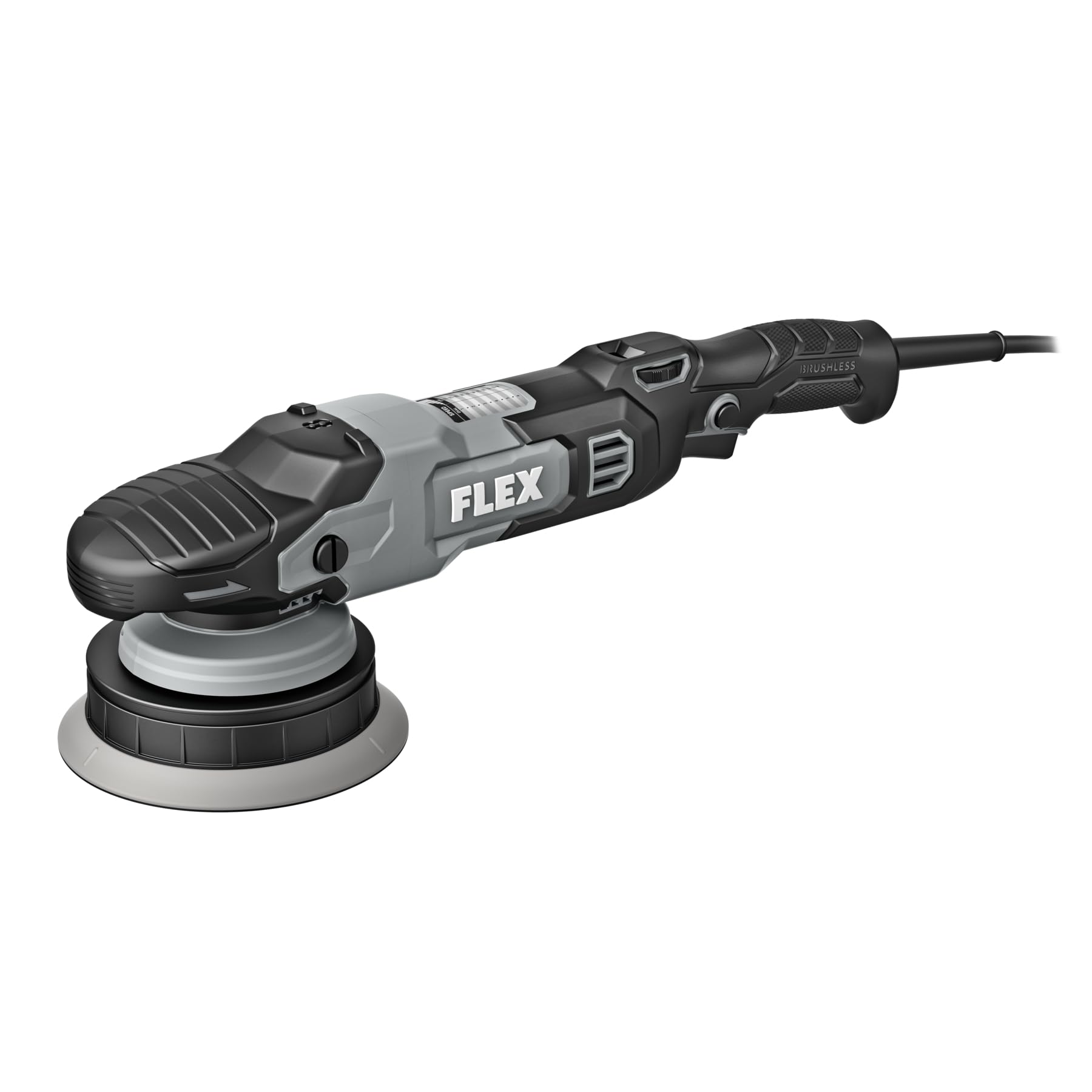
Figure 1: FLEX FC3401-Z Orbital Polisher. This image shows the complete polisher unit with its ergonomic handle and speed control dial.
ഉൾപ്പെടുന്ന ഘടകങ്ങൾ:
- FLEX FC3401-Z Polisher Unit
- 5-inch Backing Plate
- 6-inch Backing Plate
3. സജ്ജീകരണം
Before operating the polisher, ensure it is properly assembled and all safety precautions are observed.
- Select Backing Plate: Choose either the 5-inch or 6-inch backing plate based on the pad size and the area you intend to polish.
- ബാക്കിംഗ് പ്ലേറ്റ് ഘടിപ്പിക്കുക: Align the backing plate with the polisher's spindle. Securely screw the backing plate onto the spindle until it is hand-tight. Do not overtighten.
- Attach Polishing Pad: Press the desired polishing pad firmly onto the hook-and-loop surface of the backing plate. Ensure the pad is centered.
- പവർ കണക്ഷൻ: Plug the polisher's cord into a standard 120V electrical outlet. Ensure the power switch is in the "OFF" position before plugging in.
Figure 2: Backing Plate Attachment. This image illustrates how to securely attach a backing plate to the polisher's spindle.
4. പ്രവർത്തന നിർദ്ദേശങ്ങൾ
Follow these steps for effective and safe operation of your FLEX orbital polisher.
- ഉപരിതലം തയ്യാറാക്കുക: Ensure the vehicle surface is clean, dry, and free of contaminants before polishing.
- Apply Compound/Polish: Apply a small amount of polishing compound or wax directly to the polishing pad or the work surface.
- Start Polisher: Place the pad flat on the work surface before turning the tool on. Use the 11-speed control dial to select the desired speed. Start at a lower speed and gradually increase as needed. The variable speed trigger allows for fine-tuning.
- പോളിഷിംഗ് ടെക്നിക്: Move the polisher in a consistent, overlapping pattern. Apply light, even pressure. Avoid tilting the polisher, which can cause uneven results or damage.
- താപനില നിരീക്ഷിക്കുക: Periodically check the temperature of the work surface and the polisher. If either becomes excessively hot, stop and allow them to cool.
- പൂർത്തിയാക്കുക: Once the desired result is achieved, turn off the polisher before lifting it from the surface.
വേഗത നിയന്ത്രണ ഡയൽ:
The polisher features an 11-speed control dial. Refer to the table below for general speed recommendations:
| ഡയൽ ക്രമീകരണം | അപേക്ഷ |
|---|---|
| 1-3 | Waxing, Glazing, Finishing |
| 4-7 | Light Polishing, Swirl Removal |
| 8-11 | Heavy Compounding, Scratch Removal |
Note: These are general guidelines. Always test on an inconspicuous area first.
5. പരിപാലനം
Regular maintenance ensures optimal performance and extends the life of your polisher.
- വൃത്തിയാക്കൽ: After each use, disconnect the polisher from power. Remove the polishing pad and clean it according to its manufacturer's instructions. Wipe down the polisher body with a clean, damp തുണി. കഠിനമായ രാസവസ്തുക്കളോ ഉരച്ചിലുകളുള്ള ക്ലീനറുകളോ ഉപയോഗിക്കരുത്.
- പാഡ് പരിശോധന: Regularly inspect backing plates and polishing pads for wear or damage. Replace worn pads to maintain effective polishing.
- ചരട് പരിശോധന: പവർ കോഡിൽ എന്തെങ്കിലും മുറിവുകളോ, പൊട്ടലോ, കേടുപാടുകളോ ഉണ്ടോ എന്ന് പരിശോധിക്കുക. കോഡിന് കേടുപാടുകൾ സംഭവിച്ചിട്ടുണ്ടെങ്കിൽ ഉപകരണം ഉപയോഗിക്കരുത്.
- സംഭരണം: Store the polisher in a clean, dry place, out of reach of children. Avoid storing in direct sunlight or extreme temperatures.
6. പ്രശ്നപരിഹാരം
പൊതുവായ പ്രശ്നങ്ങൾക്കുള്ള പരിഹാരങ്ങൾക്കായി ഈ വിഭാഗം കാണുക.
| പ്രശ്നം | സാധ്യമായ കാരണം | പരിഹാരം |
|---|---|---|
| Polisher does not turn on. | No power supply; faulty cord/plug; internal fault. | Check power outlet and cord. Ensure plug is fully inserted. If problem persists, contact customer support. |
| അമിതമായ വൈബ്രേഷൻ അല്ലെങ്കിൽ ശബ്ദം. | Loose backing plate; unbalanced pad; internal issue. | Ensure backing plate is securely tightened. Check pad for even attachment and wear. If issue continues, discontinue use and seek service. |
| മോശം പോളിഷിംഗ് ഫലങ്ങൾ. | Incorrect pad/compound; worn pad; improper technique. | Verify pad and compound are suitable for the task. Replace worn pads. Review ശരിയായ സാങ്കേതികതയ്ക്കുള്ള പ്രവർത്തന നിർദ്ദേശങ്ങൾ. |
7 സ്പെസിഫിക്കേഷനുകൾ
| ഫീച്ചർ | വിശദാംശങ്ങൾ |
|---|---|
| മോഡൽ നമ്പർ | FC3401-Z |
| വാല്യംtage | 120 വോൾട്ട് |
| മോട്ടോർ തരം | ബ്രഷ് ഇല്ലാത്തത് |
| പരമാവധി ആർപിഎം | 700 ആർപിഎം |
| Max OPM | 8,700 ഒപിഎം |
| വേഗത നിയന്ത്രണം | 11-speed dial with variable speed trigger |
| Included Backing Plates | 5- ഇഞ്ച്, 6- ഇഞ്ച് |
| ഉൽപ്പന്ന അളവുകൾ (D x W x H) | 16.5" x 3.9" x 5" |
| പവർ ഉറവിടം | കോർഡഡ് ഇലക്ട്രിക് |
8. വാറൻ്റിയും പിന്തുണയും
This FLEX polisher is protected by a one-year limited warranty when registered.
- വാറൻ്റി രജിസ്ട്രേഷൻ: To activate your one-year limited warranty, register your product at രജിസ്റ്റർമൈഫ്ലെക്സ്.കോം.
- ഉപഭോക്തൃ പിന്തുണ: For technical assistance, service, or warranty claims, please refer to the contact information provided on the FLEX official webസൈറ്റ് അല്ലെങ്കിൽ നിങ്ങളുടെ വാങ്ങൽ ഡോക്യുമെന്റേഷൻ.