
1. ഉൽപ്പന്നം കഴിഞ്ഞുview
The NovaStar TB20 Plus is a high-performance, cost-effective asynchronous LED controller designed for managing full-color LED displays. It offers smart features such as Wi-Fi connectivity, remote management, and mobile app control, making it suitable for various applications including storefront signs, retail displays, and promotional screens.
പ്രധാന സവിശേഷതകളിൽ ഇവ ഉൾപ്പെടുന്നു:
- High Pixel Load Capacity: Supports up to 650,000 pixels with resolutions up to approximately 1920x1080, compatible with various LED module scan configurations.
- ഡ്യുവൽ നെറ്റ്വർക്ക് കണക്റ്റിവിറ്റി: Built-in 2.4GHz Wi-Fi and 10/100M Ethernet for remote content updates and device monitoring.
- മൊബൈൽ ആപ്പ് മാനേജ്മെന്റ്: Free iOS and Android app for managing multiple devices, scheduling playlists, and performing OTA firmware updates.
- Rich Multimedia Support: Plays MP4, AVI, MOV (H.264), JPG, PNG, BMP formats, scrolling text, live clock, and real-time weather. Supports multi-zone layouts.
- പ്ലഗ്-ആൻഡ്-പ്ലേ ഇൻസ്റ്റാളേഷൻ: Compact design, powered by standard DC 5V/2A, with content loading via USB drive.
- വികസിപ്പിക്കാവുന്ന സംഭരണം: 8GB internal storage with microSD/TF card expansion capability.
- വിശാലമായ പ്രവർത്തന ശ്രേണി: Functions reliably in temperatures from -20°C to +60°C.
2. എന്താണ് ഉൾപ്പെടുത്തിയിരിക്കുന്നത്
പാക്കേജിൽ എല്ലാ ഇനങ്ങളും ഉണ്ടെന്ന് ദയവായി പരിശോധിക്കുക:
- NovaStar TB20 Plus Playback Controller ×1
- DC 5V / 2A Power Adapter ×1
- Quick Start Guide ×1 (includes English instructions)

Image: The NovaStar TB20 Plus controller with its Wi-Fi antenna connected, showing the various ports and indicator lights.
3. സജ്ജീകരണ ഗൈഡ്
Follow these steps for initial setup of your NovaStar TB20 Plus controller:
- Connect to LED Display: Connect the TB20 Plus to your LED display using an Ethernet cable from the controller's Ethernet output port to the receiving card of the LED display.
- പവർ ബന്ധിപ്പിക്കുക: Plug the DC 5V / 2A power adapter into the controller's power input port and then into a power outlet. The PWR indicator light should illuminate.
- നെറ്റ്വർക്ക് കണക്ഷൻ:
- വൈഫൈ: Attach the provided Wi-Fi antenna to the designated port. You can configure Wi-Fi settings later via the mobile app or web ഇൻ്റർഫേസ്.
- ഇഥർനെറ്റ്: For a wired connection, connect an Ethernet cable from your network router or switch to the controller's Ethernet input port.
- Initial Content Loading (Optional): To load content directly, insert a USB drive containing your media files into the USB port. The controller can automatically play content from the USB drive after setup.
- മൊബൈൽ ആപ്പ് ഇൻസ്റ്റാളേഷൻ: Download the official NovaStar mobile application from the iOS App Store or Google Play Store on your smartphone or tablet.
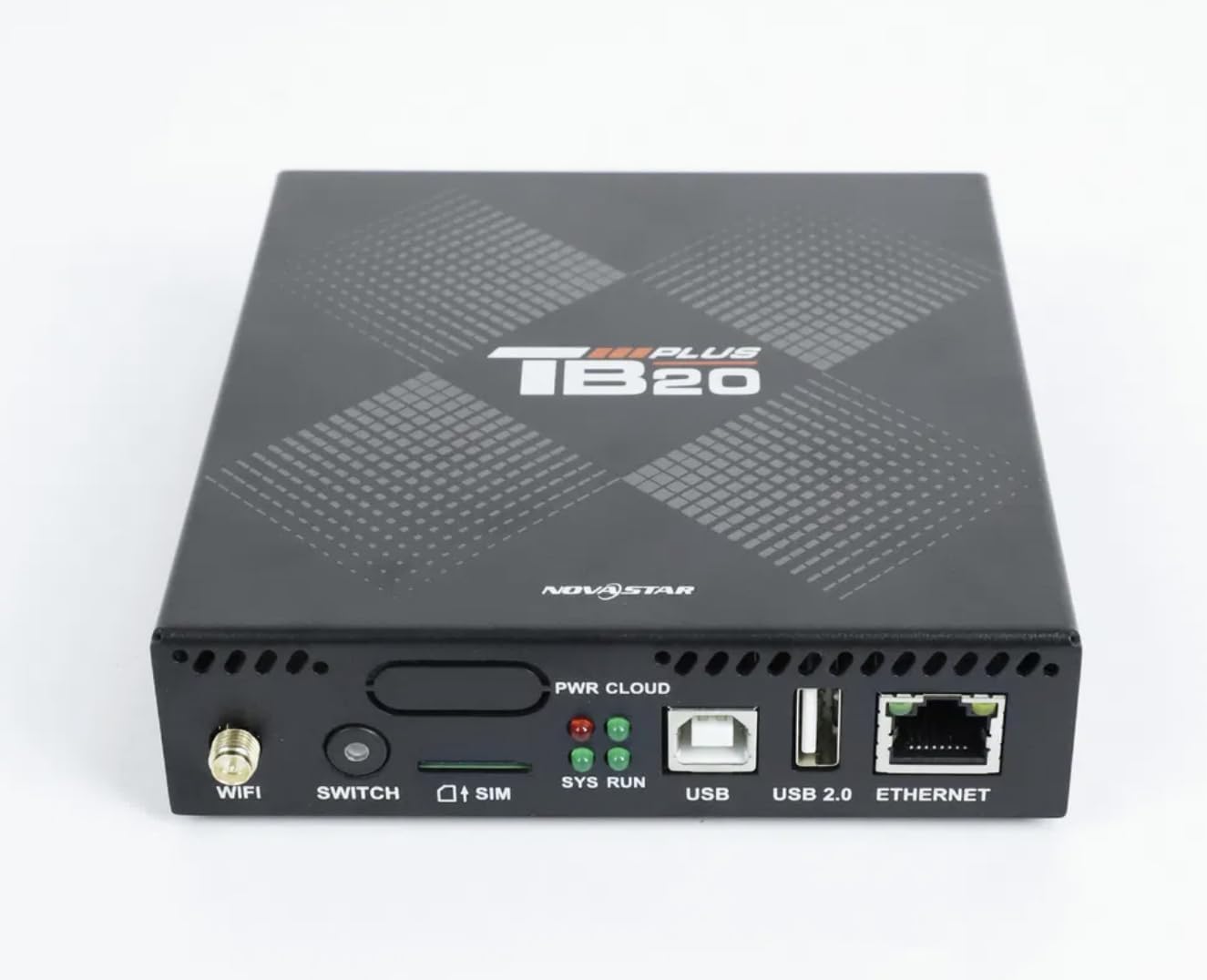
ചിത്രം: ഒരു ക്ലോസ്-അപ്പ് ഫ്രണ്ട് view of the NovaStar TB20 Plus, highlighting the Wi-Fi antenna port, SIM card slot, USB ports, and Ethernet port.
4. പ്രവർത്തന നിർദ്ദേശങ്ങൾ
The NovaStar TB20 Plus offers flexible content management and control options:
4.1. മൊബൈൽ ആപ്പ് നിയന്ത്രണം
Use the dedicated mobile app for comprehensive control:
- ഉപകരണ ജോടിയാക്കൽ: Open the app and follow the on-screen instructions to discover and pair with your TB20 Plus controller via Wi-Fi or Ethernet.
- ഉള്ളടക്ക അപ്ലോഡ്: മീഡിയ അപ്ലോഡ് ചെയ്യുക files (videos, images, text) from your mobile device or cloud storage to the controller.
- Playlist Management: Create and manage playlists, schedule playback times, and set display effects.
- റിമോട്ട് മോണിറ്ററിംഗ്: Monitor the status of your LED display and controller, receive fault alerts, and adjust settings remotely.
- OTA Firmware Updates: Perform over-the-air firmware updates to ensure your device has the latest features and improvements.
4.2. USB Content Playback
For quick content updates without a network connection:
- Save your media files (MP4, JPG, etc.) to a USB drive.
- Insert the USB drive into the USB port on the TB20 Plus.
- The controller will detect the new content and can be configured to automatically play it or add it to the device's internal storage.
4.3. Multimedia Support
The TB20 Plus supports a wide range of media types and display features:
- വീഡിയോ ഫോർമാറ്റുകൾ: MP4, AVI, MOV (H.264).
- ഇമേജ് ഫോർമാറ്റുകൾ: JPG, PNG, BMP.
- ഡൈനാമിക് ഉള്ളടക്കം: Scrolling text, live clock, real-time weather.
- ലേ outs ട്ടുകൾ: Multi-zone layouts for professional visual effects, allowing different content to be displayed simultaneously in various areas of the screen.
5. പരിപാലനം
Proper maintenance ensures the longevity and optimal performance of your NovaStar TB20 Plus:
- വൃത്തിയാക്കൽ: Keep the device clean and free from dust. Use a soft, dry cloth for cleaning. Avoid liquid cleaners.
- വെൻ്റിലേഷൻ: Ensure adequate airflow around the device to prevent overheating. Do not block ventilation holes.
- ഫേംവെയർ അപ്ഡേറ്റുകൾ: Regularly check for and apply firmware updates via the mobile app or web interface. Updates often include performance improvements and bug fixes.
- സംഭരണം: ഉപകരണം ദീർഘനേരം സൂക്ഷിക്കുകയാണെങ്കിൽ, അത് വൈദ്യുതിയിൽ നിന്ന് വിച്ഛേദിച്ച് തണുത്തതും വരണ്ടതുമായ സ്ഥലത്ത് സൂക്ഷിക്കുക.
6. പ്രശ്നപരിഹാരം
ഇനിപ്പറയുന്ന പൊതുവായ പ്രശ്നങ്ങളും പരിഹാരങ്ങളും പരിശോധിക്കുക:
| ഇഷ്യൂ | സാധ്യമായ കാരണം | പരിഹാരം |
|---|---|---|
| LED സ്ക്രീനിൽ ഡിസ്പ്ലേ ഇല്ല | Power issue, incorrect cable connection, display settings. | Check power adapter connection. Verify Ethernet cable connection to LED display. Ensure display is powered on and configured correctly. |
| Cannot connect via Wi-Fi/Ethernet | Incorrect network settings, weak signal, network interference. | Ensure Wi-Fi antenna is attached. Verify network cable is securely connected. Check Wi-Fi password. Restart the controller and router. |
| Content not playing | പിന്തുണയ്ക്കുന്നില്ല file format, empty playlist, USB drive issue. | Check if media files are in supported formats (MP4, JPG, etc.). Verify playlist configuration in the app. Ensure USB drive is formatted correctly and contains valid files. |
| ഉപകരണം പ്രതികരിക്കുന്നില്ല | സോഫ്റ്റ്വെയർ തകരാർ, വൈദ്യുതിയിലെ ഏറ്റക്കുറച്ചിലുകൾ. | Perform a power cycle: disconnect power, wait 10 seconds, then reconnect. If issue persists, contact support. |
7 സാങ്കേതിക സവിശേഷതകൾ
| ഫീച്ചർ | സ്പെസിഫിക്കേഷൻ |
|---|---|
| മോഡലിൻ്റെ പേര് | TB20 പ്ലസ് |
| പരമാവധി ലോഡ് കപ്പാസിറ്റി | ~650,000 pixels (up to 1920x1080 resolution) |
| ആന്തരിക സംഭരണം | 8GB (expandable via microSD/TF card) |
| നെറ്റ്വർക്ക് കണക്റ്റിവിറ്റി | Wi-Fi 2.4GHz, 10/100M Ethernet |
| പവർ ഇൻപുട്ട് | ഡിസി 5 വി / 2 എ |
| പ്രവർത്തന താപനില | -20°C മുതൽ +60°C വരെ |
| അനുയോജ്യമായ പ്ലാറ്റ്ഫോമുകൾ | iOS, Android, Windows |
| ഉൽപ്പന്ന അളവുകൾ | 8"L x 5"W x 2"H (approximately 20.3 x 12.7 x 5.1 cm) |
| കണക്റ്റർ തരം | HDMI (output for display, not for input) |
| റെസല്യൂഷൻ സപ്പോർട്ട് | 1080p |
8. വാറൻ്റി വിവരങ്ങൾ
Warranty details for the NovaStar TB20 Plus LED Playback Controller are typically provided at the time of purchase or can be found on the manufacturer's official webസൈറ്റ്. വാറന്റി ക്ലെയിമുകൾക്കായി നിങ്ങളുടെ വാങ്ങലിന്റെ തെളിവ് സൂക്ഷിക്കുക. സാധാരണ ഉപയോഗ സാഹചര്യങ്ങളിൽ വാറന്റി സാധാരണയായി നിർമ്മാണ വൈകല്യങ്ങൾ ഉൾക്കൊള്ളുന്നു.
9. ഉപഭോക്തൃ പിന്തുണ
For further assistance with installation, configuration, technical guidance, or any other inquiries regarding your NovaStar TB20 Plus, please contact the professional support team of your vendor or the manufacturer. Refer to the contact information provided with your purchase or on the official NovaStar webസൈറ്റ്.