
1. ആമുഖം
This manual provides detailed instructions for the setup, operation, and maintenance of your LEFFOT H618 Plus Android 14.0 TV Box. This device transforms your television into a smart entertainment hub, offering access to streaming services, apps, and media content. Please read this manual thoroughly before using the device to ensure proper functionality and safety.
2. പാക്കേജ് ഉള്ളടക്കം
താഴെ ലിസ്റ്റ് ചെയ്തിരിക്കുന്ന എല്ലാ ഇനങ്ങളും നിങ്ങളുടെ പാക്കേജിൽ ഉൾപ്പെടുത്തിയിട്ടുണ്ടെന്ന് ഉറപ്പാക്കുക:
- LEFFOT H618 Plus Android 14.0 TV Box
- പവർ അഡാപ്റ്റർ
- HD Cable (HDMI Cable)
- റിമോട്ട് കൺട്രോൾ
- ഉപയോക്തൃ മാനുവൽ (ഈ പ്രമാണം)
3. ഉൽപ്പന്നം കഴിഞ്ഞുview
The LEFFOT H618 Plus is a 4K UHD streaming device powered by Android 14.0. It features an Allwinner H618 Quad-core ARM Cortex-A53 CPU and Mali G31 GPU, providing smooth performance for streaming and applications. This model includes 2GB RAM and 16GB ROM for system operations and app storage.
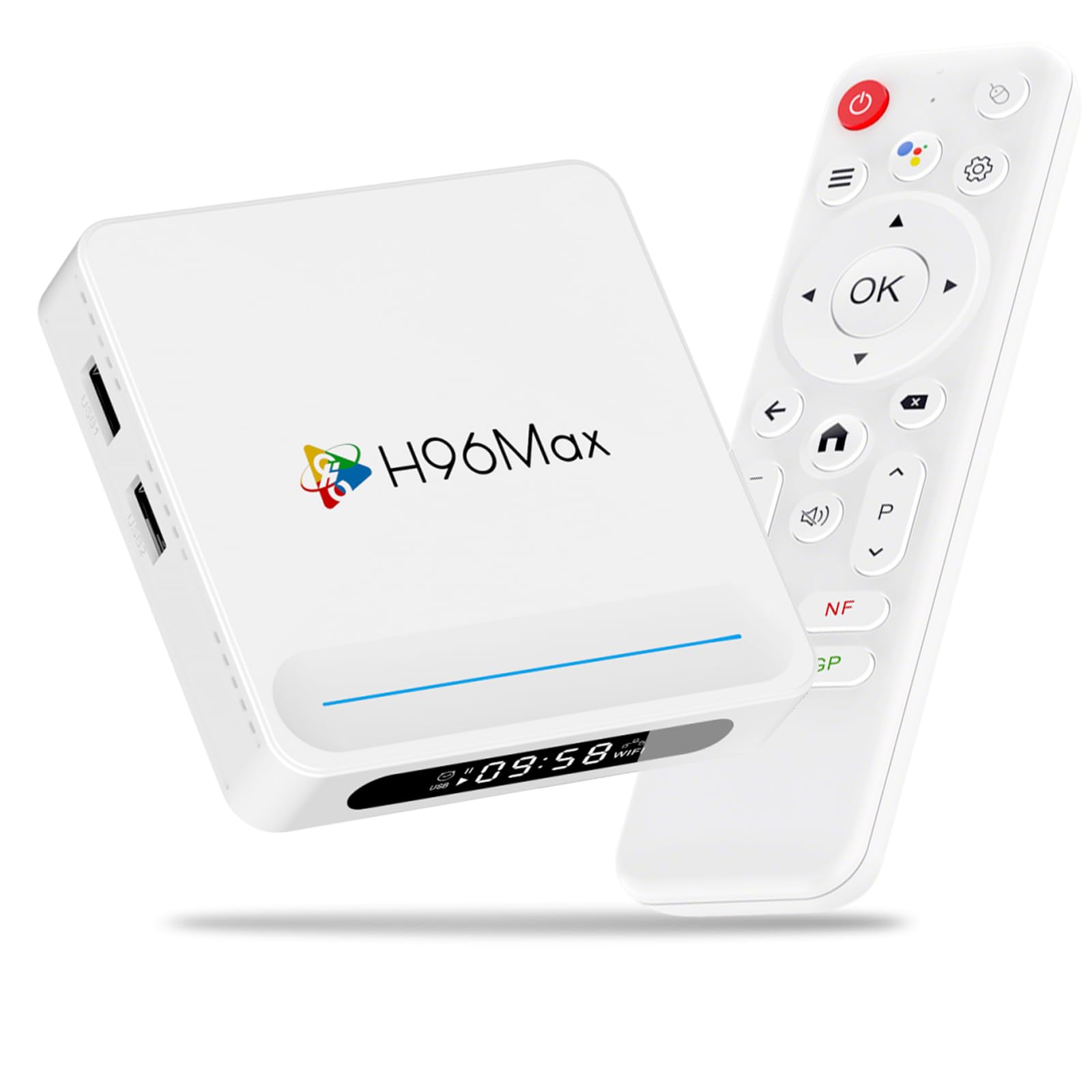
ചിത്രം 3.1: ഫ്രണ്ട് view of the LEFFOT H618 Plus Android TV Box, showcasing its compact design and various ports for connectivity. The included remote control is also visible.
തുറമുഖങ്ങളും കണക്ഷനുകളും
- HDMI 2.0a Output: Connects to your TV or display for 4K video output.
- USB 2.0 പോർട്ടുകൾ (x2): For connecting external storage devices, keyboards, mice, or other USB peripherals.
- എവി put ട്ട്പുട്ട്: For connecting to older televisions using an analog cable.
- ഡിസി പവർ ഇൻപുട്ട്: Connects the power adapter to the device.
- Ethernet Port (100M): സ്ഥിരമായ ഒരു വയർഡ് നെറ്റ്വർക്ക് കണക്ഷന് വേണ്ടി.
4. സജ്ജീകരണ ഗൈഡ്
Follow these steps to set up your LEFFOT H618 Plus TV Box:
- ടിവിയിലേക്ക് കണക്റ്റ് ചെയ്യുക: Connect one end of the provided HD cable (HDMI) to the HDMI port on the TV Box and the other end to an available HDMI input on your television.
- പവർ ബന്ധിപ്പിക്കുക: Plug the power adapter into the DC power input port on the TV Box, then plug the adapter into a wall outlet.
- പവർ ഓൺ: ഉപകരണം യാന്ത്രികമായി ഓണാകണം. അല്ലെങ്കിൽ, റിമോട്ട് കൺട്രോളിലെ പവർ ബട്ടൺ അമർത്തുക.
- ഇൻപുട്ട് തിരഞ്ഞെടുക്കുക: On your television, select the correct HDMI input source using your TV's remote control.
- പ്രാരംഭ സജ്ജീകരണം: Follow the on-screen instructions to complete the initial setup, which typically includes selecting your language, connecting to a Wi-Fi network (or using Ethernet), and signing in with your Google account.
5. പ്രവർത്തന നിർദ്ദേശങ്ങൾ
റിമോട്ട് കൺട്രോൾ നാവിഗേഷൻ
Use the included remote control to navigate the Android interface:
- ദിശാസൂചന പാഡ്: Use the up, down, left, and right arrows to move between menu items and options.
- ശരി ബട്ടൺ: Press to select an item or confirm an action.
- ബാക്ക് ബട്ടൺ: മുമ്പത്തെ സ്ക്രീനിലേക്കോ മെനുവിലേക്കോ മടങ്ങുന്നു.
- ഹോം ബട്ടണ്: പ്രധാന ഹോം സ്ക്രീനിലേക്ക് മടങ്ങുന്നു.
- വോളിയം ബട്ടണുകൾ: ഓഡിയോ ഔട്ട്പുട്ട് വോളിയം ക്രമീകരിക്കുന്നു.
- പവർ ബട്ടൺ: ഉപകരണം ഓൺ അല്ലെങ്കിൽ ഓഫ് ചെയ്യുന്നു (സ്റ്റാൻഡ്ബൈ മോഡ്).
ആപ്ലിക്കേഷനുകൾ ആക്സസ് ചെയ്യുന്നു
From the home screen, you can access pre-installed applications or download new ones from the Google Play Store. Navigate to the 'Apps' section or the Google Play Store icon and select it to browse and install applications.
6. കണക്റ്റിവിറ്റി
Wi-Fi കണക്ഷൻ
The device supports 2.4G/5G Dual-Band Wi-Fi 6 for fast and stable wireless internet access. To connect:
- പോകുക ക്രമീകരണങ്ങൾ > നെറ്റ്വർക്കും ഇൻ്റർനെറ്റും.
- തിരഞ്ഞെടുക്കുക വൈഫൈ അത് ഓണാക്കുക.
- ലിസ്റ്റിൽ നിന്ന് നിങ്ങൾക്ക് ആവശ്യമുള്ള വൈഫൈ നെറ്റ്വർക്ക് തിരഞ്ഞെടുക്കുക.
- Enter the Wi-Fi password if prompted and select ബന്ധിപ്പിക്കുക.
ഇഥർനെറ്റ് കണക്ഷൻ
For a more stable connection, connect an Ethernet cable from your router to the Ethernet port on the TV Box. The device will automatically detect and use the wired connection.
ബ്ലൂടൂത്ത് 5.0
The TV Box features Bluetooth 5.0, allowing you to connect compatible wireless accessories such as headphones, game controllers, or keyboards.
- പോകുക ക്രമീകരണങ്ങൾ > ബന്ധിപ്പിച്ച ഉപകരണങ്ങൾ > പുതിയ ഉപകരണം ജോടിയാക്കുക.
- നിങ്ങളുടെ ബ്ലൂടൂത്ത് ആക്സസറി പെയറിംഗ് മോഡിലേക്ക് ഇടുക.
- Select the accessory from the list on your TV screen to pair.
7. ശബ്ദ നിയന്ത്രണം
The LEFFOT H618 Plus integrates with Google Assistant for convenient voice control. If your remote control has a dedicated microphone button, press it to activate voice commands.
- തിരയൽ ഉള്ളടക്കം: Say "Find action movies" or "Play [Movie Title]".
- ആപ്പുകൾ സമാരംഭിക്കുക: Say "Open YouTube" or "Launch Netflix".
- പ്ലേബാക്ക് നിയന്ത്രിക്കുക: Say "Pause", "Play", "Fast forward", or "Rewind".
- വോളിയം ക്രമീകരിക്കുക: Say "Volume up" or "Volume down".
8. സ്ക്രീൻ മിററിംഗ്
The device supports AirPlay and Miracast, allowing you to wirelessly cast content from your iOS or Android devices to your television.
Using AirPlay (for iOS devices)
- Ensure your iOS device and the TV Box are connected to the same Wi-Fi network.
- On your iOS device, open the Control Center (swipe down from the top-right corner on newer iPhones/iPads, or swipe up from the bottom on older models).
- ടാപ്പ് ചെയ്യുക സ്ക്രീൻ മിററിംഗ് or എയർപ്ലേ.
- Select the LEFFOT H618 Plus from the list of available devices.
Using Miracast (for Android devices)
- Ensure your Android device and the TV Box are connected to the same Wi-Fi network.
- On your Android device, look for a feature like കാസ്റ്റ്, സ്ക്രീൻ മിററിംഗ്, സ്മാർട്ട് View, അല്ലെങ്കിൽ വയർലെസ് ഡിസ്പ്ലേ in your quick settings or display settings.
- Activate the feature and select the LEFFOT H618 Plus from the list of available devices.
9 സ്പെസിഫിക്കേഷനുകൾ
Detailed technical specifications for the LEFFOT H618 Plus Android 14.0 TV Box (2GB-16GB model):
| ബ്രാൻഡ് | ലെഫോട്ട് |
| മോഡൽ നമ്പർ | 2GB-16GB |
| ഓപ്പറേറ്റിംഗ് സിസ്റ്റം | ആൻഡ്രോയിഡ് 14.0 |
| സിപിയു | ഓൾവിന്നർ H618 ക്വാഡ്-കോർ ARM കോർടെക്സ്-A53 |
| ജിപിയു | മാലി G31 |
| റാം | 2 ജിബി |
| ROM | 16 ജിബി |
| റെസലൂഷൻ | 4K UHD |
| വൈഫൈ | 2.4G/5G Dual-Band Wi-Fi 6 |
| ബ്ലൂടൂത്ത് | ബ്ലൂടൂത്ത് 5.0 |
| ഇഥർനെറ്റ് | 100 മി |
| തുറമുഖങ്ങൾ | HDMI 2.0a, 2x USB 2.0, AV Out, DC In, Ethernet |
| പ്രത്യേക സവിശേഷതകൾ | HDR10, AirPlay, Miracast, Voice Control (Google Assistant) |
| അളവുകൾ | 3.93 x 3.93 x 0.76 ഇഞ്ച് |
| ഭാരം | 4.1 ഔൺസ് (115 ഗ്രാം) |
10. പ്രശ്നപരിഹാരം
If you encounter issues with your LEFFOT H618 Plus TV Box, refer to the following common problems and solutions:
- ശക്തിയില്ല:
- പവർ അഡാപ്റ്റർ ഉപകരണത്തിലേക്കും പ്രവർത്തിക്കുന്ന ഒരു പവർ ഔട്ട്ലെറ്റിലേക്കും സുരക്ഷിതമായി ബന്ധിപ്പിച്ചിട്ടുണ്ടെന്ന് ഉറപ്പാക്കുക.
- മറ്റൊരു പവർ ഔട്ട്ലെറ്റ് പരീക്ഷിക്കുക.
- ടിവിയിൽ സിഗ്നൽ ഇല്ല:
- Verify the HDMI cable is firmly connected to both the TV Box and the TV.
- നിങ്ങളുടെ ടിവി ശരിയായ HDMI ഇൻപുട്ട് ഉറവിടത്തിലേക്ക് സജ്ജീകരിച്ചിട്ടുണ്ടെന്ന് ഉറപ്പാക്കുക.
- നിങ്ങളുടെ ടിവിയിൽ മറ്റൊരു HDMI കേബിളോ HDMI പോർട്ടോ പരീക്ഷിച്ചുനോക്കൂ.
- Wi-Fi Connection Issues / Spotty Wi-Fi:
- നിങ്ങളുടെ വൈഫൈ റൂട്ടർ ശരിയായി പ്രവർത്തിക്കുന്നുണ്ടോയെന്ന് പരിശോധിക്കുക.
- ടിവി ബോക്സ് നിങ്ങളുടെ വൈ-ഫൈ റൂട്ടറിന്റെ പരിധിയിലാണെന്ന് ഉറപ്പാക്കുക.
- ടിവി ബോക്സും നിങ്ങളുടെ വൈ-ഫൈ റൂട്ടറും പുനരാരംഭിക്കാൻ ശ്രമിക്കുക.
- Consider using a wired Ethernet connection for better stability.
- Slow Performance / Buffering:
- ആവശ്യമില്ലാത്ത പശ്ചാത്തല ആപ്ലിക്കേഷനുകൾ അടയ്ക്കുക.
- Clear the cache of frequently used apps (Settings > Apps > [App Name] > Clear Cache).
- Ensure you have a stable and fast internet connection.
- ഉപകരണം പുനരാരംഭിക്കുക.
- റിമോട്ട് കൺട്രോൾ പ്രതികരിക്കുന്നില്ല:
- റിമോട്ട് കൺട്രോളിലെ ബാറ്ററികൾ പരിശോധിച്ച് മാറ്റിസ്ഥാപിക്കുക.
- റിമോട്ടിനും ടിവി ബോക്സിനും ഇടയിൽ തടസ്സങ്ങളൊന്നുമില്ലെന്ന് ഉറപ്പാക്കുക.
- ആപ്പ് അനുയോജ്യത പ്രശ്നങ്ങൾ:
- Some applications may not be fully optimized for Android TV Box environments. Check the app's requirements or look for alternative versions.
11. പരിപാലനം
To ensure the longevity and optimal performance of your TV Box:
- വൃത്തിയാക്കൽ: ഉപകരണം വൃത്തിയാക്കാൻ മൃദുവായതും ഉണങ്ങിയതുമായ തുണി ഉപയോഗിക്കുക. ലിക്വിഡ് ക്ലീനറുകളോ എയറോസോളുകളോ ഉപയോഗിക്കരുത്.
- പ്ലേസ്മെൻ്റ്: Place the device on a stable, flat surface with adequate ventilation. Avoid placing it near heat sources or in direct sunlight.
- പവർ ഓഫ്: If not in use for an extended period, disconnect the power adapter.
- സോഫ്റ്റ്വെയർ അപ്ഡേറ്റുകൾ: Periodically check for system updates in the device settings to ensure you have the latest features and security patches.
12 സുരക്ഷാ വിവരങ്ങൾ
ഇനിപ്പറയുന്ന സുരക്ഷാ മുൻകരുതലുകൾ പാലിക്കുക:
- ഉപകരണം വെള്ളം, ഈർപ്പം അല്ലെങ്കിൽ തീവ്രമായ താപനില എന്നിവയിൽ തുറന്നുകാട്ടരുത്.
- ഉപകരണം സ്വയം തുറക്കാനോ നന്നാക്കാനോ ശ്രമിക്കരുത്. എല്ലാ സേവനങ്ങളും യോഗ്യതയുള്ള ഉദ്യോഗസ്ഥരെ ഏൽപ്പിക്കുക.
- നൽകിയിരിക്കുന്ന പവർ അഡാപ്റ്റർ മാത്രം ഉപയോഗിക്കുക. അനധികൃത അഡാപ്റ്ററുകൾ ഉപയോഗിക്കുന്നത് ഉപകരണത്തിന് കേടുപാടുകൾ വരുത്തുകയും വാറന്റി അസാധുവാക്കുകയും ചെയ്തേക്കാം.
- കുട്ടികളിൽ നിന്നും വളർത്തുമൃഗങ്ങളിൽ നിന്നും ഉപകരണം അകറ്റി നിർത്തുക.
13. വാറൻ്റിയും പിന്തുണയും
For warranty information or technical support, please refer to the documentation provided with your purchase or contact LEFFOT customer service through their official website or the retailer where the product was purchased. Please have your model number (2GB-16GB) and purchase details ready when contacting support.