
1. ആമുഖം
Thank you for choosing the iFFALCON 32S55 32-inch Smart TV. This manual provides essential information for setting up, operating, maintaining, and troubleshooting your new television. Please read this manual thoroughly before using the TV and keep it for future reference.
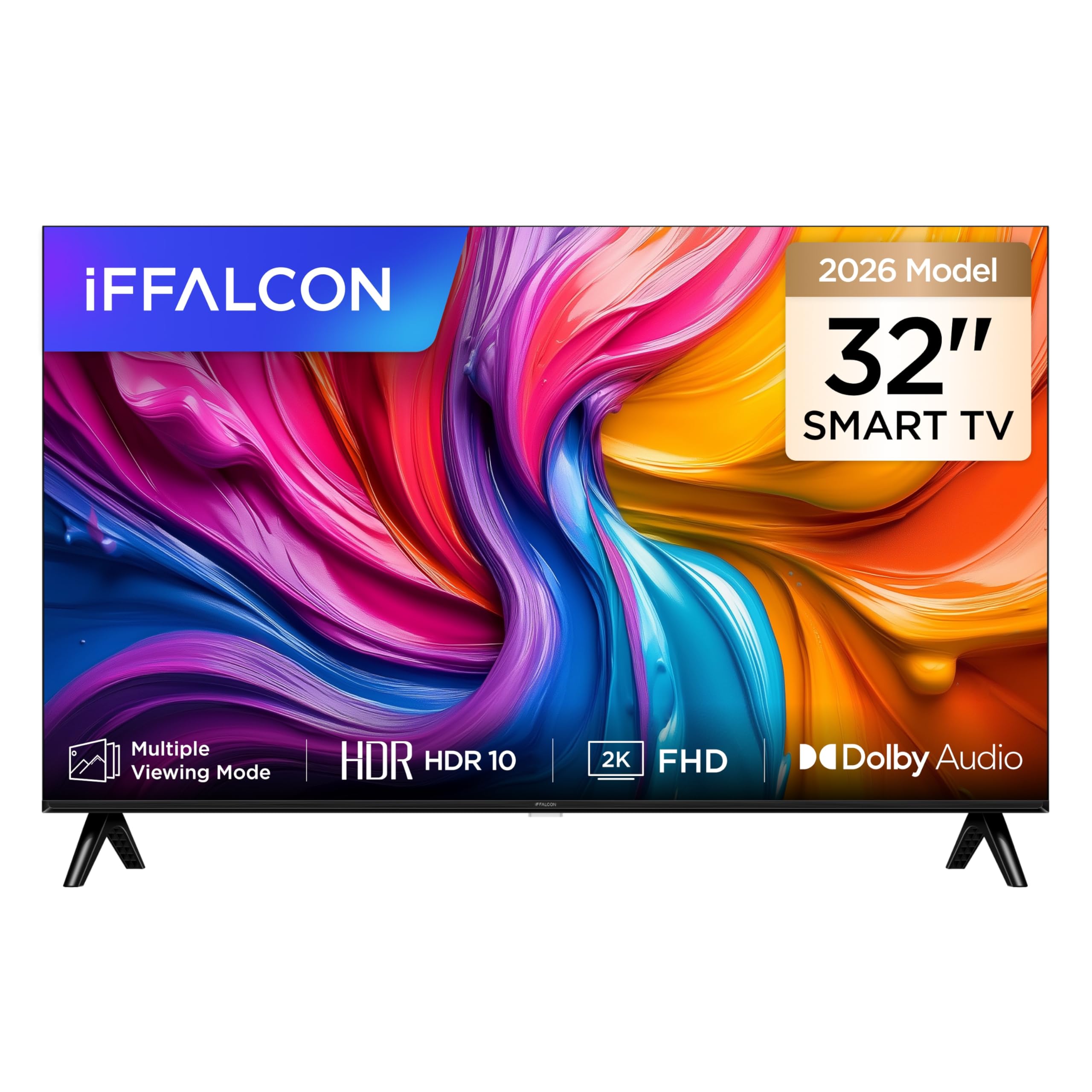
ഒരു മുന്നണി view of the iFFALCON 32S55 32-inch Smart TV, showcasing its slim bezel design and vibrant display.
The iFFALCON 32S55 combines Full HD resolution with HDR10 support for clear visuals, Dolby Audio for an immersive sound experience, and the versatility of Android TV. Its metallic bezel-less design offers a modern aesthetic for any home.
2 പ്രധാനപ്പെട്ട സുരക്ഷാ വിവരങ്ങൾ
നിങ്ങളുടെ ടെലിവിഷൻ ഉപയോഗിക്കുമ്പോൾ എല്ലായ്പ്പോഴും ഈ അടിസ്ഥാന സുരക്ഷാ മുൻകരുതലുകൾ പാലിക്കുക:
- ഊർജ്ജ സ്രോതസ്സ്: നിർദ്ദിഷ്ട വോള്യത്തിനുള്ളിൽ ടിവി ഒരു പവർ സപ്ലൈയുമായി ബന്ധിപ്പിച്ചിട്ടുണ്ടെന്ന് ഉറപ്പാക്കുക.tagഇ ശ്രേണി.
- വെൻ്റിലേഷൻ: വെന്റിലേഷൻ ദ്വാരങ്ങൾ അടയ്ക്കരുത്. ശരിയായ വായുസഞ്ചാരത്തിനായി ടിവിക്ക് ചുറ്റും മതിയായ ഇടം നൽകുക.
- ജലവും ഈർപ്പവും: ടിവിയിൽ മഴയോ ഈർപ്പമോ ഏൽക്കരുത്. പാത്രങ്ങൾ പോലുള്ള ദ്രാവകങ്ങൾ നിറച്ച വസ്തുക്കൾ ടിവിയിൽ വയ്ക്കരുത്.
- ചൂട്: Keep the TV away from heat sources like radiators, heat registers, stoves, or other heat-producing appliances.
- വൃത്തിയാക്കൽ: Unplug the TV from the wall outlet before cleaning. Use a soft, dry cloth.
- മൗണ്ടിംഗ്: When mounting the TV on a wall or stand, follow the instructions provided in this manual and with the mounting kit.
- കുട്ടികൾ: കുട്ടികൾ ടിവിയിൽ കളിക്കുന്നില്ലെന്ന് ഉറപ്പാക്കാൻ മേൽനോട്ടം വഹിക്കുക.
- മിന്നൽ: ഇടിമിന്നൽ ഉണ്ടാകുമ്പോഴോ ദീർഘനേരം ഉപയോഗിക്കാതിരിക്കുമ്പോഴോ ടിവി പ്ലഗ് ഊരിവയ്ക്കുക.
3. പാക്കേജ് ഉള്ളടക്കം
താഴെ പറയുന്ന എല്ലാ ഇനങ്ങളും നിങ്ങളുടെ പാക്കേജിൽ ഉൾപ്പെടുത്തിയിട്ടുണ്ടോ എന്ന് ദയവായി പരിശോധിക്കുക:
- iFFALCON 32S55 32-inch Smart TV
- പവർ അഡാപ്റ്റർ
- പവർ കേബിൾ
- റിമോട്ട് കൺട്രോൾ
- ടിവി സ്റ്റാൻഡ് (2 കഷണങ്ങൾ)
- ഉപയോക്തൃ മാനുവൽ (ഈ പ്രമാണം)
If any items are missing or damaged, please contact your retailer or iFFALCON customer support.
4. സജ്ജീകരണം
4.1 സ്റ്റാൻഡ് അറ്റാച്ചുചെയ്യുന്നു
- സ്ക്രീനിന് കേടുപാടുകൾ സംഭവിക്കാതിരിക്കാൻ ടിവി മൃദുവായതും പരന്നതുമായ പ്രതലത്തിൽ ശ്രദ്ധാപൂർവ്വം മുഖം താഴേക്ക് വയ്ക്കുക.
- ടിവിയുടെ അടിയിലുള്ള അനുബന്ധ സ്ലോട്ടുകളുമായി സ്റ്റാൻഡ് പീസുകൾ വിന്യസിക്കുക.
- Secure the stands using the screws provided. Ensure they are firmly attached.
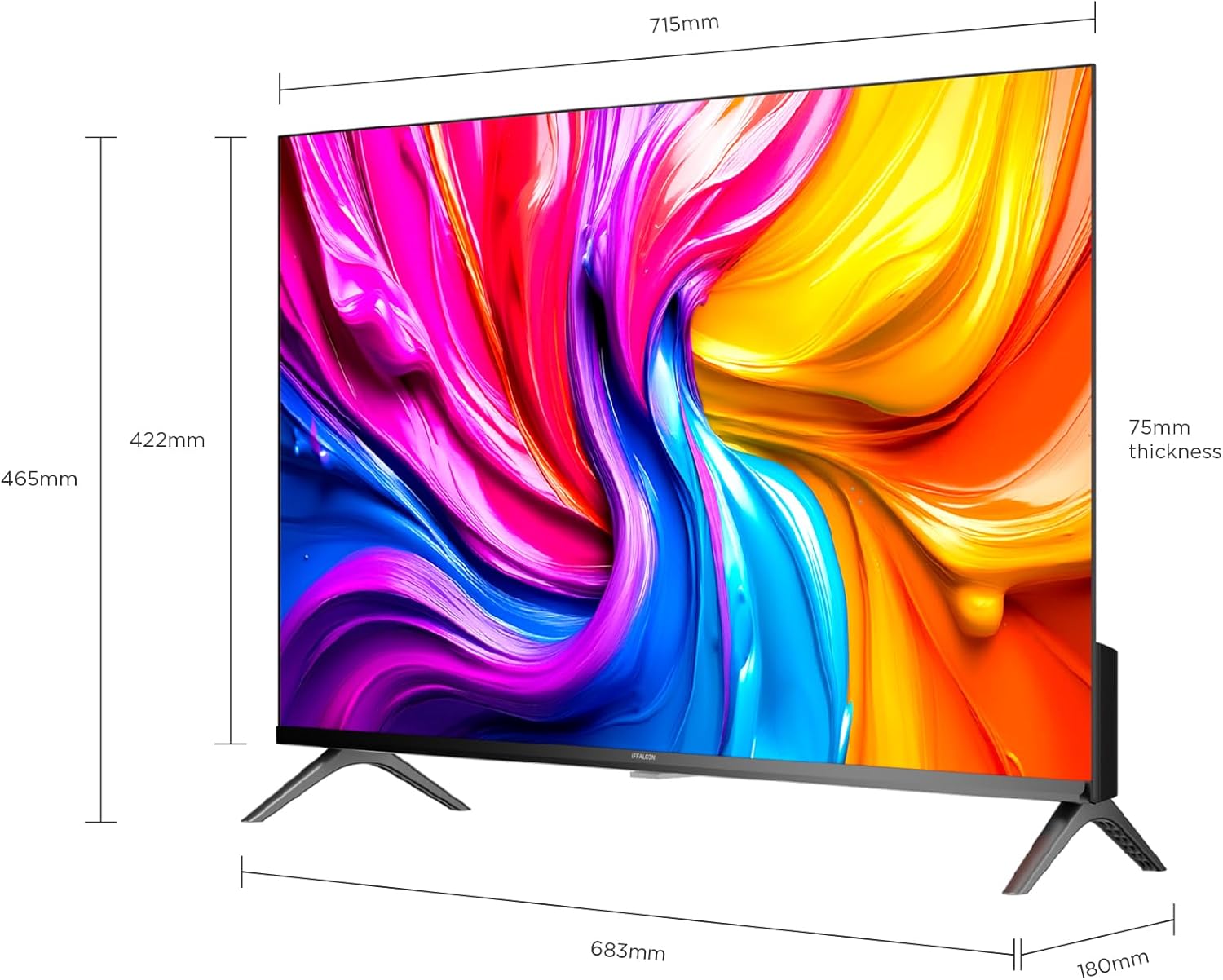
A diagram showing the physical dimensions of the iFFALCON 32S55 Smart TV, including width (715mm), height (422mm), and thickness (75mm).
4.2 ബന്ധിപ്പിക്കുന്ന പവർ
- ടിവിയുടെ പവർ ഇൻപുട്ടിലേക്ക് പവർ കേബിൾ ബന്ധിപ്പിക്കുക.
- പവർ കേബിളിന്റെ മറ്റേ അറ്റം ഒരു മതിൽ ഔട്ട്ലെറ്റിൽ പ്ലഗ് ചെയ്യുക.
4.3 ബാഹ്യ ഉപകരണങ്ങൾ ബന്ധിപ്പിക്കുന്നു
Your iFFALCON 32S55 TV offers various connectivity options:
- എച്ച്ഡിഎംഐ: Connect Blu-ray players, game consoles, or set-top boxes. (Total HDMI Ports: 2)
- USB: മീഡിയ പ്ലേബാക്കിനായി USB ഡ്രൈവുകൾ ബന്ധിപ്പിക്കുക.
- വൈഫൈ/ബ്ലൂടൂത്ത്: വയർലെസ്സ് നെറ്റ്വർക്കിനും ആക്സസറി കണക്ഷനുകൾക്കും.

The back panel of the iFFALCON 32S55 Smart TV, displaying various input and output ports for connectivity, including HDMI and USB.
4.4 പ്രാരംഭ പവർ-ഓണും അടിസ്ഥാന സജ്ജീകരണവും
- റിമോട്ട് കൺട്രോളിലോ ടിവിയിലോ പവർ ബട്ടൺ അമർത്തുക.
- നിങ്ങളുടെ ഭാഷ, രാജ്യം എന്നിവ തിരഞ്ഞെടുക്കുന്നതിനും നിങ്ങളുടെ വൈഫൈ നെറ്റ്വർക്കിലേക്ക് കണക്റ്റുചെയ്യുന്നതിനും ഓൺ-സ്ക്രീൻ നിർദ്ദേശങ്ങൾ പാലിക്കുക.
- Sign in with your Google account to access Android TV features and apps.
5. നിങ്ങളുടെ ടിവി പ്രവർത്തിപ്പിക്കുന്നു
5.1 വിദൂര നിയന്ത്രണ പ്രവർത്തനങ്ങൾ
The remote control allows you to navigate the TV's interface, adjust settings, and access smart features. Refer to the remote control diagram in your quick start guide for specific button functions.
5.2 ആൻഡ്രോയിഡ് ടിവി നാവിഗേറ്റ് ചെയ്യൽ
Your iFFALCON 32S55 runs on Android TV, providing access to a wide range of apps, streaming services, and Google Assistant. Use the directional pad and 'OK' button on your remote to navigate the home screen and menus.
5.3 ചിത്ര, ശബ്ദ ക്രമീകരണങ്ങൾ
നിങ്ങളുടെ ഇഷ്ടാനുസൃതമാക്കാൻ ക്രമീകരണ മെനു ആക്സസ് ചെയ്യുക viewകേൾക്കലും കേൾക്കൽ അനുഭവവും:
- ചിത്ര മോഡുകൾ: Choose from standard, vivid, movie, sport, or custom settings.
- HDR10: അനുയോജ്യമായ ഉള്ളടക്കത്തിൽ മെച്ചപ്പെടുത്തിയ കോൺട്രാസ്റ്റും വർണ്ണ വിശദാംശങ്ങളും അനുഭവിക്കുക.
- ഡോൾബി ഓഡിയോ: Enjoy clear, rich, and powerful sound. Adjust audio settings for different content types.
- ഗെയിമിംഗ് മോഡ്: Optimize your TV for gaming by reducing input lag.

An illustration comparing a scene with HDR10 enabled versus without HDR, highlighting the enhanced contrast, color, and detail provided by HDR10 on the iFFALCON 32S55 TV.

An image representing the immersive sound experience provided by Dolby Audio on the iFFALCON 32S55 Smart TV, with sound waves emanating from the screen.

An image showing a sports scene with Sports Mode off and Sports Mode on, demonstrating how the mode optimizes picture settings for clearer, more dynamic sports viewing on the iFFALCON 32S55 TV. This mode can also be applied to gaming for reduced input lag.
6. പരിപാലനം
6.1 സ്ക്രീൻ വൃത്തിയാക്കൽ
- ടിവി ഓഫ് ചെയ്ത് പവർ കോർഡ് ഊരിമാറ്റുക.
- മൃദുവായ, ലിന്റ് രഹിത തുണി ഉപയോഗിച്ച് സ്ക്രീൻ പതുക്കെ തുടയ്ക്കുക.
- കഠിനമായ അടയാളങ്ങൾക്ക്, നേരിയ dampവെള്ളം അല്ലെങ്കിൽ ഒരു പ്രത്യേക സ്ക്രീൻ ക്ലീനർ ഉപയോഗിച്ച് തുണിയിൽ തളിക്കുക (ഒരിക്കലും സ്ക്രീനിൽ നേരിട്ട് തളിക്കരുത്).
- Do not use abrasive cleaners, alcohol, benzene, or thinners.
6.2 ടിവി ബോഡി വൃത്തിയാക്കൽ
- മൃദുവായതും ഉണങ്ങിയതുമായ തുണി ഉപയോഗിച്ച് ടിവി ബോഡി തുടയ്ക്കുക.
- Avoid using any liquid cleaners directly on the TV body.
7. പ്രശ്നപരിഹാരം
നിങ്ങളുടെ ടിവിയിൽ പ്രശ്നങ്ങൾ നേരിടുകയാണെങ്കിൽ, ഇനിപ്പറയുന്ന പൊതുവായ പ്രശ്നങ്ങളും പരിഹാരങ്ങളും പരിശോധിക്കുക:
| പ്രശ്നം | സാധ്യമായ പരിഹാരം |
|---|---|
| ശക്തിയില്ല | Check if the power cord is securely plugged into the TV and the wall outlet. Ensure the outlet is working. |
| ചിത്രമില്ല, പക്ഷേ ശബ്ദം ഉണ്ട് | Check the input source. Ensure external devices are properly connected and powered on. Adjust brightness/contrast settings. |
| ശബ്ദമില്ല, പക്ഷേ ചിത്രം ഉണ്ട് | Check the volume level and mute status. Ensure audio cables are correctly connected for external devices. Check TV audio output settings. |
| റിമോട്ട് കൺട്രോൾ പ്രവർത്തിക്കുന്നില്ല | ബാറ്ററികൾ മാറ്റിസ്ഥാപിക്കുക. റിമോട്ടിനും ടിവിയുടെ ഐആർ സെൻസറിനും ഇടയിൽ തടസ്സങ്ങളൊന്നുമില്ലെന്ന് ഉറപ്പാക്കുക. |
| Wi-Fi കണക്ഷൻ പ്രശ്നങ്ങൾ | Restart your router and the TV. Check Wi-Fi password. Ensure the TV is within range of your router. |
| മന്ദഗതിയിലുള്ള പ്രകടനം / ആപ്പുകൾ ക്രാഷാകുന്നു | Close unused apps. Clear cache for problematic apps. Restart the TV. Consider a factory reset if issues persist (note: this will erase all data). |
For more complex issues, please refer to the online support resources or contact iFFALCON customer service.
8 സ്പെസിഫിക്കേഷനുകൾ
| ഫീച്ചർ | വിശദാംശങ്ങൾ |
|---|---|
| ബ്രാൻഡ് | ഇഫാൽക്കൺ |
| മോഡലിൻ്റെ പേര് | 32S55 |
| സ്ക്രീൻ വലിപ്പം | 32 ഇഞ്ച് |
| ഡിസ്പ്ലേ ടെക്നോളജി | എൽഇഡി |
| റെസലൂഷൻ | FHD (1920 x 1080) |
| പുതുക്കിയ നിരക്ക് | 60 Hz |
| പ്രധാന സവിശേഷതകൾ | Dolby Audio, Gaming Mode, Multi-Eye Protection, Slim Design |
| ഉൾപ്പെടുത്തിയ ഘടകങ്ങൾ | പവർ അഡാപ്റ്റർ, പവർ കേബിൾ, റിമോട്ട് കൺട്രോൾ, സ്റ്റാൻഡ്, യൂസർ മാനുവൽ |
| കണക്റ്റിവിറ്റി ടെക്നോളജി | ബ്ലൂടൂത്ത്, HDMI, USB, വൈ-ഫൈ |
| ഉൽപ്പന്ന അളവുകൾ (D x W x H) | 7.5D x 71.5W x 42.2H സെ.മീ |
| ഉൽപ്പന്ന ഭാരം | 4.8 കിലോഗ്രാം |
| ആകെ HDMI പോർട്ടുകൾ | 2 |
| നിറം | കറുപ്പ് |
| മോഡൽ വർഷം | 2026 |
| നിർമ്മാതാവ് | ഇഫാൽക്കൺ |
| മാതൃരാജ്യം | ചൈന |
9. വാറൻ്റിയും പിന്തുണയും
9.1 വാറൻ്റി വിവരങ്ങൾ
Your iFFALCON 32S55 Smart TV comes with a 2 വർഷത്തെ നിർമ്മാതാവിന്റെ വാറന്റി. സാധാരണ ഉപയോഗത്തിലുള്ള മെറ്റീരിയലുകളിലെയും നിർമ്മാണത്തിലെയും വൈകല്യങ്ങൾ ഈ വാറന്റി ഉൾക്കൊള്ളുന്നു. വാറന്റി ക്ലെയിമുകൾക്കായി നിങ്ങളുടെ വാങ്ങലിന്റെ തെളിവ് സൂക്ഷിക്കുക.
The warranty does not cover damage caused by misuse, accidents, unauthorized modifications, or external factors.
9.2 ഉപഭോക്തൃ പിന്തുണ
For technical assistance, warranty claims, or further inquiries, please visit the official iFFALCON webസൈറ്റ് അല്ലെങ്കിൽ അവരുടെ ഉപഭോക്തൃ പിന്തുണയുമായി ബന്ധപ്പെടുക:
- iFFALCON Store: Visit iFFALCON Store on Amazon
- Refer to the contact information provided in your warranty card or on the official iFFALCON webനേരിട്ടുള്ള പിന്തുണ ചാനലുകൾക്കുള്ള സൈറ്റ്.