
1. ആമുഖം
The GAN i4 Leap Smart Cube is a cutting-edge 3x3 magnetic speed puzzle designed for competitive cubers and enthusiasts. Featuring advanced smart functions, a Maglev drive system, and seamless integration with the CubeStation app, it offers unparalleled precision, customization, and a dynamic training experience. This manual will guide you through its features, setup, operation, and maintenance to help you achieve your best.
2. ഉൽപ്പന്നം കഴിഞ്ഞുview & സവിശേഷതകൾ
The GAN i4 Leap combines innovative hardware with smart software to enhance your cubing journey. Key features include:
- Next-Generation Smart Function: High-Precision Tracking: Equipped with an all-directional system and zero-contact, zero-friction magnetic sensors. A 360° gyroscope monitors cube orientation, eliminating missed rotations. Mobile connectivity accurately records movements down to milliseconds, supporting personal best (PB) updates.
- Intelligent Dual Mode: Long-Lasting Operation: Switch between 'Performance' mode for detailed data analysis and 'Endurance' mode for an astonishing 200 hours of continuous use. Quick Charge allows 10 hours of play from just a 10-minute charge, ensuring uninterrupted practice.
- Ultimate Speed Design: Maglev Drive & Stability: Utilizes a magnetic levitation system with magnetic repulsion. Features 35° auto-correction and a total of 76 magnets for silky-smooth rotations with minimal friction. Experience precise positioning that feels natural to your fingertips.
- Smart Ecosystem: Compete with Players Worldwide: The dedicated 'Cube Station' app enables 24-hour online PK battles with rivals globally. Real-time analysis, TPS analysis, and AI-powered personal training make skill improvement efficient for beginners and pros alike. This is your stage for world competitions.
- GAN Flagship Performance: 72 Personalization Options: The unique GES Pro+ system allows precise adjustment of axis distance and elasticity. Numerical management ensures your ideal feel is perfectly replicated. Features include T0-class shock resistance, honeycomb structure, and 90° full corner cutting, embodying top-tier GANCUBE specifications.

Image: The GAN i4 Leap's Smart Ball Core, illustrating its advanced internal mechanism for precise tracking and stability.

Image: Visual representation of the cube's Dual Core Endurance Mode, highlighting its long-lasting battery performance.

Image: The cube's all-directional magnetic positioning system, showcasing the Maglev technology for smooth and stable turns.
3. സജ്ജീകരണ നിർദ്ദേശങ്ങൾ
3.1 അൺബോക്സിംഗും പ്രാരംഭ പരിശോധനയും
Carefully remove all components from the packaging. Verify that all items listed in the package contents are present and undamaged.
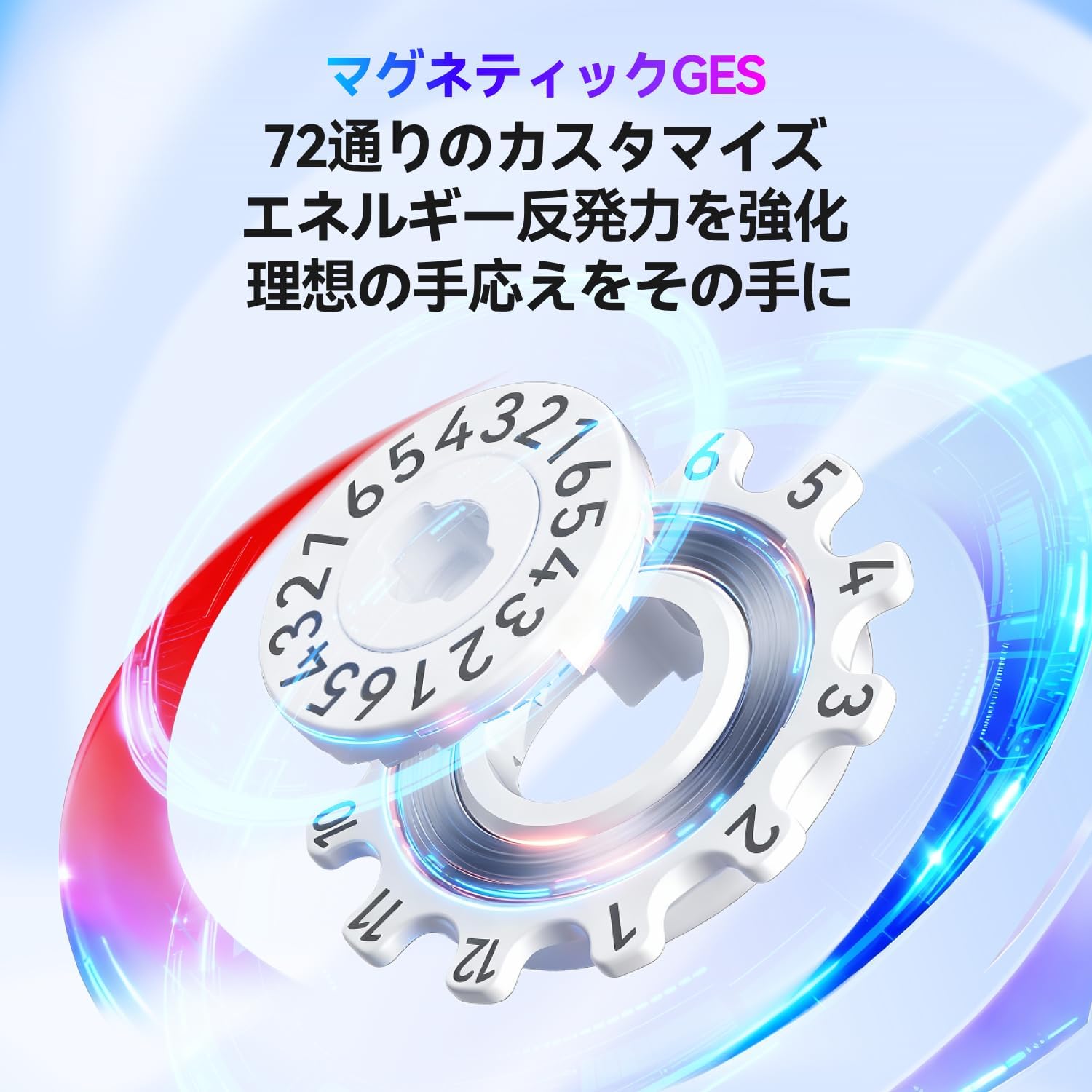
Image: The GAN i4 Leap package contents, including the cube, charging case, USB Type-C cable, center cap opening tool, and adjustment guide.
3.2 Charging the Cube
The GAN i4 Leap features a quick-charge function. Connect the cube to the dedicated charging case ('GanPod') using the provided USB Type-C cable. A 10-minute charge provides approximately 10 hours of play in Endurance mode. A full charge can last up to 200 hours in Endurance mode.
3.3 ആപ്പ് ഡൗൺലോഡും കണക്ഷനും
- Download the 'Cube Station' app from your device's app store (iOS/Android).
- നിങ്ങളുടെ സ്മാർട്ട്ഫോണിലോ ടാബ്ലെറ്റിലോ ബ്ലൂടൂത്ത് പ്രവർത്തനക്ഷമമാക്കിയിട്ടുണ്ടെന്ന് ഉറപ്പാക്കുക.
- Open the Cube Station app and follow the on-screen instructions to pair your GAN i4 Leap Smart Cube. The app will guide you through the connection process.
3.4 Adjusting the Cube (GES Pro+)
The GAN i4 Leap features the GES Pro+ system, offering 72 levels of customization for tension and elasticity. Use the included center cap opening tool to access the adjustment mechanism. Refer to the detailed adjustment guide provided in the package for specific settings. This allows you to fine-tune the cube's feel to your preference.

Image: Close-up of the GAN i4 Leap's GES Pro+ system, showing the numerical adjustment mechanism for tension and elasticity.
Video: This video demonstrates the unboxing and initial setup of a GAN smart cube, including app interaction and basic features. While it features the GAN i Carry 4, the setup principles are similar for the GAN i4 Leap.
4. പ്രവർത്തന നിർദ്ദേശങ്ങൾ
4.1 Using the CubeStation App
The CubeStation app is your portal to advanced cubing. Once connected, the app provides:
- Real-time Tracking & Analysis: Your cube's movements are tracked in real-time, providing data on turns per second (TPS), move count, and more.
- Personalized Training: AI-powered training modules help identify weaknesses and suggest specific algorithms and practice routines.
- Online Battles (PK): Compete against other cubers worldwide in real-time.
- Tutorials & Courses: Access beginner to advanced tutorials and master classes to improve your skills.

Image: The main interface of the CubeStation app, showing options for competition, training, and device management.

Image: Screenshots from the CubeStation app illustrating global online battles and AI-assisted coaching features.
4.2 Switching Modes (Performance/Endurance)
The cube can operate in two modes: Performance and Endurance. The method for switching modes is typically done through the CubeStation app settings. Refer to the app's user interface for specific instructions on how to toggle between these modes based on your current activity.
5. പരിപാലനം
5.1 വൃത്തിയാക്കൽ
To maintain optimal performance, regularly clean your GAN i4 Leap. Use a soft, dry cloth to wipe the exterior surfaces. Avoid using harsh chemicals or abrasive materials that could damage the cube's finish or internal components.
5.2 ലൂബ്രിക്കേഷൻ
The cube features a honeycomb structure designed to retain lubrication. While the cube comes pre-lubricated, you may apply a small amount of speed cube lubricant to the internal contact surfaces if you notice a decrease in smoothness. Use only lubricants specifically designed for speed cubes.
5.3 ബാറ്ററി കെയർ
To prolong battery life, avoid fully discharging the cube frequently. Charge the cube regularly, especially if it will be stored for an extended period. Store the cube in a cool, dry place away from extreme temperatures.
6. പ്രശ്നപരിഹാരം
6.1 Cube Not Connecting to App
- നിങ്ങളുടെ ഉപകരണത്തിൽ ബ്ലൂടൂത്ത് പ്രവർത്തനക്ഷമമാക്കിയിട്ടുണ്ടെന്ന് ഉറപ്പാക്കുക.
- Make sure the cube is charged.
- Restart the CubeStation app and try pairing again.
- If issues persist, try restarting your device.
6.2 Inaccurate Tracking
- Ensure the cube's firmware is up to date via the CubeStation app.
- Calibrate the gyroscope through the app settings if available.
- Check for any physical obstructions or damage to the cube.
6.3 Cube Feels Loose or Too Tight
Adjust the GES Pro+ system using the provided tool. Refer to Section 3.4 and the included adjustment guide for detailed instructions on how to modify the tension and elasticity to your desired feel.
7 സ്പെസിഫിക്കേഷനുകൾ
| ബ്രാൻഡ് | GAN |
| മോഡൽ | i4 Leap |
| Puzzle Type | Speed Cube (3x3) |
| Minimum Recommended Age | 6 years (72 months) |
| ഇനങ്ങളുടെ എണ്ണം | 1 |
| ഉൽപ്പന്ന അളവുകൾ (L x W) | 5.6 സെ.മീ x 5.6 സെ.മീ |
| മെറ്റീരിയൽ തരം | പ്ലാസ്റ്റിക് എബിഎസ് |
| വിദ്യാഭ്യാസ ലക്ഷ്യം | Brain Training |
| നൈപുണ്യ നില | ഇൻ്റർമീഡിയറ്റ് |
| ബാറ്ററി തരം | 1 ലിഥിയം അയൺ ബാറ്ററി (ഉൾപ്പെടുത്തിയിരിക്കുന്നു) |
| കണക്റ്റിവിറ്റി | ബ്ലൂടൂത്ത് |
8. വാറൻ്റിയും പിന്തുണയും
Your GAN i4 Leap Smart Cube is covered by a manufacturer's warranty. Please refer to the warranty card included in your package for specific terms and conditions. For technical support, product inquiries, or warranty claims, please contact GAN customer service through their official website or the CubeStation app's support section.
For more information, visit the official GAN Cube JP store: GAN Cube JP Store