
ആമുഖം
This user manual provides essential information for setting up, operating, and maintaining your Hisense 50" E7 Cinema Series Hi-QLED Mini-LED 4K UHD Smart Fire TV. Please read this manual thoroughly before using your television to ensure proper operation and to maximize your viewഅനുഭവം. ഭാവി റഫറൻസിനായി ഈ മാനുവൽ സൂക്ഷിക്കുക.

ചിത്രം 1: മുൻഭാഗം view of the Hisense 50" E7 Cinema Series TV.
സജ്ജമാക്കുക
അൺപാക്കിംഗും പ്രാരംഭ പരിശോധനയും
Carefully remove the television and all accessories from the packaging. Ensure all components listed below are present and undamaged. If any items are missing or damaged, contact your retailer immediately.
ഉൾപ്പെടുത്തിയ ഘടകങ്ങൾ:
- Hisense 50" E7 Cinema Series TV
- പവർ കേബിൾ
- റിമോട്ട് കൺട്രോൾ (2 AAA ബാറ്ററികൾ ആവശ്യമാണ്, ഉൾപ്പെടുത്തിയിട്ടില്ല)
- ടിവി സ്റ്റാൻഡ് (2 കഷണങ്ങൾ)
- ഉപയോക്തൃ മാനുവൽ (ഈ പ്രമാണം)
ശാരീരിക അളവുകളും ഭാരവും
Refer to the diagram below for detailed dimensions and weight information to assist with placement and mounting.

Figure 2: TV dimensions (D x W x H: 2.6" x 43.7" x 25.5") and weight (22.3 lbs without stand, 22.7 lbs with stand). VESA Wall Mount Size: 400x300 mm (M6).
പെരിഫറലുകൾ ബന്ധിപ്പിക്കുന്നു
The TV offers various ports for connecting external devices. Ensure the TV is powered off before making any connections.
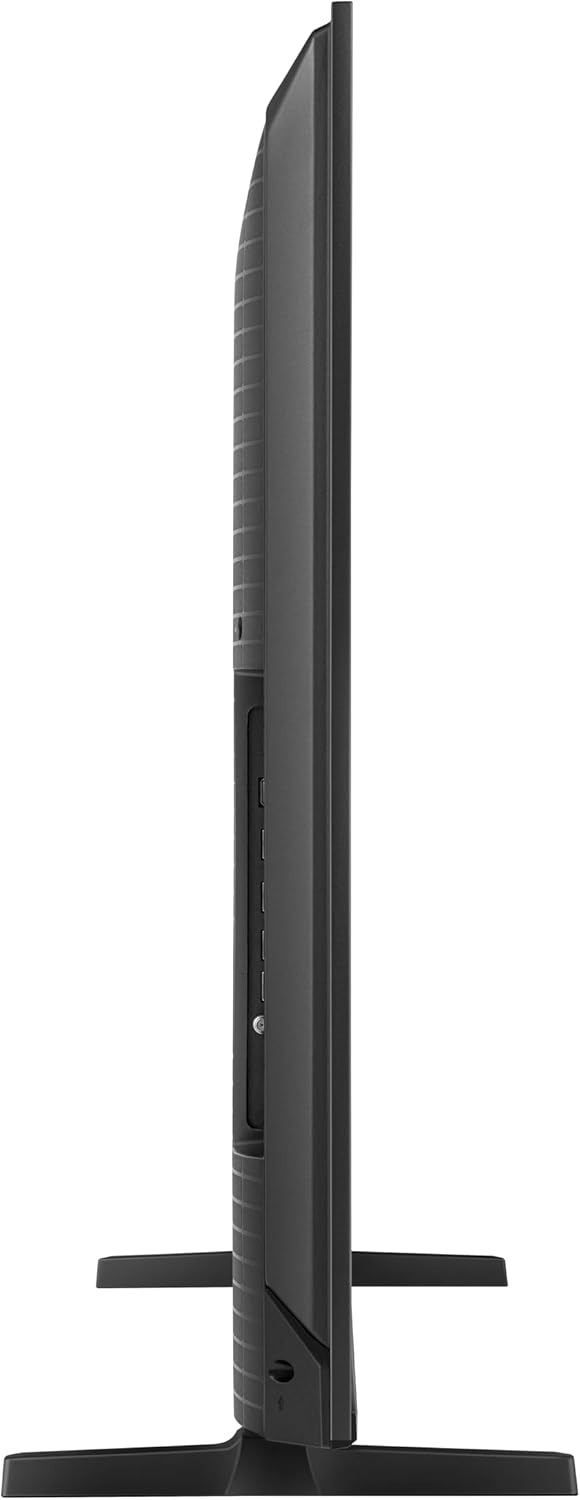
ചിത്രം 3: പിൻഭാഗം view വിവിധ ഇൻപുട്ട്/ഔട്ട്പുട്ട് പോർട്ടുകൾ കാണിക്കുന്ന ടിവിയുടെ.
- യുഎസ്ബി x 2: For media playback or powering compatible devices. (1x USB 2.0, 1x USB 3.0)
- HDMI 1 - 4K@60Hz (eARC): Enhanced Audio Return Channel for high-quality sound via soundbars or AV receivers.
- HDMI 2 - 4K@60Hz: Supports up to 4K@60Hz with VRR and ALLM, ideal for gaming consoles, PCs, and high-frame-rate sources.
- HDMI 3 / 4 - 4K@144Hz: Supports up to 4K@144Hz with VRR and ALLM, ideal for gaming consoles, PCs, and high-frame-rate sources.
- ANT / CABLE: Connects to over-the-air or cable TV signals.
- ETHERNET (LAN): Provides a stable wired connection for streaming, updates, and smart TV features.
- ഡിജിറ്റൽ ഓഡിയോ ഔട്ട് (ഒപ്റ്റിക്കൽ): Outputs high-quality digital sound to external audio systems.
റിമോട്ട് കൺട്രോൾ സജ്ജീകരണം
Insert two AAA batteries into the remote control. If the remote does not pair automatically, press and hold the Home button on the remote for a few seconds to initiate pairing. Ensure there are no obstructions between the remote and the TV.

Figure 4: The TV remote control featuring the Alexa voice assistant button.
പ്രവർത്തന നിർദ്ദേശങ്ങൾ
പവർ ചെയ്യുന്നത് ഓൺ/ഓഫ്
Press the power button on the remote control or on the TV itself to turn the television on or off. A brief press will put the TV into standby mode, while a longer press may initiate a full shutdown.
ഫയർ ടിവി ഇന്റർഫേസ്
Your Hisense TV features the Fire TV operating system, providing access to a wide range of streaming services, apps, and smart features. Navigate the interface using the remote control's directional pad and selection button.

Figure 5: The Fire TV interface, offering various streaming applications and content recommendations.
അലക്സയ്ക്കൊപ്പം വോയ്സ് കൺട്രോൾ
Press the Alexa button on your remote to use voice commands for searching content, controlling playback, launching apps, and managing smart home devices. Say "Alexa, what should I watch next?" or "Alexa, show me the front door camera."
Supported Internet Applications:
- ഡിസ്നി പ്ലസ്
- ഹുലു
- നെറ്റ്ഫ്ലിക്സ്
- പ്രധാന വീഡിയോ
- YouTube
- And many more available through the Fire TV Appstore.
Picture and Sound Features
Your Hisense E7 TV incorporates advanced technologies to deliver an enhanced viewing, ഓഡിയോ അനുഭവം.
Hi-QLED MiniLED Technology
Mini-LED backlighting utilizes thousands of precise light zones to enhance contrast, providing deeper blacks, brighter highlights, and more visible detail. This technology ensures a clear and impactful picture in various lighting conditions.

Figure 6: Comparison of Edge-lit LED vs. Hisense MiniLED, showing enhanced contrast and brightness.
Native 144Hz Game Mode
For gaming and fast-paced content, the native 144Hz refresh rate ensures fluid and sharp motion, reducing blur. This feature, combined with VRR (Variable Refresh Rate) and ALLM (Auto Low Latency Mode) on compatible HDMI ports, provides a responsive gaming experience.

Figure 7: Visual representation of smoother action with Native 144Hz Game Mode, ideal for gaming.
ഡോൾബി വിഷൻ ഐക്യു & ഡോൾബി അറ്റ്മോസ്
Experience cinematic HDR with vivid brightness and deeper contrast through Dolby Vision IQ. Paired with immersive, room-filling sound from Dolby Atmos, every scene feels more lifelike. Dolby Vision IQ intelligently optimizes picture quality based on ambient light.

Figure 8: Visualizing the immersive audio and enhanced visual experience provided by Dolby Vision IQ and Dolby Atmos.
AI ചിത്രം
Advanced AI processing analyzes content scene by scene, automatically optimizing brightness, contrast, and color for a clearer, more natural image. The picture adjusts in real-time without manual settings.

Figure 9: AI Picture engine optimizing various aspects of the image, including color, clarity, noise reduction, and contrast.
AI Smooth Motion with MEMC
Motion enhancement technology (MEMC) reduces blur and sharpens fast-moving scenes, keeping action crisp and easy to follow in sports, action movies, and gaming.

Figure 10: Side-by-side comparison demonstrating the smoother picture with AI Smooth Motion compared to conventional display.
മൊത്തം HDR പരിഹാരം
The TV supports multiple HDR formats including Dolby Vision IQ, HDR10+ Adaptive, HDR10, and HLG, ensuring brighter highlights, deeper contrast, and more detail in every scene from various sources.

Figure 11: Visual highlighting higher brightness and clearer details achieved with Total HDR Solution.
ഫിലിം മേക്കർ മോഡ്
Filmmaker Mode preserves the original aspect ratio, color, frame rate, and sound, allowing you to watch movies exactly as directors intended, without artificial enhancements.
AI 4K അപ്സ്കെയിലർ
The AI 4K Upscaler uses deep-learning models to enhance lower-resolution content by sharpening details, reconstructing textures, and reducing noise, bringing non-4K content closer to 4K quality.

Figure 12: The AI 4K Upscaler transforming 2K signal into a stunning 4K effect.
AI Light Sensor
The intelligent AI Light Sensor adapts to your environment by detecting ambient light and adjusting the backlight in real-time. This maintains optimal picture quality for comfortable viewing at any time of day without manual adjustments.

Figure 13: The AI Light Sensor automatically adjusting screen brightness for optimal viewവ്യത്യസ്ത ലൈറ്റിംഗ് അവസ്ഥകളിൽ പ്രവർത്തിക്കുന്നു.
AI സ്പോർട്സ് മോഡ്
When sports content is detected, AI Sports Mode automatically adjusts picture and sound settings for the action. This includes smoother motion, clearer details, and boosted crowd audio to enhance the viewഅനുഭവം.

Figure 14: AI Sports Mode optimizing the display for a soccer match, showing enhanced clarity and motion.
ഉൽപ്പന്നം കഴിഞ്ഞുview വീഡിയോ
വീഡിയോ 1: ഔദ്യോഗിക ഉൽപ്പന്നം അവസാനിച്ചുview of the Hisense E7SF TV, highlighting its key features and design.
മെയിൻ്റനൻസ്
സ്ക്രീൻ വൃത്തിയാക്കുന്നു
സ്ക്രീൻ വൃത്തിയാക്കാൻ, മൃദുവായ, ലിന്റ് രഹിത തുണി ഉപയോഗിച്ച് സൌമ്യമായി തുടയ്ക്കുക. കഠിനമായ പാടുകൾക്ക്, നേരിയ തോതിൽ dampen the cloth with water or a specialized screen cleaner. Never spray liquid directly onto the screen. Avoid using harsh chemicals, abrasive cleaners, or alcohol-based solutions, as these can damage the screen surface.
ടിവി ബോഡി വൃത്തിയാക്കൽ
Wipe the TV body and stand with a soft, dry cloth. Do not use any liquid cleaners on the body of the TV.
ജനറൽ കെയർ
- ടിവി നേരിട്ട് സൂര്യപ്രകാശം ഏൽക്കുന്ന സ്ഥലങ്ങളിലോ താപ സ്രോതസ്സുകൾക്ക് സമീപമോ വയ്ക്കുന്നത് ഒഴിവാക്കുക.
- ടിവി അമിതമായി ചൂടാകുന്നത് തടയാൻ ചുറ്റും ആവശ്യത്തിന് വായുസഞ്ചാരം ഉറപ്പാക്കുക.
- Unplug the power cord from the wall outlet during lightning storms or when the TV is left unattended for long periods.
ട്രബിൾഷൂട്ടിംഗ്
നിങ്ങളുടെ ടിവിയിൽ പ്രശ്നങ്ങൾ നേരിടുകയാണെങ്കിൽ, ഉപഭോക്തൃ പിന്തുണയുമായി ബന്ധപ്പെടുന്നതിന് മുമ്പ് ഇനിപ്പറയുന്ന പൊതുവായ പ്രശ്നങ്ങളും പരിഹാരങ്ങളും പരിശോധിക്കുക.
No Power / Black Screen
- ടിവിയിലേക്കും പ്രവർത്തിക്കുന്ന ഒരു പവർ ഔട്ട്ലെറ്റിലേക്കും പവർ കേബിൾ സുരക്ഷിതമായി ബന്ധിപ്പിച്ചിട്ടുണ്ടെന്ന് ഉറപ്പാക്കുക.
- If the TV goes to a black screen after rebooting, try unplugging the TV from the wall for 30 seconds, then plug it back in and power it on.
- ടിവിയിലെ പവർ ഇൻഡിക്കേറ്റർ ലൈറ്റ് ഓണാണോ എന്ന് പരിശോധിക്കുക.
റിമോട്ട് കൺട്രോൾ പ്രശ്നങ്ങൾ
- Replace the batteries in the remote control with fresh AAA batteries.
- If the remote is unresponsive, try re-pairing it by pressing and holding the Home button for a few seconds.
- റിമോട്ടിനും ടിവിയുടെ ഐആർ സെൻസറിനും ഇടയിൽ തടസ്സങ്ങളൊന്നുമില്ലെന്ന് ഉറപ്പാക്കുക.
Wi-Fi കണക്റ്റിവിറ്റി പ്രശ്നങ്ങൾ
- നിങ്ങളുടെ വൈഫൈ റൂട്ടർ ഓണാണെന്നും ശരിയായി പ്രവർത്തിക്കുന്നുണ്ടെന്നും ഉറപ്പാക്കുക.
- നിങ്ങളുടെ വൈഫൈ റൂട്ടറും ടിവിയും പുനരാരംഭിക്കുക.
- ടിവിയുടെ നെറ്റ്വർക്ക് ക്രമീകരണങ്ങളിലേക്ക് പോയി നിങ്ങളുടെ വൈഫൈ നെറ്റ്വർക്കിലേക്ക് വീണ്ടും കണക്റ്റുചെയ്യാൻ ശ്രമിക്കുക.
- If issues persist, consider performing a factory reset (note: this will erase all settings and downloaded apps).
Picture Quality Issues (e.g., colors too bright)
- Access the TV's picture settings menu.
- Adjust brightness, contrast, color saturation, and backlight levels to your preference.
- Experiment with different picture modes (e.g., Standard, Movie, Game, Filmmaker Mode) to find the most suitable setting.
സ്പെസിഫിക്കേഷനുകൾ
| ഫീച്ചർ | വിവരണം |
|---|---|
| സ്ക്രീൻ വലിപ്പം | 50 ഇഞ്ച് |
| ബ്രാൻഡ് | ഹിസെൻസ് |
| മോഡലിൻ്റെ പേര് | 50E7SF |
| ഡിസ്പ്ലേ ടെക്നോളജി | Hi-QLED-Quantum Dot Color, LCD, Mini LED, WCG-Wide Color Gamut |
| റെസലൂഷൻ | 4K അൾട്രാ HD (3840 x 2160) |
| പുതുക്കിയ നിരക്ക് | 144 Hz |
| HDR ഫോർമാറ്റ് പിന്തുണയ്ക്കുന്നു | Dolby Vision, Dolby Vision IQ, HDR10+, HDR10, HLG |
| ഓപ്പറേറ്റിംഗ് സിസ്റ്റം | ഫയർഒഎസ് |
| കണക്റ്റിവിറ്റി ടെക്നോളജി | Bluetooth 5.4, Ethernet, HDMI (4 ports), USB (2 ports), Wi-Fi 5 |
| ഓഡിയോ ഔട്ട്പുട്ട് പവർ | 20 വാട്ട്സ് |
| Integrated Surround Sound | ഡോൾബി അറ്റ്മോസ് |
| ഉൽപ്പന്ന അളവുകൾ (D x W x H) | 2.6" x 43.7" x 25.5" |
| ഇനത്തിൻ്റെ ഭാരം | 22.3 പൗണ്ട് |
| VESA മൗണ്ട് സ്റ്റാൻഡേർഡ് | 400 x 300 മി.മീ |
| വൈദ്യുതി ഉപഭോഗം | 160 വാട്ട്സ് |
| മോഡൽ വർഷം | 2026 |
വാറൻ്റിയും പിന്തുണയും
നിർമ്മാതാവിന്റെ വാറന്റി
This Hisense television comes with a 1 വർഷത്തെ നിർമ്മാതാവിന്റെ വാറന്റി from the date of purchase. This warranty covers defects in materials and workmanship under normal use. For specific terms and conditions, please refer to the warranty card included with your product or visit the official Hisense support webസൈറ്റ്.
ഉപഭോക്തൃ പിന്തുണ
For technical assistance, troubleshooting beyond this manual, or warranty claims, please contact Hisense customer support. Contact information can typically be found on the Hisense webസൈറ്റ് അല്ലെങ്കിൽ നിങ്ങളുടെ ടിവിയിൽ നൽകിയിരിക്കുന്ന ഡോക്യുമെന്റേഷനിൽ.