
1. ആമുഖം
This manual provides essential information for the safe and efficient operation of your THKFMSRC GD3024EMH High Frequency Off-Grid MPPT Solar Inverter. Please read this manual thoroughly before installation and use, and retain it for future reference.
The GD3024EMH is a high-frequency off-grid solar inverter designed to convert DC power from solar panels into AC power for household appliances. It features Maximum Power Point Tracking (MPPT) technology for optimized solar energy harvesting and operates as a hybrid system.
2 സുരക്ഷാ വിവരങ്ങൾ
മുന്നറിയിപ്പ്: ഈ സുരക്ഷാ നിർദ്ദേശങ്ങൾ പാലിക്കുന്നതിൽ പരാജയപ്പെടുന്നത് വൈദ്യുതാഘാതം, തീപിടുത്തം, ഗുരുതരമായ പരിക്കുകൾ അല്ലെങ്കിൽ മരണത്തിന് കാരണമായേക്കാം.
- യോഗ്യതയുള്ള ഉദ്യോഗസ്ഥർ ഇൻസ്റ്റാളേഷൻ നടത്തണം.
- എല്ലാ വയറിംഗും ശരിയായി പോളറൈസ് ചെയ്തിട്ടുണ്ടെന്നും സുരക്ഷിതമായി ബന്ധിപ്പിച്ചിട്ടുണ്ടെന്നും ഉറപ്പാക്കുക.
- Do not operate the inverter if it is damaged or appears to be malfunctioning.
- കത്തുന്ന വസ്തുക്കൾ, ഈർപ്പം, നേരിട്ടുള്ള സൂര്യപ്രകാശം എന്നിവയിൽ നിന്ന് ഇൻവെർട്ടർ അകറ്റി നിർത്തുക.
- അമിതമായി ചൂടാകുന്നത് തടയാൻ ഇൻവെർട്ടറിന് ചുറ്റും മതിയായ വായുസഞ്ചാരം ഉറപ്പാക്കുക.
- Disconnect all power sources (solar, battery, utility) before performing any maintenance or wiring.
3. പാക്കേജ് ഉള്ളടക്കം
Verify that all items listed below are included in your package. If any items are missing or damaged, please contact your supplier.
- THKFMSRC GD3024EMH Solar Inverter Unit
- ഉപയോക്തൃ മാനുവൽ (ഈ പ്രമാണം)
- മൗണ്ടിംഗ് ഹാർഡ്വെയർ (സ്ക്രൂകൾ, ആങ്കറുകൾ)
- Communication Cable (if applicable)
4. ഉൽപ്പന്നം കഴിഞ്ഞുview
The THKFMSRC GD3024EMH inverter integrates a solar charge controller, inverter, and battery charger into one unit. It is designed to provide uninterrupted power support.
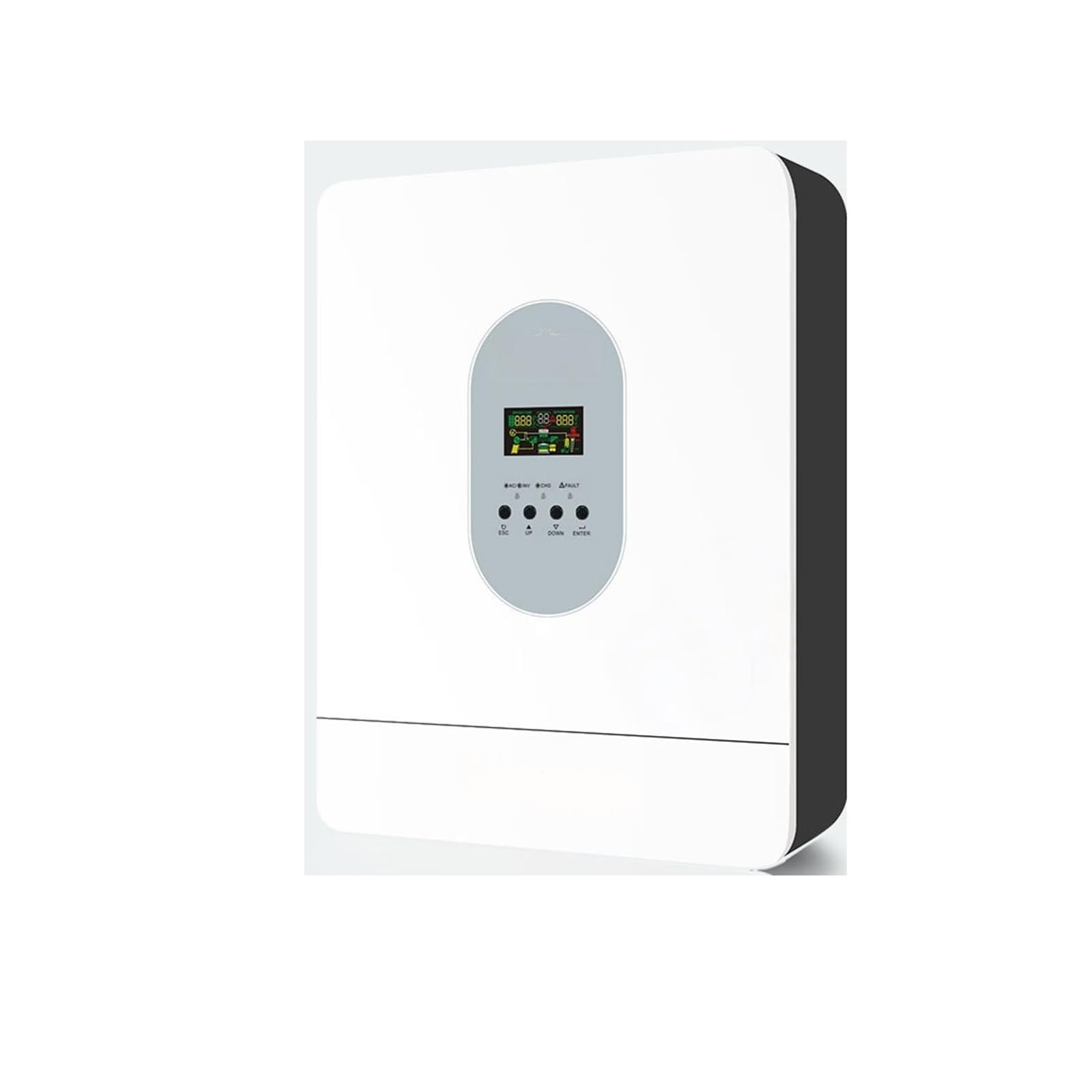
ചിത്രം 4.1: മുൻഭാഗം view of the THKFMSRC GD3024EMH solar inverter. This image displays the main unit with its control panel and various connection points for solar input, battery, and AC output.
4.1. സവിശേഷതകൾ
- ശുദ്ധ സെയ്ൻ വേവ് ഇൻവെർട്ടർ
- അന്തർനിർമ്മിത MPPT സോളാർ ചാർജ് കൺട്രോളർ
- ക്രമീകരിക്കാവുന്ന ഇൻപുട്ട് വോളിയംtagഎൽസിഡി ക്രമീകരണം വഴിയുള്ള വീട്ടുപകരണങ്ങൾക്കും വ്യക്തിഗത കമ്പ്യൂട്ടറുകൾക്കുമുള്ള ഇ ശ്രേണി
- എൽസിഡി ക്രമീകരണം വഴിയുള്ള ആപ്ലിക്കേഷനുകൾ അടിസ്ഥാനമാക്കി ക്രമീകരിക്കാവുന്ന ബാറ്ററി ചാർജിംഗ് കറന്റ്
- എൽസിഡി ക്രമീകരണം വഴി ക്രമീകരിക്കാവുന്ന എസി / സോളാർ ചാർജർ മുൻഗണന
- മെയിൻ വോള്യവുമായി പൊരുത്തപ്പെടുന്നുtagഇ അല്ലെങ്കിൽ ജനറേറ്റർ പവർ
- എസി വീണ്ടെടുക്കുമ്പോൾ യാന്ത്രികമായി പുനരാരംഭിക്കുക
- ഓവർലോഡ്/ഓവർ ടെമ്പറേച്ചർ/ഷോർട്ട് സർക്യൂട്ട് സംരക്ഷണം
- ഒപ്റ്റിമൈസ് ചെയ്ത ബാറ്ററി പ്രകടനത്തിനായി സ്മാർട്ട് ബാറ്ററി ചാർജർ ഡിസൈൻ
- തണുത്ത ആരംഭ പ്രവർത്തനം
5. സജ്ജീകരണം
5.1. ഇൻവെർട്ടർ മൌണ്ട് ചെയ്യൽ
- Choose a suitable mounting location:
- വീടിനുള്ളിൽ, നേരിട്ടുള്ള സൂര്യപ്രകാശം, മഴ, പൊടി എന്നിവയിൽ നിന്ന് സംരക്ഷിക്കപ്പെട്ടിരിക്കുന്നു.
- Vertical wall mounting is recommended.
- Ensure sufficient clearance (at least 20 cm) around the unit for proper heat dissipation.
- The ambient temperature should be between 0°C and 55°C.
- Mark the positions for the mounting screws on the wall using the inverter as a template.
- ദ്വാരങ്ങൾ തുരന്ന് വാൾ ആങ്കറുകൾ ഘടിപ്പിക്കുക (ആവശ്യമെങ്കിൽ).
- Securely mount the inverter to the wall using the provided screws.
5.2. വയറിംഗ് കണക്ഷനുകൾ
CAUTION: Before making any connections, ensure all power sources (solar panels, batteries, AC input) are disconnected and turned off.
- ബാറ്ററി കണക്ഷൻ: Connect the battery cables to the inverter's battery terminals. Ensure correct polarity (+ to + and - to -). The GD3024EMH requires a 24V battery bank.
- സോളാർ പാനൽ കണക്ഷൻ: Connect the solar panel cables to the inverter's PV input terminals. Observe correct polarity. Ensure the open-circuit voltage of your solar array does not exceed the inverter's maximum PV input voltage.
- എസി ഇൻപുട്ട് കണക്ഷൻ: If connecting to a utility grid or generator, connect the AC input cable to the designated AC input terminal.
- എസി ഔട്ട്പുട്ട് കണക്ഷൻ: നിങ്ങളുടെ ലോഡുകൾ (ഉപകരണങ്ങൾ) എസി ഔട്ട്പുട്ട് ടെർമിനലുകളുമായി ബന്ധിപ്പിക്കുക.
- ഗ്രൗണ്ടിംഗ്: Connect the inverter to an earth ground using a suitable grounding wire.
Refer to the wiring diagram provided in the full product manual for detailed connection points.
6. പ്രവർത്തന നിർദ്ദേശങ്ങൾ
6.1. പ്രാരംഭ പവർ-അപ്പ്
- എല്ലാ വയറിംഗ് കണക്ഷനുകളും സുരക്ഷിതവും കൃത്യവുമാണെന്ന് ഉറപ്പാക്കുക.
- ബാറ്ററി ബ്രേക്കർ/സ്വിച്ച് ഓണാക്കുക.
- Turn on the solar panel breaker/switch.
- If using AC input, turn on the AC input breaker.
- Press and hold the ON/OFF button on the inverter for a few seconds to power it on. The LCD display will illuminate.
6.2. എൽസിഡി ഡിസ്പ്ലേയും ബട്ടണുകളും
ഇൻവെർട്ടറിൽ ഒരു എൽസിഡി ഡിസ്പ്ലേയും നിരീക്ഷണത്തിനും കോൺഫിഗറേഷനുമായി നിരവധി ബട്ടണുകളും ഉണ്ട്.
- LCD ഡിസ്പ്ലേ: Shows real-time system status, input/output voltages, battery charge, and error codes.
- ഫംഗ്ഷൻ ബട്ടണുകൾ: Typically include UP, DOWN, ENTER, and ESCAPE for navigating menus and adjusting settings.
6.3. അടിസ്ഥാന ക്രമീകരണങ്ങൾ
Access the settings menu via the function buttons to configure parameters such as:
- Putട്ട്പുട്ട് വോളിയംtagഇ/ഫ്രീക്വൻസി: (e.g., 110V/60Hz for this model)
- ചാർജിംഗ് കറൻ്റ്: Adjust based on battery capacity.
- എസി ഇൻപുട്ട് വോളിയംtagഇ ശ്രേണി: For appliance or UPS mode.
- ചാർജർ മുൻഗണന: Solar first, AC first, or Solar and AC.
- Output Source Priority: Solar first, Utility first, or SBU (Solar-Battery-Utility).
Consult the detailed settings section in the complete manual for specific parameter adjustments.
7. പരിപാലനം
പതിവ് അറ്റകുറ്റപ്പണികൾ നിങ്ങളുടെ ഇൻവെർട്ടറിന്റെ ഒപ്റ്റിമൽ പ്രകടനവും ദീർഘായുസ്സും ഉറപ്പാക്കുന്നു.
- വൃത്തിയാക്കൽ: ഇൻവെർട്ടറിന്റെ പുറംഭാഗം ഉണങ്ങിയ തുണി ഉപയോഗിച്ച് ഇടയ്ക്കിടെ വൃത്തിയാക്കുക. വെന്റിലേഷൻ ഓപ്പണിംഗുകൾ പൊടിയിൽ നിന്നും അവശിഷ്ടങ്ങളിൽ നിന്നും മുക്തമാണെന്ന് ഉറപ്പാക്കുക.
- കണക്ഷനുകൾ: Annually check all electrical connections for tightness and corrosion. Re-tighten if necessary.
- ബാറ്ററി പരിശോധന: Regularly inspect battery terminals for corrosion and ensure battery fluid levels (if applicable) are correct.
- പരിസ്ഥിതി: പ്രവർത്തന അന്തരീക്ഷം നിശ്ചിത താപനിലയിലും ഈർപ്പത്തിലും പരിധിക്കുള്ളിൽ തുടരുന്നുവെന്ന് ഉറപ്പാക്കുക.
WARNING: Disconnect all power sources before performing any cleaning or inspection.
8. പ്രശ്നപരിഹാരം
ഈ വിഭാഗം പൊതുവായ പ്രശ്നങ്ങൾക്കുള്ള പരിഹാരങ്ങൾ നൽകുന്നു. ഇവിടെ പട്ടികപ്പെടുത്തിയിട്ടില്ലാത്ത പ്രശ്നങ്ങൾക്ക്, സാങ്കേതിക പിന്തുണയുമായി ബന്ധപ്പെടുക.
| പ്രശ്നം | സാധ്യമായ കാരണം | പരിഹാരം |
|---|---|---|
| ഇൻവെർട്ടർ ഓണാകുന്നില്ല | ബാറ്ററി കണക്ഷൻ ഇല്ല; ബാറ്ററി വോളിയംtage too low; ON/OFF button not pressed correctly. | Check battery connections; Charge battery; Press and hold ON/OFF button. |
| എസി ഔട്ട്പുട്ട് ഇല്ല | Overload; Short circuit; Inverter in fault mode. | Reduce load; Check for short circuits in wiring; Restart inverter. |
| Solar panels not charging battery | Incorrect PV connection; Insufficient sunlight; PV voltagവളരെ താഴ്ന്നത്/ഉയർന്നതാണ്. | Check PV wiring polarity; Ensure panels are in direct sunlight; Verify PV array voltagഇ സ്പെസിഫിക്കേഷനുകൾക്കുള്ളിലാണ്. |
| പിശക് കോഡ് പ്രദർശിപ്പിച്ചു | നിർദ്ദിഷ്ട സിസ്റ്റം തകരാറ്. | Refer to the full manual's error code section for detailed explanations and solutions. |
9 സ്പെസിഫിക്കേഷനുകൾ
Key technical specifications for the THKFMSRC GD3024EMH (24V-110V) model:
- മോഡൽ: GD3024EMH
- സിസ്റ്റം വോളിയംtage: 24V DC
- എസി putട്ട്പുട്ട് വോളിയംtage: 110V എസി
- Inverter Efficiency: 98% (as per product description)
- ഊർജ്ജ സ്രോതസ്സ്: Battery Powered (Hybrid with Solar/AC)
- വാട്ട്tage: 1 kWh (as per product specifications, likely refers to energy capacity or rated power)
- തരം: High Frequency Off-Grid MPPT Solar Inverter
- ASIN: B0GHF554WP
Note: Detailed specifications, including maximum PV input, charge current, and surge power, are available in the complete product datasheet.
10. വാറൻ്റിയും പിന്തുണയും
For warranty information, please refer to the warranty card included with your product or contact your point of purchase. THKFMSRC products are designed for reliability and performance.
For technical support, troubleshooting assistance, or spare parts, please contact THKFMSRC customer service through the retailer where the product was purchased or visit the official THKFMSRC webബന്ധപ്പെടാനുള്ള വിശദാംശങ്ങൾക്കുള്ള സൈറ്റ്.
When contacting support, please have your model number (GD3024EMH) and ASIN (B0GHF554WP) ready.