
1. ആമുഖം
വാങ്ങിയതിന് നന്ദി.asing the McGrey MCD-60 Vertical Stereo System. This compact Hi-Fi system offers versatile audio playback options including CD, MP3, USB, Bluetooth streaming, and FM/AM radio. Designed for space-saving, it can be used with its stand or mounted on a wall. Please read this manual carefully before using the device to ensure proper operation and to maximize its lifespan.
2. പ്രധാന സുരക്ഷാ നിർദ്ദേശങ്ങൾ
- ഉപയോഗിക്കുന്നതിന് മുമ്പ് എല്ലാ നിർദ്ദേശങ്ങളും വായിക്കുക.
- ഭാവി റഫറൻസിനായി ഈ മാനുവൽ സൂക്ഷിക്കുക.
- തീയോ വൈദ്യുതാഘാതമോ തടയാൻ യൂണിറ്റ് മഴയിലോ ഈർപ്പത്തിലോ തുറന്നുകാട്ടരുത്.
- വെന്റിലേഷൻ തുറസ്സുകളൊന്നും തടയരുത്. നിർമ്മാതാവിന്റെ നിർദ്ദേശങ്ങൾക്കനുസൃതമായി ഇൻസ്റ്റാൾ ചെയ്യുക.
- റേഡിയറുകൾ, ഹീറ്റ് രജിസ്റ്ററുകൾ, സ്റ്റൗകൾ, അല്ലെങ്കിൽ മറ്റ് ഉപകരണങ്ങൾ (ഉൾപ്പെടെ) പോലെയുള്ള താപ സ്രോതസ്സുകൾക്ക് സമീപം ഇൻസ്റ്റാൾ ചെയ്യരുത്. ampലൈഫയറുകൾ) ചൂട് ഉത്പാദിപ്പിക്കുന്നത്.
- പ്രത്യേകിച്ച് പ്ലഗുകൾ, കൺവീനിയൻസ് റെസെപ്റ്റക്കിളുകൾ, ഉപകരണത്തിൽ നിന്ന് പുറത്തുകടക്കുന്ന ഇടം എന്നിവയിൽ നടക്കുകയോ നുള്ളുകയോ ചെയ്യുന്നതിൽ നിന്ന് പവർ കോർഡ് സംരക്ഷിക്കുക.
- നിർമ്മാതാവ് വ്യക്തമാക്കിയ അറ്റാച്ച്മെൻ്റുകൾ/ആക്സസറികൾ മാത്രം ഉപയോഗിക്കുക.
- മിന്നൽ കൊടുങ്കാറ്റുകളുടെ സമയത്തോ ദീർഘനേരം ഉപയോഗിക്കാത്ത സമയത്തോ ഈ ഉപകരണം അൺപ്ലഗ് ചെയ്യുക.
- യോഗ്യതയുള്ള സേവന ഉദ്യോഗസ്ഥർക്ക് എല്ലാ സേവനങ്ങളും റഫർ ചെയ്യുക. ഉപകരണം ഏതെങ്കിലും വിധത്തിൽ കേടുവരുമ്പോൾ സർവീസ് ആവശ്യമാണ്.
3. പാക്കേജ് ഉള്ളടക്കം
പായ്ക്ക് അഴിക്കുമ്പോൾ എല്ലാ ഇനങ്ങളും ഉണ്ടെന്ന് ഉറപ്പാക്കുക:
- McGrey MCD-60 Stereo System
- റിമോട്ട് കൺട്രോൾ (ബാറ്ററികൾ ഉൾപ്പെടുത്തിയിട്ടില്ല)
- പവർ അഡാപ്റ്റർ
- ഉപയോക്തൃ മാനുവൽ (ഈ പ്രമാണം)
4. ഉൽപ്പന്നം കഴിഞ്ഞുview
4.1 മുൻവശവും വശവും View

ചിത്രം: മുൻഭാഗം view of the McGrey MCD-60 Stereo System, highlighting the USB port, headphone jack, and power button locations.

ചിത്രം: വശം views of the McGrey MCD-60 Stereo System, illustrating its compact and slim design.
4.2 പിൻഭാഗം View കണക്ഷനുകളും

ചിത്രം: പിൻഭാഗം view of the McGrey MCD-60 Stereo System, indicating the power input and FM antenna connection points. Wall mounting holes are also visible.
4.3 വിദൂര നിയന്ത്രണം

Image: The remote control for the McGrey MCD-60, showing buttons for power, EQ, repeat, volume, mode, and track navigation.
The remote control allows convenient operation of all functions from a distance. Please insert 2x AAA batteries (not included) into the remote control before first use.
5. സജ്ജീകരണം
5.1 പ്ലേസ്മെൻ്റ്
The MCD-60 can be placed on a flat surface using its integrated stand or mounted on a wall.
- സ്റ്റാൻഡ് പ്ലേസ്മെൻ്റ്: ടിപ്പിംഗ് തടയാൻ യൂണിറ്റ് ഒരു സ്ഥിരതയുള്ള, നിരപ്പായ പ്രതലത്തിൽ സ്ഥാപിച്ചിട്ടുണ്ടെന്ന് ഉറപ്പാക്കുക.
- മതിൽ മൗണ്ടിംഗ്: Use appropriate screws and wall plugs for your wall type. Ensure the mounting location is secure and can support the unit's weight (approx. 1.1 kg). Refer to the rear view മൗണ്ടിംഗ് പോയിന്റുകൾക്കുള്ള ചിത്രം.

Image: The McGrey MCD-60 Stereo System shown wall-mounted above a cabinet, demonstrating its space-saving design.
5.2 പവർ കണക്ഷൻ
- Connect the power adapter to the DC IN port on the back of the stereo system.
- പവർ അഡാപ്റ്റർ അനുയോജ്യമായ ഒരു മതിൽ ഔട്ട്ലെറ്റിലേക്ക് പ്ലഗ് ചെയ്യുക.
5.3 ആന്റിന കണക്ഷൻ
For optimal FM/AM radio reception, extend the integrated wire antenna on the back of the unit. Adjust its position for the best signal.
6. പ്രവർത്തന നിർദ്ദേശങ്ങൾ
6.1 പവർ ഓൺ/ഓഫ്
അമർത്തുക സ്റ്റാൻഡ് ബൈ യൂണിറ്റിലെ ബട്ടൺ അല്ലെങ്കിൽ ശക്തി സിസ്റ്റം ഓൺ അല്ലെങ്കിൽ ഓഫ് ചെയ്യുന്നതിന് റിമോട്ട് കൺട്രോളിലെ ബട്ടൺ അമർത്തുക.
6.2 മോഡുകൾ തിരഞ്ഞെടുക്കുന്നു
അമർത്തുക മോഡ് button on the unit or remote control to cycle through available modes: CD, USB, Bluetooth, FM/AM Radio, AUX.
6.3 സിഡി പ്ലേബാക്ക്
- തിരഞ്ഞെടുക്കുക CD മോഡ്.
- അമർത്തുക തുറക്കുക/അടയ്ക്കുക button (if available, or gently open the CD cover) to open the CD compartment.
- Insert a CD (audio CD, CD-R, CD-RW with MP3) with the label side facing you.
- Close the CD compartment. The system will automatically start playing.
- ഉപയോഗിക്കുക പ്ലേ/താൽക്കാലികമായി നിർത്തുക, നിർത്തുക, ഒഴിവാക്കുക (forward/backward) buttons on the unit or remote control to manage playback.

Image: The McGrey MCD-60 Stereo System with its vertical CD compartment open, ready for disc insertion.
6.4 യുഎസ്ബി പ്ലേബാക്ക്
- Insert a USB flash drive into the USB port on the side of the unit.
- തിരഞ്ഞെടുക്കുക USB mode. The system will automatically detect and play compatible audio files (MP3, WMA, FLAC, AAC, WAV).
- ഉപയോഗിക്കുക പ്ലേ/താൽക്കാലികമായി നിർത്തുക, നിർത്തുക, ഒഴിവാക്കുക (forward/backward) buttons on the unit or remote control to manage playback.
6.5 ബ്ലൂടൂത്ത് സ്ട്രീമിംഗ്
- തിരഞ്ഞെടുക്കുക ബ്ലൂടൂത്ത് mode. The display will show "BLU" and the unit will enter pairing mode.
- നിങ്ങളുടെ സ്മാർട്ട്ഫോണിലോ, ടാബ്ലെറ്റിലോ, മറ്റ് ബ്ലൂടൂത്ത് പ്രവർത്തനക്ഷമമാക്കിയ ഉപകരണത്തിലോ, ബ്ലൂടൂത്ത് പ്രവർത്തനക്ഷമമാക്കി ലഭ്യമായ ഉപകരണങ്ങൾക്കായി തിരയുക.
- Select "MCD-60" from the list of devices to pair.
- Once paired, you can stream audio wirelessly from your device to the stereo system.

Image: The McGrey MCD-60 display indicating "BLU" for Bluetooth mode, alongside icons representing compatible devices like laptops, smartphones, and tablets.
6.6 FM/AM റേഡിയോ
- തിരഞ്ഞെടുക്കുക FM or AM മോഡ്.
- അമർത്തുക ഓട്ടോ button on the remote control to perform an automatic station scan and save up to 50 presets.
- ഉപയോഗിക്കുക CH +/- buttons on the remote or ഒഴിവാക്കുക buttons on the unit to navigate through saved stations.
- For manual tuning, use the ട്യൂൺ+/- റിമോട്ടിലെ ബട്ടണുകൾ.
6.7 AUX ഇൻപുട്ട്
- ഒരു ബാഹ്യ ഓഡിയോ ഉപകരണം (ഉദാ. MP3 പ്ലെയർ) ഇതിലേക്ക് ബന്ധിപ്പിക്കുക ഓക്സ് ഇൻ 3.5mm ഓഡിയോ കേബിൾ ഉപയോഗിക്കുന്ന പോർട്ട് (ഉൾപ്പെടുത്തിയിട്ടില്ല).
- തിരഞ്ഞെടുക്കുക ഓക്സ് മോഡ്.
- Control playback from your connected external device.
6.8 ഹെഡ്ഫോൺ ഔട്ട്പുട്ട്
Connect headphones to the 3.5mm headphone jack for private listening. The main speakers will be muted automatically.
6.9 വോളിയം നിയന്ത്രണം
ഉപയോഗിക്കുക വോൾ +/- buttons on the unit or remote control to adjust the volume.
6.10 ഇക്വലൈസർ (EQ)
അമർത്തുക EQ button on the remote control to cycle through different equalizer presets (e.g., Pop, Rock, Classic, Jazz, Flat) to optimize sound for various music genres.
7. പരിപാലനം
- വൃത്തിയാക്കൽ: മൃദുവായതും ഉണങ്ങിയതുമായ തുണി ഉപയോഗിച്ച് യൂണിറ്റ് തുടയ്ക്കുക. അബ്രാസീവ് ക്ലീനറുകളോ ലായകങ്ങളോ ഉപയോഗിക്കരുത്.
- സിഡി കെയർ: സിഡികളുടെ അരികുകളിൽ പിടിക്കുക. അവ വൃത്തിയായും പോറലുകൾ ഇല്ലാതെയും സൂക്ഷിക്കുക.
- സംഭരണം: If storing the unit for an extended period, unplug it from the power outlet and remove batteries from the remote control. Store in a cool, dry place.
8. പ്രശ്നപരിഹാരം
| പ്രശ്നം | സാധ്യമായ കാരണം | പരിഹാരം |
|---|---|---|
| ശക്തിയില്ല | പവർ കോർഡ് ബന്ധിപ്പിച്ചിട്ടില്ല; പവർ ഔട്ട്ലെറ്റ് സജീവമല്ല. | പവർ കോർഡ് സുരക്ഷിതമായി പ്ലഗ് ഇൻ ചെയ്തിട്ടുണ്ടെന്ന് ഉറപ്പാക്കുക; മറ്റൊരു ഔട്ട്ലെറ്റ് പരീക്ഷിക്കുക. |
| ശബ്ദമില്ല | Volume too low; Mute activated; Incorrect mode selected; Headphones connected. | Increase volume; Press MUTE on remote; Select correct mode; Disconnect headphones. |
| സിഡി പ്ലേ ചെയ്യുന്നില്ല | CD inserted incorrectly; CD dirty or scratched; Incorrect mode. | Reinsert CD correctly; Clean or replace CD; Select CD mode. |
| യുഎസ്ബി പ്ലേ ചെയ്യുന്നില്ല | USB drive not inserted correctly; Incompatible file format; Incorrect mode. | Reinsert USB drive; Ensure files are MP3, WMA, FLAC, AAC, WAV; Select USB mode. |
| ബ്ലൂടൂത്ത് ജോടിയാക്കൽ പരാജയപ്പെടുന്നു | Bluetooth mode not selected; Device too far; Device already paired with another unit. | Select Bluetooth mode; Move device closer (within 10m); Disconnect from other devices. |
| മോശം റേഡിയോ സ്വീകരണം | Antenna not extended or positioned poorly; Interference. | Extend and adjust the antenna; Move unit away from other electronic devices. |
| റിമോട്ട് കൺട്രോൾ പ്രവർത്തിക്കുന്നില്ല | ബാറ്ററികൾ തീർന്നു അല്ലെങ്കിൽ തെറ്റായി ചേർത്തു; റിമോട്ടിനും യൂണിറ്റിനും ഇടയിലുള്ള തടസ്സം. | Replace batteries (2x AAA); Ensure correct polarity; Remove obstructions. |
9 സ്പെസിഫിക്കേഷനുകൾ
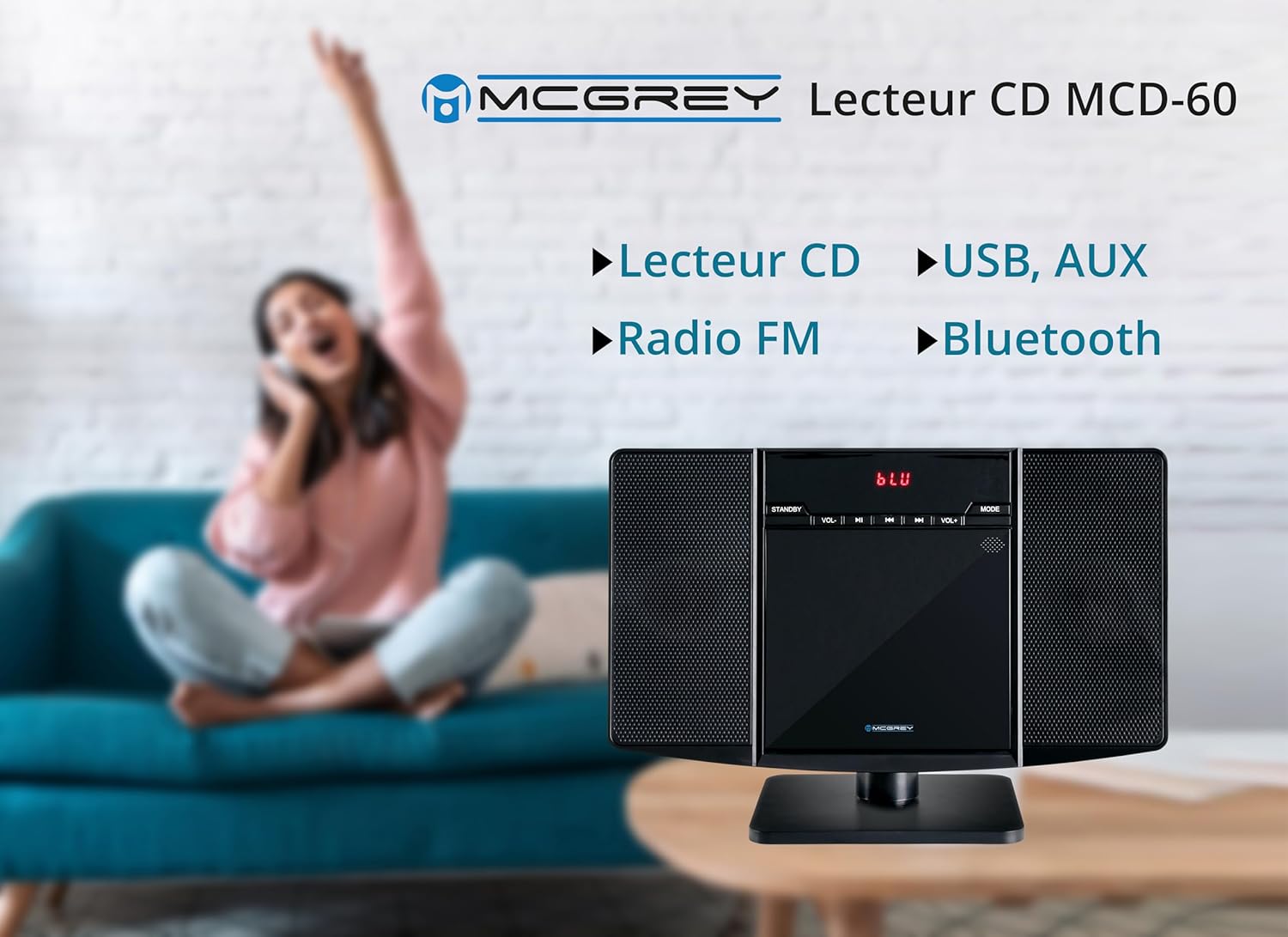
Image: Dimensions of the McGrey MCD-60 Stereo System, showing approximate measurements for height, width, and depth.
- മോഡൽ: MCD-60
- പവർ ഔട്ട്പുട്ട്: 2 x 3 വാട്ട്സ് ആർഎംഎസ്
- കണക്റ്റിവിറ്റി: Bluetooth, USB, AUX (3.5mm jack), Headphone Out (3.5mm jack)
- പ്ലേ ചെയ്യാവുന്ന ഫോർമാറ്റുകൾ: CD, MP3, CD-R, CD-RW, WMA, FLAC, AAC, WAV (via USB)
- റേഡിയോ: FM/AM with PLL tuner, 50 station presets
- ബ്ലൂടൂത്ത് ശ്രേണി: 10 മീറ്റർ വരെ (ഏകദേശം 33 അടി)
- ഡിസ്പ്ലേ: Red backlit LCD
- അളവുകൾ (H x W x D):
- With stand: approx. 23.8 x 34.9 x 13.9 cm (9.37 x 13.74 x 5.47 inches)
- Without stand: approx. 20.4 x 34.9 x 6 cm (8.03 x 13.74 x 2.36 inches)
- ഭാരം: ഏകദേശം. 1.1 കിലോഗ്രാം (2.4 പ bs ണ്ട്)
- നിറം: തിളങ്ങുന്ന കറുപ്പ്
- ഊർജ്ജ സ്രോതസ്സ്: കേബിൾ ഇലക്ട്രിക്
- ഉൾപ്പെടുത്തിയ ആക്സസറികൾ: വിദൂര നിയന്ത്രണം (ബാറ്ററികൾ ഉൾപ്പെടുത്തിയിട്ടില്ല)
10. വാറൻ്റിയും പിന്തുണയും
വാറന്റി വിവരങ്ങൾക്കും സാങ്കേതിക പിന്തുണയ്ക്കും, വാങ്ങുന്ന സമയത്ത് നൽകിയിട്ടുള്ള ഡോക്യുമെന്റേഷൻ പരിശോധിക്കുകയോ നിങ്ങളുടെ റീട്ടെയിലറെ ബന്ധപ്പെടുകയോ ചെയ്യുക. ഏതെങ്കിലും വാറന്റി ക്ലെയിമുകൾക്കായി നിങ്ങളുടെ വാങ്ങിയതിന്റെ തെളിവ് സൂക്ഷിക്കുക.
തിരികെ നൽകൽ നയം: The product typically comes with a 30-day refund/replacement policy. Please check with your retailer for specific terms.