
1. ആമുഖം
Thank you for choosing the Audizio Arco Active Tower Speaker. This manual provides essential information for the safe and correct operation of your new audio system. Please read it thoroughly before use and retain it for future reference.
2. സുരക്ഷാ നിർദ്ദേശങ്ങൾ
- വൈദ്യുതി വിതരണം: വൈദ്യുതി വിതരണം വോളിയം ഉറപ്പാക്കുകtage matches the requirements specified on the speaker.
- വെൻ്റിലേഷൻ: വെന്റിലേഷൻ തുറസ്സുകളൊന്നും തടയരുത്. നിർമ്മാതാവിന്റെ നിർദ്ദേശങ്ങൾക്കനുസൃതമായി ഇൻസ്റ്റാൾ ചെയ്യുക.
- ജലവും ഈർപ്പവും: ഈ ഉപകരണം മഴയിലോ ഈർപ്പത്തിലോ തുറന്നുകാട്ടരുത്. പാത്രങ്ങൾ പോലുള്ള ദ്രാവകങ്ങൾ നിറച്ച വസ്തുക്കൾ ഉപകരണത്തിൽ വയ്ക്കരുത്.
- താപ സ്രോതസ്സുകൾ: റേഡിയറുകൾ, ഹീറ്റ് രജിസ്റ്ററുകൾ, സ്റ്റൗകൾ, അല്ലെങ്കിൽ മറ്റ് ഉപകരണങ്ങൾ (ഉൾപ്പെടെ) പോലെയുള്ള താപ സ്രോതസ്സുകൾക്ക് സമീപം ഇൻസ്റ്റാൾ ചെയ്യരുത്. ampലൈഫയറുകൾ) ചൂട് ഉത്പാദിപ്പിക്കുന്നത്.
- വൃത്തിയാക്കൽ: ഉണങ്ങിയ തുണി ഉപയോഗിച്ച് മാത്രം വൃത്തിയാക്കുക.
- സേവനം: യോഗ്യതയുള്ള സേവന ഉദ്യോഗസ്ഥർക്ക് എല്ലാ സേവനങ്ങളും റഫർ ചെയ്യുക. ഉപകരണം ഏതെങ്കിലും വിധത്തിൽ കേടുവരുമ്പോൾ സർവീസ് ആവശ്യമാണ്.
3. പാക്കേജ് ഉള്ളടക്കം
Carefully unpack the box and ensure all items are present and in good condition. If any item is missing or damaged, contact your retailer immediately.
- Audizio Arco Active Speaker
- Front Panel (Speaker Grille)
- സ്പീക്കർ നിലപാട്
- റിമോട്ട് കൺട്രോൾ
- പവർ കേബിൾ
- നിർദ്ദേശ മാനുവൽ (ഈ പ്രമാണം)
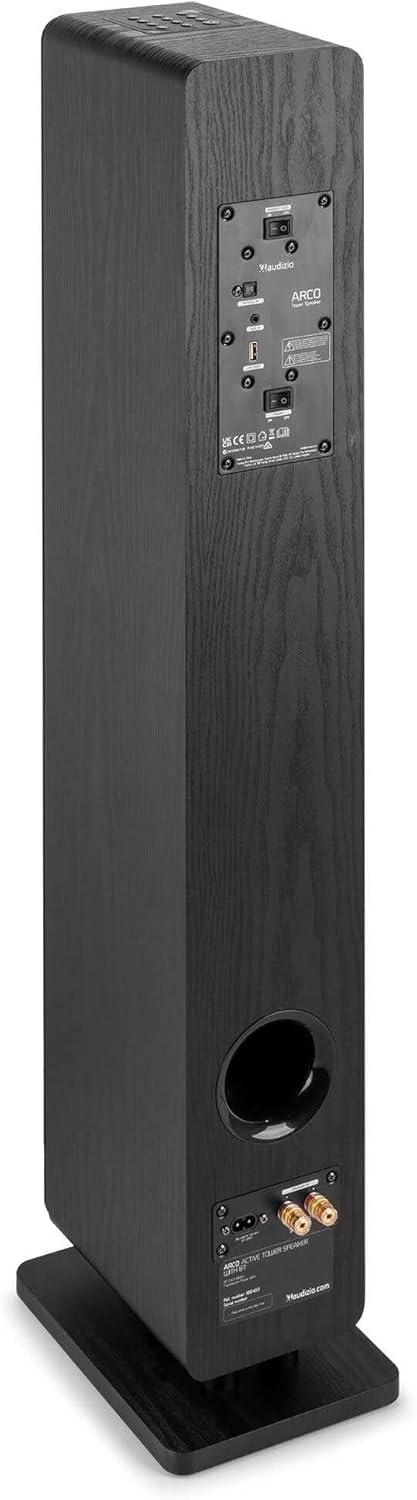
Image: All components included in the Audizio Arco package, including the speaker, remote control, and various connection cables.
4. ഉൽപ്പന്നം കഴിഞ്ഞുview
ഫ്രണ്ട് View (with Grille)

Image: The Audizio Arco speaker from the front, with the black fabric grille covering the drivers. The top panel shows control buttons, and the base features subtle LED lighting.
ഫ്രണ്ട് View (without Grille)

Image: The Audizio Arco speaker with the front grille removed, showcasing the tweeter and three 4-inch woofer/subwoofer drivers. The top panel controls and LED-lit base are also visible.
പിൻഭാഗം View (Connections and Controls)

Image: The back panel of the Audizio Arco speaker, featuring the power input, optical input, AUX input, USB port, and speaker output terminals for passive speakers. Control switches are also visible.
റിമോട്ട് കൺട്രോൾ

ചിത്രം: വിശദമായ ഒരു ചിത്രം view of the Audizio Arco remote control, showing buttons for power, mute, Bluetooth, link (TWS), input selection, playback controls, volume adjustment, and bass/treble settings.
Base LED Lighting

Image: A close-up of the speaker's base, illustrating the integrated ambient LED lighting feature that illuminates the area beneath the speaker.
5. സജ്ജീകരണം
5.1 Assembling the Speaker
- Carefully remove the speaker and its stand from the packaging.
- Attach the speaker stand to the base of the speaker using the provided screws. Ensure it is securely fastened.
- If desired, attach the front panel (grille) to the front of the speaker. It is held in place magnetically.
5.2 പവർ കണക്ഷൻ
- Connect the power cable to the AC IN port on the rear of the speaker.
- പവർ കേബിളിന്റെ മറ്റേ അറ്റം അനുയോജ്യമായ ഒരു മതിൽ ഔട്ട്ലെറ്റിലേക്ക് പ്ലഗ് ചെയ്യുക.
5.3 പ്രാരംഭ പ്ലേസ്മെന്റ്
Place the speaker on a stable, flat surface. For optimal sound, position it in a location where sound can propagate freely without obstruction. Avoid placing it directly against a wall if possible, to allow for better bass response.
6. പ്രവർത്തന നിർദ്ദേശങ്ങൾ
6.1 പവർ ഓൺ/ഓഫ്
അമർത്തുക ശക്തി button on the top panel of the speaker or on the remote control to turn the speaker on or off.
6.2 ഇൻപുട്ട് തിരഞ്ഞെടുക്കൽ
അമർത്തുക ഇൻപുട്ട് button on the top panel or the remote control to cycle through available input sources: Bluetooth, USB, AUX, Optical.
6.3 ബ്ലൂടൂത്ത് കണക്ഷൻ
- തിരഞ്ഞെടുക്കുക ബ്ലൂടൂത്ത് as the input source. The speaker will enter pairing mode, indicated by a flashing LED.
- നിങ്ങളുടെ മൊബൈൽ ഉപകരണത്തിൽ (സ്മാർട്ട്ഫോൺ, ടാബ്ലെറ്റ് മുതലായവ), ബ്ലൂടൂത്ത് പ്രവർത്തനക്ഷമമാക്കി ലഭ്യമായ ഉപകരണങ്ങൾക്കായി തിരയുക.
- Select "Audizio ARCO" from the list of devices.
- Once paired, the LED indicator will stop flashing and remain solid. You can now stream audio from your device.
6.4 യുഎസ്ബി പ്ലേബാക്ക്
- ഓഡിയോ അടങ്ങിയ യുഎസ്ബി ഫ്ലാഷ് ഡ്രൈവ് ചേർക്കുക fileഎസ് USB port on the rear of the speaker.
- തിരഞ്ഞെടുക്കുക USB ഇൻപുട്ട് ഉറവിടമായി.
- The speaker will automatically begin playing audio files from the USB drive. Use the remote control for playback functions (play/pause, skip track).
6.5 AUX ഇൻപുട്ട്
- Connect an external audio device (e.g., MP3 player, CD player) to the ഓക്സ് ഇൻ (3.5mm) port on the rear of the speaker using an appropriate audio cable.
- തിരഞ്ഞെടുക്കുക ഓക്സ് ഇൻപുട്ട് ഉറവിടമായി.
- Audio from your connected device will now play through the speaker.
6.6 ഒപ്റ്റിക്കൽ ഇൻപുട്ട്
- Connect your TV or other audio source with an optical output to the ഒപ്റ്റിക്കൽ ഇൻ (Toslink) port on the rear of the speaker using an optical cable.
- തിരഞ്ഞെടുക്കുക ഒപ്റ്റിക്കൽ ഇൻപുട്ട് ഉറവിടമായി.
- Ensure your TV's audio output settings are configured for PCM stereo output if you experience no sound.
6.7 ട്രൂ വയർലെസ് സ്റ്റീരിയോ (TWS) ജോടിയാക്കൽ
The Audizio Arco speaker supports TWS functionality, allowing you to pair two Arco speakers wirelessly for a stereo sound experience.
- Ensure both Audizio Arco speakers are powered on and not connected to any Bluetooth device.
- ഒരു സ്പീക്കറിൽ (ഇതായിരിക്കും പ്രാഥമിക സ്പീക്കർ), അമർത്തിപ്പിടിക്കുക ലിങ്ക് button on the remote control or the TWS button on the top panel until you hear a pairing tone.
- പ്രൈമറി സ്പീക്കർ സെക്കൻഡറി സ്പീക്കറിനായി തിരയും. കണക്റ്റ് ചെയ്തുകഴിഞ്ഞാൽ, നിങ്ങൾ ഒരു സ്ഥിരീകരണ ടോൺ കേൾക്കും, രണ്ട് സ്പീക്കറുകളിലെയും LED ഇൻഡിക്കേറ്ററുകൾ സമന്വയിപ്പിക്കപ്പെടും.
- ഇപ്പോൾ, വിഭാഗം 6.3-ൽ വിവരിച്ചിരിക്കുന്നതുപോലെ നിങ്ങളുടെ ബ്ലൂടൂത്ത് ഉപകരണം പ്രാഥമിക സ്പീക്കറുമായി ബന്ധിപ്പിക്കുക. രണ്ട് സ്പീക്കറുകളിലൂടെയും ഓഡിയോ സ്റ്റീരിയോയിൽ പ്ലേ ചെയ്യും.
6.8 LED ലൈറ്റ് കൺട്രോൾ
The ambient LED light at the base of the speaker can be controlled via the remote control. Refer to the remote control diagram for the specific button.
6.9 Tone Control (Remote Control)
ഉപയോഗിക്കുക BASS+ / BASS- ഒപ്പം TBL+ / TBL- buttons on the remote control to adjust the bass and treble levels to your preference. The ഫ്ലാറ്റ് button resets the tone settings to default.
7. പരിപാലനം
7.1 വൃത്തിയാക്കൽ
- വൃത്തിയാക്കുന്നതിന് മുമ്പ് എപ്പോഴും പവർ ഔട്ട്ലെറ്റിൽ നിന്ന് സ്പീക്കർ അൺപ്ലഗ് ചെയ്യുക.
- സ്പീക്കറിന്റെ പുറംഭാഗങ്ങൾ തുടയ്ക്കാൻ മൃദുവായതും ഉണങ്ങിയതുമായ തുണി ഉപയോഗിക്കുക.
- Do not use liquid cleaners, aerosols, or abrasive chemicals, as these may damage the finish.
- For the speaker grille, use a soft brush or vacuum cleaner with a brush attachment to gently remove dust.
7.2 സംഭരണം
If storing the speaker for an extended period, unplug it from the power source and store it in a cool, dry place, away from direct sunlight and extreme temperatures.
8. പ്രശ്നപരിഹാരം
| പ്രശ്നം | സാധ്യമായ കാരണം | പരിഹാരം |
|---|---|---|
| ശക്തിയില്ല | പവർ കേബിൾ ബന്ധിപ്പിച്ചിട്ടില്ല; പവർ ഔട്ട്ലെറ്റ് സജീവമല്ല. | Ensure power cable is securely connected to speaker and outlet. Test outlet with another device. |
| ശബ്ദമില്ല | Incorrect input selected; Volume too low; Mute activated; Source device issue. | Select correct input. Increase volume. Deactivate mute. Check audio output of source device. |
| ബ്ലൂടൂത്ത് ജോടിയാക്കൽ പരാജയപ്പെടുന്നു | Speaker not in pairing mode; Device too far; Already paired to another device. | Ensure speaker is in Bluetooth pairing mode. Move device closer. Disconnect from other devices. |
| No sound from Optical input | TV audio output settings incorrect; Optical cable damaged. | Set TV audio output to PCM stereo. Check optical cable for damage and ensure secure connection. |
| TWS ജോടിയാക്കൽ പരാജയപ്പെട്ടു | Speakers not in TWS pairing mode; Too far apart. | Ensure both speakers are in TWS pairing mode (not connected to Bluetooth). Move speakers closer. |
9 സ്പെസിഫിക്കേഷനുകൾ
| ഫീച്ചർ | സ്പെസിഫിക്കേഷൻ |
|---|---|
| ബ്രാൻഡ് | ഓഡിസിയോ |
| മോഡലിൻ്റെ പേര് | ARCO Active Tower |
| സ്പീക്കർ തരം | Active Hi-Fi Speaker (Floor-standing) |
| പരമാവധി ഔട്ട്പുട്ട് പവർ | 160 വാട്ട് |
| കണക്റ്റിവിറ്റി ടെക്നോളജി | Bluetooth 5.4, Optical (Toslink), USB, AUX (3.5mm) |
| ഓഡിയോ put ട്ട്പുട്ട് മോഡ് | സ്റ്റീരിയോ |
| ഫ്രീക്വൻസി പ്രതികരണം | 20000 Hz (Upper limit, typical for full-range speakers) |
| Woofer Driver Size | 3 x 4 ഇഞ്ച് |
| ഇൻപുട്ട് വോളിയംtage | 230 വോൾട്ട് |
| നിയന്ത്രണ രീതി | Remote Control, On-device buttons |
| പ്രത്യേക സവിശേഷതകൾ | Ambient LED light, TWS (True Wireless Stereo) function |
| അളവുകൾ (D x W x H) | 24 സെ.മീ x 17 സെ.മീ x 95.5 സെ.മീ |
| ഇനത്തിൻ്റെ ഭാരം | 9.85 കിലോഗ്രാം |
| അനുയോജ്യമായ ഉപകരണങ്ങൾ | Smartphones, Televisions, Tablets |
10. വാറണ്ടിയും പിന്തുണയും
10.1 വാറൻ്റി വിവരങ്ങൾ
Audizio products are manufactured to high quality standards. This product is covered by a manufacturer's warranty, the terms of which may vary by region. Please refer to your purchase documentation or contact your local retailer for specific warranty details.
10.2 ഉപഭോക്തൃ പിന്തുണ
Should you require technical assistance or have questions regarding your Audizio Arco speaker, please contact your retailer or visit the official Audizio webപിന്തുണാ ഉറവിടങ്ങൾക്കും ബന്ധപ്പെടാനുള്ള വിവരങ്ങൾക്കുമുള്ള സൈറ്റ്.