
ആമുഖം
Thank you for choosing the OneOdio Studio Max 1 Wireless DJ Headphone and USB-C to 3.5 mm Adapter. This manual provides essential information for the proper setup, operation, and maintenance of your device. Please read it thoroughly before use and retain it for future reference.
പാക്കേജ് ഉള്ളടക്കം
താഴെ കൊടുത്തിരിക്കുന്ന എല്ലാ ഇനങ്ങളും നിങ്ങളുടെ പാക്കേജിൽ ഉണ്ടെന്ന് ഉറപ്പാക്കുക:
- OneOdio Studio Max 1 Wireless DJ Headphone
- USB-C to 3.5 mm Audio Adapter
- USB-C ചാർജിംഗ് കേബിൾ
- 3.5 എംഎം ഓഡിയോ കേബിൾ
- ഉപയോക്തൃ മാനുവൽ (ഈ പ്രമാണം)
- Carrying Pouch (if included)
ഉൽപ്പന്നം കഴിഞ്ഞുview
Familiarize yourself with the components of your OneOdio Studio Max 1 headphones and the USB-C adapter.
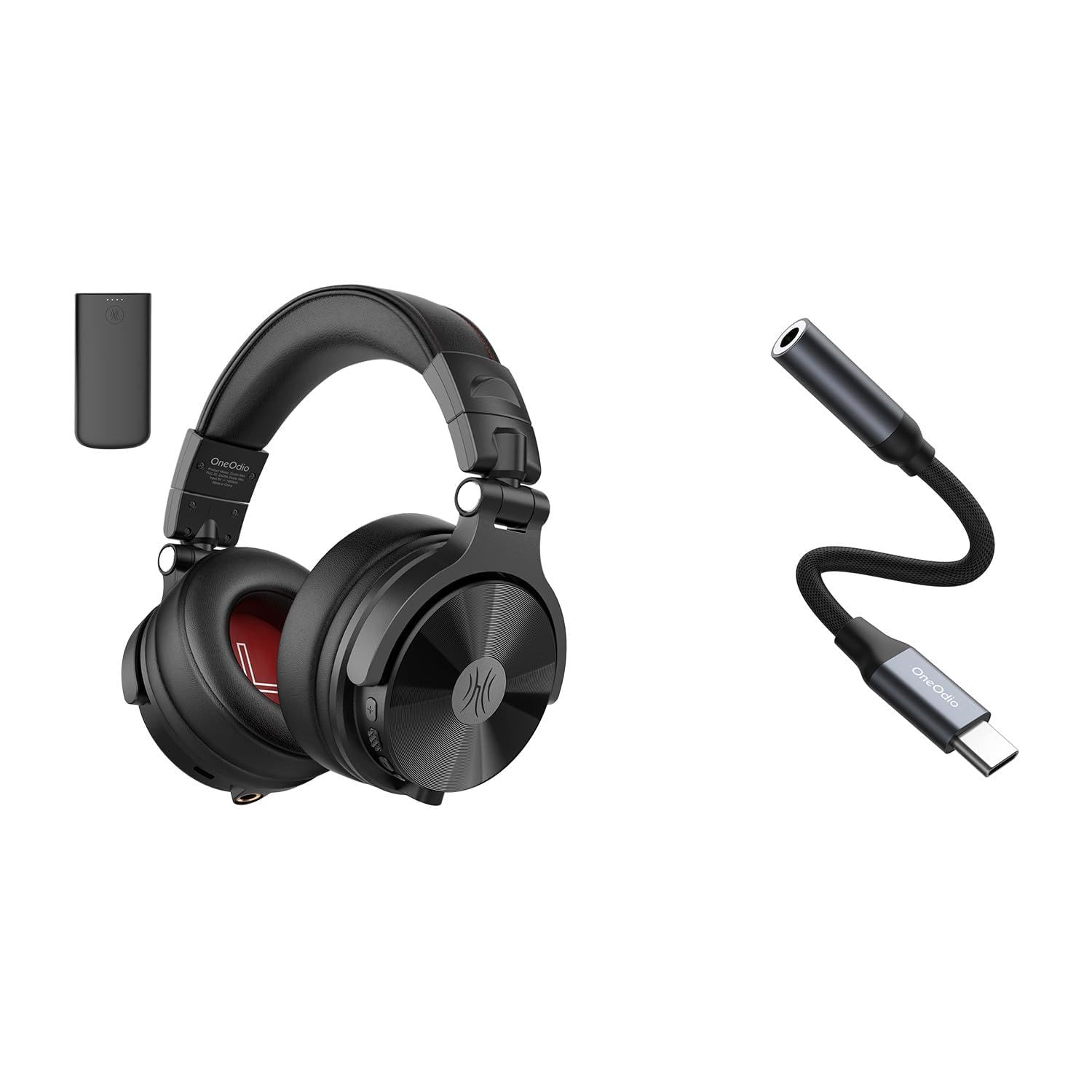
ചിത്രം 1: OneOdio Studio Max 1 Wireless DJ Headphone and USB-C to 3.5 mm Adapter. This image displays the headphones in their folded state alongside the USB-C to 3.5 mm adapter and included cables, providing a general view ഉൽപ്പന്നത്തിന്റെയും അതിന്റെ അനുബന്ധ ഉപകരണങ്ങളുടെയും.
ഹെഡ്ഫോൺ ഘടകങ്ങൾ
- പവർ ബട്ടൺ: On/Off, Play/Pause, Call Answer/End
- വോളിയം കൂട്ടാനുള്ള ബട്ടൺ: Increase volume, Next track (long press)
- വോളിയം ഡൗൺ ബട്ടൺ: Decrease volume, Previous track (long press)
- USB-C ചാർജിംഗ് പോർട്ട്: ഹെഡ്ഫോണുകൾ ചാർജ് ചെയ്യുന്നതിന്
- 3.5 mm Audio Input: വയർഡ് കണക്ഷനായി
- മൈക്രോഫോൺ: ഹാൻഡ്സ് ഫ്രീ കോളുകൾക്കായി
- LED സൂചകം: Displays power, pairing, and charging status
USB-C to 3.5 mm Adapter Components
- യുഎസ്ബി-സി കണക്റ്റർ: Connects to your device
- 3.5 എംഎം ഓഡിയോ ജാക്ക്: Connects to headphones or other audio devices
- DAC ചിപ്പ്: Provides high-resolution audio conversion
സജ്ജമാക്കുക
ഹെഡ്ഫോണുകൾ ചാർജ് ചെയ്യുന്നു
Before initial use, fully charge the headphones.
- ഹെഡ്ഫോണുകളിലെ USB-C ചാർജിംഗ് പോർട്ടിലേക്ക് USB-C ചാർജിംഗ് കേബിൾ ബന്ധിപ്പിക്കുക.
- കേബിളിന്റെ മറ്റേ അറ്റം ഒരു USB പവർ സ്രോതസ്സുമായി ബന്ധിപ്പിക്കുക (ഉദാ: കമ്പ്യൂട്ടർ USB പോർട്ട്, വാൾ അഡാപ്റ്റർ).
- ചാർജ് ചെയ്യുമ്പോൾ LED ഇൻഡിക്കേറ്റർ ചുവപ്പ് നിറത്തിൽ തിളങ്ങുകയും പൂർണ്ണമായി ചാർജ് ചെയ്യുമ്പോൾ ഓഫാകുകയും ചെയ്യും.
ചിത്രം 2: Illustrates the USB-C charging port on the headphones. For charging, locate this port, typically on one of the earcups, and connect the provided USB-C cable.
Bluetooth Pairing (Wireless Mode)
- ഹെഡ്ഫോണുകൾ ഓഫാണെന്ന് ഉറപ്പാക്കുക.
- Press and hold the Power Button for approximately 5-7 seconds until the LED indicator flashes blue and red alternately. This indicates pairing mode.
- നിങ്ങളുടെ ഓഡിയോ ഉപകരണത്തിൽ (സ്മാർട്ട്ഫോൺ, ടാബ്ലെറ്റ്, കമ്പ്യൂട്ടർ), ബ്ലൂടൂത്ത് പ്രവർത്തനക്ഷമമാക്കി ലഭ്യമായ ഉപകരണങ്ങൾക്കായി തിരയുക.
- Select "OneOdio Studio Max 1" from the list of found devices.
- Once paired, the LED indicator will flash blue slowly.
Wired Connection (3.5 mm Audio Cable)
For a wired connection, you can use the included 3.5 mm audio cable.
- Connect one end of the 3.5 mm audio cable to the 3.5 mm audio input on the headphones.
- Connect the other end of the 3.5 mm audio cable to the 3.5 mm audio output on your device.
- ഹെഡ്ഫോണുകൾ സ്വയമേവ വയർഡ് മോഡിലേക്ക് മാറും.
Using the USB-C to 3.5 mm Adapter
This adapter allows you to connect 3.5 mm audio devices to USB-C ports that lack a dedicated audio jack.
- Connect the USB-C end of the adapter to the USB-C port on your audio source device (e.g., smartphone, laptop).
- Connect your 3.5 mm headphones or other audio device to the 3.5 mm audio jack on the adapter.
- Ensure your device's audio output is set to the USB-C audio accessory if prompted.
ചിത്രം 3: Depicts the USB-C to 3.5 mm adapter. To use, insert the USB-C connector into your device and plug your 3.5 mm audio cable into the adapter's audio jack.
പ്രവർത്തന നിർദ്ദേശങ്ങൾ
പവർ ഓൺ/ഓഫ്
- പവർ ഓൺ: Press and hold the Power Button for 2-3 seconds until the LED indicator flashes blue.
- പവർ ഓഫ്: Press and hold the Power Button for 3-4 seconds until the LED indicator flashes red and then turns off.
Music Playback (Wireless Mode)
- പ്ലേ/താൽക്കാലികമായി നിർത്തുക: പവർ ബട്ടൺ ചെറുതായി അമർത്തുക.
- വോളിയം കൂട്ടുക: വോളിയം അപ്പ് (+) ബട്ടൺ ചുരുക്കി അമർത്തുക.
- വോളിയം താഴേക്ക്: വോളിയം ഡൗൺ (-) ബട്ടൺ ചുരുക്കി അമർത്തുക.
- അടുത്ത ട്രാക്ക്: വോളിയം അപ്പ് (+) ബട്ടൺ ദീർഘനേരം അമർത്തുക.
- മുമ്പത്തെ ട്രാക്ക്: വോളിയം ഡൗൺ (-) ബട്ടൺ ദീർഘനേരം അമർത്തുക.
Call Management (Wireless Mode)
- ഉത്തരം/അവസാന കോൾ: പവർ ബട്ടൺ ചെറുതായി അമർത്തുക.
- കോൾ നിരസിക്കുക: പവർ ബട്ടൺ ദീർഘനേരം അമർത്തുക.
- അവസാന നമ്പർ വീണ്ടും ഡയൽ ചെയ്യുക: പവർ ബട്ടൺ രണ്ടുതവണ അമർത്തുക.
LDAC/LC3 Codec Support
The OneOdio Studio Max 1 supports LDAC and LC3 codecs for high-resolution wireless audio transmission. Ensure your source device also supports these codecs and that they are enabled in your device's Bluetooth settings for optimal audio quality.
പരിപാലനവും പരിചരണവും
- Clean the headphones and adapter with a soft, dry cloth. Do not use abrasive cleaners or solvents.
- ഉപകരണങ്ങൾ തീവ്രമായ താപനില, ഈർപ്പം അല്ലെങ്കിൽ നേരിട്ടുള്ള സൂര്യപ്രകാശം എന്നിവയിൽ ഏൽക്കുന്നത് ഒഴിവാക്കുക.
- Store the headphones in the included carrying pouch when not in use to protect them from dust and scratches.
- Do not attempt to disassemble or modify the headphones or adapter, as this will void the warranty.
- Keep away from water and liquids. If exposed, power off immediately and allow to dry completely before use.
ട്രബിൾഷൂട്ടിംഗ്
| പ്രശ്നം | സാധ്യമായ കാരണം | പരിഹാരം |
|---|---|---|
| ഹെഡ്ഫോണുകൾ പവർ ഓൺ ചെയ്യുന്നില്ല. | കുറഞ്ഞ ബാറ്ററി. | ഹെഡ്ഫോണുകൾ പൂർണ്ണമായും ചാർജ് ചെയ്യുക. |
| ബ്ലൂടൂത്ത് വഴി ജോടിയാക്കാൻ കഴിയില്ല. | Headphones not in pairing mode; Bluetooth disabled on device; too far from device. | Ensure headphones are in pairing mode (flashing red/blue). Enable Bluetooth on your device. Move headphones closer to the device (within 10 meters). |
| വയർലെസ് മോഡിൽ ശബ്ദമില്ല. | ശബ്ദം വളരെ കുറവാണ്; ഹെഡ്ഫോണുകൾ കണക്റ്റ് ചെയ്തിട്ടില്ല; തെറ്റായ ഓഡിയോ ഔട്ട്പുട്ട് തിരഞ്ഞെടുത്തു. | ഹെഡ്ഫോണുകളിലും ഉപകരണത്തിലും ശബ്ദം വർദ്ധിപ്പിക്കുക. ഹെഡ്ഫോണുകൾ വീണ്ടും ജോടിയാക്കുക. ഉപകരണത്തിന്റെ ഓഡിയോ ഔട്ട്പുട്ട് ക്രമീകരണങ്ങൾ പരിശോധിക്കുക. |
| വയേർഡ് മോഡിൽ ശബ്ദമില്ല. | Cable not fully inserted; faulty cable; incorrect audio output selected. | Ensure 3.5 mm cable is fully inserted into both devices. Try a different 3.5 mm cable. Check device's audio output settings. |
| USB-C adapter not working. | Adapter not fully inserted; device incompatible; incorrect audio output selected. | Ensure adapter is fully inserted into the USB-C port. Verify your device supports USB-C audio output. Check device's audio output settings. |
സ്പെസിഫിക്കേഷനുകൾ
- മോഡൽ: OneOdio Studio Max 1
- ഡ്രൈവർ വ്യാസം: 50 മി.മീ
- ഫ്രീക്വൻസി പ്രതികരണം: 20 Hz - 40 kHz (Hi-Res Audio certified)
- പ്രതിരോധം: 32 ഓം
- സംവേദനക്ഷമത: 110 dB ± 3 dB
- ബ്ലൂടൂത്ത് പതിപ്പ്: 5.2
- ബ്ലൂടൂത്ത് ശ്രേണി: 10 മീറ്റർ വരെ (33 അടി)
- പിന്തുണയ്ക്കുന്ന കോഡെക്കുകൾ: LDAC, LC3, SBC, AAC
- USB-C Adapter Sampലിംഗ് നിരക്ക്: 24-bit/96kHz HiFi audio
വാറൻ്റിയും പിന്തുണയും
OneOdio products come with a standard manufacturer's warranty. For detailed warranty information, please refer to the warranty card included in your package or visit the official OneOdio website. For technical support, troubleshooting assistance, or warranty claims, please contact OneOdio customer service through their official channels.
ഉദ്യോഗസ്ഥൻ Webസൈറ്റ്: www.oneodio.com
ഇമെയിൽ പിന്തുണ: support@oneodio.com