
ആമുഖം
This manual provides comprehensive instructions for the AT&T EL2131-11 DECT 6.0 Cordless Telephone. It covers essential information regarding setup, operation, maintenance, and troubleshooting to ensure optimal performance and a seamless user experience. Please read this manual thoroughly before using your new telephone.
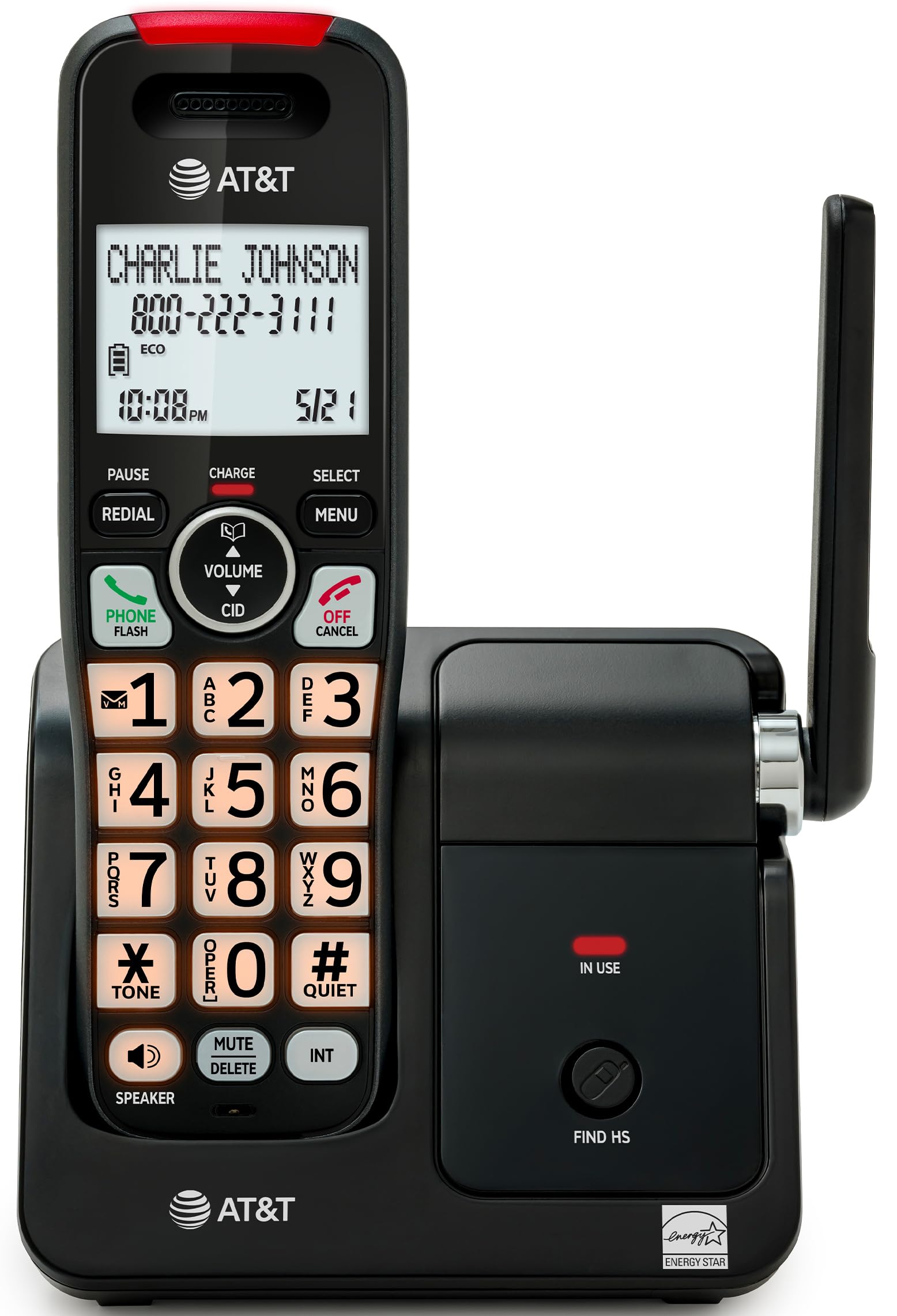
This image displays the AT&T EL2131-11 cordless telephone handset resting on its base unit, showcasing its sleek black and silver design. The handset features a clear display and a well-arranged keypad.
ഉൽപ്പന്നം കഴിഞ്ഞുview
പ്രധാന സവിശേഷതകൾ
- Call Blocker: Block up to 50 unwanted numbers, including robocalls and telemarketers, ensuring peaceful home calls.
- കോളർ ഐഡി/കോൾ വെയ്റ്റിംഗ്: View caller information (name, number, time, date) before answering and store up to 50 call records for easy review.
- Full-Duplex Handset Speakerphone: Enjoy clear, natural two-way conversations hands-free on both the handset and base unit simultaneously.
- ബാക്ക്ലിറ്റ് ഡിസ്പ്ലേയും കീപാഡും: High-contrast 2-inch white backlit display and orange backlit keypad for easy readability and dialing in any lighting condition.
- നീണ്ട ബാറ്ററി ലൈഫ്: Provides up to 10 hours of talk time or 5 days of standby time on a single charge.
- ECO മോഡ്: Power-saving technology that automatically conserves energy, optimizing battery performance and reducing power consumption.
- DECT 6.0 സാങ്കേതികവിദ്യ: Delivers superior voice quality and secure, interference-free communication throughout your home.
Feature Illustrations

This image highlights the Call Blocker feature, showing the phone's display with a 'Block list' menu. It illustrates how users can manage and block unwanted callers, preventing interruptions.

A close-up of the handset's screen demonstrating the Caller ID feature, displaying the caller's name and number ('CHARLIE JOHNSON 800-222-3111'), along with the time and date of the call.

This image depicts a user engaging in a hands-free conversation using the handset's speakerphone, illustrating the clear, two-way audio capability.

The image shows the handset being held in a dimly lit environment, with its screen and keypad brightly illuminated, emphasizing ease of use in low-light conditions.

This visual demonstrates the phone's extended battery life, showing a transition from a fully charged state to a state indicating 5 days of standby time.

ഒരു ഏരിയൽ view of a home layout with the phone's base unit centrally located, illustrating the wide and clear signal coverage provided by DECT 6.0 technology.
ഉൽപ്പന്ന ഘടകങ്ങൾ
- ഒരു കോർഡ്ലെസ് ഹാൻഡ്സെറ്റ്
- അടിസ്ഥാന യൂണിറ്റ്
- പവർ അഡാപ്റ്റർ
- ടെലിഫോൺ ലൈൻ കോർഡ്
- Two battery cells
- Quick start guide (separate document)
- വാൾ മൗണ്ട് ബ്രാക്കറ്റ് (ഓപ്ഷണൽ)
സജ്ജമാക്കുക
1. ബാറ്ററി ഇൻസ്റ്റാളേഷൻ
Carefully open the battery compartment cover on the back of the handset. Insert the two provided battery cells, ensuring that the polarity (+ and -) matches the markings inside the compartment. Close the battery compartment cover securely until it clicks into place.
2. ബേസ് യൂണിറ്റ് ബന്ധിപ്പിക്കുന്നു.
Connect the small end of the power adapter to the 'DC IN' jack on the back of the base unit. Plug the larger end of the power adapter into a standard electrical outlet that is not controlled by a wall switch. Next, connect one end of the telephone line cord to the 'LINE' jack on the base unit and the other end to your telephone wall jack.
3. ഹാൻഡ്സെറ്റ് ചാർജ് ചെയ്യുന്നു
Place the handset on the base unit with the display facing forward. The handset will emit a short beep, and the display will show a charging indicator. For optimal battery performance and to ensure a full charge, allow the handset to charge continuously for at least 16 hours before its first use.
പ്രവർത്തന നിർദ്ദേശങ്ങൾ
ഒരു കോൾ ചെയ്യുന്നു
- അമർത്തുക ഫോൺ / ഫ്ലാഷ് button or any dialing key to get a dial tone.
- കീപാഡ് ഉപയോഗിച്ച് ആവശ്യമുള്ള ഫോൺ നമ്പർ നൽകുക.
- അമർത്തുക ഫോൺ / ഫ്ലാഷ് again or place the handset back on the base to end the call.
ഒരു കോളിന് മറുപടി നൽകുന്നു
ഫോൺ റിംഗ് ചെയ്യുമ്പോൾ, അമർത്തുക ഫോൺ / ഫ്ലാഷ് ബട്ടൺ അല്ലെങ്കിൽ സ്പീക്കർ കോളിന് മറുപടി നൽകാനുള്ള ബട്ടൺ.
സ്പീക്കർഫോൺ ഉപയോഗിക്കുന്നു
ഒരു സജീവ കോൾ സമയത്ത്, അമർത്തുക സ്പീക്കർ button to activate the speakerphone mode. To switch back to the handset earpiece, press the സ്പീക്കർ വീണ്ടും ബട്ടൺ.
കോളർ ഐഡി
When an incoming call is received, the caller's information (name and number, if available) will be displayed on the handset screen. To review നിങ്ങളുടെ കോൾ ചരിത്രം, അമർത്തുക സി.ഐ.ഡി button and use the navigation keys to scroll through recent calls.
കോൾ ബ്ലോക്കർ
To block an unwanted number from your call history:
- അമർത്തുക മെനു ഹാൻഡ്സെറ്റിലെ ബട്ടൺ.
- Navigate to the "Call Blocker" option using the navigation keys and press തിരഞ്ഞെടുക്കുക.
- Choose "Block a number" and follow the on-screen prompts to add the desired number to the block list. The phone can store up to 50 blocked numbers.
ഇക്കോ മോഡ്
The phone automatically activates ECO mode to conserve power when the handset is placed close to the base unit. This feature helps extend battery life and reduce energy consumption without user intervention.
മെയിൻ്റനൻസ്
വൃത്തിയാക്കൽ
To clean your telephone and base unit, use a soft, slightly damp cloth. Avoid using cleaning sprays, waxes, or harsh chemicals, as these can damage the product's finish or electrical components. Ensure no moisture enters the openings.
ബാറ്ററി കെയർ
To maintain optimal battery life, avoid fully discharging the battery frequently. If the phone will not be used for an extended period (e.g., more than a month), it is recommended to remove the battery from the handset to prevent potential leakage or damage.
ട്രബിൾഷൂട്ടിംഗ്
If you experience any issues with your AT&T EL2131-11 cordless telephone, please refer to the table below for common problems and their solutions.
| പ്രശ്നം | പരിഹാരം |
|---|---|
| ഡയൽ ടോൺ ഇല്ല | Ensure the telephone line cord is securely connected to both the base unit and the telephone wall jack. Verify that the power adapter is properly connected to the base unit and a working electrical outlet. |
| ഹാൻഡ്സെറ്റ് ചാർജ് ചെയ്യുന്നില്ല | Verify the handset is correctly placed on the base unit, ensuring the charging contacts align. Clean the charging contacts on both the handset and base with a dry cloth. Ensure the power adapter is plugged in and the outlet is functional. |
| മോശം ശബ്ദ നിലവാരം അല്ലെങ്കിൽ സ്റ്റാറ്റിക് | Move the handset closer to the base unit. Check for interference from other electronic devices (e.g., Wi-Fi routers, microwaves). Ensure the telephone line cord is not damaged or coiled excessively. |
| കോളർ ഐഡി പ്രദർശിപ്പിച്ചിട്ടില്ല. | Confirm that you have subscribed to Caller ID service from your telephone service provider. Ensure the phone's date and time settings are correct. |
| കോളുകൾ വിളിക്കാനോ സ്വീകരിക്കാനോ കഴിയില്ല | Check all cable connections. Ensure the handset battery is charged. If using a DSL service, ensure a DSL filter is installed on the telephone line. |
സ്പെസിഫിക്കേഷനുകൾ
The following table outlines the technical specifications for the AT&T EL2131-11 Cordless Telephone.
| ഫീച്ചർ | വിശദാംശങ്ങൾ |
|---|---|
| ബ്രാൻഡ് | AT&T |
| മോഡൽ നമ്പർ | EL2131-11 |
| നിറം | കറുപ്പ് & വെള്ളി |
| ഫോൺ തരം | കോർഡ്ലെസ്സ് |
| മെറ്റീരിയൽ | പ്ലാസ്റ്റിക് |
| പവർ ഉറവിടം | കോർഡഡ് ഇലക്ട്രിക് |
| ഉൽപ്പന്ന അളവുകൾ (അടിസ്ഥാന യൂണിറ്റ്) | 12.9 x 11.8 x 18.4 സെ.മീ (നീളം x വീതി x ഉയരം) |
| Product Dimensions (Handset) | 7.8 x 9.1 x 18.42 സെ.മീ (നീളം x വീതി x ഉയരം) |
| സ്റ്റാൻഡ്ബൈ സമയം | 5 ദിവസം വരെ |
| സംസാര സമയം | 10 മണിക്കൂർ വരെ |
| കോളർ ഐഡി | അതെ |
| മൾട്ടി-ലൈൻ പ്രവർത്തനം | സിംഗിൾ-ലൈൻ പ്രവർത്തനം |
| ഉത്തരം നൽകുന്ന സിസ്റ്റം തരം | ഒന്നുമില്ല |
| ജിടിഐഎൻ (യുപിസി) | 650530034510 |

This image provides a visual representation of the combined dimensions of the base unit and the handset, indicating height, length, and width in both inches and centimeters.

This image focuses on the handset, detailing its individual dimensions including height, length, and width, for a clear understanding of its size.
വാറൻ്റിയും പിന്തുണയും
For detailed warranty information regarding your AT&T EL2131-11 Cordless Telephone, please refer to the quick start guide included in the product packaging or visit the official AT&T website. For technical assistance, troubleshooting beyond this manual, or customer service inquiries, please contact AT&T customer support directly through their official channels.


