
1. ആമുഖം
Welcome to the user manual for your truke TruClips Wireless Open Ear Buds (Model S45). These earbuds are designed to provide a comfortable and immersive audio experience with their open-ear design, custom drivers, and advanced features. This manual will guide you through the setup, operation, and maintenance of your new device.
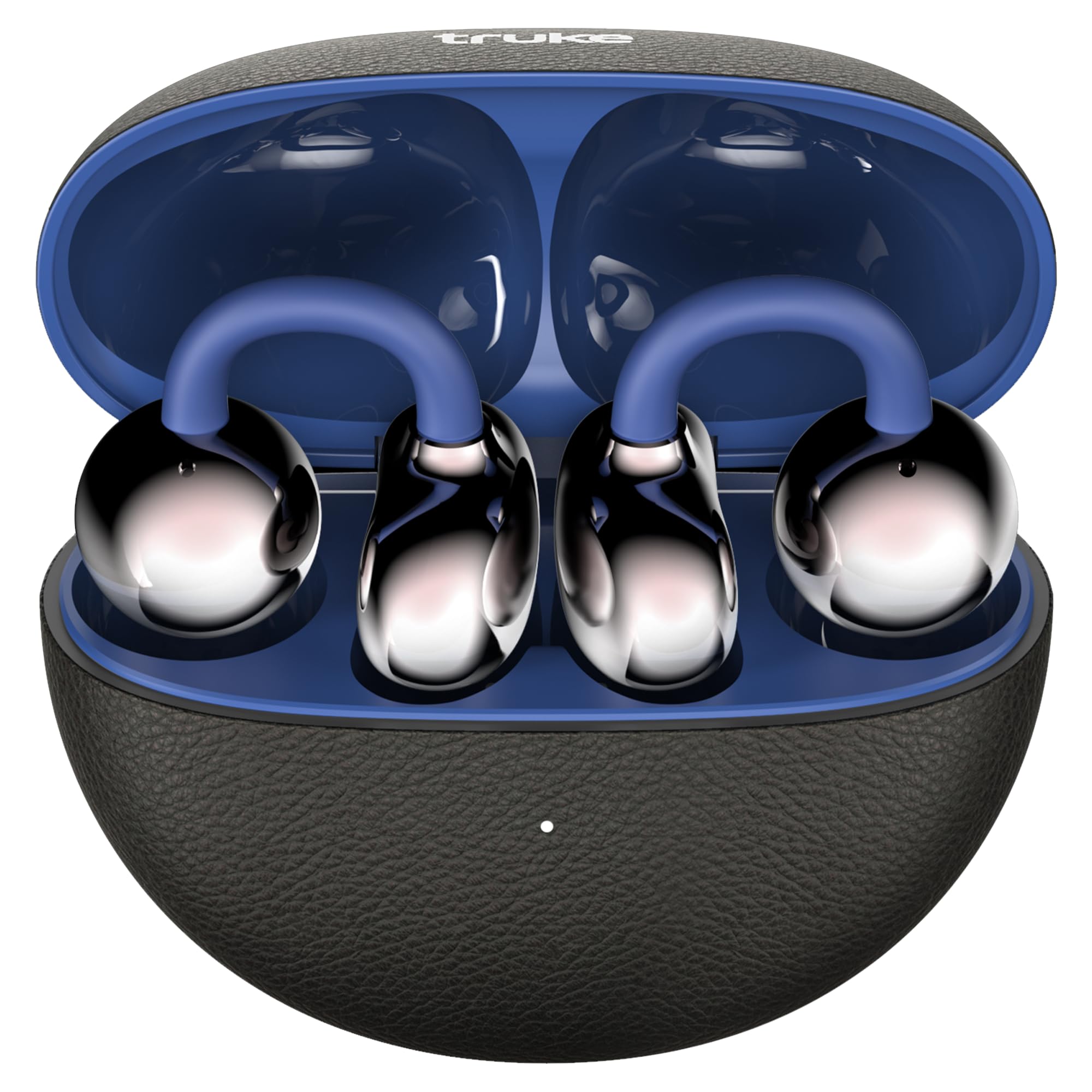
Image: truke TruClips Wireless Open Ear Buds in Onyx Blue, showcasing മിനുസമാർന്ന ഡിസൈൻ.

Image: Close-up of the truke TruClips charging case, highlighting its premium leather-like finish.
2. സജ്ജീകരണം
2.1 ബോക്സിൽ എന്താണുള്ളത്
- truke TruClips Earbuds
- ടൈപ്പ്-സി ചാർജിംഗ് കേബിൾ
- ഉപയോക്തൃ മാനുവൽ
2.2 ഇയർബഡുകളും കേസും ചാർജ് ചെയ്യുന്നു
Before first use, fully charge your truke TruClips.
- ചാർജിംഗ് കെയ്സിലേക്ക് ഇയർബഡുകൾ സ്ഥാപിക്കുക.
- ടൈപ്പ്-സി ചാർജിംഗ് കേബിൾ കേസിലെ ചാർജിംഗ് പോർട്ടിലേക്കും ഒരു പവർ സ്രോതസ്സിലേക്കും ബന്ധിപ്പിക്കുക.
- The indicator light on the case will show charging status. A full charge provides up to 55 hours of total playtime with the charging case.

Image: Visual representation of the 55-hour total playtime capability of the TruClips earbuds and charging case.
2.3 നിങ്ങളുടെ ഉപകരണവുമായി ജോടിയാക്കൽ
- ചാർജിംഗ് കേസ് തുറക്കുക. ഇയർബഡുകൾ സ്വയമേവ ജോടിയാക്കൽ മോഡിലേക്ക് പ്രവേശിക്കും.
- നിങ്ങളുടെ ഉപകരണത്തിൽ (സ്മാർട്ട്ഫോൺ, ടാബ്ലെറ്റ് മുതലായവ), ബ്ലൂടൂത്ത് പ്രവർത്തനക്ഷമമാക്കുക.
- ഇതിനായി തിരയുക "truke TruClips" in the list of available Bluetooth devices and select it to connect.
- കണക്റ്റ് ചെയ്തുകഴിഞ്ഞാൽ, നിങ്ങൾക്ക് ഒരു ഓഡിയോ പ്രോംപ്റ്റ് കേൾക്കാനാകും, ഇയർബഡുകളിലെ ഇൻഡിക്കേറ്റർ ലൈറ്റ് മാറുകയും ചെയ്യും.
2.4 ഇയർബഡുകൾ ധരിക്കൽ
The truke TruClips feature an open-ear design for comfort and ambient awareness.
- Gently place the earbuds onto your ears, ensuring the clip rests securely.
- Adjust for a comfortable fit. The open-ear design allows you to hear your surroundings while enjoying audio.

Image: Diagram illustrating the true open-ear design of the TruClips, showing how it sits comfortably without blocking the ear canal.
3. ഓപ്പറേഷൻ
3.1 ടച്ച് നിയന്ത്രണങ്ങൾ
The truke TruClips feature intuitive touch controls for easy management of music, calls, and voice assistants. Specific touch gestures may vary; refer to the quick start guide for detailed commands.
- പ്ലേ/താൽക്കാലികമായി നിർത്തുക: ഇയർബഡുകളിൽ ഏതെങ്കിലുമൊന്നിൽ ഒറ്റ ടാപ്പ് ചെയ്യുക.
- അടുത്ത ട്രാക്ക്: വലതുവശത്തെ ഇയർബഡിൽ രണ്ടുതവണ ടാപ്പ് ചെയ്യുക.
- മുമ്പത്തെ ട്രാക്ക്: ഇടതുവശത്തെ ഇയർബഡിൽ രണ്ടുതവണ ടാപ്പ് ചെയ്യുക.
- ഉത്തരം/അവസാന കോൾ: ഇയർബഡുകളിൽ ഏതെങ്കിലുമൊന്നിൽ ഒറ്റ ടാപ്പ് ചെയ്യുക.
- കോൾ നിരസിക്കുക: ഇയർബഡുകളിൽ ഏതെങ്കിലുമൊന്നിൽ ദീർഘനേരം അമർത്തുക.
- വോയ്സ് അസിസ്റ്റന്റിനെ സജീവമാക്കുക: ഇയർബഡുകളിൽ ഏതെങ്കിലുമൊന്നിൽ മൂന്ന് തവണ ടാപ്പ് ചെയ്യുക.
3.2 ഓഡിയോ സവിശേഷതകൾ
- 12mm Custom Drivers: Experience deep bass and high-fidelity acoustics.
- സ്പേഷ്യൽ ഓഡിയോ: Immerse yourself in a 360-degree soundstage for a cinematic audio experience.
- Quad Mic PureVoice ENC: Ensures crystal-clear calls by reducing environmental noise.

ചിത്രം: പൊട്ടിത്തെറിച്ചു view diagram of the 12mm customised titanium drivers, illustrating components like the speaker, sound tube, graphene diaphragm, and bass reflector.

Image: Graphic depicting 24-bit 360-degree spatial audio, showing sound waves emanating around the earbuds.

Image: Illustration of Quad Mic PureVoice ENC technology, showing its effectiveness in various environments like indoor, street, and metro stations for clear calls.

Image: Diagram showing Smart Directional Sound Technology within the earbud, highlighting the placement of the call mic and crystal clear windproof audio components.
3.3 പ്രത്യേക മോഡുകൾ
- Ambient Awareness: The open-ear design naturally allows you to stay aware of your surroundings, ideal for commuting or outdoor activities.
- Ultra-Low Latency Mode (Battle Mode): For gaming, activate this mode to minimize audio lag, providing an instant response for an immersive experience.

Image: Graphic illustrating the Ultra Low Latency feature, showing earbuds connected to a gaming setup for reduced audio delay.
4. പരിപാലനം
4.1 വൃത്തിയാക്കൽ
To ensure optimal performance and hygiene, regularly clean your earbuds.
- ഇയർബഡുകളും ചാർജിംഗ് കെയ്സും തുടയ്ക്കാൻ മൃദുവായതും ഉണങ്ങിയതും ലിന്റ് രഹിതവുമായ ഒരു തുണി ഉപയോഗിക്കുക.
- അബ്രാസീവ് ക്ലീനറുകൾ, ലായകങ്ങൾ, എയറോസോൾ സ്പ്രേകൾ എന്നിവ ഉപയോഗിക്കരുത്.
- ഏതെങ്കിലും തുറസ്സുകളിൽ ഈർപ്പം ലഭിക്കുന്നത് ഒഴിവാക്കുക.
4.2 ജല പ്രതിരോധം (IPX5)
The truke TruClips are rated IPX5 for water and sweat resistance. This means they are protected against sweat and heavy splashes of water.
- ഇയർബഡുകൾ വെള്ളത്തിൽ മുക്കരുത്.
- കേടുപാടുകൾ സംഭവിക്കാതിരിക്കാൻ ചാർജിംഗ് കെയ്സിലേക്ക് തിരികെ വയ്ക്കുന്നതിന് മുമ്പ് ഇയർബഡുകൾ ഉണങ്ങിയെന്ന് ഉറപ്പാക്കുക.
5. പ്രശ്നപരിഹാരം
If you encounter any issues with your truke TruClips, please refer to the following common solutions:
| പ്രശ്നം | പരിഹാരം |
|---|---|
| ഇയർബഡുകൾ ജോടിയാക്കുന്നില്ല |
|
| ശബ്ദമോ കുറഞ്ഞ വോളിയമോ ഇല്ല |
|
| മൈക്രോഫോൺ പ്രവർത്തിക്കുന്നില്ല |
|
| ഇയർബഡുകൾ ചാർജ് ചെയ്യുന്നില്ല |
|
6 സ്പെസിഫിക്കേഷനുകൾ
| ഫീച്ചർ | വിശദാംശങ്ങൾ |
|---|---|
| ബ്രാൻഡ് | ട്രക്ക് |
| മോഡലിൻ്റെ പേര് | truke TruCLips earbuds |
| മോഡൽ നമ്പർ | എസ് 45 |
| ചെവി പ്ലേസ്മെൻ്റ് | തുറന്ന ചെവി |
| ഫോം ഫാക്ടർ | തുറന്ന ചെവി |
| നിറം | Onyx Blue |
| ഡ്രൈവർമാർ | 12mm Custom Drivers |
| കളിസമയം | 55 മണിക്കൂർ വരെ (ചാർജിംഗ് കേസ് ഉപയോഗിച്ച്) |
| മൈക്രോഫോൺ | Quad Mic with ENC |
| ജല പ്രതിരോധം | IPX5 |
| കണക്റ്റിവിറ്റി | Bluetooth (latest stable technology) |
| ഇനത്തിൻ്റെ ഭാരം | 42 ഗ്രാം |
| മാതൃരാജ്യം | ഇന്ത്യ |
7. വാറൻ്റിയും പിന്തുണയും
7.1 വാറൻ്റി വിവരങ്ങൾ
Your truke TruClips earbuds come with a 12 മാസ വാറൻ്റി വാങ്ങിയ തീയതി മുതൽ. ഈ വാറന്റി നിർമ്മാണ വൈകല്യങ്ങൾ ഉൾക്കൊള്ളുന്നു. വാറന്റി ക്ലെയിമുകൾക്കായി നിങ്ങളുടെ വാങ്ങിയതിന്റെ തെളിവ് സൂക്ഷിക്കുക.
7.2 ഉപഭോക്തൃ പിന്തുണ
For technical assistance, warranty claims, or any other inquiries, please contact truke customer support.
- നിർമ്മാതാവ്: STAUNCH ELECTRONICS INDIA LLP
- ഇറക്കുമതിക്കാരൻ: Eccentric Enterprises Private Limited
- Refer to the official truke webഏറ്റവും പുതിയ കോൺടാക്റ്റ് വിശദാംശങ്ങൾക്ക് സൈറ്റ് അല്ലെങ്കിൽ നിങ്ങളുടെ വാങ്ങൽ ഡോക്യുമെന്റേഷൻ.
8. ഉൽപ്പന്നം കഴിഞ്ഞുview വീഡിയോ
Video: A hands-on demonstration of the truke TruClips Wireless Open Ear Buds, showing their design, how they are worn, and key features like touch controls and open-ear design. This video provides a practical overview of the product's functionality and comfort.