
1. ഓവർview
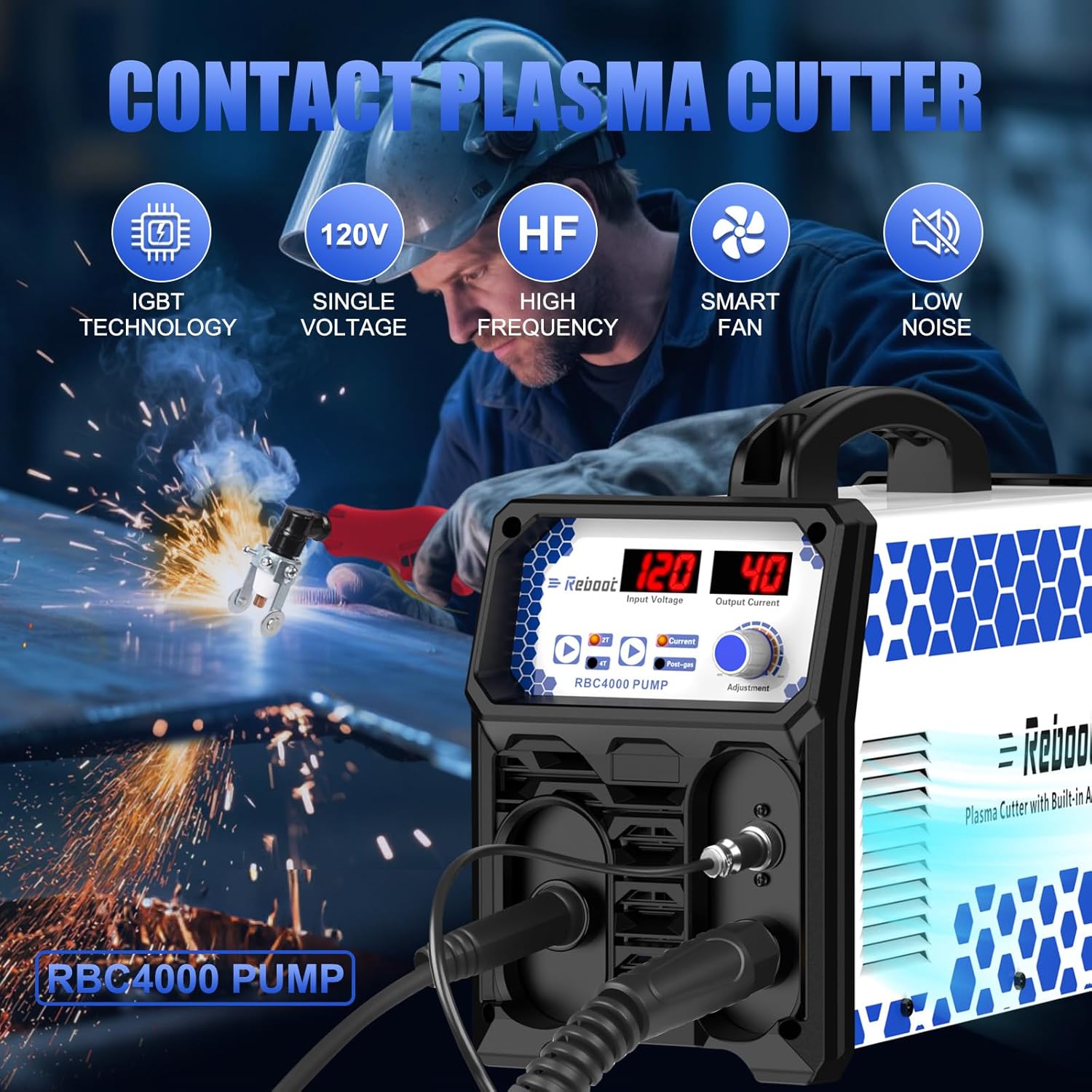
The Reboot RBC4000PUMP is a 40A 120V IGBT Inverter Digital Plasma Cutting Machine featuring a built-in air compressor. This integrated design eliminates the need for external air units, offering enhanced portability and space-saving benefits. It is designed for efficient and precise metal cutting, providing a 3/8 inch clean cut and a 3/5 inch maximum cut at 40A. The unit is engineered for quick setup and user-friendly operation, making it suitable for various workshop and job site applications.

2 സുരക്ഷാ വിവരങ്ങൾ
Always prioritize safety when operating the plasma cutter. Failure to follow safety guidelines can result in serious injury or equipment damage.
- കണ്ണിനും മുഖത്തിനും സംരക്ഷണം: Always wear a welding helmet with appropriate shade settings to protect your eyes and face from intense light, sparks, and UV radiation.
- ശരീര സംരക്ഷണം: Wear flame-resistant clothing, heavy-duty gloves, and protective footwear to shield against sparks, hot metal, and electrical shock.
- വെൻ്റിലേഷൻ: Ensure adequate ventilation in the work area to remove fumes and gases produced during cutting. Work in an open area or use a fume extractor.
- ഇലക്ട്രിക്കൽ സുരക്ഷ: Ensure the machine is properly grounded. Do not operate in wet conditions. Inspect cables and connections for damage before each use.
- അഗ്നി പ്രതിരോധം: Keep a fire extinguisher nearby. Remove all flammable materials from the work area. Sparks and hot metal can travel considerable distances.
- കംപ്രസ്ഡ് എയർ സുരക്ഷ: Although the compressor is built-in, ensure proper handling of the torch and maintain clear airflow around the machine to prevent overheating.
- മാനുവൽ വായിക്കുക: Familiarize yourself with all instructions and warnings in this manual before operating the equipment.
3. പാക്കേജ് ഉള്ളടക്കം
താഴെ ലിസ്റ്റ് ചെയ്തിരിക്കുന്ന എല്ലാ ഇനങ്ങളും നിങ്ങളുടെ പാക്കേജിൽ ഉൾപ്പെടുത്തിയിട്ടുണ്ടെന്ന് ഉറപ്പാക്കുക:
- RBC4000PUMP Plasma Cutter Machine
- ഗ്രൗണ്ട് Clamp (2M/6.6FT cable)
- Plasma Cutting Torch (3M/9.9FT cable)
- Electrode and Nozzle Kit (Consumables)
- ഇൻസ്ട്രക്ഷൻ മാനുവൽ
- റോളർ ഗൈഡ്

4. ഉൽപ്പന്ന സവിശേഷതകൾ
- Built-in Air Compressor: The integrated high-efficiency air pump eliminates the need for a separate external air compressor, simplifying setup and reducing equipment requirements.
- മെച്ചപ്പെടുത്തിയ പോർട്ടബിലിറ്റി: Its compact and self-contained design allows for easy transport and use across various job sites or workshops without the hassle of external air hoses or connections.
- Cost and Space Savings: By integrating the air compressor, the unit reduces initial equipment investment and ongoing maintenance, while maximizing available workspace.
- പ്ലഗ്-ആൻഡ്-പ്ലേ പ്രവർത്തനം: Designed for ease of use, the machine requires no complex air line connections or pressure adjustments, enabling faster operational readiness.
- ഒപ്റ്റിമൈസ് ചെയ്ത വായുപ്രവാഹം: The engineered pump delivers stable and continuous airflow, ensuring a consistent plasma arc and clean cuts on various metal types.
- IGBT Inverter Technology: Provides stable output, high efficiency, and reliable performance.
- High Frequency (HF) Ignition: Ensures quick and reliable arc starting.
- Smart Fan Cooling: Automatically adjusts fan speed to optimize cooling and reduce noise.
- Overload and Thermal Protection: Built-in safety features to protect the machine from damage due to excessive load or temperature.



5 സ്പെസിഫിക്കേഷനുകൾ
| ഫീച്ചർ | വിവരണം |
|---|---|
| ബ്രാൻഡ് | റീബൂട്ട് ചെയ്യുക |
| മോഡൽ നമ്പർ | RBC4000PUMP |
| പവർ ഉറവിടം | എസി (120V) |
| ഔട്ട്പുട്ട് കറൻ്റ് | 40എ |
| Clean Cut Thickness | 3/8 inch @ 40A |
| Max Cut Thickness | 3/5 inch @ 40A |
| പ്രത്യേക ഫീച്ചർ | ബിൽറ്റ്-ഇൻ എയർ കംപ്രസർ |
| സാങ്കേതികവിദ്യ | IGBT Inverter, High Frequency |
| ശുപാർശ ചെയ്യുന്ന ഉപയോഗങ്ങൾ | കട്ടിംഗ് |
6. സജ്ജീകരണം
Follow these steps to set up your plasma cutter:
- അൺപാക്ക്: Carefully remove the plasma cutter and all accessories from the packaging. Inspect for any shipping damage.
- Connect Plasma Torch: Insert the plasma torch connector into the designated port on the front panel of the machine. Ensure it is securely tightened.
- ഗ്രൗണ്ട് Cl ബന്ധിപ്പിക്കുകamp: ഗ്രൗണ്ട് cl ഘടിപ്പിക്കുകamp cable to the appropriate terminal on the machine's front panel. Secure the ground clamp to the workpiece or a sturdy metal workbench that is electrically connected to the workpiece.
- പവർ കണക്ഷൻ: Connect the power cord to a suitable 120V AC power outlet. Ensure the power supply matches the machine's requirements.
- വർക്ക് ഏരിയ തയ്യാറാക്കുക: Clear the work area of any flammable materials. Ensure proper ventilation.

7. പ്രവർത്തന നിർദ്ദേശങ്ങൾ
Once the machine is set up, follow these steps for operation:
- പവർ ഓൺ: Turn on the main power switch located on the machine. The digital display will illuminate.
- കറന്റ് ക്രമീകരിക്കുക: Use the 'Current Adjust Knob' on the front panel to set the desired cutting amperage. Refer to the cutting thickness guidelines for appropriate settings.
- Select Mode (2T/4T): Press the '2T/4T Button' to select the desired trigger mode.
- 2T (Two-Touch): Press and hold the torch trigger to start the arc; release to stop.
- 4T (Four-Touch): Press and release the trigger to start the arc; press and release again to stop. This mode is useful for longer cuts to reduce hand fatigue.
- Set Post Gas Time: Adjust the 'Post Gas Time' knob if necessary. This controls how long air flows after the arc stops, helping to cool the torch and extend consumable life.
- മുറിക്കാൻ തുടങ്ങുക: Position the torch nozzle close to the workpiece. Press the torch trigger to initiate the plasma arc. Maintain a consistent standoff distance and travel speed for optimal cut quality.
- Monitor Cut: Observe the cut to ensure the plasma stream is passing completely through the material. Adjust travel speed or ampആവശ്യാനുസരണം കോപം.
- പവർ ഓഫ്: After completing your work, release the trigger, allow the post-gas to finish, and then turn off the main power switch.


8. പരിപാലനം
Regular maintenance ensures optimal performance and extends the lifespan of your plasma cutter.
- Consumables Inspection: Regularly inspect the torch consumables (electrode, nozzle, shield cup) for wear. Replace them when signs of degradation appear to maintain cut quality.
- Torch Cleaning: Keep the torch head clean and free of spatter. Use a non-abrasive tool to remove any buildup.
- എയർ ഫിൽട്ടർ: Periodically check and clean or replace the air filter for the built-in compressor to ensure clean airflow and prevent internal contamination.
- കേബിൾ പരിശോധന: Inspect all cables (power, torch, ground) for cuts, abrasions, or loose connections. Repair or replace damaged cables immediately.
- പൊതുവായ ശുചീകരണം: Keep the machine's exterior clean. Use compressed air to blow out dust and debris from cooling vents. Ensure the machine is unplugged before cleaning.
9. പ്രശ്നപരിഹാരം
പൊതുവായ പ്രശ്നങ്ങളും അവയുടെ സാധ്യമായ പരിഹാരങ്ങളും അറിയാൻ താഴെയുള്ള പട്ടിക കാണുക:
| പ്രശ്നം | സാധ്യമായ കാരണം | പരിഹാരം |
|---|---|---|
| ആർക്ക് ഇഗ്നിഷൻ ഇല്ല | Loose connections, worn consumables, insufficient ground, power issue. | Check all cable connections. Replace torch consumables. Ensure ground clamp is secure on bare metal. Verify power supply. |
| മോശം കട്ട് ക്വാളിറ്റി | Worn consumables, incorrect amperage, improper travel speed or standoff distance. | Replace consumables. Adjust amperage according to material thickness. Optimize travel speed and maintain correct torch-to-workpiece distance. |
| മെഷീൻ അമിത ചൂടാക്കൽ | Exceeding duty cycle, blocked ventilation, high ambient temperature. | Allow machine to cool down. Ensure clear airflow around vents. Reduce cutting time or ampഇറേജ്. |
| Air Flow Issues | Clogged air filter, internal compressor issue. | Check and clean/replace the air filter. If issues persist, contact customer support. |
10. വാറൻ്റിയും പിന്തുണയും
This Reboot RBC4000PUMP Plasma Cutter comes with a standard manufacturer's warranty. Please refer to the warranty card included in your package for specific terms and conditions, including coverage duration and claim procedures. For technical assistance, troubleshooting beyond this manual, or warranty claims, please contact Reboot customer support through the official webസൈറ്റ് അല്ലെങ്കിൽ നിങ്ങളുടെ വാങ്ങൽ സ്ഥലം.