
ആമുഖം
Welcome to the Samsung Galaxy S26 Ultra 5G. This device features a built-in Privacy Display, advanced AI capabilities including Photo Assist and Creative Studio, a powerful 200MP camera system, a 5000mAh battery, and is powered by the Snapdragon 8 Elite Gen 5 processor. This manual provides essential information for setting up, operating, maintaining, and troubleshooting your new smartphone.
ആരംഭിക്കൽ: സജ്ജീകരണം
ബോക്സിൽ എന്താണുള്ളത്
നിങ്ങളുടെ ഉൽപ്പന്ന പാക്കേജിംഗിൽ എല്ലാ ഇനങ്ങളും ഉണ്ടെന്ന് ഉറപ്പാക്കുക:
- Samsung Galaxy S26 Ultra 5G സ്മാർട്ട്ഫോൺ
- Data Cable (USB Type-C to Type-C)
- സിം എജക്ഷൻ പിൻ
- ദ്രുത ആരംഭ ഗൈഡ്
- എസ് പേന

Image: The Galaxy S26 Ultra, a USB-C charge cable, and a SIM ejection pin, illustrating the contents of the product box.
സിം കാർഡ് ഇൻസ്റ്റാളേഷൻ
To install your Nano-SIM card(s):
- നിങ്ങളുടെ ഉപകരണത്തിന്റെ വശത്ത് സിം കാർഡ് ട്രേ കണ്ടെത്തുക.
- ട്രേ തുറക്കാൻ അതിനടുത്തുള്ള ചെറിയ ദ്വാരത്തിലേക്ക് സിം എജക്ഷൻ പിൻ തിരുകുക.
- സ്വർണ്ണ കോൺടാക്റ്റുകൾ താഴേക്ക് അഭിമുഖീകരിക്കുന്ന തരത്തിൽ നിങ്ങളുടെ നാനോ-സിം കാർഡ്(കൾ) ട്രേയിൽ വയ്ക്കുക. ശരിയായ ഓറിയന്റേഷൻ ഉറപ്പാക്കുക.
- ട്രേ അതിന്റെ സ്ഥാനത്ത് ക്ലിക്ക് ആകുന്നതുവരെ സ്ലോട്ടിലേക്ക് പതുക്കെ തിരികെ തള്ളുക.
പ്രാരംഭ പവർ ഓൺ
Press and hold the Power/Side key until the Samsung logo appears. Follow the on-screen prompts to complete the initial setup, including language selection, Wi-Fi connection, and Google account sign-in.
നിങ്ങളുടെ ഉപകരണം പ്രവർത്തിപ്പിക്കുന്നു
ഡിസ്പ്ലേയും ഇൻ്റർഫേസും
The Galaxy S26 Ultra features a 6.9-inch Dynamic AMOLED 2X display with a 120Hz refresh rate, offering vibrant colors and smooth visuals. The maximum display resolution is 3120 x 1440 pixels.
Privacy Display
The world's first built-in Privacy Display on a mobile device allows you to customize screen viewability settings. When activated, the screen's pixels dynamically adjust to keep the display visible only when viewed straight on, dimming for those viewing from the side. This feature can be configured for full-screen privacy or specific app notifications.

Image: A demonstration of the Privacy Display feature, showing how content is visible only to the direct viewer.
ക്യാമറ സവിശേഷതകൾ
The Galaxy S26 Ultra is equipped with a versatile camera system for capturing high-quality photos and videos.
200MP High Resolution Camera
The main 200MP camera (F1.4) captures bright and detailed images, even in low-light conditions, thanks to enhanced noise reduction. The rear camera setup includes a 50MP Ultra Wide (F1.9), a 50MP Telephoto (F2.9 with 5x optical zoom), and a 10MP Telephoto (F2.4 with 3x optical zoom). The front camera is 12MP (F2.2).

Image: An illustration detailing the specifications of the Galaxy S26 Ultra's multi-lens camera system.
Photo Assist and Creative Studio
Utilize Photo Assist for easy photo editing with simple prompts. Creative Studio allows you to generate personalized stickers from your photos with a single tap, enhancing your creative expression.

Image: The Photo Assist feature on the Galaxy S26 Ultra, demonstrating studio-level edits directly on the device.
പ്രകടനവും ബാറ്ററിയും
Experience robust performance and extended battery life with your device.
Snapdragon 8 Elite Gen 5 for Galaxy
The customized Snapdragon 8 Elite Gen 5 processor ensures smooth multitasking, gaming, and overall device responsiveness. A newly designed Vapor Chamber improves thermal performance by 21%, preventing overheating during intensive use.

Image: A visual representation of the customized processor for Galaxy, highlighting NPU, GPU, and CPU performance enhancements.
ബാറ്ററിയും ചാർജിംഗും
The 5000mAh battery provides up to 31 hours of video playback. Super Fast Charging 3.0 supports up to 60W charging speed, allowing you to charge your device up to 75% in approximately 30 minutes. Super Fast Wireless Charging supports up to 25W.

Image: An infographic showing the ultra-fast charging capability, reaching 75% charge in about 30 minutes.
AI സവിശേഷതകൾ
The Galaxy S26 Ultra integrates advanced AI to simplify interactions and enhance user experience.
Agentic AI Experience
New AI features include Now Nudge, which intelligently reduces steps and offers real-time suggestions, and Finder, for quick searches directly from the Home screen. One UI 8.5 further personalizes your Galaxy experience.

Image: Quick shortcuts and AI suggestions available through the Samsung UI on the Galaxy S26 Ultra.
കണക്റ്റിവിറ്റി
ദ്രുത ഷെയർ
Quick Share allows for easy and fast sharing of files between Galaxy devices and is now compatible with AirDrop® for sharing with Apple devices. Ensure both devices have Bluetooth and Wi-Fi enabled for optimal performance.
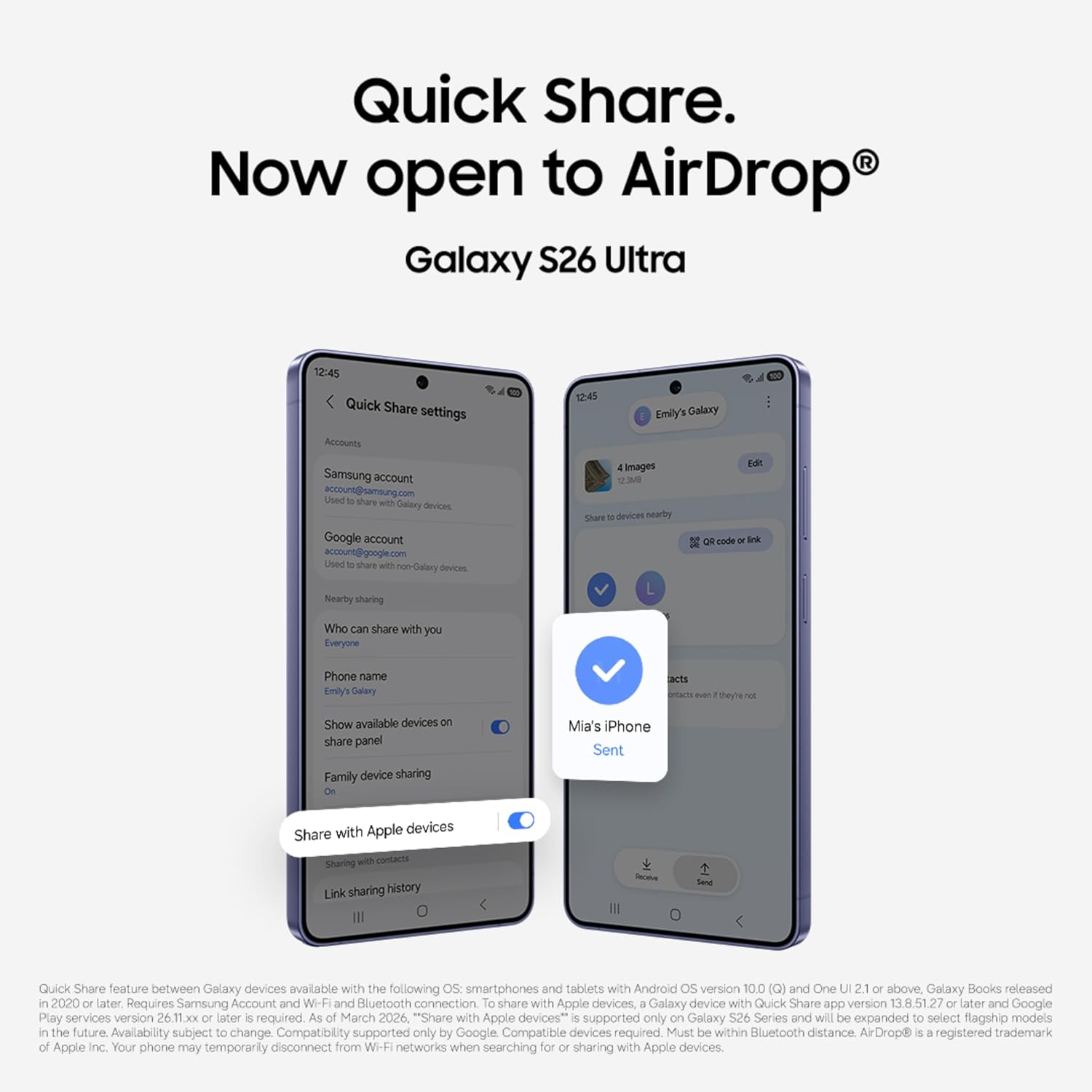
Image: The Quick Share interface on the Galaxy S26 Ultra, showing options for sharing files with nearby devices, including Apple devices.
മെയിൻ്റനൻസ്
സോഫ്റ്റ്വെയർ അപ്ഡേറ്റുകൾ
നിങ്ങളുടെ ഉപകരണത്തിൽ ഏറ്റവും പുതിയ ഫീച്ചറുകൾ, സുരക്ഷാ പാച്ചുകൾ, പ്രകടന മെച്ചപ്പെടുത്തലുകൾ എന്നിവ ഉണ്ടെന്ന് ഉറപ്പാക്കാൻ സോഫ്റ്റ്വെയർ അപ്ഡേറ്റുകൾ പതിവായി പരിശോധിച്ച് ഇൻസ്റ്റാൾ ചെയ്യുക. ഇതിലേക്ക് നാവിഗേറ്റ് ചെയ്യുക ക്രമീകരണങ്ങൾ > സോഫ്റ്റ്വെയർ അപ്ഡേറ്റ് > ഡൗൺലോഡ് ചെയ്ത് ഇൻസ്റ്റാൾ ചെയ്യുക.
ഉപകരണ പരിപാലനം
To maintain your device's longevity and performance:
- Keep your device clean using a soft, dry cloth. Avoid harsh chemicals.
- തീവ്രമായ താപനിലയിൽ നിന്നും നേരിട്ടുള്ള സൂര്യപ്രകാശത്തിൽ നിന്നും നിങ്ങളുടെ ഉപകരണത്തെ സംരക്ഷിക്കുക.
- Avoid exposing the device to water or excessive moisture, despite its water-resistant rating.
- സാംസങ് അംഗീകൃത ചാർജറുകളും അനുബന്ധ ഉപകരണങ്ങളും മാത്രം ഉപയോഗിക്കുക.
ട്രബിൾഷൂട്ടിംഗ്
If you encounter issues with your Galaxy S26 Ultra, try the following common solutions:
- ഉപകരണം ഓണാക്കുന്നില്ല: ബാറ്ററി ചാർജ്ജ് ചെയ്തിട്ടുണ്ടെന്ന് ഉറപ്പാക്കുക. വീണ്ടും പവർ ഓൺ ചെയ്യാൻ ശ്രമിക്കുന്നതിന് മുമ്പ് ഒരു ചാർജറുമായി കണക്റ്റ് ചെയ്ത് കുറച്ച് മിനിറ്റ് കാത്തിരിക്കുക.
- സ്ക്രീൻ പ്രതികരിക്കുന്നില്ല: Perform a forced restart by pressing and holding the Volume Down button and the Side key simultaneously for more than seven seconds.
- ആപ്പുകൾ ക്രാഷാകുകയോ മരവിക്കുകയോ ചെയ്യുന്നു: Close and reopen the app. If the issue persists, clear the app's cache (Settings > Apps > [App Name] > Storage > Clear cache).
- മോശം ബാറ്ററി ലൈഫ്: Adjust screen brightness, disable unnecessary features like Wi-Fi or Bluetooth when not in use, and check battery usage in Settings to identify power-consuming apps.
- നെറ്റ്വർക്ക് കണക്റ്റിവിറ്റി പ്രശ്നങ്ങൾ: Toggle Airplane Mode on and off. Restart your device. Check with your wireless provider for service outages.
For more detailed troubleshooting or persistent issues, refer to the official Samsung support webസൈറ്റ് അല്ലെങ്കിൽ ഉപഭോക്തൃ സേവനവുമായി ബന്ധപ്പെടുക.
സ്പെസിഫിക്കേഷനുകൾ
Key technical specifications for the Samsung Galaxy S26 Ultra 5G:
| ബ്രാൻഡ് | സാംസങ് |
| മോഡൽ | Galaxy S26 Ultra 5G |
| ഓപ്പറേറ്റിംഗ് സിസ്റ്റം | ആൻഡ്രോയിഡ് 16 |
| പ്രോസസ്സർ | Snapdragon 8 Elite Gen 5 (4.74 GHz) |
| റാം | 12 ജിബി |
| സംഭരണ ശേഷി | 256 GB (up to 1 TB options available) |
| പ്രദർശിപ്പിക്കുക | 6.9 Inches AMOLED, 3120 x 1440 Resolution, 120Hz Refresh Rate |
| പിൻ ക്യാമറ | 200 MP (Wide), 50 MP (Ultra Wide), 50 MP (Telephoto 5x), 10 MP (Telephoto 3x) |
| മുൻ ക്യാമറ | 12 എം.പി |
| ബാറ്ററി ശേഷി | 5000 മില്ലിamp മണിക്കൂറുകൾ |
| കണക്റ്റിവിറ്റി | 5G, Bluetooth, NFC, USB Type C, Wi-Fi |
| ബയോമെട്രിക് സുരക്ഷ | വിരലടയാള തിരിച്ചറിയൽ |
| ജല പ്രതിരോധം | വെള്ളത്തെ പ്രതിരോധിക്കുന്ന |
| അളവുകൾ | 8 x 78 x 164 മില്ലിമീറ്റർ |
| ഭാരം | 214 ഗ്രാം |
വാറൻ്റി വിവരങ്ങൾ
Your Samsung Galaxy S26 Ultra 5G comes with a 1 Year Manufacturer Warranty for the Device ഒപ്പം 6 Months for In-Box Accessories. Please retain your proof of purchase for warranty claims. For detailed terms and conditions, refer to the warranty card included in your product packaging or visit the official Samsung support webസൈറ്റ്.
പിന്തുണ
For further assistance, technical support, or service inquiries, please contact Samsung customer support:
- നിർമ്മാതാവ്: Samsung India Electronics Pvt ltd
- വിലാസം: 6th Floor, DLF Centre, Sansad Marg, New Delhi - 110001, India
- ഇമെയിൽ: support.india@samsung.com
- Webസൈറ്റ്: Visit the official Samsung India webപിന്തുണാ ഉറവിടങ്ങൾ, പതിവുചോദ്യങ്ങൾ, സേവന കേന്ദ്ര ലൊക്കേഷനുകൾ എന്നിവയ്ക്കായുള്ള സൈറ്റ്.