
ആമുഖം
This manual provides instructions for the RadioShack Mechanical Gaming Keyboard, Model 2607135. This keyboard features a 98-key layout, mechanical switches designed for durability, adjustable rainbow backlighting, 25-key anti-ghosting, and an integrated rotary knob for volume control. It is designed for plug-and-play operation via USB and is compatible with Windows operating systems.
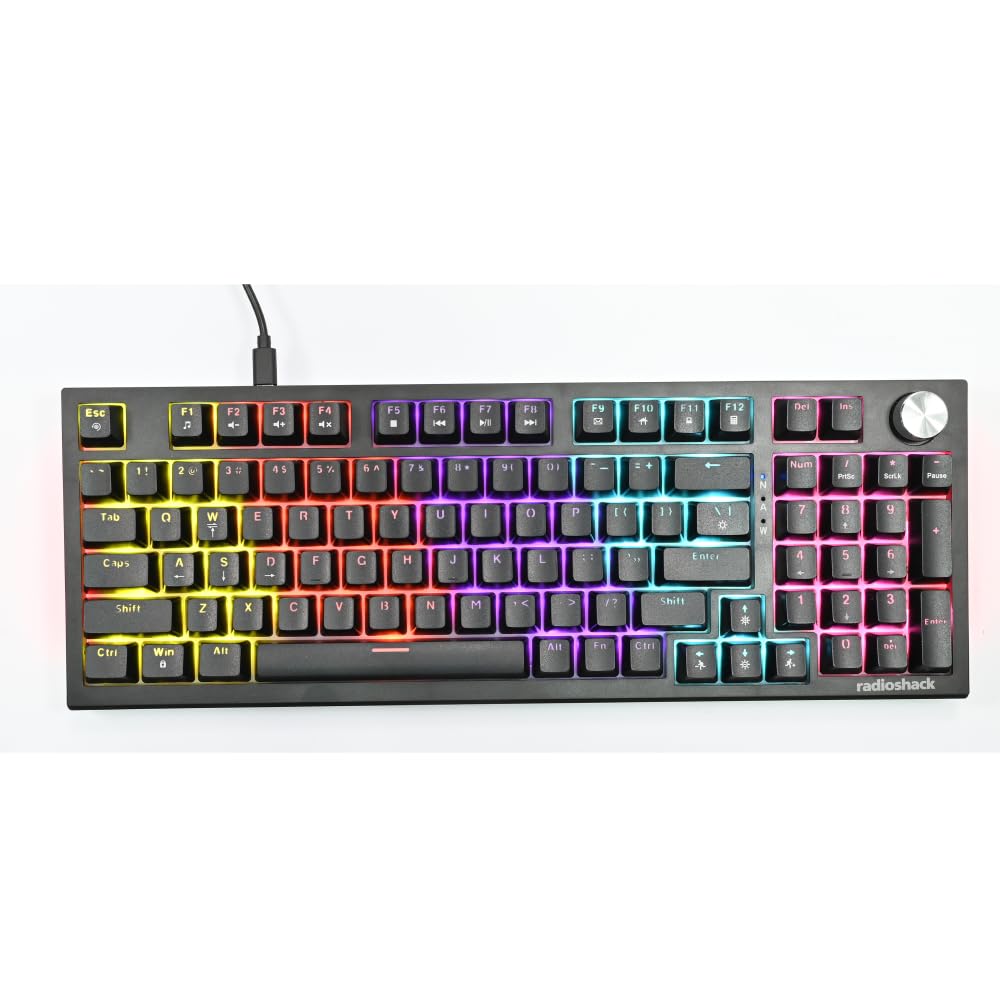
Image: The RadioShack Mechanical Gaming Keyboard, showcasing its 98-key layout and vibrant rainbow backlighting.
പാക്കേജ് ഉള്ളടക്കം
എല്ലാ ഇനങ്ങളും ഉണ്ടെന്ന് ഉറപ്പാക്കാൻ പാക്കേജ് ഉള്ളടക്കങ്ങൾ പരിശോധിക്കുക:
- 1x RadioShack Mechanical Gaming Keyboard
- 1x USB കേബിൾ
- 1x ഉപയോക്തൃ മാനുവൽ (ഈ പ്രമാണം)

Image: A graphic illustrating the contents of the product package, including the gaming keyboard and user manual.
സജ്ജമാക്കുക
- കീബോർഡ് അൺപാക്ക് ചെയ്യുക: Carefully remove the keyboard and USB cable from its packaging.
- കമ്പ്യൂട്ടറുമായി ബന്ധിപ്പിക്കുക: Insert the USB-A connector of the provided USB cable into an available USB port on your computer.
- ഡ്രൈവർ ഇൻസ്റ്റാളേഷൻ: The keyboard is plug-and-play. Your operating system (Windows XP-10 compatible) will automatically detect and install the necessary drivers. No additional software installation is required.
- പ്ലേസ്മെൻ്റ്: Place the keyboard on a stable, flat surface. Adjust the rear feet for your preferred typing angle.

Image: An illustration highlighting key features such as the 1.5m USB cable length and compatibility with Windows XP through 10.
പ്രവർത്തന നിർദ്ദേശങ്ങൾ
കീബോർഡ് ലേഔട്ടും പ്രവർത്തനങ്ങളും
The keyboard features a 98-key layout, providing a compact design while retaining essential keys, including a numeric keypad.
റോട്ടറി നോബ് പ്രവർത്തനങ്ങൾ
The dedicated rotary knob located on the top right of the keyboard controls audio volume.
- ഘടികാരദിശയിൽ തിരിക്കുക: വോളിയം വർദ്ധിപ്പിക്കുന്നു.
- എതിർ ഘടികാരദിശയിൽ തിരിക്കുക: വോളിയം കുറയ്ക്കുന്നു.
- അമർത്തി പിടിക്കുക: ഓഡിയോ നിശബ്ദമാക്കുന്നു/അൺമ്യൂട്ടുചെയ്യുന്നു.

Image: A close-up of a hand interacting with the rotary knob, demonstrating its use for volume adjustment.
ബാക്ക്ലൈറ്റിംഗ് നിയന്ത്രണം
The keyboard features adjustable rainbow backlighting with multiple modes and side-light effects. Specific key combinations (often Fn + a function key) are used to cycle through lighting modes, adjust brightness, or change speed. Refer to the keycap legends for specific lighting control functions.
- മോഡ് സ്വിച്ചിംഗ്: Typically Fn + Ins, Home, PgUp, Del, End, PgDn.
- തെളിച്ച ക്രമീകരണം: Typically Fn + Up/Down arrow keys.
- വേഗത ക്രമീകരണം: Typically Fn + Left/Right arrow keys.

Image: A collage showing the keyboard with various backlighting patterns and side-light effects, illustrating the 17 available lighting modes.
ആൻ്റി-ഗോസ്റ്റിംഗ്
The keyboard supports 25-key anti-ghosting, ensuring that multiple simultaneous key presses are registered accurately, which is crucial for gaming and fast typing.

Image: A user actively typing on the keyboard during a gaming session, emphasizing the accuracy provided by 25 anti-ghosting keys.
മെയിൻ്റനൻസ്
- വൃത്തിയാക്കൽ: Use a soft, dry cloth to wipe the surface of the keyboard. For deeper cleaning, use compressed air to remove dust and debris from between the keycaps. Avoid using liquid cleaners directly on the keyboard.
- സംഭരണം: ദീർഘനേരം ഉപയോഗിക്കാത്തപ്പോൾ, നേരിട്ടുള്ള സൂര്യപ്രകാശവും കടുത്ത താപനിലയും ഏൽക്കാത്ത വൃത്തിയുള്ളതും വരണ്ടതുമായ അന്തരീക്ഷത്തിൽ കീബോർഡ് സൂക്ഷിക്കുക.
- ചോർച്ച ഒഴിവാക്കുക: Liquids can damage the internal components. Exercise caution to prevent spills on the keyboard.
ട്രബിൾഷൂട്ടിംഗ്
കീബോർഡ് പ്രതികരിക്കുന്നില്ല
- യുഎസ്ബി കേബിൾ കീബോർഡിലേക്കും കമ്പ്യൂട്ടറിലേക്കും സുരക്ഷിതമായി ബന്ധിപ്പിച്ചിട്ടുണ്ടെന്ന് ഉറപ്പാക്കുക.
- നിങ്ങളുടെ കമ്പ്യൂട്ടറിലെ മറ്റൊരു USB പോർട്ടിലേക്ക് കീബോർഡ് ബന്ധിപ്പിക്കാൻ ശ്രമിക്കുക.
- നിങ്ങളുടെ കമ്പ്യൂട്ടർ പുനരാരംഭിക്കുക.
- പ്രശ്നം കീബോർഡിലാണോ അതോ കമ്പ്യൂട്ടറിന്റെ USB പോർട്ട്/ഡ്രൈവറുകളിലാണോ എന്ന് നിർണ്ണയിക്കാൻ മറ്റൊരു കമ്പ്യൂട്ടറിൽ കീബോർഡ് പരിശോധിക്കുക.
ബാക്ക്ലൈറ്റിംഗ് പ്രവർത്തിക്കുന്നില്ല
- Check if the backlighting has been turned off using the keyboard's function keys (e.g., Fn + brightness down key).
- Cycle through the lighting modes to see if it reactivates.
Keys Not Registering / Ghosting Issues
- Ensure the keyboard is clean and free of debris that might be obstructing key switches.
- The keyboard features 25-key anti-ghosting. If more than 25 keys are pressed simultaneously, some inputs may not register.
സ്പെസിഫിക്കേഷനുകൾ
| മോഡൽ നമ്പർ | 2607135 |
| ബ്രാൻഡ് | റേഡിയോഷാക്ക് |
| കീബോർഡ് തരം | മെക്കാനിക്കൽ ഗെയിമിംഗ് കീബോർഡ് |
| കീ ലേഔട്ട് | 98-കീ |
| കണക്റ്റിവിറ്റി | USB-A (Corded Electric) |
| സ്വിച്ച് ഡ്യൂറബിലിറ്റി | 50 ദശലക്ഷം കീസ്ട്രോക്കുകൾ വരെ |
| ബാക്ക്ലൈറ്റിംഗ് | Rainbow (Adjustable modes, brightness, speed) |
| ആൻ്റി-ഗോസ്റ്റിംഗ് | 25-കീ |
| പ്രത്യേക സവിശേഷതകൾ | Rotary Volume Knob, Ergonomic Design |
| അനുയോജ്യമായ ഉപകരണങ്ങൾ | Laptop, PC (Windows XP-10) |
| ഉൾപ്പെടുത്തിയ ഘടകങ്ങൾ | USB കേബിൾ |

ചിത്രം: വിശദമായ ഒരു ചിത്രം view of a mechanical switch, illustrating the 50-million keystroke life for long-term reliability.
പിന്തുണ
For further assistance or inquiries, please refer to the official RadioShack support channels or webസൈറ്റ്.