
1. ആമുഖം
This manual provides essential information for setting up, operating, and maintaining your iFFALCON 50U95A 50-inch 4K QD-Mini LED Smart Google TV. Please read it thoroughly before using the product to ensure safe and optimal performance. Keep this manual for future reference.
The iFFALCON 50U95A combines advanced QD-Mini LED display technology with a 144Hz native refresh rate, HDR 1000nit peak brightness, and an ONKYO 2.1 Hi-Fi audio system to deliver an immersive viewing and listening experience. Powered by Google TV, it offers a wide range of smart features and content.
2 പ്രധാനപ്പെട്ട സുരക്ഷാ വിവരങ്ങൾ
തീ, വൈദ്യുതാഘാതം, പരിക്കുകൾ എന്നിവ കുറയ്ക്കുന്നതിന് ഈ ടെലിവിഷൻ ഉപയോഗിക്കുമ്പോൾ എല്ലായ്പ്പോഴും അടിസ്ഥാന സുരക്ഷാ മുൻകരുതലുകൾ പാലിക്കുക.
- മഴയോ ഈർപ്പമോ ടിവിയെ തുറന്നുകാട്ടരുത്.
- കാബിനറ്റ് തുറക്കരുത്; എല്ലാ സേവനങ്ങളും യോഗ്യതയുള്ള ഉദ്യോഗസ്ഥരെ ഏൽപ്പിക്കുക.
- ശരിയായ വായുസഞ്ചാരം ഉറപ്പാക്കുക, വായുസഞ്ചാര ദ്വാരങ്ങൾ തടയരുത്.
- Use only the power adapter and cable supplied with the unit.
- ടിവി വീഴുന്നത് തടയാൻ സ്ഥിരതയുള്ളതും നിരപ്പായതുമായ ഒരു പ്രതലത്തിൽ വയ്ക്കുക.
- Keep the TV away from direct sunlight, heat sources, and extreme temperatures.
- ഇടിമിന്നൽ ഉണ്ടാകുമ്പോഴോ ദീർഘനേരം ഉപയോഗിക്കാതിരിക്കുമ്പോഴോ ടിവി പ്ലഗ് ഊരിവയ്ക്കുക.
3. എന്താണ് ഉൾപ്പെടുത്തിയിരിക്കുന്നത്
പാക്കേജിംഗിൽ എല്ലാ ഘടകങ്ങളും ഉണ്ടെന്ന് ഉറപ്പാക്കുക:
- iFFALCON 50U95A 50-inch 4K QD-Mini LED Smart Google TV
- പവർ അഡാപ്റ്റർ
- പവർ കേബിൾ
- റിമോട്ട് കൺട്രോൾ
- ടിവി സ്റ്റാൻഡ് (2 കഷണങ്ങൾ)
- ഉപയോക്തൃ മാനുവൽ (ഈ പ്രമാണം)

ചിത്രം: മുൻഭാഗം view of the iFFALCON 50U95A 50-inch TV. This image shows the television from the front, highlighting its slim bezels and stand.
4. സജ്ജീകരണം
4.1 സ്റ്റാൻഡ് അറ്റാച്ചുചെയ്യുന്നു
- സ്ക്രീൻ കേടുപാടുകൾ സംഭവിക്കാതിരിക്കാൻ ടിവി മുഖം മൃദുവായതും പരന്നതുമായ പ്രതലത്തിൽ ശ്രദ്ധാപൂർവ്വം വയ്ക്കുക.
- ടിവിയുടെ അടിയിലുള്ള സ്ക്രൂ ദ്വാരങ്ങൾ ഉപയോഗിച്ച് സ്റ്റാൻഡ് പീസുകൾ വിന്യസിക്കുക.
- നൽകിയിരിക്കുന്ന സ്ക്രൂകൾ ഉപയോഗിച്ച് സ്റ്റാൻഡുകൾ ഉറപ്പിക്കുക. അവ ദൃഢമായി ഘടിപ്പിച്ചിട്ടുണ്ടെന്ന് ഉറപ്പാക്കുക.

ചിത്രം: വശം view of the iFFALCON 50U95A TV with stand. This image illustrates the television's profile and how the stand supports it.
4.2 പെരിഫറലുകൾ ബന്ധിപ്പിക്കുന്നു
ടിവിയിൽ ഒന്നിലധികം കണക്റ്റിവിറ്റി ഓപ്ഷനുകൾ ഉണ്ട്:
- HDMI പോർട്ടുകൾ (x4): Connect Blu-ray players, gaming consoles, and other HDMI-enabled devices.
- യുഎസ്ബി പോർട്ട് (x1): മീഡിയ പ്ലേബാക്കിനായി USB സംഭരണ ഉപകരണങ്ങൾ ബന്ധിപ്പിക്കുക.
- വൈഫൈ & ബ്ലൂടൂത്ത്: വയർലെസ്സ് നെറ്റ്വർക്കിനും ആക്സസറി കണക്ഷനുകൾക്കും.
ചിത്രം: പിൻഭാഗം view of the iFFALCON 50U95A TV showing ports. This image displays the back panel of the television, indicating the location of various input and output ports.
4.3 പവർ ചെയ്യുന്നു
- പവർ കേബിൾ ടിവിയിലേക്കും തുടർന്ന് ഒരു പവർ ഔട്ട്ലെറ്റിലേക്കും ബന്ധിപ്പിക്കുക.
- റിമോട്ട് കൺട്രോളിലോ ടിവിയിലോ പവർ ബട്ടൺ അമർത്തുക.
- Follow the on-screen instructions for initial setup, including network connection and Google TV account login.
5. പ്രവർത്തന നിർദ്ദേശങ്ങൾ
5.1 വിദൂര നിയന്ത്രണ പ്രവർത്തനങ്ങൾ
The remote control allows you to navigate the TV's interface, adjust settings, and access smart features. Refer to the remote control diagram in the separate quick start guide for button layout.
5.2 ഗൂഗിൾ ടിവി ഇന്റർഫേസ്
Your iFFALCON TV runs on Google TV, providing a personalized experience with content recommendations, access to streaming apps, and Google Assistant voice control.
- ഹോം സ്ക്രീൻ: Access your favorite apps, movies, and shows.
- Google അസിസ്റ്റൻ്റ്: ഉള്ളടക്കം തിരയുന്നതിനും സ്മാർട്ട് ഹോം ഉപകരണങ്ങൾ നിയന്ത്രിക്കുന്നതിനും മറ്റും വോയ്സ് കമാൻഡുകൾ ഉപയോഗിക്കാൻ നിങ്ങളുടെ റിമോട്ടിലെ Google അസിസ്റ്റന്റ് ബട്ടൺ അമർത്തുക.
- അപ്ലിക്കേഷനുകൾ: ഗൂഗിൾ പ്ലേ സ്റ്റോറിൽ നിന്ന് ആപ്പുകൾ ഡൗൺലോഡ് ചെയ്ത് മാനേജ് ചെയ്യുക.
5.3 ചിത്ര, ശബ്ദ ക്രമീകരണങ്ങൾ
നിങ്ങളുടെ ഇഷ്ടാനുസൃതമാക്കാൻ ക്രമീകരണ മെനു ആക്സസ് ചെയ്യുക viewകേൾക്കലും കേൾക്കൽ അനുഭവവും:
- ചിത്ര മോഡുകൾ: Choose from various presets (e.g., Standard, Vivid, Movie, Game) or customize brightness, contrast, color, and sharpness.
- ശബ്ദ മോഡുകൾ: Select audio presets (e.g., Standard, Music, Movie) or adjust equalizer settings.
- HDR ക്രമീകരണങ്ങൾ: The TV supports HDR10, HDR10+, Dolby Vision, and HLG. Ensure your content source is HDR compatible for optimal performance.
- ഗെയിം മാസ്റ്റർ: Activate Game Master mode for reduced input lag and optimized gaming performance.
6 പ്രധാന സവിശേഷതകൾ
6.1 QD-Mini LED Display Technology
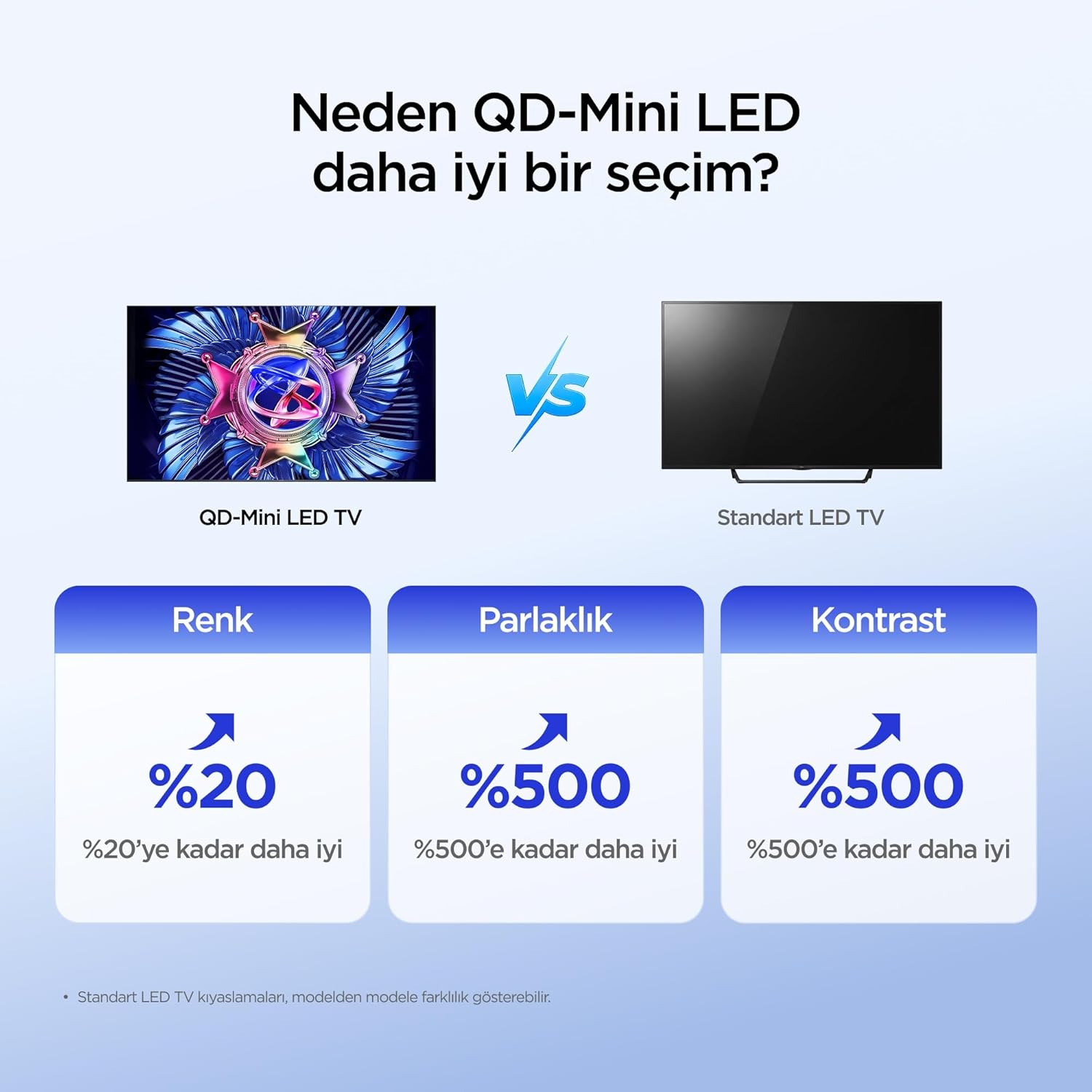
The iFFALCON 50U95A utilizes QD-Mini LED technology, combining Quantum Dot color with Mini LED backlighting. This results in superior brightness, contrast, and color accuracy compared to traditional LED TVs.

Image: Comparison illustrating the benefits of QD-Mini LED over standard LED TVs in terms of color, brightness, and contrast.
With over 500 local dimming zones, the TV provides precise light control at a pixel level, enhancing detail in both bright and dark scenes. It achieves a peak brightness of 1000 nits, ensuring vibrant images even in well-lit environments.

Image: A vibrant image demonstrating the 1000 nits peak brightness capability of the TV.
6.2 144Hz Native Refresh Rate
Experience smoother motion and clearer images with the 144Hz native refresh rate. This is particularly beneficial for fast-paced action movies and gaming, reducing motion blur and ghosting.

Image: A dynamic image of a race car, illustrating the smooth motion provided by the 144Hz native refresh rate.
6.3 ONKYO 2.1 Hi-Fi Audio System with Dolby Atmos
The integrated ONKYO 2.1 channel speaker system delivers rich, immersive stereo sound with deep bass. Combined with Dolby Atmos, it creates a cinematic audio experience, bringing sound to life with incredible clarity and depth.

Image: A living room scene depicting sound waves emanating from the TV, illustrating the immersive audio experience of the 2.1 speaker system.
6.4 AI PQ Pro Processor
The AI PQ Pro Processor intelligently analyzes and optimizes content pixel by pixel. This advanced processor enhances picture quality, delivering sharper details, improved contrast, and more vibrant colors for an overall superior viewഅനുഭവം.

Image: A visual representation of the AI PQ Pro Processor chip, highlighting its role in optimizing image quality.
6.5 Matte HVA Panel & Ultra Slim Design
The Matte HVA Panel reduces glare and reflections, providing a comfortable viewing experience even in bright rooms. Its ultra-slim design allows for seamless integration into any living space, whether on a stand or wall-mounted.

Image: A comparison showing the reduced reflections and improved viewing experience of a Matte HVA Panel compared to a standard panel.

Image: A visual representation of the TV's ultra-slim design, highlighting its sleek profile.
7. പരിപാലനം
7.1 സ്ക്രീൻ വൃത്തിയാക്കൽ
- ടിവി ഓഫ് ചെയ്ത് പവർ കോർഡ് ഊരിമാറ്റുക.
- മൃദുവായ, ലിന്റ് രഹിത തുണി ഉപയോഗിച്ച് സ്ക്രീൻ പതുക്കെ തുടയ്ക്കുക.
- കഠിനമായ അടയാളങ്ങൾക്ക്, നേരിയ dampവെള്ളം അല്ലെങ്കിൽ ഒരു പ്രത്യേക സ്ക്രീൻ ക്ലീനർ ഉപയോഗിച്ച് തുണിയിൽ തളിക്കുക (സ്ക്രീനിൽ നേരിട്ട് സ്പ്രേ ചെയ്യരുത്).
- കഠിനമായ രാസവസ്തുക്കൾ, അബ്രാസീവ്സുകൾ, അല്ലെങ്കിൽ ആൽക്കഹോൾ അടിസ്ഥാനമാക്കിയുള്ള ക്ലീനറുകൾ എന്നിവ ഉപയോഗിക്കുന്നത് ഒഴിവാക്കുക.
7.2 കാബിനറ്റ് വൃത്തിയാക്കൽ
- Wipe the cabinet with a soft, dry cloth.
- Do not use liquid or aerosol cleaners directly on the cabinet.
8. പ്രശ്നപരിഹാരം
| പ്രശ്നം | സാധ്യമായ കാരണം | പരിഹാരം |
|---|---|---|
| ശക്തിയില്ല | പവർ കോർഡ് ബന്ധിപ്പിച്ചിട്ടില്ല; പവർ ഔട്ട്ലെറ്റ് പ്രവർത്തിക്കുന്നില്ല. | പവർ കോർഡ് സുരക്ഷിതമായി പ്ലഗ് ഇൻ ചെയ്തിട്ടുണ്ടെന്ന് ഉറപ്പാക്കുക. മറ്റൊരു ഉപകരണം ഉപയോഗിച്ച് ഔട്ട്ലെറ്റ് പരിശോധിക്കുക. |
| ചിത്രമില്ല, പക്ഷേ ശബ്ദം ഉണ്ട് | Incorrect input source selected; backlight off. | ശരിയായ ഉറവിടം തിരഞ്ഞെടുക്കാൻ റിമോട്ടിലെ "ഇൻപുട്ട്" ബട്ടൺ അമർത്തുക. ചിത്ര ക്രമീകരണങ്ങൾ പരിശോധിക്കുക. |
| ശബ്ദമില്ല, പക്ഷേ ചിത്രം ഉണ്ട് | Volume muted or too low; incorrect audio output selected. | Unmute volume or increase level. Check audio output settings (e.g., TV speakers, external soundbar). |
| റിമോട്ട് കൺട്രോൾ പ്രവർത്തിക്കുന്നില്ല | ബാറ്ററികൾ തീർന്നിരിക്കുന്നു അല്ലെങ്കിൽ തെറ്റായി ഘടിപ്പിച്ചിരിക്കുന്നു; റിമോട്ടിനും ടിവിക്കും ഇടയിലുള്ള തടസ്സം. | ബാറ്ററികൾ മാറ്റിസ്ഥാപിക്കുക. ടിവിയുടെ ഐആർ റിസീവറിന്റെ കാഴ്ച വ്യക്തമായി കാണുന്നുണ്ടെന്ന് ഉറപ്പാക്കുക. |
| Wi-Fi കണക്ഷൻ പ്രശ്നങ്ങൾ | തെറ്റായ പാസ്വേഡ്; റൂട്ടർ പ്രശ്നങ്ങൾ; ടിവി റൂട്ടറിൽ നിന്ന് വളരെ അകലെയാണ്. | Re-enter Wi-Fi password. Restart router. Move TV closer to router or use a Wi-Fi extender. |
If the problem persists after trying these solutions, please contact iFFALCON customer support.
9 സ്പെസിഫിക്കേഷനുകൾ
| ഫീച്ചർ | വിശദാംശങ്ങൾ |
|---|---|
| മോഡൽ | 50U95എ |
| സ്ക്രീൻ വലിപ്പം | 50 ഇഞ്ച് |
| ഡിസ്പ്ലേ ടെക്നോളജി | ക്യുഡി-മിനി എൽഇഡി |
| റെസലൂഷൻ | 4K (3840 x 2160) |
| പുതുക്കിയ നിരക്ക് | 144 Hz (നേറ്റീവ്) |
| പീക്ക് തെളിച്ചം | 1000 നിറ്റ് |
| HDR പിന്തുണ | HDR10, HDR10+, ഡോൾബി വിഷൻ, HLG |
| ഓഡിയോ സിസ്റ്റം | ONKYO 2.1 Channel Speakers, Dolby Atmos, DTS Virtual:X |
| ഓപ്പറേറ്റിംഗ് സിസ്റ്റം | Google TV |
| പ്രോസസ്സർ | AI PQ Pro Processor |
| കണക്റ്റിവിറ്റി | 4x HDMI, 1x USB, Wi-Fi, Bluetooth |
| അളവുകൾ (D x W x H) | 6.9D x 111.1W x 64.6H സെ.മീ |
| ഭാരം | 13 കി.ഗ്രാം |
10. വാറൻ്റിയും പിന്തുണയും
Your iFFALCON 50U95A TV comes with a 2 വർഷത്തെ നിർമ്മാതാവിന്റെ വാറന്റി. This warranty covers defects in materials and workmanship under normal use. For warranty claims or technical support, please contact iFFALCON customer service through their official webസൈറ്റ് അല്ലെങ്കിൽ നിങ്ങളുടെ ഉൽപ്പന്ന ഡോക്യുമെന്റേഷനിൽ നൽകിയിരിക്കുന്ന ബന്ധപ്പെടാനുള്ള വിവരങ്ങൾ.
For the latest support information, FAQs, and software updates, visit the official iFFALCON support webസൈറ്റ്: www.iffalcon.com