
1. സജ്ജീകരണവും ഇൻസ്റ്റാളേഷനും
This section guides you through the initial setup and installation of your Hiseeu Solar Wireless Outdoor Security System. The system is designed for easy, wire-free installation.
1.1 പാക്കേജ് ഉള്ളടക്കം
ആരംഭിക്കുന്നതിന് മുമ്പ്, നിങ്ങളുടെ പാക്കേജിൽ എല്ലാ ഘടകങ്ങളും ഉണ്ടെന്ന് ഉറപ്പാക്കുക:
- NVR (നെറ്റ്വർക്ക് വീഡിയോ റെക്കോർഡർ)
- 8 x 4MP Pan-Tilt Cameras
- 8 x Solar Panels with 10-foot cables
- 8 x Mount Bases for Solar Panels
- സ്ക്രൂകളും മൗണ്ടിംഗ് ഹാർഡ്വെയറും
- 12V 2A പവർ സപ്ലൈ
- ഇഥർനെറ്റ് കേബിൾ
- HDMI കേബിൾ
- യുഎസ്ബി മൗസ്
- User Manual & Warning Stickers
Video: What is included in the WK-8TD504-1T product package? ഈ വീഡിയോ വിശദമായ ഒരു വിവരണം നൽകുന്നുview of all items included in your security system kit, ensuring you have everything needed for installation.
1.2 Camera and Solar Panel Installation
The cameras are 100% wire-free and solar-powered, simplifying outdoor installation. Ensure solar panels receive adequate direct sunlight for continuous power.
- ചാർജ് ക്യാമറകൾ: Before mounting, fully charge each camera using the provided USB cable. This ensures initial operation before solar power takes over.
- മൗണ്ട് ക്യാമറ: Use the provided mounting hardware to securely attach the camera to your desired outdoor location. The cameras feature a 360° pan and tilt for optimal viewകോണുകൾ.
- മൗണ്ട് സോളാർ പാനൽ: Position the solar panel in an area that receives maximum direct sunlight throughout the day. Use the flexible mount base to adjust the panel's angle (30-45 degrees is often optimal) to capture sunlight effectively. The 10-foot cable allows for flexible placement away from the camera if needed.
- സോളാർ പാനൽ ബന്ധിപ്പിക്കുക: Plug the solar panel cable into the camera's charging port.
- Turn On Camera: Locate the ON/OFF switch on the camera and turn it on. If necessary, you can reset the camera by pressing the RESET button.
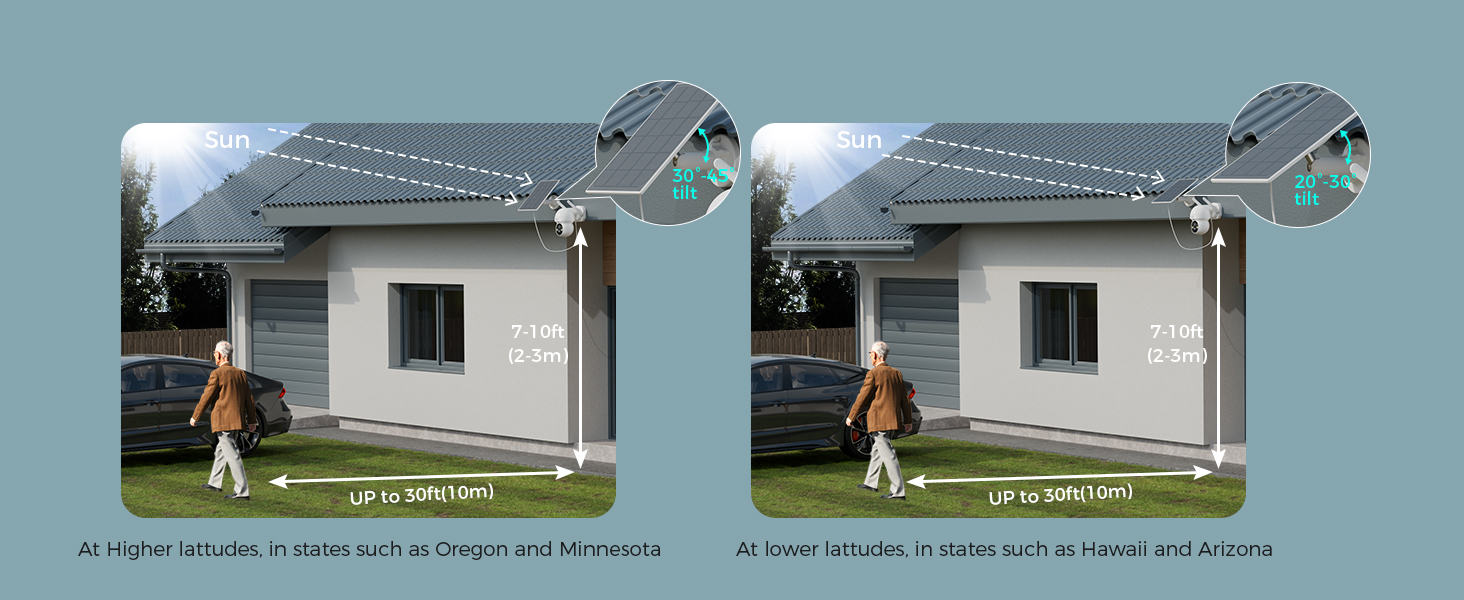
Image: Easy Clip Installation. This image demonstrates the simple clip installation method for attaching the camera to various surfaces like walls, fences, or posts.

Image: Flexible Solar Panel. This image illustrates how to adjust the solar panel's angle to obtain maximum solar power, ensuring continuous camera operation.
Video: How to install solar panel? This video demonstrates the step-by-step process of installing the solar panel for your Hiseeu camera system.
Video: How do you use a waterproof cap? This video shows how to properly use the waterproof cap to protect connections from weather elements.
1.3 NVR Setup and Camera Pairing
The NVR (Network Video Recorder) is the central hub for your security system. It comes with a pre-installed 1TB HDD for local storage.
- NVR ബന്ധിപ്പിക്കുക: Plug in the NVR's power cable. Connect a monitor to the NVR using the HDMI cable.
- പ്രാരംഭ സജ്ജീകരണം: Follow the on-screen prompts to select your language, set the date and time, and configure network settings (supports 2.4GHz/5GHz WiFi).
- പാസ്വേഡ് സജ്ജമാക്കുക: Create a secure password for your NVR system.
- Auto Pair Cameras: The system is designed for automatic pairing. Once the NVR is set up and cameras are powered on, they should automatically connect.
- അപ്ലിക്കേഷൻ ഡൗൺലോഡുചെയ്യുക: Scan the QR code displayed on the monitor to download the EseeCloud app. Register an account and log in.
- ആപ്പിലേക്ക് ഉപകരണം ചേർക്കുക: In the app, click "Add smart device" and scan the QR code on the NVR's screen to add your system.
Video: How to use? This comprehensive video guides you through the initial setup of the NVR, connecting the monitor, and pairing the cameras, including app integration.
2. നിങ്ങളുടെ സുരക്ഷാ സംവിധാനം പ്രവർത്തിപ്പിക്കൽ
Your Hiseeu security system offers advanced features for comprehensive home monitoring.
2.1 വിദൂര Viewഇംഗും നിയന്ത്രണവും
Access live video feeds and control your cameras from anywhere using the EseeCloud mobile app.
- 360° Pan-Tilt: The cameras support 355° pan and 90° tilt, allowing you to adjust the viewing angle remotely via the app to eliminate blind spots.
- മൾട്ടി-ചാനൽ View: View up to 4 camera feeds simultaneously on one screen within the app or connected monitor. The system supports expansion up to 10 channels.
- ടു-വേ ഓഡിയോ: സന്ദർശകരുമായി ഇരുവശങ്ങളിലേക്കുമുള്ള ആശയവിനിമയത്തിനോ നുഴഞ്ഞുകയറ്റക്കാരെ തടയാനോ ബിൽറ്റ്-ഇൻ മൈക്രോഫോണും സ്പീക്കറും ഉപയോഗിക്കുക.

Image: Large Angle, No Blind Spots. This image highlights the 355° pan and 90° tilt capabilities of the cameras, providing comprehensive coverage.

Image: 2-Way Real Audio. This image demonstrates the two-way audio function, allowing you to communicate through the camera.
2.2 വീഡിയോ ഗുണനിലവാരവും രാത്രി കാഴ്ചയും
Experience clear and detailed surveillance footagഇ പകലും രാത്രിയും.
- 4MP Sharp Video: Cameras deliver crisp 4MP Full HD visuals for clear footage.
- കളർ നൈറ്റ് വിഷൻ: Advanced smart LED technology provides bright, clear color video even in very low light conditions, extending your viewing range up to 65 feet.

Image: HD Colorful Night View. This image showcases the camera's ability to provide bright and clear color night vision using 2 LEDs.
2.3 മോഷൻ ഡിറ്റക്ഷനും അലേർട്ടുകളും
Stay informed with intelligent motion detection and customizable alerts.
- ചലന-ട്രിഗർ ചെയ്ത റെക്കോർഡിംഗ്: Cameras automatically trigger recording when motion is detected.
- Event Notifications: Receive instant push notifications on your phone app when motion events occur.
- പ്രവർത്തന മേഖലകൾ: Set specific activity zones to monitor only the areas that matter, reducing unnecessary notifications.

Image: Monitor Only the Areas You Want. This image illustrates how to set activity zones to receive alerts only for relevant areas.

Image: Events Notification. This image shows a push notification on a phone app, indicating a device-object movement detected by the camera.
2.4 Connectivity and Storage
- ഡ്യുവൽ-ബാൻഡ് വൈഫൈ: The system supports both 2.4GHz and 5GHz WiFi, ensuring stable and longer-distance transmission.
- 1TB Local Storage: All recordings are encrypted and stored locally on the included 1TB hard drive in the NVR. This means no monthly subscription fees for storage.
- H.265 വീഡിയോ കംപ്രഷൻ: Ensures stable, fast, and lag-free live streaming and recording.
- അലക്സാ ഇന്റഗ്രേഷൻ: The system works with Alexa, allowing convenient voice control to view ക്യാമറകൾ.

Image: Ultra-Stable 5G/2.4Ghz WiFi. This image illustrates the dual-band WiFi coverage, ensuring stable and extended signal range for your security system.
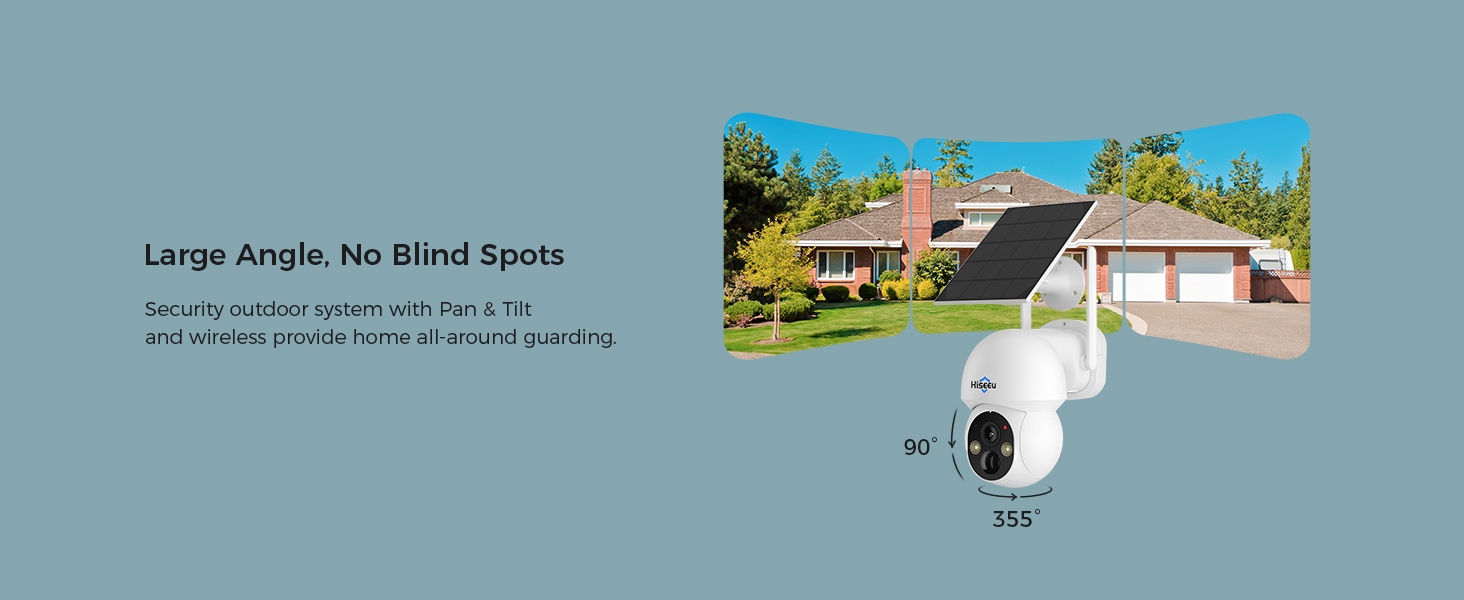
Image: Safe Local Data. This image emphasizes the security of local data storage on the 1TB hard drive, protecting against hacking and information leakage.
3. പരിപാലനം
Proper maintenance ensures the longevity and optimal performance of your security system.
- സോളാർ പാനൽ കെയർ: Regularly clean the surface of the solar panels to ensure maximum sunlight absorption. Dust, dirt, or debris can reduce charging efficiency.
- കാലാവസ്ഥ പ്രതിരോധം: The cameras are IP66 professional-grade waterproof, designed to operate effectively in various weather conditions including rain, snow, or extreme heat.
- ഫേംവെയർ അപ്ഡേറ്റുകൾ: Periodically check for and install any available firmware updates for the NVR and cameras to ensure optimal performance and security.

Image: IP66 Professional-Grade Waterproof. This image highlights the camera's robust design, built to withstand various weather conditions year-round.
4. പ്രശ്നപരിഹാരം
If you encounter any issues with your Hiseeu security system, refer to the following common troubleshooting tips:
- വീഡിയോ ഫീഡ് ഇല്ല: Ensure the camera is powered on and the solar panel is connected and receiving sunlight. Check the NVR's network connection.
- ദുർബലമായ വൈഫൈ സിഗ്നൽ: Verify the NVR's antenna is properly installed. Consider repositioning the NVR or cameras to improve signal strength, especially with dual-band WiFi.
- പാസ്വേഡ് മറന്നോ: Refer to the NVR's on-screen options for password recovery or reset procedures.
- മോഷൻ ഡിറ്റക്ഷൻ പ്രശ്നങ്ങൾ: Adjust activity zones and sensitivity settings in the EseeCloud app. Ensure camera lens is clean and unobstructed.
- ആപ്പ് കണക്റ്റിവിറ്റി: Ensure your smartphone has a stable internet connection and the EseeCloud app is updated to the latest version.
5 സ്പെസിഫിക്കേഷനുകൾ
| ഫീച്ചർ | വിശദാംശങ്ങൾ |
|---|---|
| ബ്രാൻഡ് | ഹിസ്യു |
| മോഡൽ നമ്പർ | WK-8TD504-AT |
| കണക്റ്റിവിറ്റി ടെക്നോളജി | Wireless (Dual-Band 2.4GHz/5GHz WiFi) |
| വീഡിയോ ക്യാപ്ചർ റെസല്യൂഷൻ | 4എംപി |
| പ്രത്യേക സവിശേഷതകൾ | Two-Way Audio, Pan-Tilt (355° pan, 90° tilt), Motion Detection, Color Night Vision |
| ചാനലുകളുടെ എണ്ണം | 10 (വിപുലീകരിക്കാവുന്ന) |
| മെമ്മറി സ്റ്റോറേജ് കപ്പാസിറ്റി | 1 TB HDD (local storage) |
| പവർ ഉറവിടം | സൗരോർജ്ജം |
| അനുയോജ്യമായ ഉപകരണങ്ങൾ | Smartphones, TV |
| നൈറ്റ് വിഷൻ റേഞ്ച് | 65 അടി |
| ഫ്രെയിം റേറ്റ് | 15-30 FPS |
| റെക്കോർഡിംഗ് മോഡ് | തുടർച്ചയായി |
| ഹാർഡ്വെയർ ഇന്റർഫേസ് | 802.11 ac/b/g/n |
| ലെൻസ് തരം | വൈഡ് ആംഗിൾ |
| സിഗ്നൽ ഫോർമാറ്റ് | ഡിജിറ്റൽ |
| ഒപ്റ്റിക്കൽ സെൻസർ ടെക്നോളജി | CMOS |
| ഇനത്തിൻ്റെ അളവുകൾ | 14.37 x 13.58 x 9.96 ഇഞ്ച് |
| ആൻ്റിന സ്ഥാനം | ഔട്ട്ഡോർ |
| IP റേറ്റിംഗ് | IP66 വാട്ടർപ്രൂഫ് |
6. വാറൻ്റിയും പിന്തുണയും
Hiseeu is committed to providing excellent customer service and support for your security system.
- ആജീവനാന്ത പിന്തുണ: The manufacturer offers lifetime support for the product.
- ബന്ധപ്പെടാനുള്ള വിവരങ്ങൾ: For any inquiries or technical assistance, please refer to the contact details provided in the quick guide or on the official Hiseeu website. Support options typically include email, phone call, and online chat.

Image: Lifetime Support. This image highlights the high-quality response and considerate service offered by Hiseeu's support team.