
ആമുഖം
This manual provides detailed instructions for the proper use and maintenance of your CASIO MS-20YC desktop calculator. Please read it thoroughly before use to ensure optimal performance and longevity of your device. This calculator is designed for everyday calculations, offering a range of basic and advanced functions.
സജ്ജമാക്കുക
പവർ ഉറവിടം
Your CASIO MS-20YC calculator operates on solar power with a backup battery. Ensure sufficient light for optimal performance. The backup battery is pre-installed to provide power in low-light conditions.
- സൗരോർജ്ജം: The calculator primarily uses solar energy when sufficient light is available.
- ബാക്കപ്പ് ബാറ്ററി: A nonstandard battery is included and installed to ensure continuous operation when solar power is insufficient.
- യാന്ത്രിക ഷട്ട്-ഓഫ്: The calculator features an automatic shut-off function to conserve battery life when not in use.
പ്രാരംഭ ഉപയോഗം
Upon first use, ensure the calculator is exposed to light. If the display is blank or dim, press the AC (All Clear) button. The calculator is ready for use once the display shows '0'.
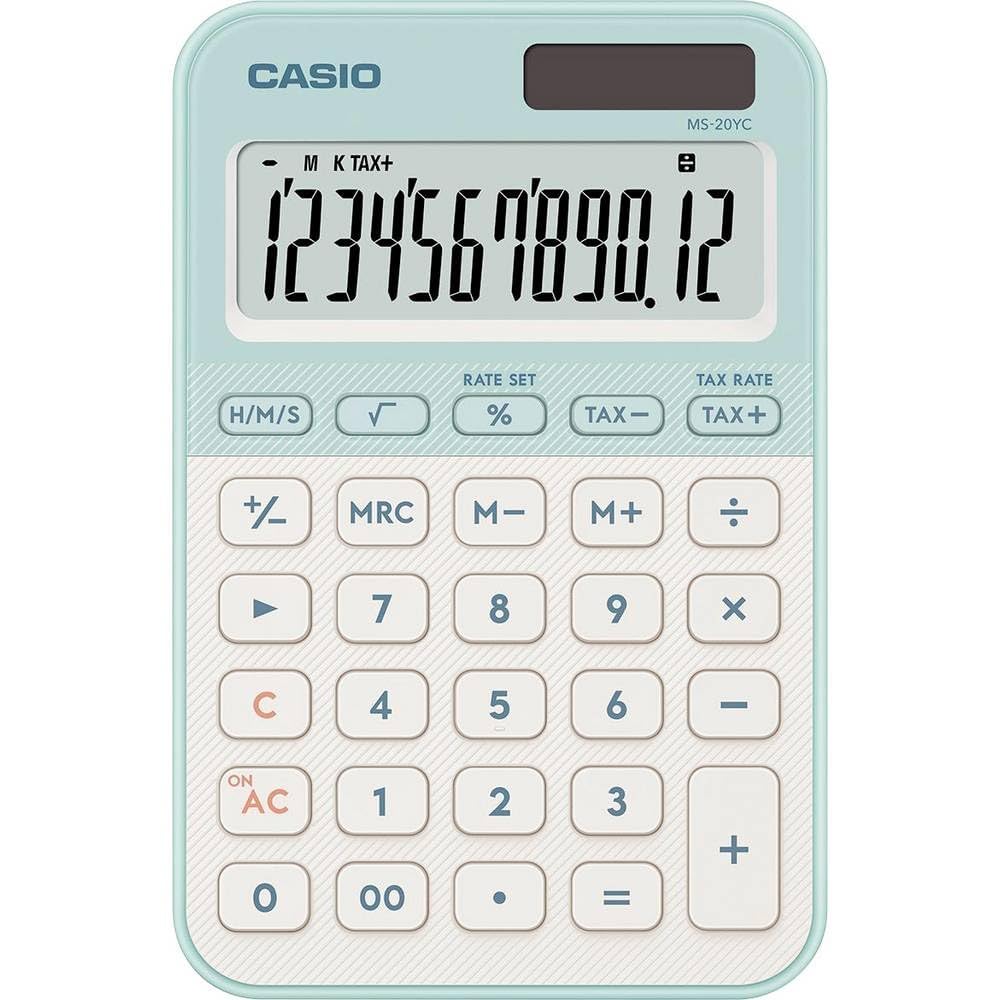
Image: CASIO MS-20YC Desktop Calculator. This image shows the calculator's front view, highlighting its 12-digit display and key layout.
പ്രവർത്തന നിർദ്ദേശങ്ങൾ
അടിസ്ഥാന കണക്കുകൂട്ടലുകൾ
Enter numbers using the numeric keys (0-9) and the decimal point (.). Use the arithmetic operators for addition (+), subtraction (-), multiplication (*), and division (/). Press the equals key (=) to display the result.
- കൂട്ടിച്ചേർക്കൽ:
[Number 1] [+] [Number 2] [=] - കുറയ്ക്കൽ:
[Number 1] [-] [Number 2] [=] - ഗുണനം:
[Number 1] [*] [Number 2] [=] - ഡിവിഷൻ:
[Number 1] [/] [Number 2] [=]
പ്രധാന പ്രവർത്തനങ്ങൾ കഴിഞ്ഞുview
| താക്കോൽ | ഫംഗ്ഷൻ |
|---|---|
| AC | All Clear: Clears all entries and memory. |
| C (ബാക്ക്സ്പേസ്) | Clear Entry / Backspace: Deletes the last digit entered or clears the current entry. |
| +/- | Sign Change: Changes the sign of the displayed number (positive to negative, or vice versa). |
| 00 | Double Zero: Enters two zeros simultaneously. |
| % | ശതമാനംtage / Markup: Performs percentage calculations and markup calculations. |
| നികുതി+ / നികുതി- | Tax Calculation: Adds or subtracts a pre-set tax rate. |
| M+, M-, MR, MC | Memory Functions: Add to memory, subtract from memory, recall memory, clear memory. |
| √ (Square Root) | പ്രദർശിപ്പിച്ച സംഖ്യയുടെ വർഗ്ഗമൂല്യം കണക്കാക്കുന്നു. |
Advanced Calculations
- ശതമാനംtagഇ കണക്കുകൂട്ടൽ: Thanks to CASIO's unique input logic, the absolute value of the percentage is displayed before markup on the base. For markup calculation, use the % താക്കോൽ.
- നികുതി കണക്കുകൂട്ടലുകൾ: The calculator allows for tax calculations with display of gross, net, and tax amounts. The tax rate can be saved for convenience. Refer to the full manual for setting the tax rate.
- സമയ കണക്കുകൂട്ടൽ: Perform calculations in hours:minutes:seconds format and convert results to decimal format.
- Constant Calculation: This feature allows for repetitive calculations using a constant value.
മെയിൻ്റനൻസ്
വൃത്തിയാക്കൽ
To clean your calculator, gently wipe the surface with a soft, dry cloth. Do not use abrasive cleaners, solvents, or chemical sprays, as these can damage the display or casing.
സംഭരണം
Store the calculator in a cool, dry place away from direct sunlight and extreme temperatures. Avoid placing heavy objects on top of the calculator to prevent damage to the display or keys.
ബാറ്ററി മാറ്റിസ്ഥാപിക്കൽ
If the display becomes consistently dim even in sufficient light, the backup battery may need replacement. Battery replacement should ideally be performed by an authorized service center to ensure proper handling and to avoid voiding any warranty.
ട്രബിൾഷൂട്ടിംഗ്
- ഡിസ്പ്ലേ ശൂന്യമോ മങ്ങിയതോ ആണ്:
Ensure the calculator is exposed to adequate light. If the issue persists, the backup battery may be low or depleted. - തെറ്റായ കണക്കുകൂട്ടലുകൾ:
അമർത്തുക AC to clear all previous calculations and memory. Re-enter your calculation carefully. - പ്രതികരിക്കാത്ത കീകൾ:
Check for any debris lodged under the keys. Gently clean around the keys. If the problem continues, contact customer support. - Calculator turns off unexpectedly:
This is likely the automatic shut-off feature. If it occurs too frequently during active use, ensure sufficient light for solar power or consider battery replacement.
സ്പെസിഫിക്കേഷനുകൾ
| ഫീച്ചർ | വിശദാംശങ്ങൾ |
|---|---|
| ബ്രാൻഡ് | കാസിയോ |
| മോഡൽ | MS-20YC |
| അളവുകൾ (L x W x H) | 10.1 x 15.5 x 1.8 cm (approx. 3.98"L x 6.1"W x 0.7"H) |
| പ്രദർശിപ്പിക്കുക | 12-digit LCD, 8.0 x 2.7 cm, Digit height 1.7 cm, Calculation function indicator, 1,000s separators |
| പവർ ഉറവിടം | Solar powered with backup battery (1 Nonstandard Battery included) |
| കീ തരം | Smooth-operating plastic keys with key rollover |
| ഭാരം | 118 ഗ്രാം |
| പ്രത്യേക സവിശേഷതകൾ | Time calculation, Tax calculation, Advanced percentage calculation, Square root, Constant calculation, 3-key memory, Backspace key, +/- key, Double zero key (00), Non-slip rubber feet |
വാറൻ്റിയും പിന്തുണയും
For detailed warranty information, terms, and conditions, please refer to the documentation included with your original purchase. For customer support, technical assistance, or service inquiries, please visit the official Casio webസൈറ്റ് അല്ലെങ്കിൽ നിങ്ങളുടെ പ്രാദേശിക കാസിയോ വിതരണക്കാരനെ ബന്ധപ്പെടുക.