
ആമുഖം
Thank you for choosing the Cillso Smartwatch. This manual provides detailed instructions on how to set up, operate, and maintain your device. This smartwatch features a 1.95-inch HD display, Bluetooth calling capabilities, IP68 water resistance, comprehensive health monitoring including SpO2 and sleep tracking, over 100 sports modes, and integrated Alexa for voice control. Please read this manual carefully to ensure optimal performance and longevity of your smartwatch.
സജ്ജമാക്കുക
1. സ്മാർട്ട് വാച്ച് ചാർജ് ചെയ്യുന്നു
Before initial use, fully charge your smartwatch. Connect the provided charging cable to the charging port on the back of the watch and to a standard USB power adapter (not included). A full charge typically takes approximately 2 മണിക്കൂർ. The watch has a 300mAh ബാറ്ററി, നൽകുന്നത് 5-7 days of normal use വരെ 30 days of standby time.

Image: The smartwatch display indicating a 1.95-inch screen, 2 hours charging time, 5-7 days normal use, 30 days standby time, and a 300mAh battery capacity.
2. ആപ്പ് ഇൻസ്റ്റാളേഷനും ജോടിയാക്കലും
- ആപ്പ് ഡൗൺലോഡ് ചെയ്യുക: Scan the QR code in the quick start guide or search for the companion app (e.g., 'GloryFit' as suggested by watch dial image) in your smartphone's app store (Android or iOS).
- രജിസ്റ്റർ ചെയ്യുക/ലോഗിൻ ചെയ്യുക: ഒരു അക്കൗണ്ട് സൃഷ്ടിക്കുന്നതിനോ ലോഗിൻ ചെയ്യുന്നതിനോ ഓൺ-സ്ക്രീൻ നിർദ്ദേശങ്ങൾ പാലിക്കുക.
- സ്മാർട്ട് വാച്ച് ജോടിയാക്കുക: Ensure Bluetooth is enabled on your smartphone. Open the app, navigate to the device section, and select 'Add Device'. Choose your Cillso Smartwatch from the list of available devices. Confirm the pairing request on both your phone and the smartwatch.
പ്രവർത്തന നിർദ്ദേശങ്ങൾ
1. അടിസ്ഥാന നാവിഗേഷൻ
- ടച്ച് സ്ക്രീൻ: മെനുകളിലൂടെയും അറിയിപ്പുകളിലൂടെയും നാവിഗേറ്റ് ചെയ്യാൻ മുകളിലേക്കും താഴേക്കും ഇടത്തേക്കോ വലത്തേക്കോ സ്വൈപ്പ് ചെയ്യുക. ഇനങ്ങൾ തിരഞ്ഞെടുക്കാൻ ടാപ്പ് ചെയ്യുക.
- സൈഡ് ബട്ടൺ: Press the side button to return to the home screen or to wake up the display.
2. ബ്ലൂടൂത്ത് കോളിംഗ്
സ്മാർട്ട് വാച്ച് പിന്തുണയ്ക്കുന്നു Bluetooth 5.3 calling, allowing you to make and receive calls directly from your wrist when connected to your smartphone. It features a അന്തർനിർമ്മിത മൈക്രോഫോൺ and supports കോൾ റെക്കോർഡുകൾ വരെ 100 കോൺടാക്റ്റുകൾ.
- കോളുകൾക്ക് ഉത്തരം നൽകുന്നു: When an incoming call notification appears, tap the green phone icon to answer.
- കോളുകൾ നിരസിക്കുന്നു: Tap the red phone icon to reject an incoming call.
- കോളുകൾ ചെയ്യുന്നു: Access the dial pad or contact list on your smartwatch to initiate a call.
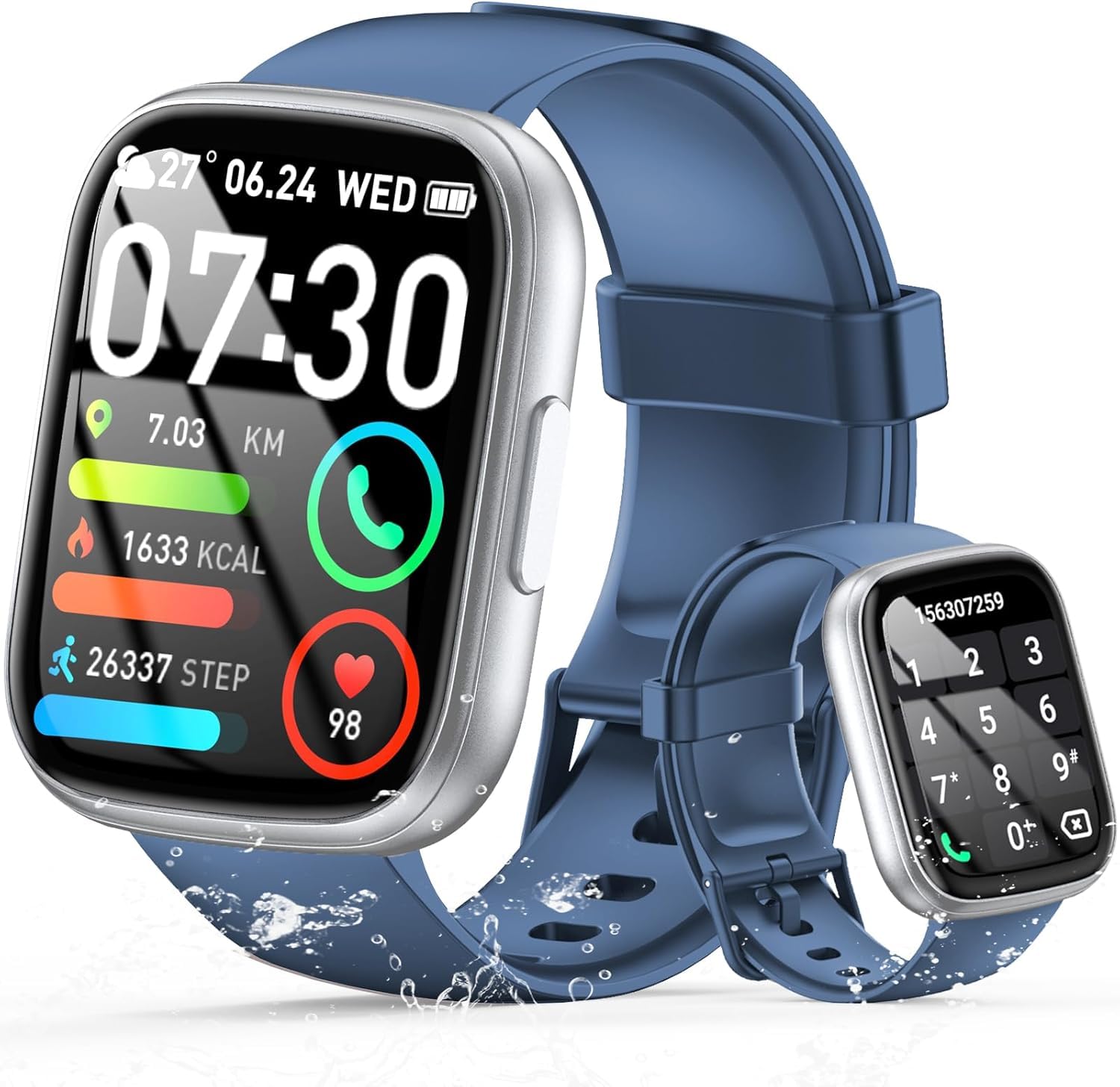
Image: The smartwatch displaying an incoming call, along with icons for built-in mic, Hi-Fi Spectra, call records, and 100 contacts. Examples of dial pad and contact list are also shown.
3. ആരോഗ്യ നിരീക്ഷണം
The smartwatch provides continuous health monitoring features to help you track your well-being.
- ഹൃദയമിടിപ്പ് നിരീക്ഷണം: ദിവസം മുഴുവൻ വാച്ച് നിങ്ങളുടെ ഹൃദയമിടിപ്പ് തുടർച്ചയായി നിരീക്ഷിക്കുന്നു. View your heart rate data on the watch or in the app.
- രക്തത്തിലെ ഓക്സിജൻ (SpO2) നിരീക്ഷണം: നിങ്ങളുടെ രക്തത്തിലെ ഓക്സിജൻ സാച്ചുറേഷൻ അളവ് അളക്കുക.
- ഉറക്ക നിരീക്ഷണം: Tracks your sleep patterns, including deep sleep, light sleep, and wake times, to provide insights into your sleep quality.

Image: Visual representation of heart rate, blood oxygen (SpO2), and sleep monitoring graphs and data on the smartwatch and a person sleeping while wearing the watch.
4. സ്പോർട്സ് മോഡുകൾ
സ്മാർട്ട് വാച്ച് പിന്തുണയ്ക്കുന്നു over 100 sports modes to accurately track your workouts. Common modes include running, basketball, climbing, skipping, swimming, and badminton. It tracks metrics such as steps, distance, calories burned, and exercise duration.

Image: A person cycling with the smartwatch, illustrating various sports modes like running, basketball, climbing, skipping, swimming, and badminton. Also shows tracking for steps, distance, and calories.
5. അലക്സാ ഇന്റഗ്രേഷൻ
കൂടെ Alexa integrated, you can use voice commands to control music playback, check weather, set alarms, and more directly from your smartwatch.
6. Personalized Watch Dials
Customize your smartwatch with over 200 stylish watch faces available through the companion app. You can also upload your favorite photos to create personalized watch dials. The display features wide color gamut, AM LED technology, and color accuracy.

ചിത്രം: സ്മാർട്ട് വാച്ച് ഷോക്asing multiple personalized watch dial options, highlighting wide color gamut, AM LED, and color accuracy features.
7. Multifunctional Features
- സംഗീത നിയന്ത്രണം: നിങ്ങളുടെ കണക്റ്റുചെയ്ത സ്മാർട്ട്ഫോണിൽ സംഗീതം പ്ലേ ചെയ്യുക, താൽക്കാലികമായി നിർത്തുക, ട്രാക്കുകൾ ഒഴിവാക്കുക, വോളിയം ക്രമീകരിക്കുക.
- ക്യാമറ നിയന്ത്രണം: Remotely control your smartphone's camera to frame, focus, and snap photos or start/stop video recording.
- അലാറം ക്ലോക്ക്: നിങ്ങളെ ഉണർത്തുന്നതിനോ പ്രധാനപ്പെട്ട ഇവന്റുകൾ ഓർമ്മിപ്പിക്കുന്നതിനോ അലാറങ്ങൾ സജ്ജമാക്കുക.
- മറ്റ് സവിശേഷതകൾ: Includes weather forecasts, stopwatch, timer, and more.

Image: The smartwatch displaying interfaces for music control, remote camera control, and alarm clock settings, along with icons for other features like temperature, weather, and microphone.
മെയിൻ്റനൻസ്
1. വൃത്തിയാക്കൽ
മൃദുവായതും ഉണങ്ങിയതുമായ തുണി ഉപയോഗിച്ച് സ്മാർട്ട് വാച്ച് പതിവായി തുടയ്ക്കുക. കഠിനമായ അഴുക്കിന്, അല്പം d ഉപയോഗിക്കുക.amp തുണി ഉപയോഗിച്ച് നന്നായി ഉണക്കുക. കഠിനമായ രാസവസ്തുക്കളോ ഉരച്ചിലുകളോ ഉള്ള വസ്തുക്കൾ ഉപയോഗിക്കുന്നത് ഒഴിവാക്കുക.
2. ജല പ്രതിരോധം (IP68)
The Cillso Smartwatch is IP68 വാട്ടർ റെസിസ്റ്റൻ്റ്, meaning it is protected against dust ingress and can withstand immersion in water up to 1.5 meters for up to 30 minutes. It is suitable for daily use, hand washing, and light rain. However, it is not recommended for hot showers, saunas, or diving, as steam and high water pressure can compromise the seal.
3. ബാറ്ററി പരിചരണം
- ബാറ്ററിയുടെ ആയുസ്സ് കുറയ്ക്കുന്ന, ഉയർന്ന താപനില ഒഴിവാക്കുക.
- Charge the device fully before long periods of inactivity.
- നൽകിയിരിക്കുന്ന ചാർജിംഗ് കേബിൾ മാത്രം ഉപയോഗിക്കുക.
ട്രബിൾഷൂട്ടിംഗ്
- വാച്ച് ഓണാകുന്നില്ല: വാച്ച് പൂർണ്ണമായും ചാർജ് ചെയ്തിട്ടുണ്ടെന്ന് ഉറപ്പാക്കുക. കുറഞ്ഞത് 30 മിനിറ്റെങ്കിലും ചാർജറുമായി ബന്ധിപ്പിക്കുക.
- ഫോണുമായി ജോടിയാക്കാൻ കഴിയില്ല: Make sure Bluetooth is enabled on your phone and the watch is within range. Restart both devices and try pairing again through the app.
- കൃത്യമല്ലാത്ത ആരോഗ്യ ഡാറ്റ: വാച്ച് നിങ്ങളുടെ കൈത്തണ്ടയിൽ നന്നായി ധരിക്കുന്നുണ്ടെന്ന് ഉറപ്പാക്കുക, അധികം ഇറുകിയതോ അധികം അയഞ്ഞതോ ആകരുത്. സെൻസറുകൾ പതിവായി വൃത്തിയാക്കുക.
- അറിയിപ്പുകൾ ലഭിച്ചിട്ടില്ല: Check app permissions on your phone to ensure the companion app has access to notifications. Verify that notifications are enabled within the app settings.
- അലക്സ പ്രതികരിക്കുന്നില്ല: Ensure the watch is connected to your phone and has an active internet connection. Check Alexa settings within the companion app.
സ്പെസിഫിക്കേഷനുകൾ
| മോഡൽ നമ്പർ | B0GQGYDJS7 |
| ബ്രാൻഡ് | Cillso |
| സ്ക്രീൻ വലിപ്പം | 1.95 ഇഞ്ച് |
| കണക്റ്റിവിറ്റി ടെക്നോളജി | ബ്ലൂടൂത്ത് 5.3 |
| വാട്ടർ റെസിസ്റ്റൻസ് റേറ്റിംഗ് | IP68 |
| ബാറ്ററി ശേഷി | 300 mAh (ലിഥിയം-പോളിമർ) |
| ചാർജിംഗ് സമയം | ഏകദേശം 2 മണിക്കൂർ |
| സാധാരണ ഉപയോഗ ബാറ്ററി ലൈഫ് | 7-10 ദിവസം |
| സ്റ്റാൻഡ്ബൈ സമയം | 30 ദിവസം വരെ |
| മെമ്മറി സ്റ്റോറേജ് കപ്പാസിറ്റി | 1 ജിബി |
| ഹ്യൂമൻ ഇന്റർഫേസ് ഇൻപുട്ട് | മൈക്രോഫോൺ, ടച്ച്സ്ക്രീൻ |
| ഉൾപ്പെടുത്തിയ ഘടകങ്ങൾ | ചാർജിംഗ് കേബിൾ |
വാറൻ്റിയും പിന്തുണയും
Warranty information for your Cillso Smartwatch is typically provided with your purchase documentation. Please refer to those materials for details regarding warranty coverage and terms. For technical support, product inquiries, or assistance with troubleshooting beyond this manual, please contact Cillso customer service through the contact information provided with your product or on the official Cillso webസൈറ്റ്.