
1. ഉൽപ്പന്നം കഴിഞ്ഞുview
The G-Shock Casio GD010 digital watch is engineered for durability and functionality, designed to withstand demanding conditions while providing essential timekeeping features. This timepiece incorporates bio-based resin components and a CORDURA re/cor band, reflecting a commitment to environmental considerations.
This manual provides detailed instructions for setting up, operating, maintaining, and troubleshooting your GD010 watch.
പ്രധാന സവിശേഷതകൾ
- Shock Resistant Construction: Designed to endure impacts and vibrations.
- കാർബൺ കോർ ഗാർഡ് ഘടന: Enhances durability and protection for the internal module.
- 200 മീറ്റർ ജല പ്രതിരോധം: Suitable for swimming, snorkeling, and diving (non-SCUBA).
- നീണ്ട ബാറ്ററി ലൈഫ്: Approximately 10 years on a CR2025 battery.
- Bio-based Resin Components: Case and bezel made with environmentally conscious materials.
- CORDURA re/cor Band: Durable strap made from recycled PET plastic fiber.
- ഡിജിറ്റൽ ഡിസ്പ്ലേ: Clear and easy-to-read time and function information.
- ഒന്നിലധികം പ്രവർത്തനങ്ങൾ: Includes alarm, chronograph (stopwatch), and timer.

Image 1.1: The G-Shock GD010 watch, showcasing its core features including shock resistance, Carbon Core Guard structure, and a 10-year battery life.
2. ആരംഭിക്കൽ: സജ്ജീകരണം
ബട്ടൺ പ്രവർത്തനങ്ങൾ
Your GD010 watch features several buttons for navigation and function control. Familiarize yourself with their locations and primary roles.

ചിത്രം 2.1: വശം view of the G-Shock GD010, illustrating the location of the control buttons.
- ADJUST (Top Left): ക്രമീകരണ മോഡുകളിൽ പ്രവേശിക്കാനും പുറത്തുകടക്കാനും, ക്രമീകരണങ്ങൾ സ്ഥിരീകരിക്കാനും ഉപയോഗിക്കുന്നു.
- മോഡ് (താഴെ ഇടതുവശത്ത്): Cycles through the watch's various modes (Timekeeping, Stopwatch, Timer, Alarm).
- REVERSE (Top Right): Used to decrease values or move backward through options during setting.
- FORWARD / START (Bottom Right): Used to increase values or move forward through options during setting. Also used to start/stop stopwatch or timer.
- LIGHT (Center Bottom): Activates the backlight for illumination.
പ്രാരംഭ സമയ, തീയതി ക്രമീകരണം
- ടൈം കീപ്പിംഗ് മോഡിൽ, അമർത്തിപ്പിടിക്കുക ക്രമീകരിക്കുക സിറ്റി കോഡ് മിന്നിത്തുടങ്ങുന്നതുവരെ ബട്ടൺ അമർത്തുക, ഇത് ക്രമീകരണ മോഡിനെ സൂചിപ്പിക്കുന്നു.
- ഉപയോഗിക്കുക റിവേഴ്സ് ഒപ്പം മുന്നോട്ട് buttons to select your desired Home City Code. This will automatically set the correct time zone.
- അമർത്തുക മോഡ് button to cycle through the settings: DST (Daylight Saving Time) → 12/24-hour format → Seconds → Hour → Minute → Year → Month → Day.
- For each setting, use the റിവേഴ്സ് ഒപ്പം മുന്നോട്ട് മൂല്യം മാറ്റുന്നതിനുള്ള ബട്ടണുകൾ.
- എല്ലാ ക്രമീകരണങ്ങളും ക്രമീകരിച്ചുകഴിഞ്ഞാൽ, അമർത്തുക ക്രമീകരിക്കുക ക്രമീകരണ മോഡിൽ നിന്ന് പുറത്തുകടക്കാൻ ബട്ടൺ.
3. നിങ്ങളുടെ വാച്ച് പ്രവർത്തിപ്പിക്കുക
The GD010 offers various modes for different functions. Press the മോഡ് ബട്ടൺ അമർത്തി അവയിലൂടെ കറങ്ങുക.
ടൈംകീപ്പിംഗ് മോഡ്
This is the default mode, displaying the current time, day of the week, and date.
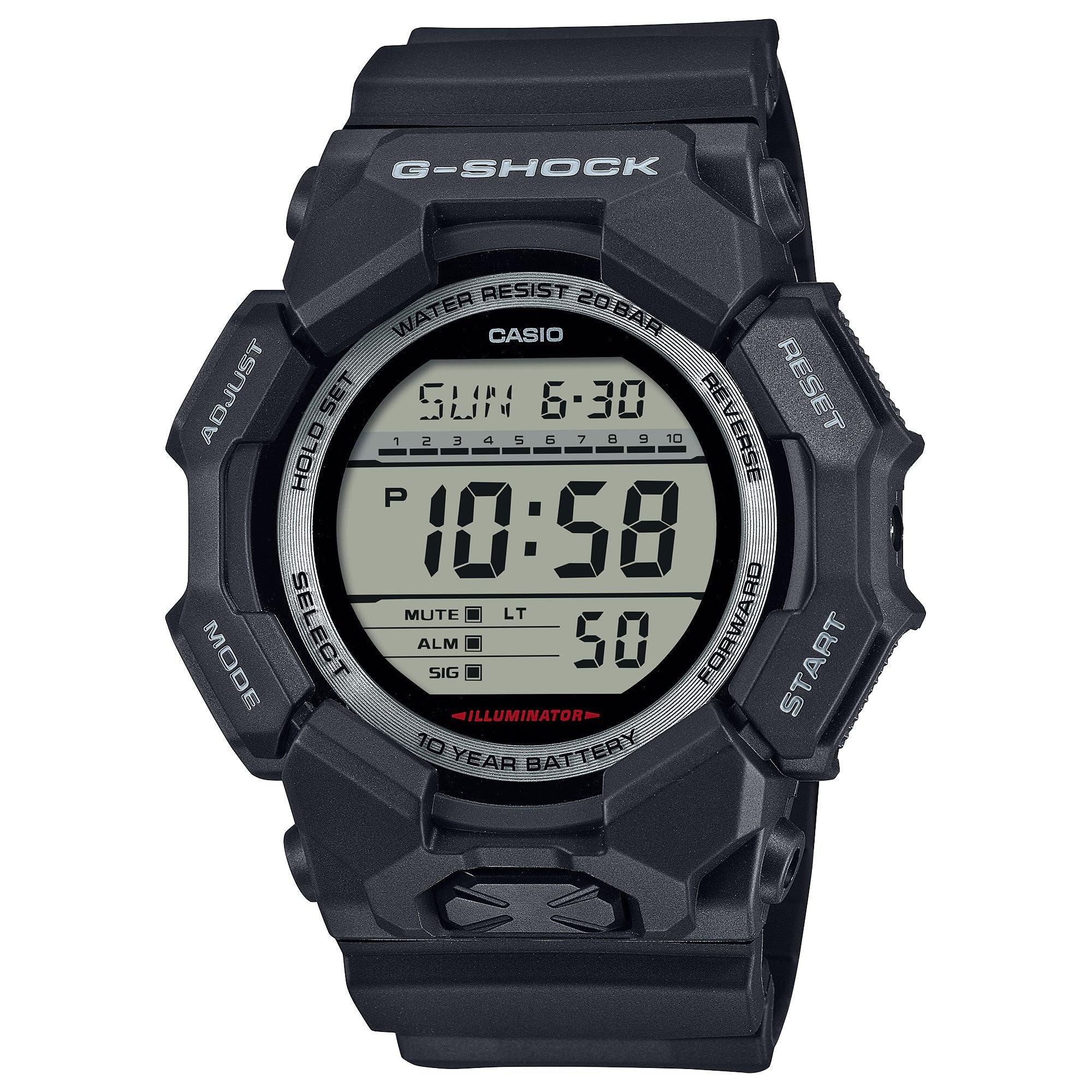
Image 3.1: The G-Shock GD010 watch face in Timekeeping Mode.
സ്റ്റോപ്പ് വാച്ച് (ക്രോണോഗ്രാഫ്) ഉപയോഗിക്കുന്നു
- സമയസൂചന മോഡിൽ നിന്ന്, അമർത്തുക മോഡ് button until "STW" or "STOPWATCH" appears on the display.
- അമർത്തുക FORWARD / START സ്റ്റോപ്പ് വാച്ച് ആരംഭിക്കാൻ ബട്ടൺ അമർത്തുക.
- അമർത്തുക FORWARD / START സ്റ്റോപ്പ് വാച്ച് നിർത്താൻ വീണ്ടും ബട്ടൺ അമർത്തുക.
- സ്റ്റോപ്പ്വാച്ച് പൂജ്യത്തിലേക്ക് പുനഃസജ്ജമാക്കാൻ, അമർത്തുക റിവേഴ്സ് button while the stopwatch is stopped.
കൗണ്ട്ഡൗൺ ടൈമർ സജ്ജീകരിക്കുന്നു
- സമയസൂചന മോഡിൽ നിന്ന്, അമർത്തുക മോഡ് button until "TMR" or "TIMER" appears.
- അമർത്തിപ്പിടിക്കുക ക്രമീകരിക്കുക button until the current timer setting starts to flash.
- ഉപയോഗിക്കുക മോഡ് button to select the hour or minute setting.
- ഉപയോഗിക്കുക റിവേഴ്സ് ഒപ്പം മുന്നോട്ട് ആവശ്യമുള്ള കൗണ്ട്ഡൗൺ സമയം സജ്ജമാക്കാൻ ബട്ടണുകൾ.
- അമർത്തുക ക്രമീകരിക്കുക ക്രമീകരണ മോഡിൽ നിന്ന് പുറത്തുകടക്കാൻ ബട്ടൺ.
- അമർത്തുക FORWARD / START button to start the countdown. An alarm will sound when the timer reaches zero.
അലാറം പ്രവർത്തനങ്ങൾ
- സമയസൂചന മോഡിൽ നിന്ന്, അമർത്തുക മോഡ് button until "ALM" or "ALARM" appears.
- അമർത്തിപ്പിടിക്കുക ക്രമീകരിക്കുക അലാറം സമയം മിന്നാൻ തുടങ്ങുന്നതുവരെ ബട്ടൺ അമർത്തുക.
- ഉപയോഗിക്കുക മോഡ് button to select the hour or minute setting.
- ഉപയോഗിക്കുക റിവേഴ്സ് ഒപ്പം മുന്നോട്ട് ആവശ്യമുള്ള അലാറം സമയം സജ്ജമാക്കാൻ ബട്ടണുകൾ.
- അമർത്തുക ക്രമീകരിക്കുക ക്രമീകരണ മോഡിൽ നിന്ന് പുറത്തുകടക്കാൻ ബട്ടൺ.
- അലാറം ഓൺ/ഓഫ് ചെയ്യാൻ, അമർത്തുക FORWARD / START button while in Alarm Mode (without holding ADJUST).
ജല പ്രതിരോധ മാർഗ്ഗനിർദ്ദേശങ്ങൾ
Your GD010 watch is rated for 200-meter water resistance. This means it is suitable for recreational diving (excluding saturation diving), swimming, snorkeling, and water sports.
- Do not operate buttons while the watch is submerged in water or wet.
- Avoid exposing the watch to hot water, steam, or extreme temperature changes, as this can compromise water resistance.
- After exposure to saltwater, rinse the watch thoroughly with fresh water and wipe it dry.
4. പരിചരണവും പരിപാലനവും
ജനറൽ കെയർ
- അഴുക്കും ഈർപ്പവും നീക്കം ചെയ്യുന്നതിനായി മൃദുവായതും ഉണങ്ങിയതുമായ തുണി ഉപയോഗിച്ച് വാച്ച് പതിവായി തുടയ്ക്കുക.
- Avoid exposing the watch to strong chemicals, solvents, or detergents, as these can damage the resin materials.
- ഉപയോഗിക്കാത്തപ്പോൾ നേരിട്ടുള്ള സൂര്യപ്രകാശവും കടുത്ത താപനിലയും ഏൽക്കാത്ത തണുത്തതും വരണ്ടതുമായ സ്ഥലത്ത് വാച്ച് സൂക്ഷിക്കുക.
- The watch's resin components and band are designed for durability, but prolonged exposure to UV light may cause discoloration over time.
ബാറ്ററി മാറ്റിസ്ഥാപിക്കൽ
The GD010 watch is equipped with a CR2025 battery, providing an approximate battery life of 10 years. When the display becomes dim or functions become erratic, it may be time for a battery replacement.
Battery replacement should ideally be performed by a qualified watch technician to ensure proper sealing and maintain water resistance. Attempting to replace the battery yourself may void the warranty and compromise the watch's water resistance.
വൃത്തിയാക്കൽ
To clean your watch, use a soft cloth dampened with mild soap and water. Gently wipe the case and band. For stubborn dirt, a soft brush can be used. Rinse thoroughly with fresh water and dry completely with a soft cloth.
5. ട്രബിൾഷൂട്ടിംഗ് ഗൈഡ്
If you encounter issues with your GD010 watch, refer to the following common problems and their solutions.
| പ്രശ്നം | സാധ്യമായ കാരണം | പരിഹാരം |
|---|---|---|
| ഡിസ്പ്ലേ ശൂന്യമോ മങ്ങിയതോ ആണ്. | കുറഞ്ഞ ബാറ്ററി. | Replace the battery (CR2025). Consult a professional watch technician. |
| സമയം തെറ്റാണ്. | Incorrect time zone or manual setting error. | വിഭാഗം 2-ൽ വിവരിച്ചിരിക്കുന്നതുപോലെ സമയ, തീയതി ക്രമീകരണങ്ങൾ വീണ്ടും ക്രമീകരിക്കുക. |
| ബട്ടണുകൾ പ്രതികരിക്കുന്നില്ല. | Watch is wet, or internal module error. | Ensure the watch is dry. If the problem persists, a reset may be required (consult support), or professional service. |
| അലാറം മുഴങ്ങുന്നില്ല. | Alarm is turned off or volume is too low (if adjustable). | Verify the alarm is set to ON in Alarm Mode. Check watch settings for alarm volume if applicable. |
If the problem persists after attempting these solutions, please contact G-Shock customer support for further assistance.
6. ഉൽപ്പന്ന സവിശേഷതകൾ
| മോഡലിൻ്റെ പേര് | GD010 |
| മോഡൽ നമ്പർ | GD010-1 |
| Case Size (L× W× H) | 54.9 × 51.9 × 16.1 മി.മീ |
| ഭാരം | 73 ഗ്രാം (ഏകദേശം 2.57 ഔൺസ്) |
| Case and Bezel Material | Bio-based Carbon / Bio-based Resin |
| ബാൻഡ് മെറ്റീരിയൽ തരം | Resin (CORDURA re/cor) |
| നിർമ്മാണം | Shock Resistant, Carbon Core Guard structure |
| ജല പ്രതിരോധം | 200 മീറ്റർ ജല പ്രതിരോധം |
| വൈദ്യുതി വിതരണം | CR2025 (1 Lithium Metal battery, included) |
| ഏകദേശം ബാറ്ററി ലൈഫ് | 10 വർഷം |
| ക്രിസ്റ്റൽ | മിനറൽ ഗ്ലാസ് |
| ഡിസ്പ്ലേ തരം | ഡിജിറ്റൽ |
| ചലന തരം | ജാപ്പനീസ് ക്വാർട്സ് |
| അധിക സവിശേഷതകൾ | Alarm, Chronograph, Timer |
| ക്ലാസ്പ് തരം | ബക്കിൾ |
| ബാൻഡ് നിറം | കറുപ്പ് |
| ഡയൽ കളർ | കറുപ്പ് |
7. വാറണ്ടിയും ഉപഭോക്തൃ പിന്തുണയും
വാറൻ്റി വിവരങ്ങൾ
Your G-Shock GD010 watch comes with a പരിമിത വാറൻ്റി. The terms and conditions of this warranty cover manufacturing defects under normal use. Please refer to the warranty card included with your purchase for specific details regarding coverage duration, exclusions, and how to make a claim. Keep your proof of purchase for warranty validation.
ഉപഭോക്തൃ പിന്തുണയുമായി ബന്ധപ്പെടുന്നു
For technical assistance, warranty service, or any other inquiries regarding your G-Shock GD010 watch, please contact G-Shock customer support.
- Visit the official G-Shock website for support contact information, FAQs, and service center locations.
- Have your watch model number (GD010-1) and proof of purchase ready when contacting support.