
1. ആമുഖവും അവസാനവുംview
The Onkyo C-30 CD Player is engineered for audiophiles seeking superior digital audio reproduction. It features a premium 32-bit/768 kHz stereo DAC and Onkyo's proprietary VLSC (Vector Linear Shaping Circuit) technology for noise reduction, ensuring crystal-clear and faithful sound reproduction. Its fanless design eliminates unwanted vibrations, complemented by a flat anti-vibration chassis and an extruded aluminum heat sink for optimal stability. The high-rigidity aluminum front panel with a sandblasted finish provides both elegance and durability.
This player supports various disc formats, including CD Audio, CD-R, CD-RW, and digital audio formats like MP3 and WMA. It offers multiple playback modes: normal, random, programmed, and repeat. Connectivity options include gold-plated stereo RCA analog outputs, optical and coaxial digital outputs, and a gold-plated headphone output on the front panel. A precision clock with a deviation of ±10 PPM ensures impeccable synchronization for an undisturbed listening experience.
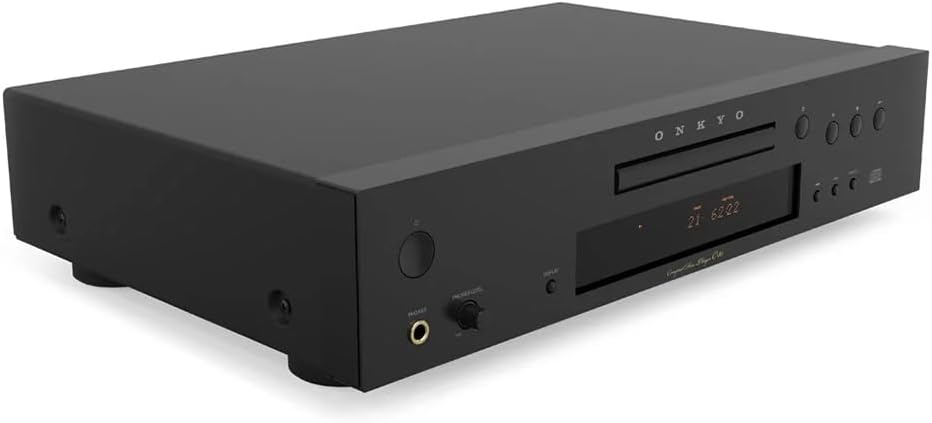
ചിത്രം 1: മുൻഭാഗം view of the Onkyo C-30 CD Player, showcasing its sleek black finish and control buttons.
2. സജ്ജീകരണം
Follow these steps to correctly set up your Onkyo C-30 CD Player:
- പ്ലേസ്മെൻ്റ്: Place the CD player on a stable, level surface away from direct sunlight, heat sources, and excessive dust. Ensure adequate ventilation around the unit.
- പവർ കണക്ഷൻ: Connect the power cord to the AC inlet on the rear panel of the CD player and then plug it into a suitable wall outlet.
- ഓഡിയോ ഔട്ട്പുട്ട് കണക്ഷൻ: Choose one of the following methods to connect the CD player to your ampലിഫയർ അല്ലെങ്കിൽ റിസീവർ:
- അനലോഗ് കണക്ഷൻ (RCA): Use a stereo RCA cable to connect the gold-plated 'ANALOG AUDIO OUT' jacks (red for right, white for left) on the CD player to the corresponding analog input jacks on your ampലൈഫയർ/സ്വീകർത്താവ്.
- ഡിജിറ്റൽ ഒപ്റ്റിക്കൽ കണക്ഷൻ: Use an optical digital cable to connect the 'DIGITAL OPTICAL OUT' jack on the CD player to an optical digital input on your ampലൈഫയർ/സ്വീകർത്താവ്.
- Digital Coaxial Connection: Use a coaxial digital cable to connect the 'DIGITAL COAXIAL OUT' jack on the CD player to a coaxial digital input on your ampലൈഫയർ/സ്വീകർത്താവ്.
- ഹെഡ്ഫോൺ കണക്ഷൻ: For private listening, connect your headphones to the gold-plated headphone jack on the front panel. Adjust the 'PHONES LEVEL' knob to control headphone volume.

Figure 2: Rear panel of the Onkyo C-30 CD Player, showing analog RCA, digital optical, and coaxial output connections.
3. പ്രവർത്തന നിർദ്ദേശങ്ങൾ
This section details the basic operation of your Onkyo C-30 CD Player.
3.1 പവർ ഓൺ/ഓഫ്
അമർത്തുക പവർ യൂണിറ്റ് ഓണാക്കാനോ ഓഫാക്കാനോ മുൻ പാനലിലെ ബട്ടണോ റിമോട്ട് കൺട്രോളോ അമർത്തുക.
3.2 Loading and Playing a Disc
- അമർത്തുക തുറക്കുക/അടയ്ക്കുക ഡിസ്ക് ട്രേ തുറക്കാനുള്ള ബട്ടൺ.
- Place a CD (Audio CD, CD-R, CD-RW, MP3, or WMA disc) gently into the tray with the label side facing up.
- അമർത്തുക തുറക്കുക/അടയ്ക്കുക button again to close the tray. The player will read the disc.
- അമർത്തുക കളിക്കുക പ്ലേബാക്ക് ആരംഭിക്കുന്നതിനുള്ള ബട്ടൺ.
3.3 അടിസ്ഥാന പ്ലേബാക്ക് നിയന്ത്രണങ്ങൾ
- പ്ലേ/താൽക്കാലികമായി നിർത്തുക: പ്ലേബാക്ക് ആരംഭിക്കുന്നതിനോ താൽക്കാലികമായി നിർത്തുന്നതിനോ അമർത്തുക.
- നിർത്തുക: പ്ലേബാക്ക് നിർത്താൻ അമർത്തുക.
- SKIP (◀◀ / ▶▶): Press to skip to the previous or next track. Hold to fast forward or rewind within a track.
- ആവർത്തിക്കുക: Press to repeat the current track, all tracks, or a programmed sequence.
- ക്രമരഹിതം: Press to play tracks in a random order.
3.4 പ്രോഗ്രാം ചെയ്ത പ്ലേബാക്ക്
To create a custom playback sequence:
- With the disc stopped, press the പ്രോഗ്രാം ബട്ടൺ.
- ഉപയോഗിക്കുക ഒഴിവാക്കുക ആവശ്യമുള്ള ട്രാക്ക് നമ്പർ തിരഞ്ഞെടുക്കാൻ ബട്ടണുകൾ.
- അമർത്തുക പ്രോഗ്രാം again to add the track to the sequence.
- ആവശ്യമുള്ള എല്ലാ ട്രാക്കുകൾക്കും 2 ഉം 3 ഉം ഘട്ടങ്ങൾ ആവർത്തിക്കുക.
- അമർത്തുക കളിക്കുക പ്രോഗ്രാം ചെയ്ത പ്ലേബാക്ക് ആരംഭിക്കാൻ.
4. പരിപാലനം
Proper maintenance ensures the longevity and optimal performance of your CD player.
- യൂണിറ്റ് വൃത്തിയാക്കൽ: മൃദുവായതും ഉണങ്ങിയതുമായ തുണി ഉപയോഗിച്ച് യൂണിറ്റിന്റെ പുറംഭാഗം തുടയ്ക്കുക. കഠിനമായ അഴുക്കിന്, അല്പം ഡി-ഗ്രേസർ ഉപയോഗിക്കുക.amp cloth and then dry thoroughly. Avoid using abrasive cleaners, solvents, or chemical sprays, as these can damage the finish.
- ക്ലീനിംഗ് ഡിസ്കുകൾ: Handle discs by their edges. If a disc is dirty, wipe it gently from the center outwards with a soft, lint-free cloth. Do not use harsh cleaners or abrasive materials.
- Disc Tray Care: Keep the disc tray clean and free of dust. Avoid placing heavy objects on the tray or forcing it open or closed.
- വെൻ്റിലേഷൻ: അമിതമായി ചൂടാകുന്നത് തടയാൻ യൂണിറ്റിലെ വെന്റിലേഷൻ ഓപ്പണിംഗുകൾ അടഞ്ഞിട്ടില്ലെന്ന് ഉറപ്പാക്കുക.
- സംഭരണം: When not in use for extended periods, disconnect the power cord and store the unit in a cool, dry place.
5. പ്രശ്നപരിഹാരം
If you encounter issues with your Onkyo C-30 CD Player, refer to the following common problems and solutions:
| പ്രശ്നം | സാധ്യമായ കാരണം | പരിഹാരം |
|---|---|---|
| ശക്തിയില്ല | പവർ കോർഡ് സുരക്ഷിതമായി ബന്ധിപ്പിച്ചിട്ടില്ല. | യൂണിറ്റിലേക്കും മതിൽ ഔട്ട്ലെറ്റിലേക്കും പവർ കോർഡ് കണക്ഷൻ പരിശോധിക്കുക. |
| ശബ്ദമില്ല | Incorrect audio cable connection or input selection on ampജീവൻ. | Ensure audio cables are correctly connected to the amplifier and the correct input is selected. Check ampലൈഫയർ വോളിയം. |
| Disc does not play / "NO DISC" error | Disc inserted incorrectly, disc is dirty or scratched, or unsupported disc format. | Insert disc with label side up. Clean the disc. Ensure the disc format (CD Audio, CD-R, CD-RW, MP3, WMA) is supported. |
| ശബ്ദം ഒഴിവാക്കൽ അല്ലെങ്കിൽ വികലമാക്കൽ | Dirty or scratched disc, or unit is subject to vibrations. | ഡിസ്ക് വൃത്തിയാക്കുക. വൈബ്രേഷനുകളിൽ നിന്ന് അകലെ സ്ഥിരതയുള്ള ഒരു പ്രതലത്തിൽ യൂണിറ്റ് വയ്ക്കുക. |
| റിമോട്ട് കൺട്രോൾ പ്രവർത്തിക്കുന്നില്ല | Batteries are depleted or remote is not aimed correctly. | Replace batteries. Ensure no obstacles are between the remote and the unit's sensor. |
6 സ്പെസിഫിക്കേഷനുകൾ
Key technical specifications for the Onkyo C-30 CD Player:
- മോഡലിൻ്റെ പേര്: സി-30
- ബ്രാൻഡ്: ഓങ്കിയോ
- നിറം: കറുപ്പ്
- DAC: 32-bit / 768 kHz Stereo DAC
- ശബ്ദം കുറയ്ക്കൽ: VLSC (Vector Linear Shaping Circuit)
- പിന്തുണയ്ക്കുന്ന ഓഡിയോ ഫോർമാറ്റുകൾ: CD Audio, CD-R, CD-RW, MP3, WMA
- കണക്റ്റിവിറ്റി ടെക്നോളജി: RCA, Optical, Coaxial, Headphone
- Analog Input (RGB): RCA, Optical Output, 3.5 mm Jack (This seems to be a misinterpretation from the source data, likely referring to output types rather than RGB input)
- ചാനലുകളുടെ എണ്ണം: 2
- അനുയോജ്യമായ ഉപകരണങ്ങൾ: Speakers, Headphones
- Precision Clock: ± 10 PPM
- ചേസിസ് ഡിസൈൻ: Fanless, flat anti-vibration chassis, extruded aluminum heat sink, high-rigidity aluminum front panel.
7. വാറൻ്റിയും പിന്തുണയും
For warranty information and customer support, please refer to the documentation included with your product or visit the official Onkyo webസൈറ്റ്. ഏതെങ്കിലും വാറന്റി ക്ലെയിമുകൾക്ക് നിങ്ങളുടെ വാങ്ങലിന്റെ തെളിവ് സൂക്ഷിക്കുക.
If you require further assistance or have questions not covered in this manual, please contact Onkyo customer service or your authorized dealer.