
ആമുഖം
This manual provides detailed instructions for the HP K500F Wireless Gaming Keyboard. It covers setup, operation, maintenance, troubleshooting, and product specifications to ensure optimal use of your device. Please read this manual thoroughly before using the keyboard.

Image: The HP K500F keyboard showcasing its tri-mode wireless capability, multimedia knob, and RGB backlighting.
ഉൽപ്പന്നം കഴിഞ്ഞുview
The HP K500F is a versatile 98-key compact membrane keyboard designed for various computing environments. It features tri-mode connectivity, dynamic RGB backlighting, and a dedicated volume knob for enhanced user experience.
പ്രധാന സവിശേഷതകൾ:
- ട്രൈ-മോഡ് വയർലെസ് കണക്റ്റിവിറ്റി: Supports Bluetooth 5.0, 2.4GHz wireless (via USB dongle), and USB-C wired modes.
- RGB Backlit with Side Light Bar: Customizable dynamic RGB backlighting with adjustable breathing effects and a stylish side light strip.
- 3000mAh റീചാർജ് ചെയ്യാവുന്ന ബാറ്ററി: Built-in high-capacity battery for extended use.
- 98-കീ കോംപാക്റ്റ് ലേഔട്ട്: Space-saving design with an integrated number pad and a dedicated multimedia volume control knob.
- Retro Round Keycaps & Ergonomic Comfort: ABS round keycaps and dual-stage adjustable feet for comfortable typing angles.
- അനുയോജ്യത: Compatible with WINDOWS series, MACOS, and other operating systems.

Image: The HP K500F keyboard in Gradient Pink, highlighting its compact layout and design.
സജ്ജീകരണ നിർദ്ദേശങ്ങൾ
1. പ്രാരംഭ ചാർജിംഗ്
Before first use, fully charge the keyboard. Connect the included 1.5m USB-C to USB-A cable to the keyboard's USB-C port and the other end to a computer's USB port. Important: Only charge via a computer USB port. Do NOT use wall adapters, power banks, or fast chargers to prevent damage to the battery.
2. കീബോർഡ് ബന്ധിപ്പിക്കുന്നു
The HP K500F supports three connection modes:
2.1. 2.4GHz വയർലെസ് മോഡ്
- Locate the 2.4GHz USB dongle, usually stored in a compartment on the keyboard.
- നിങ്ങളുടെ കമ്പ്യൂട്ടറിൽ ലഭ്യമായ ഒരു USB പോർട്ടിലേക്ക് USB ഡോംഗിൾ പ്ലഗ് ചെയ്യുക.
- Set the mode selector switch on the keyboard to the 2.4GHz position. The keyboard will automatically connect.
2.2. ബ്ലൂടൂത്ത് 5.0 മോഡ്
- Set the mode selector switch on the keyboard to the Bluetooth position.
- നിങ്ങളുടെ ഉപകരണത്തിൽ (കമ്പ്യൂട്ടർ, ടാബ്ലെറ്റ് മുതലായവ), ബ്ലൂടൂത്ത് പ്രവർത്തനക്ഷമമാക്കി പുതിയ ഉപകരണങ്ങൾക്കായി തിരയുക.
- Select "HP K500F" from the list of available devices to pair.
2.3. USB-C വയേർഡ് മോഡ്
- Connect the included USB-C to USB-A cable from the keyboard's USB-C port to a USB port on your computer.
- Set the mode selector switch on the keyboard to the wired (USB-C) position. The keyboard will function as a wired device.
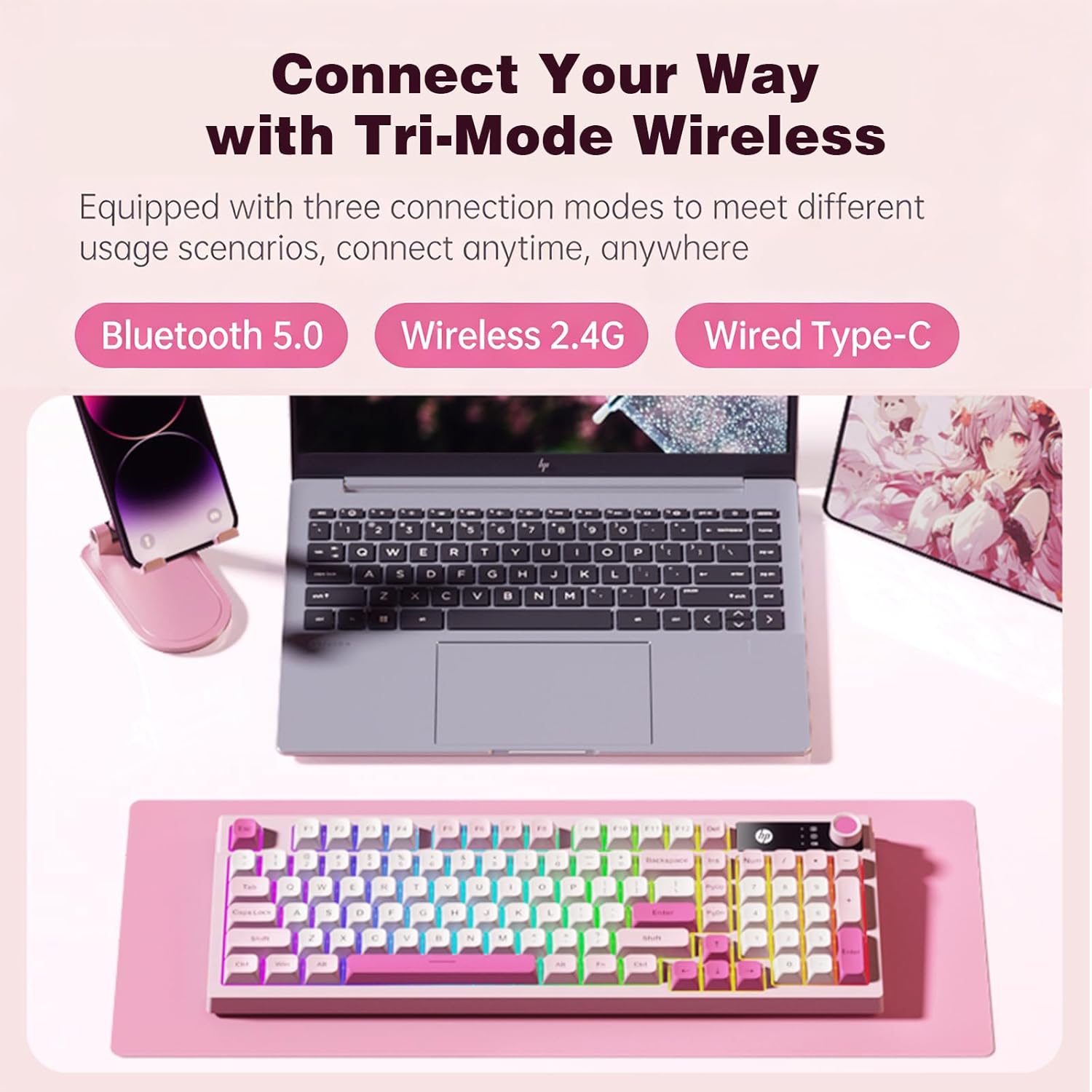
Image: The HP K500F keyboard demonstrating its tri-mode wireless connectivity options with various devices.
പ്രവർത്തന നിർദ്ദേശങ്ങൾ
1. Multimedia Volume Knob
The dedicated volume knob allows for quick audio adjustments:
- വലത്തേക്ക് തിരിക്കുക: വോളിയം കൂട്ടുക.
- ഇടത്തേക്ക് തിരിക്കുക: വോളിയം കുറയ്ക്കുക.
- അമർത്തുക: ഓഡിയോ മ്യൂട്ട് ചെയ്യുക/അൺമ്യൂട്ട് ചെയ്യുക.

Image: A close-up illustrating the functions of the multimedia volume knob: rotate right to increase, rotate left to decrease, and press to mute.
2. RGB ബാക്ക്ലൈറ്റിംഗ് നിയന്ത്രണം
The keyboard features dynamic RGB backlighting and a side light bar. Specific key combinations (often Fn + arrow keys or dedicated light keys) are used to:
- Change lighting modes (e.g., breathing, static, wave).
- തെളിച്ച നില ക്രമീകരിക്കുക.
- Change lighting speed.
Refer to the quick start guide included with your keyboard for exact key combinations for lighting control.

Image: The HP K500F keyboard displaying its vibrant rainbow LED backlighting across the keys.
3. ക്രമീകരിക്കാവുന്ന കാലുകൾ
The keyboard is equipped with dual-stage adjustable feet on the underside. These allow you to customize the typing angle to reduce wrist strain and improve ergonomic comfort during extended use. Simply flip out the desired stage of the feet to adjust the tilt.

ചിത്രം: എ view of the HP K500F keyboard's underside, illustrating the two stages of its adjustable tilt legs for ergonomic positioning.
മെയിൻ്റനൻസ്
1. വൃത്തിയാക്കൽ
നിങ്ങളുടെ കീബോർഡ് വൃത്തിയാക്കാൻ, മൃദുവായ, ഡി-ടച്ച് ഉപയോഗിച്ച് പ്രതലം സൌമ്യമായി തുടയ്ക്കുക.amp cloth. For deeper cleaning, use compressed air to remove debris from between the keycaps. Avoid using harsh chemicals or abrasive materials, as these can damage the keyboard's finish and components.
2. ബാറ്ററി പരിചരണം
To prolong battery life and ensure safety:
- Always charge the keyboard using the provided USB-C cable connected to a computer's USB port.
- Do not use third-party wall adapters, power banks, or fast chargers.
- കീബോർഡ് ഉയർന്ന താപനിലയിലോ നേരിട്ടുള്ള സൂര്യപ്രകാശത്തിലോ ഏൽക്കുന്നത് ഒഴിവാക്കുക.
- If storing the keyboard for an extended period, ensure it is partially charged (around 50%) to prevent deep discharge.
ട്രബിൾഷൂട്ടിംഗ്
1. കീബോർഡ് പ്രതികരിക്കുന്നില്ല
- ബാറ്ററി പരിശോധിക്കുക: Ensure the keyboard is charged. Connect it to a computer's USB port for charging.
- കണക്ഷൻ മോഡ് പരിശോധിക്കുക: Verify the mode selector switch is set to the correct position (2.4GHz, Bluetooth, or Wired) for your intended connection.
- 2.4GHz: Ensure the USB dongle is securely plugged into the computer. Try a different USB port.
- ബ്ലൂടൂത്ത്: Re-pair the keyboard with your device. Ensure Bluetooth is enabled on your device.
- വയർ: USB-C കേബിൾ കീബോർഡിലേക്കും കമ്പ്യൂട്ടറിലേക്കും സുരക്ഷിതമായി ബന്ധിപ്പിച്ചിട്ടുണ്ടെന്ന് ഉറപ്പാക്കുക. മറ്റൊരു USB പോർട്ട് അല്ലെങ്കിൽ കേബിൾ പരീക്ഷിക്കുക.
2. RGB ബാക്ക്ലൈറ്റിംഗ് പ്രവർത്തിക്കുന്നില്ല.
- തെളിച്ചം പരിശോധിക്കുക: The backlight might be turned off or set to the lowest brightness. Use the designated key combinations (refer to quick start guide) to adjust brightness.
- ബാറ്ററി നില: Low battery can sometimes affect lighting functionality. Charge the keyboard fully.
3. Keys Not Registering or Double Typing
- ക്ലീൻ കീകൾ: Dust or debris under the keycaps can cause issues. Use compressed air to clean around the affected keys.
- Restart Connection: Disconnect and reconnect the keyboard (either by unplugging the dongle/cable or turning Bluetooth off/on).
- മറ്റൊരു ഉപകരണത്തിൽ പരീക്ഷിക്കുക: If possible, test the keyboard on a different computer or device to determine if the issue is with the keyboard or the original device.
സ്പെസിഫിക്കേഷനുകൾ
| ബ്രാൻഡ് | HP |
| മോഡൽ നമ്പർ | K500F |
| നിറം | Gradient Pink |
| കീബോർഡ് തരം | മെംബ്രൺ കീബോർഡ് |
| കണക്റ്റിവിറ്റി | ട്രൈ-മോഡ് (ബ്ലൂടൂത്ത് 5.0, 2.4GHz വയർലെസ്, USB-C വയേർഡ്) |
| കീ എണ്ണം | 98 keys (compact layout with integrated number pad) |
| ബാക്ക്ലൈറ്റ് | RGB with adjustable breathing effects and side light bar |
| ബാറ്ററി | 3000mAh rechargeable (charge via computer USB port only) |
| കീക്യാപ് മെറ്റീരിയൽ | എബിഎസ് പ്ലാസ്റ്റിക് |
| ബോഡി മെറ്റീരിയൽ | എബിഎസ് പ്ലാസ്റ്റിക് |
| കേബിൾ നീളം | 1.5m USB-C to USB-A (included) |
| ക്രമീകരിക്കാവുന്ന പാദങ്ങൾ | ഇരട്ട-കൾtage for ergonomic typing angles |
| അനുയോജ്യത | WINDOWS series/MACOS/etc |
| അളവുകൾ (L x W x H) | 15.98" x 1.5" x 5.55" |
വാറൻ്റിയും പിന്തുണയും
1. വാറൻ്റി വിവരങ്ങൾ
The HP K500F Wireless Gaming Keyboard comes with a 30-day warranty from the date of purchase. This warranty covers manufacturing defects under normal use. It does not cover damage caused by misuse, accidents, unauthorized modifications, or improper charging practices.
2. ഉപഭോക്തൃ പിന്തുണ
For technical assistance, warranty claims, or further inquiries, please contact HP customer support through their official website or the contact information provided with your purchase documentation. Please have your model number (K500F) and proof of purchase ready when contacting support.