
1. ആമുഖം
This manual provides detailed instructions for the Eyoyo 2D Barcode Scanner Bundle, which includes the EY-015P Mini Portable Barcode Scanner and a Back Clip 2D Barcode Scanner. Please read this manual carefully before using the devices to ensure proper operation and to maximize their lifespan.
2. EY-015P Mini Portable Scanner Overview
The Eyoyo EY-015P is a compact and lightweight 2D barcode scanner designed for portability and ease of use. It supports multiple connection modes and is compatible with various operating systems.
2.1 പ്രധാന സവിശേഷതകൾ
- Mini & Lightweight Design: Weighs approximately 30g (1.06 ounces) with dimensions of 85mm x 30mm x 20mm.
- മൂന്ന് കണക്ഷൻ മോഡുകൾ: ബ്ലൂടൂത്ത്, 2.4G വയർലെസ്, യുഎസ്ബി വയർഡ് കണക്ഷനുകൾ പിന്തുണയ്ക്കുന്നു.
- Versatile Decoding: Capable of scanning most 1D, 2D, and QR barcodes from both paper and digital screens.
- വിശാലമായ അനുയോജ്യത: Works with Windows XP/7/8/10, MacOS, Linux, and Windows Mobile, as well as mobile phones, tablets, POS systems, and laptops.
- ക്രമീകരിക്കാവുന്ന ക്രമീകരണങ്ങൾ: Offers instant upload mode, storage mode, sound/vibration toggle, custom prefixes/suffixes, character deletion, and keyboard hotkey combinations (e.g., TAB, CR&LF, Home).

Image: The Eyoyo EY-015P scanner, highlighting its mini size (85mm length, 30mm width, 20mm thickness) and light weight (32g/1.13oz). It is shown held in a hand and fitting into a pocket.
3. EY-015P Setup and Connection
3.1 സ്കാനർ ചാർജ് ചെയ്യുന്നു
Before initial use, fully charge the EY-015P scanner. A full charge allows for approximately 10,000 scans. Connect the scanner to a USB power source using the provided USB cable.
3.2 കണക്ഷൻ മോഡുകൾ
The EY-015P supports three distinct connection methods:

Image: A visual representation of the three connection options: Bluetooth (wireless to phone/tablet/laptop), 2.4G Wireless (via USB dongle to laptop/desktop), and USB Wired (direct cable connection to laptop/desktop).
- ബ്ലൂടൂത്ത് വയർലെസ് കണക്ഷൻ:
- സ്കാനർ ഓണാക്കുക.
- Activate Bluetooth on your host device (e.g., smartphone, tablet, laptop).
- ഇതിനായി തിരയുക available Bluetooth devices and select the Eyoyo scanner.
- Pair the devices. The scanner will indicate a successful connection.
The Bluetooth mode offers a transmission distance of up to 50 meters (164 feet) in an unobstructed environment and 20 meters (66 feet) with obstacles.
- 2.4G വയർലെസ് കണക്ഷൻ:
- നിങ്ങളുടെ കമ്പ്യൂട്ടറിൽ ലഭ്യമായ ഒരു USB പോർട്ടിലേക്ക് 2.4G USB ഡോംഗിൾ പ്ലഗ് ചെയ്യുക.
- സ്കാനർ ഓണാക്കുക. അത് ഡോംഗിളിലേക്ക് യാന്ത്രികമായി കണക്റ്റ് ചെയ്യണം.
The 2.4G wireless mode provides a transmission distance of up to 30 meters (98 feet) in an unobstructed environment and 15 meters (49 feet) with obstacles.
- USB വയർഡ് കണക്ഷൻ:
- നൽകിയിരിക്കുന്ന USB കേബിൾ ഉപയോഗിച്ച് സ്കാനർ നിങ്ങളുടെ കമ്പ്യൂട്ടറിന്റെ USB പോർട്ടിലേക്ക് നേരിട്ട് ബന്ധിപ്പിക്കുക.
- സ്കാനർ ഒരു പ്ലഗ്-ആൻഡ്-പ്ലേ ഉപകരണമായി പ്രവർത്തിക്കും, അധിക ഡ്രൈവറുകൾ ആവശ്യമില്ല.

Image: Illustration of the wireless transmission ranges. 2.4G Wireless mode reaches 30m/98ft unobstructed and 15m/49ft with obstacles. Bluetooth mode reaches 50m/164ft unobstructed and 20m/66ft with obstacles.
4. EY-015P Operating Instructions
4.1 ബാർകോഡുകൾ സ്കാൻ ചെയ്യുന്നു
To scan a barcode, point the scanner's window at the barcode and press the scan button. The scanner will emit a light beam to read the code. A successful scan is typically indicated by a beep or vibration (if enabled).

Image: The scanner is shown reading various barcode types including QR Code, Data Matrix, Maxicode, Aztec code, Hanxin, UPC/EAN, and PDF417. It demonstrates the scanner's ability to read codes from both paper and digital screens.

Image: This image further illustrates the scanner's robust decoding capabilities, showing it can easily scan various 1D and 2D barcodes, including those that are damaged, distorted, colorful, fuzzy, or reflective, from both paper and screen.
4.2 Scan Button Design
The EY-015P features a versatile scan button design, allowing comfortable operation with either the left or right hand.
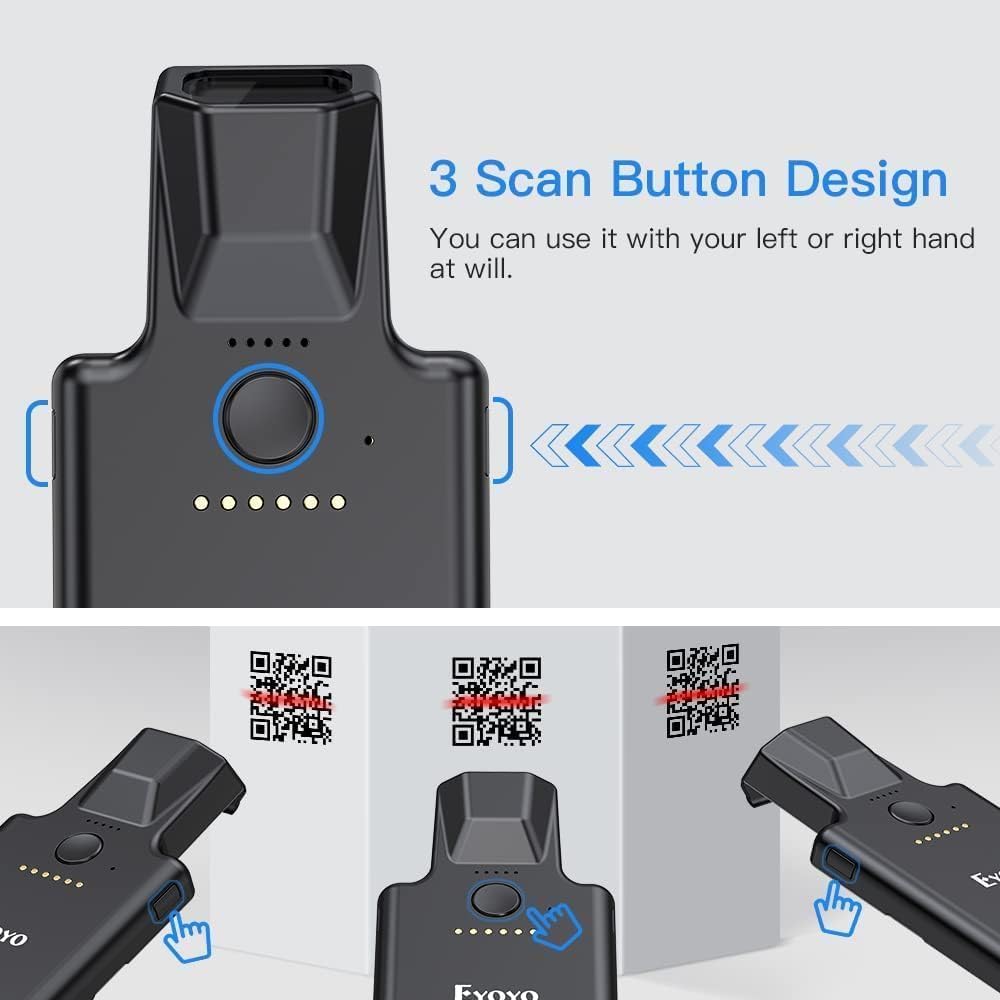
ചിത്രം: മുകളിൽ നിന്ന് താഴേക്ക് view of the scanner highlighting its main scan button and indicating that it can be operated with either the left or right hand, suggesting an ergonomic design.
4.3 കോൺഫിഗറേഷൻ ഓപ്ഷനുകൾ
The scanner offers multiple configuration options, typically set by scanning specific setup barcodes found in a separate configuration guide (not included in this manual). These options include:
- തൽക്ഷണ അപ്ലോഡ് മോഡ്: സ്കാൻ ചെയ്ത ഡാറ്റ ഉടൻ തന്നെ ബന്ധിപ്പിച്ച ഉപകരണത്തിലേക്ക് കൈമാറും.
- സ്റ്റോറേജ് മോഡ്: Scanned data is stored in the scanner's internal memory and can be uploaded later.
- Sound/Vibration Toggle: Enable or disable audible beeps and tactile vibrations for scan feedback.
- Custom Prefixes/Suffixes: Add specific characters before or after scanned data.
- Character Deletion: Remove unwanted characters from scanned data.
- കീബോർഡ് ഹോട്ട്കീകൾ: Add keyboard functions like TAB, CR&LF (Carriage Return & Line Feed), or Home to the end of scanned data for automated input.
5. Back Clip 2D Scanner Overview
The bundle also includes a Back Clip 2D Scanner, designed to attach to a smartphone, enhancing its barcode scanning capabilities. This scanner features robust construction and advanced scanning technology.

Image: A comparison of the newly upgraded Eyoyo Back Clip 2D Scanner (New Version) with an older version. The new version is described as having more powerful scanning technology and being stronger and less prone to damage. It is presented as an ideal partner for phones.
5.1 പ്രധാന സവിശേഷതകൾ
- Enhanced Scanning Technology: Provides efficient and accurate 2D barcode decoding.
- നീണ്ടുനിൽക്കുന്ന നിർമ്മാണം: Designed to be robust and resistant to damage.
- സ്മാർട്ട്ഫോൺ സംയോജനം: Attaches to a smartphone to create a mobile scanning solution.
5.2 Setup and Operation
To use the Back Clip 2D Scanner, attach it securely to your smartphone. It typically connects via Bluetooth to your phone. Refer to the specific instructions provided with the Back Clip Scanner for detailed pairing and operation procedures, as these may vary.
6. പരിപാലനം
6.1 വൃത്തിയാക്കൽ
To clean the scanner, use a soft, dry, lint-free cloth. For stubborn dirt, slightly dampen the cloth with water or a mild, non-abrasive cleaner. Do not use harsh chemicals or abrasive materials, as these can damage the scanner's surface or optical components.
6.2 ബാറ്ററി കെയർ
- ബാറ്ററി ഇടയ്ക്കിടെ പൂർണ്ണമായും ഡിസ്ചാർജ് ചെയ്യുന്നത് ഒഴിവാക്കുക.
- If storing the scanner for an extended period, ensure it is charged to approximately 50% and store it in a cool, dry place.
- നൽകിയിരിക്കുന്ന ചാർജിംഗ് കേബിളോ അനുയോജ്യമായ ഒരു USB ചാർജറോ മാത്രം ഉപയോഗിക്കുക.
7. പ്രശ്നപരിഹാരം
7.1 സ്കാനർ കണക്റ്റുചെയ്യുന്നില്ല
- പവർ പരിശോധിക്കുക: Ensure the scanner is turned on and has sufficient battery charge.
- പരിശോധിച്ചുറപ്പിക്കൽ മോഡ്: Confirm the scanner is in the correct connection mode (Bluetooth, 2.4G, or USB) for your setup.
- Re-pair/Reconnect: For Bluetooth, try unpairing and re-pairing the device. For 2.4G, ensure the dongle is securely plugged in. For USB, try a different USB port or cable.
- ദൂരം: Ensure the scanner is within the effective range of the host device.
7.2 സ്കാനർ ബാർകോഡുകൾ വായിക്കുന്നില്ല
- ബാർകോഡ് തരം: Ensure the barcode type is supported by the scanner (1D, 2D, QR).
- ബാർകോഡ് ഗുണനിലവാരം: ബാർകോഡ് കേടായതാണോ, മങ്ങിയതാണോ, അല്ലെങ്കിൽ മോശമായി അച്ചടിച്ചതാണോ എന്ന് പരിശോധിക്കുക.
- ലൈറ്റിംഗ്: Ensure adequate lighting. Avoid direct glare or very dim conditions.
- ദൂരം/ആംഗിൾ: സ്കാനറിനും ബാർകോഡിനും ഇടയിലുള്ള ദൂരവും കോണും ക്രമീകരിക്കുക.
- സ്ക്രീൻ തെളിച്ചം: If scanning from a screen, increase the screen's brightness.
7.3 ഡാറ്റാ ട്രാൻസ്മിഷൻ പ്രശ്നങ്ങൾ
- സോഫ്റ്റ്വെയർ ഫോക്കസ്: Ensure the cursor is in the correct input field on your host device.
- മോഡ് ക്രമീകരണം: If data is not appearing, check if the scanner is in storage mode instead of instant upload mode.
8 സ്പെസിഫിക്കേഷനുകൾ
| ഫീച്ചർ | EY-015P Mini Portable Scanner | Back Clip 2D Scanner |
|---|---|---|
| മോഡൽ | EY-015P | Not specified (Bundled Item) |
| അളവുകൾ (L x W x H) | 85mm x 30mm x 20mm (3.35in x 1.18in x 0.79in) | വ്യക്തമാക്കിയിട്ടില്ല |
| ഭാരം | ഏകദേശം. 30 ഗ്രാം (1.06 ഔൺസ്) | വ്യക്തമാക്കിയിട്ടില്ല |
| കണക്റ്റിവിറ്റി | ബ്ലൂടൂത്ത്, 2.4G വയർലെസ്, യുഎസ്ബി വയർഡ് | Bluetooth (typically) |
| Wireless Range (Unobstructed) | Bluetooth: 50m (164ft) 2.4G: 30m (98ft) | വ്യക്തമാക്കിയിട്ടില്ല |
| Wireless Range (With Obstacles) | Bluetooth: 20m (66ft) 2.4G: 15m (49ft) | വ്യക്തമാക്കിയിട്ടില്ല |
| പിന്തുണയ്ക്കുന്ന ബാർകോഡ് തരങ്ങൾ | 1D, 2D, QR (QR Code, Data Matrix, Maxicode, Aztec code, Hanxin, UPC/EAN, PDF417) | 1D, 2D (as per product title) |
| Battery Life (EY-015P) | Approx. 10,000 scans per full charge | വ്യക്തമാക്കിയിട്ടില്ല |
| ഓപ്പറേറ്റിംഗ് സിസ്റ്റം അനുയോജ്യത | Windows XP/7/8/10, MacOS, Linux, Windows Mobile | Smartphone OS (iOS, Android typically) |
9. വാറൻ്റിയും പിന്തുണയും
For warranty information and technical support, please refer to the documentation included with your purchase or contact the seller/manufacturer directly. Keep your proof of purchase for warranty claims.