
ഉൽപ്പന്നം കഴിഞ്ഞുview
The Bestier 55-inch Computer Desk is designed for home office, gaming, and study environments, offering a blend of functionality and modern aesthetics. Key features include an integrated power station, lockable file drawer, LED lighting, an ergonomic monitor stand, and a dedicated printer shelf.
പ്രധാന സവിശേഷതകൾ:
- All-in-One Charging Hub: Includes 2 AC outlets, 1 USB-A port, and 1 Type-C port for convenient device charging.
- ലോക്ക് ചെയ്യാവുന്നത് File ഡ്രോയർ: Secure storage for sensitive documents with a lock and key system, accommodating Letter, Legal, and A4 size files.
- സംയോജിത എൽഇഡി ലൈറ്റിംഗ്: RGB LED light strip with multiple colors and dynamic modes, controlled by a user-friendly switch for customizable ambiance.
- എർഗണോമിക് മോണിറ്റർ സ്റ്റാൻഡ്: Elevates screens to eye level to improve posture and reduce neck strain, also providing additional storage space.
- Dedicated Printer Shelf: Maximizes vertical storage for printers, scanners, or large gaming towers, keeping the main desktop clear.
- നീണ്ടുനിൽക്കുന്ന നിർമ്മാണം: Crafted from thick P2-grade MDF board and a reinforced heavy-duty metal frame for stability and durability.
- വിശാലമായ വർക്ക് ഉപരിതലം: 55"L x 21.7"W desktop accommodates multiple monitors and peripherals.
- റിവേഴ്സിബിൾ ഡിസൈൻ: Storage shelves and CPU stand can be configured to fit various room layouts.
സുരക്ഷാ വിവരങ്ങൾ
അസംബ്ലി ചെയ്യുന്നതിനും ഉപയോഗിക്കുന്നതിനും മുമ്പ് എല്ലാ സുരക്ഷാ നിർദ്ദേശങ്ങളും വായിച്ച് മനസ്സിലാക്കുക. ഈ നിർദ്ദേശങ്ങൾ പാലിക്കുന്നതിൽ പരാജയപ്പെടുന്നത് പരിക്കോ ഉൽപ്പന്ന നാശമോ ഉണ്ടാക്കിയേക്കാം.
- Assemble strictly according to the instruction manual.
- Do not exceed the specified weight capacity of the desk.
- Keep children under supervision during use to avoid injury.
- Ensure all connections for the power outlets and LED lights are secure before use.
- മേശ ഇളകാതിരിക്കാൻ ഒരു നിരപ്പായ പ്രതലത്തിൽ വയ്ക്കുക.
അസംബ്ലി നിർദ്ദേശങ്ങൾ
This desk requires assembly. All necessary tools and illustrated step-by-step instructions are provided. Each part is individually labeled for easy identification. It is recommended to have two people for assembly.
പൊതുസമ്മേളന ഘട്ടങ്ങൾ:
- Attach legs with screws and tighten using the provided tool.
- Connect the desktop to the frame using bolts.
- Insert drawer slides into side panels.
- Assemble the drawer boxes.
- Attach the power station and LED light strip.
- സുരക്ഷിതമാക്കുക file drawer with the lock and key system.
- Install adjustable footpads to level the desk.
അസംബ്ലി വീഡിയോ ഗൈഡ്:
This video provides a detailed, step-by-step guide on how to assemble the Bestier 55-inch Computer Desk. It covers all components and tools required for a smooth assembly process.
Visual Assembly Aids:

Image showing the fully assembled Bestier 55-inch Computer Desk, highlighting its overall design and functionality in a typical use environment.

Diagram illustrating the precise dimensions of the desk, including the main desktop, monitor stand, and drawer unit, crucial for planning placement and ensuring fit.
പ്രവർത്തന നിർദ്ദേശങ്ങൾ
LED ലൈറ്റിംഗ് സിസ്റ്റം:
The desk features an integrated RGB LED light strip with multiple color and dynamic mode options. The lighting is controlled via a user-friendly switch located on the underside of the monitor stand.
- പവർ ബട്ടൺ: LED ലൈറ്റുകൾ ഓണാക്കാനോ ഓഫാക്കാനോ അമർത്തുക.
- വർണ്ണ ബട്ടൺ: Cycle through 16 different colors.
- മോഡ് ബട്ടൺ: Select from 22 dynamic lighting modes.
- Adjustable Speed/Brightness: Adjust the speed of dynamic modes and the brightness of static colors using the controls.

This image details the LED light strip and its control panel, illustrating how to operate the lighting features of the desk.
Integrated Power Outlets:
The desk includes a recessed power strip for convenient charging of electronic devices.
- 2 AC Outlets (125V/12A): For standard electronic devices.
- 1 USB-A Port (5V/2.1A): For charging USB-compatible devices.
- 1 Type-C Port (5V/2.1A): For fast-charging compatible devices.
- Connect the desk's power cord (4.6 feet) to a wall outlet to activate the charging hub.
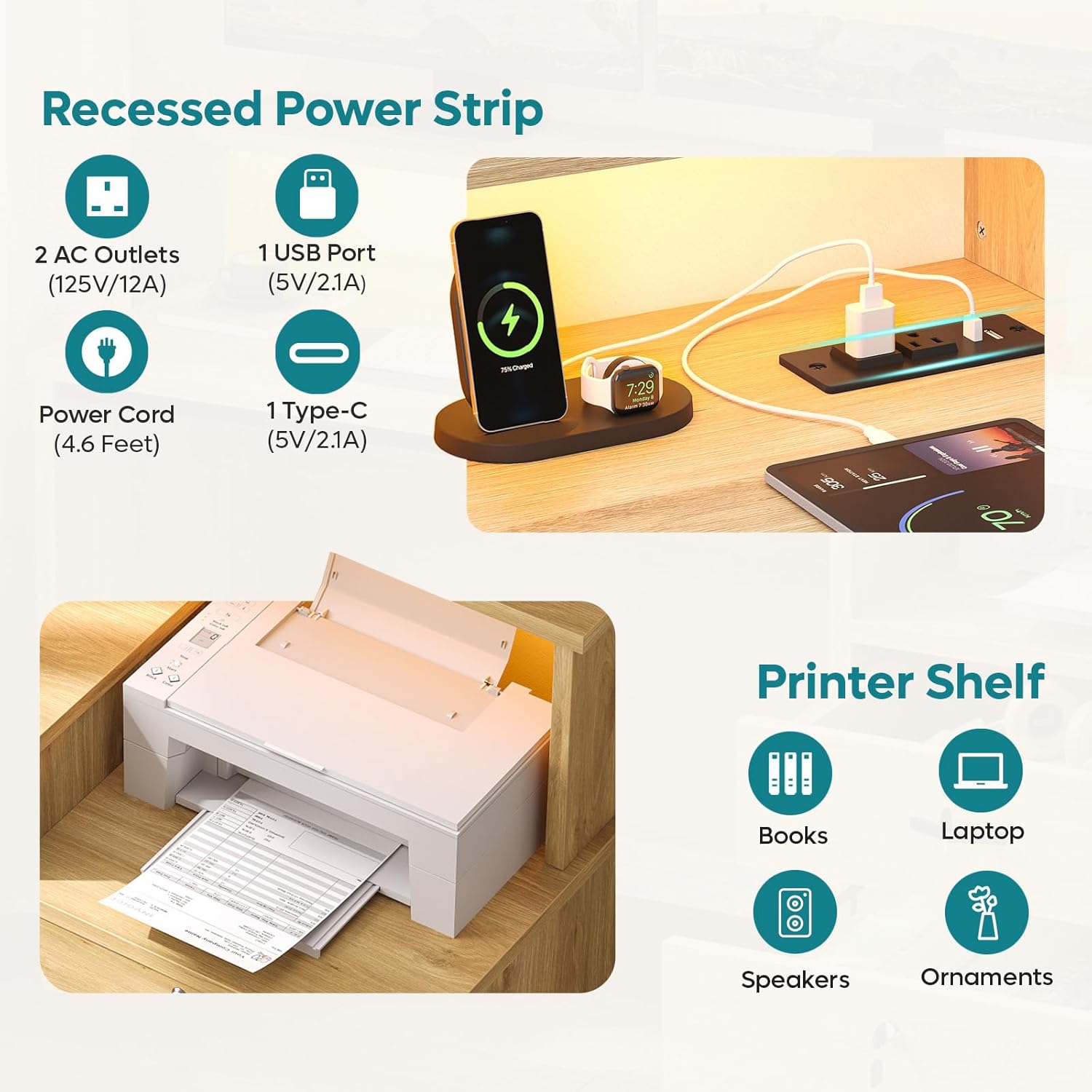
This image highlights the integrated power strip with its various ports, demonstrating how to connect and charge devices directly from the desk.
ലോക്ക് ചെയ്യാവുന്നത് File ഡ്രോയർ:
The desk features a lockable file drawer for secure storage.
- Use the provided key to lock and unlock the drawer.
- The drawer includes hanging bars suitable for Letter, Legal, and A4 size files.

This image highlights the lockable file drawer, demonstrating its capacity for organized document storage and the security feature.
എർഗണോമിക് മോണിറ്റർ സ്റ്റാൻഡ്:
The full-length raised monitor shelf helps maintain an ergonomic posture.
- Place your monitor(s) on the elevated shelf to align with eye level.
- Utilize the space underneath for keyboard, mouse, or notebooks.

This image visually explains the ergonomic benefits of the monitor stand, showing how it helps improve sitting posture and reduce strain.
പരിപാലനവും പരിചരണവും
To ensure the longevity and appearance of your Bestier Computer Desk, follow these maintenance guidelines:
- വൃത്തിയാക്കൽ: The desk features a scratch-resistant and waterproof walnut finish. Wipe surfaces with a soft, damp തുണി. കഠിനമായ രാസവസ്തുക്കളോ ഉരച്ചിലുകളുള്ള ക്ലീനറുകളോ ഒഴിവാക്കുക.
- ചോർച്ച: Promptly clean up any spills to prevent water damage, especially around the power outlets.
- ചൂട്: സംരക്ഷണമില്ലാതെ ചൂടുള്ള വസ്തുക്കൾ നേരിട്ട് മേശയുടെ പ്രതലത്തിൽ വയ്ക്കുന്നത് ഒഴിവാക്കുക.
- ഫാസ്റ്റനറുകൾ: സ്ഥിരത നിലനിർത്താൻ എല്ലാ സ്ക്രൂകളും ബോൾട്ടുകളും ഇടയ്ക്കിടെ പരിശോധിച്ച് മുറുക്കുക.
- ഭാരം ശേഷി: Do not overload the desktop or shelves beyond their intended weight capacity to prevent structural damage.
ട്രബിൾഷൂട്ടിംഗ്
If you encounter any issues with your Bestier Computer Desk, please refer to the following common solutions:
- ചലിക്കുന്ന ഡെസ്ക്: Ensure all assembly screws are securely tightened. Check that the desk is on a level surface; use the adjustable footpads to stabilize if necessary.
- LED വിളക്കുകൾ പ്രവർത്തിക്കുന്നില്ല: Verify the power cord for the desk's integrated power station is securely plugged into a wall outlet. Check the connection of the LED light strip to the power source. Ensure the power button on the LED control panel is pressed.
- Power Outlets Not Functioning: Confirm the desk's main power cord is plugged in. Test the wall outlet with another device to ensure it is functional.
- Drawer Sticking/Not Closing Properly: Check that the drawer slides are correctly installed and free of obstructions. Ensure the drawer box is assembled squarely.
കൂടുതൽ സഹായത്തിന്, ദയവായി ഉപഭോക്തൃ പിന്തുണയുമായി ബന്ധപ്പെടുക.
സ്പെസിഫിക്കേഷനുകൾ
| ഫീച്ചർ | വിശദാംശങ്ങൾ |
|---|---|
| ബ്രാൻഡ് | ബെസ്റ്റിയർ |
| മോഡൽ നമ്പർ | H107014AUS |
| ഉൽപ്പന്ന അളവുകൾ | Overall: 55"L x 21.7"W x 36.1"H (Main desktop depth: 19.7", Side unit depth: 19.4") |
| ഡെസ്ക്ടോപ്പ് മെറ്റീരിയൽ | P2-grade MDF board with Oak Wood finish |
| ഫ്രെയിം മെറ്റീരിയൽ | ലോഹം |
| നിറം | സ്വാഭാവിക വുഡ് ഫിനിഷ് |
| ഇനത്തിൻ്റെ ഭാരം | 37 പൗണ്ട് |
| ഡ്രോയറുകളുടെ എണ്ണം | 1 (File (ഡ്രോയർ) |
| ഷെൽഫുകളുടെ എണ്ണം | 3 (including monitor stand and printer shelf) |
| പവർ lets ട്ട്ലെറ്റുകൾ | 2 AC (125V/12A), 1 USB-A (5V/2.1A), 1 Type-C (5V/2.1A) |
| പവർ കോർഡ് നീളം | 4.6 അടി |
| LED ലൈറ്റുകൾ | RGB, 16 Colors, 22 Modes, Adjustable Speed & Brightness |
| അസംബ്ലി ആവശ്യമാണ് | Yes, all tools included |
വാറൻ്റിയും പിന്തുണയും
Bestier offers customer support for any inquiries or issues you may have with your product. Please refer to the contact information below:
| മേഖല | ബന്ധപ്പെടാനുള്ള വിവരങ്ങൾ |
|---|---|
| വടക്കേ അമേരിക്കൻ | Phone: 888-666-1086, Email: Service.US@bestier.net |
| യൂറോപ്പ് (യുകെ) | Email: Service.UK@bestier.net |
| Europe (FR) | Email: Service.FR@bestier.net |
| Europe (DE) | Email: Service.DE@bestier.net |
| Europe (IT) | Email: Service.IT@bestier.net |
| Europe (ES) | Email: Service.ES@bestier.net |
| Asia (JP) | Phone: 04-8888-0283, Email: Service.JP@bestier.net |
| ആഗോള പിന്തുണ | Email: Service@bestier.net |
For return policy details, please refer to your purchase platform or contact customer support. The product typically includes a 30-day easy return policy.