
1. ആമുഖം
Thank you for choosing Monster Persona 6th ANC Active Noise Cancelling Headphones. These headphones are designed to provide a superior audio experience with advanced features such as Active Noise Cancellation, Bluetooth 6.0 connectivity, 60 hours of playtime, and three distinct music modes. This manual will guide you through the setup, operation, and maintenance of your new headphones to ensure optimal performance and longevity.
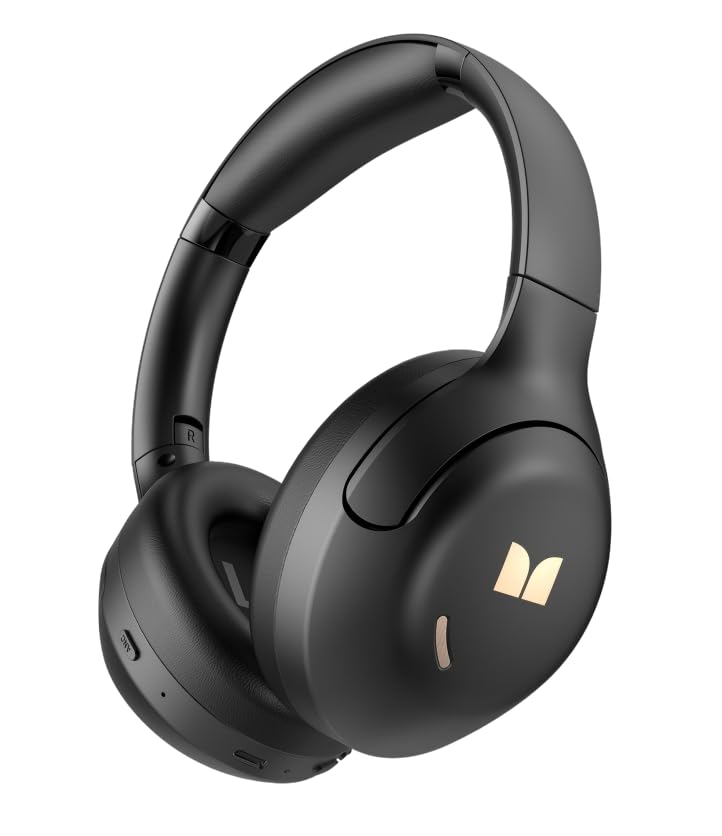
ചിത്രം 1.1: മുൻഭാഗം view of the Monster Persona 6th ANC Active Noise Cancelling Headphones. The headphones feature a sleek, over-ear design with cushioned earcups and an adjustable headband, providing comfort for extended listening sessions.
2. പാക്കേജ് ഉള്ളടക്കം
പാക്കേജിൽ ഇനിപ്പറയുന്ന ഇനങ്ങൾ ഉണ്ടോ എന്ന് പരിശോധിക്കുക:
- Monster Persona 6th ANC Headphones × 1
- ടൈപ്പ്-സി ചാർജിംഗ് കേബിൾ × 1
- Audio Cable × 1 (for wired connection)
- ഉപയോക്തൃ മാനുവൽ × 1
3. സജ്ജീകരണം
3.1 ഹെഡ്ഫോണുകൾ ചാർജ് ചെയ്യുന്നു
Before first use, fully charge your headphones. A full charge takes approximately 2-3 hours.
- ഹെഡ്ഫോണുകളിലെ ചാർജിംഗ് പോർട്ടിലേക്ക് ടൈപ്പ്-സി ചാർജിംഗ് കേബിൾ ബന്ധിപ്പിക്കുക.
- കേബിളിന്റെ മറ്റേ അറ്റം ഒരു USB പവർ അഡാപ്റ്ററുമായി (ഉൾപ്പെടുത്തിയിട്ടില്ല) അല്ലെങ്കിൽ ഒരു കമ്പ്യൂട്ടറിന്റെ USB പോർട്ടുമായി ബന്ധിപ്പിക്കുക.
- LED ഇൻഡിക്കേറ്റർ ചാർജിംഗ് സ്റ്റാറ്റസ് കാണിക്കും (ഉദാ: ചാർജ് ചെയ്യുന്നതിന് ചുവപ്പ്, പൂർണ്ണമായി ചാർജ് ചെയ്തതിന് നീല).
ദ്രുത ചാർജ്ജ്: 10 മിനിറ്റ് ചാർജ് ചെയ്താൽ ഏകദേശം 5 മണിക്കൂർ പ്ലേബാക്ക് ലഭിക്കും.
Image 3.1: Location of the Type-C charging port on the Monster Persona 6th ANC Headphones. The port is typically located on the bottom edge of one earcup, alongside other control buttons.
3.2 പവർ ഓൺ/ഓഫ്
- പവർ ഓൺ: Press and hold the Power button for 3 seconds until the LED indicator flashes blue and you hear a power-on prompt.
- പവർ ഓഫ്: Press and hold the Power button for 3 seconds until the LED indicator flashes red and you hear a power-off prompt.
3.3 ബ്ലൂടൂത്ത് ജോടിയാക്കൽ
വയർലെസ് ഓഡിയോയ്ക്കായി നിങ്ങളുടെ ഉപകരണവുമായി ഹെഡ്ഫോണുകൾ ജോടിയാക്കുക.
- ഹെഡ്ഫോണുകൾ ഓഫാണെന്ന് ഉറപ്പാക്കുക.
- എൽഇഡി ഇൻഡിക്കേറ്റർ നീലയും ചുവപ്പും മാറിമാറി മിന്നുന്നതുവരെ പവർ ബട്ടൺ 5-7 സെക്കൻഡ് അമർത്തിപ്പിടിക്കുക, ഇത് ജോടിയാക്കൽ മോഡിനെ സൂചിപ്പിക്കുന്നു.
- നിങ്ങളുടെ ഉപകരണത്തിൽ (സ്മാർട്ട്ഫോൺ, ടാബ്ലെറ്റ്, കമ്പ്യൂട്ടർ), ബ്ലൂടൂത്ത് പ്രവർത്തനക്ഷമമാക്കി ലഭ്യമായ ഉപകരണങ്ങൾക്കായി തിരയുക.
- Select "Monster Persona 6th ANC" from the list of devices.
- കണക്റ്റ് ചെയ്തുകഴിഞ്ഞാൽ, LED ഇൻഡിക്കേറ്റർ സാവധാനം നീല നിറത്തിൽ മിന്നിമറയും, ഒരു കണക്ഷൻ പ്രോംപ്റ്റ് നിങ്ങൾ കേൾക്കും.
ഇരട്ട ഉപകരണ കണക്ഷൻ: These headphones support connecting to two Bluetooth devices simultaneously. After pairing with the first device, disable Bluetooth on the first device, pair with the second, then re-enable Bluetooth on the first device. The headphones should connect to both.
4. ഹെഡ്ഫോണുകൾ പ്രവർത്തിപ്പിക്കൽ
4.1 അടിസ്ഥാന നിയന്ത്രണങ്ങൾ
| ഫംഗ്ഷൻ | ആക്ഷൻ |
|---|---|
| പവർ ഓൺ/ഓഫ് | Press and hold Power button for 3 seconds. |
| പ്ലേ/താൽക്കാലികമായി നിർത്തുക | Press the Multi-function button (often the Power button when not powering on/off). |
| വോളിയം കൂട്ടുക | Short press '+' button. |
| വോളിയം ഡൗൺ | Short press '-' button. |
| അടുത്ത ട്രാക്ക് | Long press '+' button. |
| മുമ്പത്തെ ട്രാക്ക് | Long press '-' button. |
| ഉത്തരം / കോൾ അവസാനിപ്പിക്കുക | മൾട്ടി-ഫംഗ്ഷൻ ബട്ടൺ അമർത്തുക. |
| കോൾ നിരസിക്കുക | മൾട്ടി-ഫംഗ്ഷൻ ബട്ടൺ ദീർഘനേരം അമർത്തുക. |
| വോയ്സ് അസിസ്റ്റൻ്റ് സജീവമാക്കുക | മൾട്ടി-ഫംഗ്ഷൻ ബട്ടൺ ഇരട്ട-അമർത്തുക. |
Image 4.1: Diagram illustrating the location and function of control buttons on the Monster Persona 6th ANC Headphones. Buttons typically include Power/Multi-function, Volume Up/Next Track, Volume Down/Previous Track, and an ANC mode button.
4.2 Music Modes (EQ Modes)
Your headphones feature three distinct music modes to optimize your listening experience. Press the dedicated EQ/Mode button to cycle through them:
- സജീവ നോയ്സ് റദ്ദാക്കൽ (ANC) മോഡ്: Reduces ambient noise for an immersive audio experience. Ideal for travel or noisy environments.
- സുതാര്യത മോഡ്: Allows you to hear your surroundings while still enjoying your audio. Useful for awareness in urban environments or when interacting with others.
- സ്റ്റാൻഡേർഡ് മോഡ്: Provides a balanced, classic sound profile without active noise cancellation or transparency features.
4.3 വയർഡ് കണക്ഷൻ
You can use the included audio cable to connect your headphones to devices without Bluetooth capability or when the battery is depleted. Simply plug one end into the headphone's audio jack and the other into your device's 3.5mm audio output.
5. പരിപാലനം
5.1 വൃത്തിയാക്കൽ
- മൃദുവായതും ഉണങ്ങിയതും ലിന്റ് രഹിതവുമായ തുണി ഉപയോഗിച്ച് ഹെഡ്ഫോണുകൾ തുടയ്ക്കുക.
- അബ്രാസീവ് ക്ലീനറുകൾ, ആൽക്കഹോൾ, കെമിക്കൽ ലായകങ്ങൾ എന്നിവ ഉപയോഗിക്കരുത്.
- ഏതെങ്കിലും ദ്വാരങ്ങളിൽ ഈർപ്പം കയറുന്നത് ഒഴിവാക്കുക.
5.2 സംഭരണം
- ഹെഡ്ഫോണുകൾ തണുത്തതും വരണ്ടതുമായ സ്ഥലത്ത് സൂക്ഷിക്കുക, നേരിട്ടുള്ള സൂര്യപ്രകാശത്തിൽ നിന്നും കടുത്ത താപനിലയിൽ നിന്നും അകറ്റി നിർത്തുക.
- If storing for an extended period, charge the headphones every three months to maintain battery health.
6. പ്രശ്നപരിഹാരം
നിങ്ങളുടെ ഹെഡ്ഫോണുകളിൽ പ്രശ്നങ്ങൾ നേരിടുകയാണെങ്കിൽ, ഇനിപ്പറയുന്ന പൊതുവായ പരിഹാരങ്ങൾ പരിശോധിക്കുക:
| പ്രശ്നം | പരിഹാരം |
|---|---|
| ഹെഡ്ഫോണുകൾ പവർ ഓൺ ചെയ്യുന്നില്ല. | ഹെഡ്ഫോണുകൾ ചാർജ് ചെയ്തിട്ടുണ്ടെന്ന് ഉറപ്പാക്കുക. ടൈപ്പ്-സി കേബിൾ ഉപയോഗിച്ച് ഒരു പവർ സ്രോതസ്സിലേക്ക് കണക്റ്റ് ചെയ്യുക. |
| ഉപകരണവുമായി ജോടിയാക്കാൻ കഴിയില്ല. | ഹെഡ്ഫോണുകൾ ജോടിയാക്കൽ മോഡിലാണെന്ന് ഉറപ്പാക്കുക (ഫ്ലാഷിംഗ് നീല/ചുവപ്പ്). നിങ്ങളുടെ ഉപകരണത്തിൽ ബ്ലൂടൂത്ത് ഓഫാക്കി ഓണാക്കുക. ഹെഡ്ഫോണുകൾ ഉപകരണത്തിന് അടുത്തേക്ക് നീക്കുക. നിങ്ങളുടെ ഉപകരണത്തിലെ മുൻ ബ്ലൂടൂത്ത് കണക്ഷനുകൾ മായ്ക്കുക. |
| ശബ്ദമില്ല അല്ലെങ്കിൽ കുറഞ്ഞ ശബ്ദമില്ല. | Check headphone and device volume levels. Ensure headphones are properly paired. Try playing different audio sources. If using wired connection, ensure cable is fully inserted. |
| ANC ഫലപ്രദമായി പ്രവർത്തിക്കുന്നില്ല. | Ensure ANC mode is activated. ANC is most effective against low-frequency, constant noise. It may not completely eliminate all sounds. |
| ഇടവിട്ടുള്ള കണക്ഷൻ. | Ensure no obstacles between headphones and device. Move away from strong Wi-Fi signals or other Bluetooth devices that may cause interference. Keep within the 33 feet Bluetooth range. |
7 സ്പെസിഫിക്കേഷനുകൾ
| ഫീച്ചർ | വിശദാംശങ്ങൾ |
|---|---|
| ബ്രാൻഡ് | രാക്ഷസൻ |
| മോഡലിൻ്റെ പേര് | Monster Persona 6th ANC |
| ചെവി പ്ലേസ്മെൻ്റ് | ചെവിക്ക് മുകളിൽ |
| ശബ്ദ നിയന്ത്രണം | സജീവ നോയ്സ് റദ്ദാക്കൽ |
| കണക്റ്റിവിറ്റി ടെക്നോളജി | Wireless (Bluetooth), Wired (3.5mm Audio Cable) |
| ബ്ലൂടൂത്ത് പതിപ്പ് | 6.0 |
| ബ്ലൂടൂത്ത് ശ്രേണി | 33 അടി (10 മീറ്റർ) |
| ബാറ്ററി ലൈഫ് | 60 മണിക്കൂർ വരെ |
| ചാർജിംഗ് പോർട്ട് | ടൈപ്പ്-സി |
| ഓഡിയോ ഡ്രൈവർ വലിപ്പം | 40 മില്ലിമീറ്റർ |
| ഫ്രീക്വൻസി റേഞ്ച് | 20Hz - 20,000Hz |
| നിയന്ത്രണ തരം | ബട്ടൺ നിയന്ത്രണം |
| മെറ്റീരിയൽ | പ്ലാസ്റ്റിക് |
| അധിക സവിശേഷതകൾ | 3 Music Modes (ANC, Transparency, Standard), Dual Device Connection, Hands-free Calling |
8. വാറൻ്റിയും പിന്തുണയും
8.1 വാറൻ്റി വിവരങ്ങൾ
Your Monster Persona 6th ANC Headphones come with a 180 ദിവസത്തെ വാറൻ്റി വാങ്ങിയ തീയതി മുതൽ. സാധാരണ ഉപയോഗത്തിലുള്ള നിർമ്മാണ വൈകല്യങ്ങളും പ്രവർത്തനക്ഷമതയും ഈ വാറന്റി ഉൾക്കൊള്ളുന്നു. ദുരുപയോഗം, അപകടങ്ങൾ, അനധികൃത പരിഷ്കാരങ്ങൾ, അല്ലെങ്കിൽ സാധാരണ തേയ്മാനം എന്നിവ മൂലമുണ്ടാകുന്ന നാശനഷ്ടങ്ങൾക്ക് ഇത് പരിരക്ഷ നൽകുന്നില്ല.
8.2 ഉപഭോക്തൃ പിന്തുണ
For technical assistance, warranty claims, or any questions regarding your Monster Persona 6th ANC Headphones, please contact Monster customer support through their official website or the retailer where the product was purchased. Please have your purchase receipt and product model information ready when contacting support.